
GCP-193 · Lesson 1 of 12 · 21 min
How the Associate Google Workspace Administrator exam works
▶ Video coming soon A video version of this lesson is on the way.
Owen Mitchell has spent the autumn learning to run Birchline Outfitters' new Google Workspace tenant. In the first course he built the directory, the organizational units and the licence plan. In the second he configured Gmail, Drive, Calendar, Meet, Chat and Gemini. In the third he wrote the security baseline, planned 2-step verification, set up data loss prevention and Vault, and rehearsed an incident. Now Sofia Marchetti, the collaboration and identity lead who has mentored him through all three, books a small meeting room at the head office in Toronto and puts one document on the screen: the exam guide for the Associate Google Workspace Administrator certification.
"Everything you need is in what we have already done," she says. "This course is about turning it into a pass. That means knowing exactly what the exam measures, how it asks, how to pace yourself, and how to find the gaps you don't know you have." Owen's plan, which they write together in this first session, is to sit the exam in late May 2027, after the head office wave in February and the stores and warehouses in April. By then he will have run the tenant for real through two large migration waves, which is the kind of experience the exam assumes.
This is GCP-193, the final course of the Associate Google Workspace Administrator program on this site. GCP-210 covered users, organizational units, groups, domains and licensing. GCP-211 covered configuring the core services. GCP-212 covered security, data protection and troubleshooting. This course reviews all of that against the current exam guide, and adds what an exam needs that a job does not: registration and delivery, reading questions, timing, practice and the day itself.
What the certification says about you
Google Cloud groups its certifications in three levels. Foundational certifications check broad knowledge of what the cloud can do. Associate certifications check that a person can set up and run a service day to day. Professional certifications check design and leadership across larger environments. The Associate Google Workspace Administrator sits in the middle level. It says that the holder can manage the everyday running of a Workspace organization: user accounts, organizational units and groups, the core services, sharing and security settings, devices and browsers, and the troubleshooting that keeps people working.
The exam guide opens with a short description of the role. In our own words, it describes someone who keeps the environment running so that people can communicate and collaborate safely, who manages accounts and configures services such as Gmail and Drive, who protects the organization's data and keeps it compliant, and who resolves the problems that users bring. That description is worth reading slowly, because every question on the exam is written from that person's point of view. When an option is something a careful day-to-day administrator would do, it is usually closer to right than an option that is clever but risky.
The facts about the exam
Google's certification page for this exam lists the facts that matter for planning. We read the page in November 2026; Google changes these details from time to time, so check the page before you book.
| Item | What Google's page said (November 2026) |
|---|---|
| Length | 2 hours |
| Number of questions | 50 to 60 |
| Question formats | Multiple choice (one answer) and multiple select (more than one answer) |
| Registration fee | 125 US dollars, plus tax where it applies |
| Languages | English and Japanese |
| Delivery | Online-proctored from home or work, or onsite at a testing centre |
| Prerequisites | None |
| Recommended experience | About six months as a super admin in a real or test environment, hands-on work with Business Plus, and knowledge of Enterprise edition features |
| Validity | 3 years |
For a Canadian candidate, the fee is quoted in US dollars. The registration system may show the amount converted to Canadian dollars with tax added at checkout, so the total Owen pays will be somewhat more than 125, depending on the exchange rate and the sales tax that applies in Ontario. He notes the amount on his plan as an estimate and checks the exact figure when he books.
Two of these facts shape how he studies. First, the recommended experience mentions Business Plus and Enterprise features. Birchline uses Enterprise Standard and Frontline Standard, so Owen must also know what other editions include and lack, because questions often turn on whether a feature is available at all. Second, there is no published passing score. Google reports results as pass or fail, and its support pages say numerical scores are not shared. That means there is no point aiming for a number; the only goal is to know the material well enough to pass with room to spare.
The six sections of the exam guide
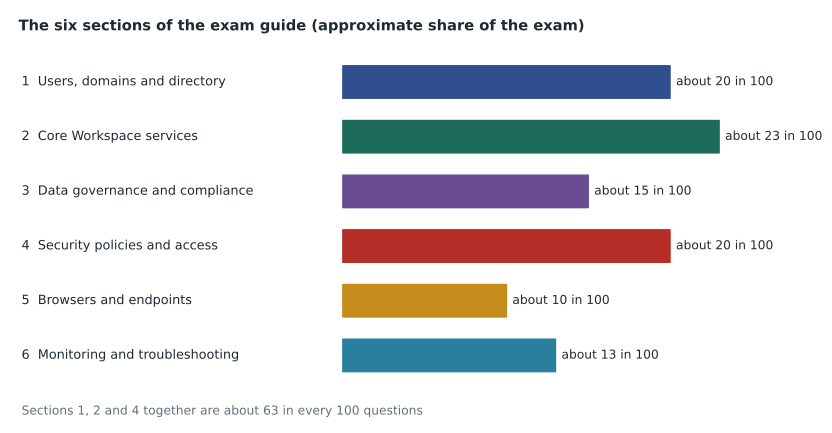
The exam guide divides the exam into six sections, each with an approximate weight: the share of questions that section is likely to have. The weights are approximate, add up to about 100 and can change when Google revises the guide, but they are the best guide to where marks come from.
| Section | Approximate weight | What it covers (in brief) |
|---|---|---|
| 1. Managing user accounts, domains and directory | about 20 in 100 | The user life cycle, migration and provisioning tools, SSO basics, organizational units, groups, domains and aliases, buildings and resources |
| 2. Managing core Workspace services | about 23 in 100 | Gmail, Drive and Docs, Calendar, Meet, Chat, Gemini and generative AI settings, AppSheet and Apps Script |
| 3. Managing data governance and compliance | about 15 in 100 | Vault, data loss prevention, Drive trust rules, data export and data regions, labels |
| 4. Managing security policies and access controls | about 20 in 100 | Passwords and 2-step verification, context-aware access, admin roles, the security center and audit tools, third-party and Marketplace apps |
| 5. Managing browsers and endpoints | about 10 in 100 | Mobile device management choices and policies, Chrome browser enrollment, policies and extensions |
| 6. Monitoring and troubleshooting common issues | about 13 in 100 | Audit logs, the Status Dashboard, mail delivery, account and service problems, reports, and using support resources |
Each section is broken into numbered objectives. Section 2, for example, has separate objectives for Gmail, Drive and Docs, Calendar, Meet, Chat, generative AI, and development tools. Every objective lists the considerations it includes, such as MX records, content compliance rules or booking permissions. The guide is not a textbook, but it is a precise list of what can be asked. Owen prints it, and over the next sessions he will mark every consideration with one of three symbols: confident, unsure, or never seen.
How the sections map to the earlier courses
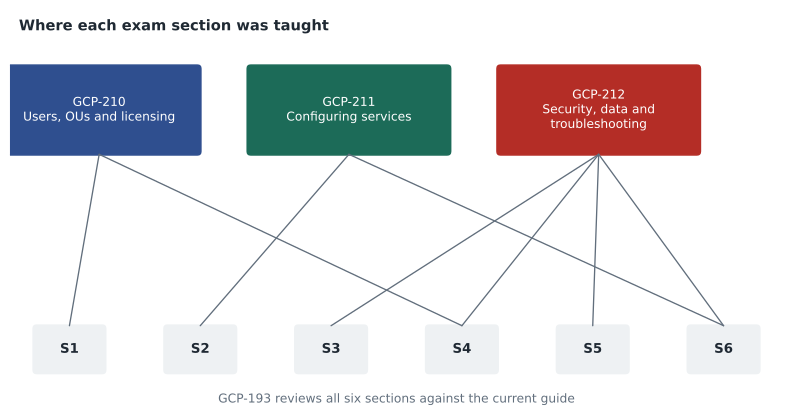
| Exam section | Where it was taught | Review lesson in this course |
|---|---|---|
| 1. Users, domains and directory | GCP-210, all lessons | Lesson 4 |
| 2. Core services | GCP-211, lessons 1 to 11 | Lesson 5 |
| 3. Data governance and compliance | GCP-212, lessons 4 to 6; GCP-211 for labels and sharing | Lesson 6 |
| 4. Security policies and access | GCP-212, lessons 1 to 3, 7 and 8; GCP-210 for admin roles; GCP-211 for Marketplace | Lesson 6 |
| 5. Browsers and endpoints | GCP-212, lesson 9; Chrome browser management is added in this course | Lesson 6 |
| 6. Monitoring and troubleshooting | GCP-212, lessons 8, 10 and 11; GCP-211 for status and change management | Lesson 7 |
One section gets less attention in the earlier courses than its weight deserves. Chrome browser management, half of section 5, came up only in passing, because Birchline's laptops were already managed in other ways. Lesson 6 of this course fills that gap with the browser policies, enrollment and extension controls the guide lists. Owen writes it on his plan as a known gap before he has even started marking the guide.
Turning weights into expected questions
Weights become more useful when they are turned into numbers of questions. If an exam has 60 questions and a section's weight is about 20 in 100, that section will have about 12 of them. The exact count varies from one form of the exam to another, and some questions touch two sections at once, but the estimate tells Owen how much each section can lift or sink his result. A short calculation does it for both ends of the range.
# Approximate section weights from the exam guide (out of 100).
weights = {
    "1 Users, domains, directory": 20,
    "2 Core services": 23,
    "3 Data governance": 15,
    "4 Security and access": 20,
    "5 Browsers and endpoints": 10,
    "6 Troubleshooting": 13,
}
total = sum(weights.values())
print("Weights add up to", total)
for n_questions in (50, 60):
    print(f"\nOn a {n_questions}-question exam:")
    for section, w in weights.items():
        expected = n_questions * w / total
print(f" {section:30s} about {expected:4.1f} questions")Weights add up to 101 On a 50-question exam: 1 Users, domains, directory about 9.9 questions 2 Core services about 11.4 questions 3 Data governance about 7.4 questions 4 Security and access about 9.9 questions 5 Browsers and endpoints about 5.0 questions 6 Troubleshooting about 6.4 questions On a 60-question exam: 1 Users, domains, directory about 11.9 questions 2 Core services about 13.7 questions 3 Data governance about 8.9 questions 4 Security and access about 11.9 questions 5 Browsers and endpoints about 5.9 questions 6 Troubleshooting about 7.7 questions
What this code does
The program starts from the six approximate weights in the exam guide and adds them up, because they total 101 rather than exactly 100 after rounding. For an exam of 50 questions and one of 60, it shares the questions out in proportion to each weight. The result is an estimate of how many questions each section is likely to contribute, which tells a candidate where most of the marks are.
The weights add up to 101 because each was rounded, so the program divides by the real total rather than 100. On a 60-question exam, core services contribute about 14 questions, users and security about 12 each, data governance about 9, troubleshooting about 8 and browsers and endpoints about 6. The three largest sections together are worth roughly 37 or 38 questions out of 60. Owen draws the obvious conclusion: no section can be skipped, but a weak spot in sections 1, 2 or 4 costs about twice as much as one in section 5.
What kind of questions to expect
All questions are multiple choice or multiple select. Most are short scenarios: a few sentences about an organization, a goal or a problem, and a question about what the administrator should do. Some ask for the first step, some for the best option, and some for the option that meets a constraint such as least administrative effort or no effect on other users. Multiple select questions say how many answers to choose. Lesson 3 is devoted to reading these questions well, because many wrong answers come from misreading a single word rather than from not knowing the material.
Google also publishes a small set of sample questions linked from the certification page. They are not a practice exam, and they are not scored for the real thing, but they show the style. Sofia asks Owen not to open them yet. "Save them for a check later," she says. "If you see them now, you'll remember the answers, and they'll tell you nothing."
What a pass does and does not require
The exam does not require memorizing every menu path in the Admin console. It does require knowing where a setting lives in the structure of the console, which organizational unit or group it applies to, which edition includes it, and what it does to users. A question might describe sharing failures in a shared drive and ask why; the answer depends on knowing that a shared drive follows its own organizational unit's settings, not on the exact name of a menu. Another might ask how to give a few users access to a feature without giving it to everyone; the answer is a configuration group or a child organizational unit, a pattern that runs through the whole Admin console.
Owen finds that reassuring. Most of the material is patterns, and he has used the patterns every week since October. Sofia adds one caution: the exam is written about Workspace in general, not about Birchline. Birchline made particular choices, such as keeping Exchange as the primary mail system during the migration and using Google as the identity provider. Other organizations make other choices, and the exam expects him to know the options and when each fits.
Building the first study plan
Before ending the session, they write the first version of the plan. It will change, but writing it now makes the next six months concrete.
| Period | Main work | Check |
|---|---|---|
| November and December 2026 | Mark every consideration in the guide; review sections 1 and 2 (lessons 4 and 5) | A first set of practice questions Sofia writes from the guide |
| January and February 2027 | Review sections 3 to 6 (lessons 6 and 7); learn Chrome browser management; work through the head office wave | Confusable pairs drill (lesson 8) |
| March 2027 | Practice strategy and timing (lesson 9); first full timed practice set | A full timed set on Saturday, March 20 |
| April 2027 | Close gaps found in March (lesson 10); stores and warehouses wave | Google's sample questions |
| May 2027 | Second full timed set on Saturday, May 8; final week (lesson 11) | Exam planned for Tuesday, May 25 |
The exam date falls on the Tuesday after the Victoria Day long weekend. Sofia points out that a long weekend just before an exam is a gift if Owen rests, and a trap if he spends it cramming. He keeps the date.
Common mistakes
MistakeStarting to study from memory of the earlier courses without reading the exam guide.
InsteadRead the guide first and mark every consideration as confident, unsure or never seen.
MistakeSpending equal time on every section.
InsteadUse the weights: sections 1, 2 and 4 carry about two thirds of the exam.
MistakeAnswering from the way Birchline does things.
InsteadAnswer from what a careful administrator in any organization would do, knowing the options and when each fits.
MistakeAiming for a particular score.
InsteadResults are pass or fail with no published passing score; aim to know the material with room to spare.
Worked problem
Estimating the cost of a weak section
Owen estimates that he would answer about 9 in 10 questions correctly in most sections, but only about 5 in 10 in section 5 and 6 in 10 in section 2. On a 60-question exam with the guide's weights, how many questions would each weakness cost compared with a 9-in-10 standard?
Show solution
- Section 5 is about 10 of 101 parts of the exam: 60 × 10 ÷ 101 is about 5.9 questions.
- At 9 in 10 he would get about 5.3 of them right; at 5 in 10, about 3.0. The weakness costs about 2.3 questions.
- Section 2 is about 23 of 101 parts: 60 × 23 ÷ 101 is about 13.7 questions.
- At 9 in 10 he would get about 12.3 right; at 6 in 10, about 8.2. The weakness costs about 4.1 questions.
- The section 2 weakness costs nearly twice as much, even though it is a smaller weakness, because the section is larger.
Answer: About 2.3 questions for section 5 and 4.1 for section 2: improve section 2 first, then section 5.
Summary and key terms
- The Associate Google Workspace Administrator certification is an associate-level credential for people who run Workspace day to day.
- Google's page in November 2026 listed 2 hours, 50 to 60 multiple choice and multiple select questions, a 125 US dollar fee plus tax, English and Japanese, online or testing centre delivery, and 3 years of validity.
- Results are pass or fail, with no published passing score.
- The exam guide has six sections weighted about 20, 23, 15, 20, 10 and 13 in 100.
- Turning weights into expected questions shows where marks come from.
- The exam tests patterns and judgement more than menu paths.
- Chrome browser management needs extra study because the earlier courses touched it only briefly.
- Exam guide
- Google's published list of the sections, objectives and considerations an exam covers.
- Section weight
- The approximate share of questions a section of the exam guide is expected to have.
- Associate level
- The middle level of Google Cloud certifications, for people who set up and run services.
- Multiple select
- A question with more than one correct answer, which states how many to choose.
- Pass or fail result
- A result reported without a numerical score.
- Recommended experience
- Google's suggestion of about six months as a super admin before taking the exam.
- Consideration
- A specific topic listed under an objective in the exam guide.
- Sample questions
- A short set of questions Google publishes to show the exam's style.
Practice problems
Work each problem on paper first, then reveal the answer to check.
Which three sections carry the most weight?
Show answer
Section 2 (core services, about 23), then sections 1 and 4 (about 20 each).
Why does Owen divide by 101 rather than 100?
Show answer
The rounded weights add up to 101, so dividing by the real total keeps the estimates in proportion.
Why does knowing other editions matter for this exam?
Show answer
Questions often depend on whether a feature is available in a given edition, and the guide mentions Business Plus and Enterprise features.
Lesson quiz · 5 questions
Score 60% or more to complete this lesson.
Create a free account to save your progress, take quizzes and earn a certificate.