
GCP-193 · Lesson 3 of 12 · 19 min
Reading scenario questions carefully
▶ Video coming soon A video version of this lesson is on the way.
On Tuesday, November 10, before this course began, Sofia gave Owen a set of 30 practice questions she had written from the exam guide, to see where he stood. He answered 19 correctly. When they go through the 11 he missed, a pattern appears that surprises him. In only four did he not know the material. In the other seven he knew the answer but chose another option: he missed the word first, chose an option that worked but ignored a constraint, or picked two answers to a question that asked for three. This lesson is about those seven.
Most questions on the exam are short scenarios. Reading them well is a skill separate from knowing Workspace, and it can be practised. The aim is not tricks. Exam questions are written so that exactly one option, or the stated number of options, fits every clue. A careful reader who finds every clue usually finds that option.
The four parts of a scenario
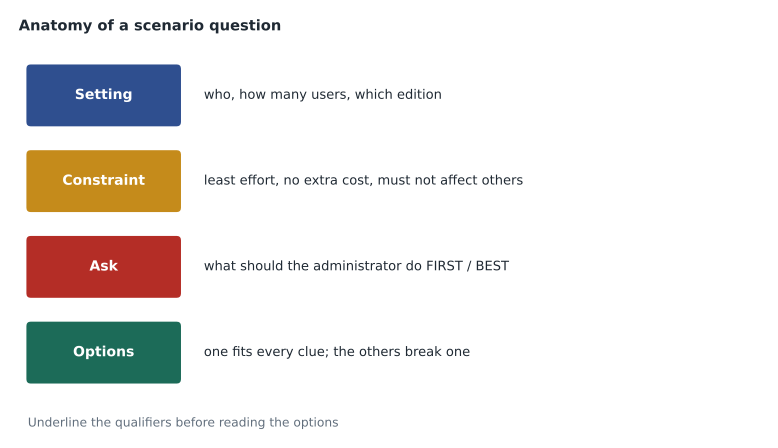
Almost every scenario can be split into four parts. The setting describes the organization: its size, its edition, its structure, and what has already been configured. The constraint limits acceptable answers: it must be done with the least administrative effort, it must not affect other users, it must not add cost, it must meet a legal requirement. The ask is the question itself: what should you do, what should you do first, which is the best option, why is this happening. The options are the answers to choose from.
Owen's habit had been to read the setting, jump to the options, and pick the first one that sounded right. Sofia asks him to change the order. Read the whole question. Underline, or in the exam simply note mentally, every qualifier in the constraint and the ask. Then predict an answer before looking at the options. Only then read every option, including the ones after a promising one.
Qualifiers that change the answer
A single word in the constraint or the ask often decides which of two reasonable options is correct. The table lists the qualifiers that appear most often in Workspace scenarios and what each usually points to.
| Qualifier | What it usually means | Typical right answer pattern |
|---|---|---|
| first | The step to take before anything else, often a check rather than a change | Confirm scope or status, or look at the logs, before changing settings |
| best, most appropriate | Several options work; choose the one that fits every clue and Google's recommended practice | The option that follows least privilege and uses a built-in feature |
| least administrative effort | Avoid manual, per-user or repeated work | Apply a setting to an OU or group; use a bulk tool or automation |
| without affecting other users | Scope must be narrow | A child OU or a configuration group, not a change at the top level |
| minimize cost, no additional licences | Use what the current edition includes | Avoid answers that need an upgrade or add-on |
| as soon as possible, immediately | Speed matters more than elegance | The action that takes effect fastest, such as suspending an account or signing out sessions |
| must comply with, legal requirement | A rule that cannot be traded off | Vault retention or holds, data regions, or DLP, whichever matches the rule |
| temporarily | The change will be reversed | Suspend rather than delete; a time-limited exception |
Qualifiers also hide in the setting. A sentence like "the organization uses Business Starter" may be the most important clue in the question, because some features in the options are not in that edition. A sentence like "users are in the Sales OU, but some also belong to the Partners group" is a hint that the answer involves a configuration group. Owen starts asking of every sentence in the setting: why did the writer include this?
Working through an example
Sofia writes a practice question of her own to show the method. It is not from the exam; it is written to the same pattern.
A company with 900 users on an Enterprise edition wants members of its
Legal team, who sit in several different OUs, to be able to share Drive
files with outside law firms. All other users must keep external sharing
turned off. What should the administrator do with the least effort?

A. Move all Legal team members into a new OU and allow external sharing there.
B. Create a group for the Legal team, use it as a configuration group, and
   allow external sharing for that group.
C. Allow external sharing for the whole organization and use DLP rules to
   block sharing by everyone outside Legal.
D. Ask each Legal team member to request sharing through a help desk ticket
   so an administrator shares the files for them.
Sofia reads it aloud and stops at each clue. The setting: 900 users, an Enterprise edition, Legal team members in several different OUs. The constraint: all other users keep external sharing off, and least effort. The ask: what should the administrator do. Before looking at the options, Owen predicts: a setting applied to just the Legal people, who are spread across OUs, so a group.
| Option | Does it fit every clue? |
|---|---|
| A. New OU for Legal | It works, but Legal members sit in several OUs for other reasons, such as their department's other settings. Moving them breaks those and takes more effort. |
| B. Configuration group | Fits every clue: narrow scope, no OU changes, one setting, and Enterprise editions support group-based settings for Drive sharing. |
| C. Allow for all, block with DLP | Breaks "all other users must keep external sharing turned off" during the change, and is far more effort and risk. |
| D. Help desk tickets | Breaks "least effort" and is not a configuration at all. |
Option A is the trap. It would work in a simpler organization where everyone in Legal sat in one OU, and many candidates choose it because OUs are the first scoping tool everyone learns. The phrase "who sit in several different OUs" is the clue that rules it out. Sofia says this is typical: the wrong options are usually not absurd. Each breaks exactly one clue.
Eliminating options
When the right answer is not obvious, elimination often finds it. Sofia's method has three passes.
- Remove options that break a stated clue. An option that needs a feature the edition lacks, affects users the question says must be untouched, or ignores a deadline is out, however attractive it looks.
- Remove options that are risky or against recommended practice. Giving users super admin rights, turning a security setting off for everyone, deleting accounts that might be needed, and sharing passwords are almost never correct, even when they would technically solve the problem.
- Between the last two, prefer the built-in, centrally managed and least privileged option. If one option uses a Workspace feature applied to an OU or group and the other relies on users, scripts or manual steps, the first is usually right.
Elimination also helps with options that use unfamiliar names. If an option mentions a setting Owen has never heard of, he does not choose it or reject it because it is unfamiliar. He checks whether the other options can be ruled out. If three clearly break clues, the fourth is the answer, familiar or not.
Multiple select questions
Multiple select questions state how many answers to choose: "Choose two" or "Choose three". In the November practice set, Owen lost two questions by choosing two answers where three were asked. The exam interface may let a candidate select the wrong number, and the answer is then marked wrong. Sofia's rule: read the number first, and check it again just before moving on.
Multiple select questions are best treated as a set of true-or-false judgements. For each option, ask whether it is correct on its own, given the scenario. Do not choose an option because it pairs nicely with another. If you find more correct options than the number asked, at least one of them must break a clue you have missed; go back to the qualifiers. If you find fewer, an option you rejected is probably right because of a detail you overlooked.
Questions that ask what to do first
"What should you do first?" questions deserve special care, because several options are often correct steps; the question is which comes first. In troubleshooting, the first step is usually to establish scope and gather evidence: is it one user or many, what do the logs show, is there a service problem on the Status Dashboard. In security incidents, the first step is usually containment: suspend the account, revoke sessions, or reset sign-in. In configuration changes, the first step is often to test with a small OU or group before applying broadly.
Worked problem
Choosing the first step
A practice question says: several users in one office report that they cannot open Google Drive, while users elsewhere can. Options: (A) Reset the affected users' passwords. (B) Check the Google Workspace Status Dashboard. (C) Check whether a context-aware access level or network setting applies to that office. (D) Open a support case with Google. What is the best first step?
Show solution
- Identify the scope: one office, several users, while others work. This points away from a global outage.
- Option B is reasonable in general, but a Google outage would usually affect users everywhere, not one office.
- Option A treats it as an account problem, but several users at once in one place suggests something about the location.
- Option D is premature before gathering evidence.
- Option C tests the clue that sets this office apart: its network or an access level that depends on location.
Answer: C: the scope (one office) points to a location-based cause, so check access levels or network settings first.
Sofia adds a caution. Some questions do expect the Status Dashboard first, especially when the scenario says many users across the organization report a problem at the same time. The scope clue decides. That is why she wants Owen to stop learning answers like "always check the dashboard first" and to learn instead what each clue points to.
Reading for Google's recommended practice
Many questions can be answered by knowing what Google recommends. Across the Workspace documentation, the same principles appear again and again: give administrators the least privilege they need; apply settings to OUs and groups rather than individuals; test changes on a small group first; turn on 2-step verification and prefer security keys for administrators; use built-in tools before scripts or third-party tools; keep at least two super admins and do not use super admin accounts for daily work. An option that follows these principles is more likely to be correct than one that does not, even when both would work.
Owen makes a short card of these principles. It is one of only two cards he will carry into the final week; the other, built in lesson 8, lists commonly confused pairs.
Reading speed and stamina
Careful reading takes time. With up to 60 questions in 120 minutes, Owen has about two minutes a question, and lesson 9 sets the exact checkpoints. Sofia's experience is that careful reading is faster overall, because it avoids rereading a question three times when the options all seem possible. The habit to build now, in practice, is a steady rhythm: read the whole question once, note the qualifiers, predict, read every option, decide, and move on, marking the question for review only when genuinely unsure.
To build the habit, Sofia gives Owen 10 practice questions per session for the rest of the course, with one extra task: before answering, write the constraint and the ask in five words or fewer. After three weeks he will stop writing them down, because the habit will be automatic.
Common mistakes
MistakeChoosing the first option that would work.
InsteadRead every option; the right answer is the one that fits every clue, and a workable option can still break a constraint.
MistakeIgnoring the edition or structure in the setting.
InsteadAsk why each sentence of the setting is there; editions and OU or group details are often the deciding clue.
MistakeChoosing two answers when three are asked.
InsteadRead the number in a multiple select question first and check it again before moving on.
MistakeLearning rules like always check the dashboard first.
InsteadLearn what each clue points to: scope across the organization suggests a service problem; one location suggests local settings.
MistakeRejecting an option only because its feature name is unfamiliar.
InsteadEliminate the options that break clues; if three are out, the fourth is the answer.
Summary and key terms
- Most exam questions are scenarios with a setting, a constraint, an ask and options.
- Underline the qualifiers, predict an answer, then read every option.
- Qualifiers such as first, best, least effort, without affecting others and temporarily often decide between two workable options.
- The setting carries clues too, such as the edition and how users are grouped.
- Eliminate options that break a clue, then risky options, then prefer built-in, centrally managed, least privileged ones.
- In multiple select questions, check the number asked and judge each option on its own.
- First-step questions depend on scope: organization-wide problems point to service status, local ones to local settings.
- Google's recommended practices are a reliable tiebreaker.
- Setting
- The part of a scenario that describes the organization and what is already configured.
- Constraint
- A condition that limits acceptable answers, such as least effort or no effect on other users.
- Ask
- The question itself, such as what to do first or which option is best.
- Qualifier
- A word or phrase in a question that changes which answer is correct.
- Distractor
- A wrong option written to look plausible, usually breaking one clue.
- Elimination
- Ruling out options that break clues to find the remaining answer.
- Least privilege
- Giving each person or administrator only the access their task needs.
- Configuration group
- A group used to apply settings to members regardless of their OU.
Practice problems
Work each problem on paper first, then reveal the answer to check.
In Sofia's example, which clue rules out moving Legal into a new OU?
Show answer
The Legal members sit in several different OUs, so moving them would break their other settings and take more effort.
What should you do if you find more correct options than a multiple select question asks for?
Show answer
Go back to the qualifiers; at least one option must break a clue you missed.
What is usually the first step in a security incident question?
Show answer
Containment, such as suspending the account or revoking sessions.
Lesson quiz · 5 questions
Score 60% or more to complete this lesson.
Create a free account to save your progress, take quizzes and earn a certificate.