
GCP-111 · Lesson 9 of 12 · 18 min
AI infrastructure: TPUs, GPUs and AI Hypercomputer
▶ Video coming soon A video version of this lesson is on the way.
Dana Leclair joined the ninth session with a question from the board. One director had read that AI was "running out of chips" and wanted to know whether Birchline's plans were at risk. "Do we need to buy hardware? Reserve capacity? Should we be worried?" Farah smiled. "For what we're building, almost certainly not. But it's a fair question, and the answer depends on understanding the bottom of the stack."
This lesson covers the infrastructure layer: why AI needs specialized hardware, the difference between CPUs, GPUs and Google's TPUs, what Google means by AI Hypercomputer, and when a business should care. The exam guide lists AI-optimized infrastructure, hypercomputer, custom-designed TPUs, GPUs, data centres and cloud computing among Google Cloud's strengths, so a leader should be able to explain them in plain language.
Why AI needs special hardware
Training and running a neural network means performing a vast number of simple calculations, mostly multiplying and adding large grids of numbers called matrices and tensors. A large model may have hundreds of billions of numbers, called parameters, and every token it reads or writes involves calculations across many of them. Ordinary processors can do this, but slowly. Hardware designed to do many such calculations at once, in parallel, does it far faster and with less energy per calculation.
Two different workloads matter. Training builds a model from data and needs enormous amounts of computing for days or weeks, across thousands of chips working together. Inference, also called serving, uses a trained model to answer requests; each request needs much less computing, but there are many of them, all the time, and each user wants a fast answer. Most businesses only do inference, and mostly through managed APIs where Google handles the hardware.
| Training | Inference | |
|---|---|---|
| What happens | A model learns its parameters from data | A trained model answers requests |
| Computing needed | Huge, concentrated over days or weeks | Smaller per request, continuous, at scale |
| What matters most | Total throughput and fast links between chips | Low latency, high throughput and low cost per request |
| Who usually does it | Model builders such as Google and research labs; some large companies | Every company that uses AI, usually through managed services |
CPUs, GPUs and TPUs
Three kinds of processor appear in AI conversations, and the exam expects a leader to know what each is for.
| Processor | What it is | Typical role in AI |
|---|---|---|
| CPU (central processing unit) | A general-purpose processor that runs operating systems and most software | Data preparation, application logic, small models, orchestration |
| GPU (graphics processing unit) | A processor with thousands of small cores, first built for graphics, now widely used for parallel maths | Training and serving many kinds of models; broad framework support |
| TPU (Tensor Processing Unit) | A chip Google designs specifically for the tensor calculations in machine learning | Large-scale training and high-volume serving, especially of Google's own models |
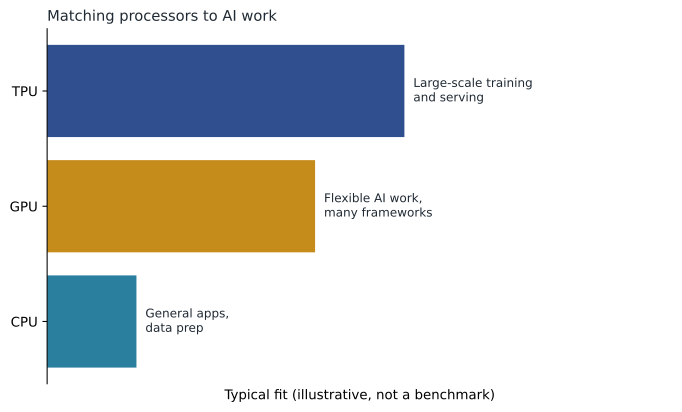
Google has designed its own TPUs for about a decade and uses them to train and serve Gemini and to run AI features in products such as Search. Google Cloud offers several TPU generations to customers; at Google Cloud Next in April 2026, Google announced an eighth generation split into one chip designed mainly for training and one designed mainly for inference, following the seventh-generation chip called Ironwood. Google Cloud also offers GPUs from other chip makers, because many customers' tools and code are written for them. The exam does not test chip specifications; it tests the idea that Google offers a choice of accelerators and designs its own.
Farah summed up the choice in one sentence for Dana: "GPUs are the flexible, widely supported option; TPUs are Google's specialized option that can be very efficient at scale; and for Birchline, the right answer is to let Google choose by using managed models."
AI Hypercomputer
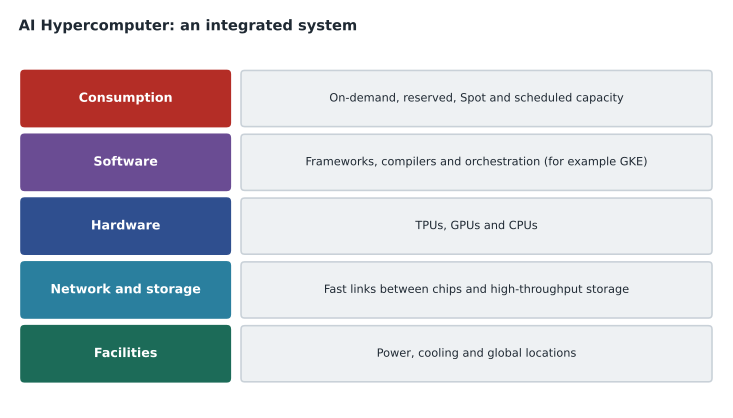
Fast chips alone do not make a fast AI system. Thousands of chips must exchange data quickly, storage must feed them without delays, software must spread work across them, and companies need sensible ways to pay. AI Hypercomputer is Google Cloud's name for this whole integrated system: a supercomputing architecture combining hardware, software and consumption models, designed so that AI workloads run efficiently from small experiments to the largest training jobs.
| Part | What it includes | Why it matters |
|---|---|---|
| Performance-optimized hardware | TPUs, GPUs and CPUs, with fast networking and storage | Chips spend their time calculating rather than waiting for data |
| Open software | Support for popular machine learning frameworks, compilers, and orchestration with GKE and other tools | Teams use familiar tools and move work between hardware types |
| Flexible consumption | On-demand, committed, Spot and scheduled options, such as Dynamic Workload Scheduler for jobs that can wait for capacity | Matching cost to how urgent and how steady the work is |
GCP-101 introduced Spot VMs and committed use discounts for ordinary computing. The same ideas apply to AI hardware. A research team that can wait for capacity, or tolerate interruptions with checkpoints, pays less; a production service that must always be available reserves or commits. Dynamic Workload Scheduler, mentioned in the Cloud Digital Leader guide, helps obtain scarce accelerators for jobs by scheduling them when capacity becomes available.
Data centres, energy and global reach
The infrastructure layer also includes the buildings and networks underneath. Google runs data centres in many regions, connected by its private global network, which GCP-101 described. AI workloads use a lot of electricity and generate a lot of heat, so energy efficiency and cooling matter for cost and for environmental impact. Google publishes information about its data centre efficiency and energy goals; a leader assessing providers can compare such reports. For Birchline the practical points were that the AI services it needed were available in its Canadian regions and that Google, not Birchline, would manage the hardware.
Does a business need to care?
Farah gave Dana three answers, depending on what a company does.
- Using applications and managed models. Most companies, including Birchline today, use Gemini through Workspace, Gemini Enterprise or the platform's APIs. Google runs the hardware. The company pays for use and should watch quotas, regional availability and cost per request, not chips.
- Hosting or tuning models. A company that deploys open models to its own endpoints, or tunes models, chooses machine types with GPUs or TPUs and pays for the time they run. It should plan capacity, choose sensible consumption options and switch off idle endpoints.
- Training large models. A small number of companies train their own large models. They work directly with AI Hypercomputer, reserving large amounts of capacity and tuning software for performance. This is a specialist activity with very large costs.
# Illustrative: why an idle self-hosted endpoint costs money while a managed API does not.
hours_in_month = 730
endpoint_price_per_hour = 4.00     # invented price for a GPU-backed endpoint
api_price_per_1k_requests = 1.20   # invented blended price for a managed model API

def endpoint_cost(busy_hours, always_on=True):
    hours = hours_in_month if always_on else busy_hours
    return hours * endpoint_price_per_hour

for requests in (20_000, 200_000, 2_000_000):
    api = requests / 1000 * api_price_per_1k_requests
print(f"{requests:>9,} requests: managed API {api:9,.0f} | always-on endpoint {endpoint_cost(0):9,.0f}")20,000 requests: managed API 24 | always-on endpoint 2,920 200,000 requests: managed API 240 | always-on endpoint 2,920 2,000,000 requests: managed API 2,400 | always-on endpoint 2,920
What this code does
Using invented prices, the program compares a managed model service, which charges per request, with a self-hosted endpoint that is paid for every hour it runs. It costs both at three monthly request volumes. At low volumes the managed service is far cheaper, because the always-on endpoint costs the same whether it is busy or idle.
With these invented prices, the managed API is cheaper at low volume and the dedicated endpoint becomes competitive only at very high, steady volume. Real prices differ, but the shape is typical, and it is why Farah recommended managed models for Birchline's first projects.
Answering the board
Dana's note back to the board was three sentences long: Birchline's 2027 plans use managed Google services, so Google provides the hardware; the risk to watch is regional availability and usage limits for specific models, which the team will confirm during testing; and if Birchline ever wants to host or train models itself, the infrastructure options exist and would be costed as a separate decision.
Common mistakes
MistakeAssuming every AI project needs the company to buy or reserve chips.
InsteadMost businesses use managed models and pay per use; Google runs the hardware.
MistakeTreating TPUs and GPUs as competitors where one always wins.
InsteadThey suit different needs; Google Cloud offers both.
MistakeLeaving self-hosted model endpoints running when idle.
InsteadEndpoints charge while they run; scale them down or use managed APIs.
MistakeThinking AI Hypercomputer is a single machine.
InsteadIt is an integrated system of hardware, software and consumption options.
Capacity, quotas and availability
Even when Google runs the hardware, capacity is not unlimited. Managed model services have quotas, limits on how many requests or tokens a project can use per minute, which protect the service and the customer. A company planning a busy launch, such as Birchline's shopping assistant during the Boxing Day sale, should estimate its peak requests per minute, compare them with its quotas and request increases well in advance. Some services also offer ways to reserve guaranteed throughput for production workloads at a set price, which trades flexibility for predictability.
Availability also varies by region and by model. A new model may launch first in a few regions, and some features may not be offered everywhere. Teresa's location policy meant Birchline could only use models offered in its approved regions, so Owen added a line to every model shortlist: "Available in our regions? Yes or no, with the date checked."
Why Google designs its own chips
Jules asked why Google bothers to design TPUs when other companies make excellent GPUs. Farah gave three reasons that Google itself emphasizes. Designing the chip, the network between chips, the data centre and the software together lets each part be tuned for the others, which can improve performance and energy efficiency for large AI workloads. Owning the design gives Google more control over supply for its own products, such as Search and Gemini. And offering both TPUs and GPUs gives customers a choice: GPUs for broad compatibility with existing code and tools, TPUs where they fit the workload well. For the exam, it is enough to know that TPUs are Google's custom AI accelerators and that AI Hypercomputer brings them together with GPUs, networking, storage and software.
Owen wrote a final note in his book: for most businesses, the infrastructure layer shows up as a line on the bill and a quota on a dashboard, not as a machine anyone has to look after.
Dana's final question was about cost control. Farah pointed her to the same tools GCP-101 covered: budgets and alerts on each AI project, billing reports broken down by service, and the billing export to BigQuery, where Ravi could chart cost per conversation over time.
Worked problem
Choosing infrastructure for three teams
Birchline has three AI needs: (a) the shopping assistant using Gemini; (b) a data scientist who wants to tune a small open model on product reviews, running a few days a month; (c) a hypothetical future idea to train a model from scratch on all retail data. What infrastructure approach fits each?
Show solution
- (a) Call Gemini through the platform's managed API. No hardware decisions; watch quotas, region and cost per request.
- (b) Run tuning jobs on GPU or TPU capacity for the few days needed, using interruptible or scheduled options where the job can tolerate waiting, and shut it down afterwards.
- (c) Training from scratch needs large, reserved accelerator capacity on AI Hypercomputer and specialist skills. It should be a separate business case, and is very unlikely to beat adapting existing models for a retailer.
Answer: Managed API for the assistant; short-lived accelerator capacity with flexible pricing for tuning; a separate, sceptical business case for training from scratch.
"So the chip shortage isn't our problem," Dana said. "Not this year," Farah answered. "Our problem is writing good prompts and keeping our data clean."
Summary and key terms
- AI calculations are huge numbers of parallel matrix operations, so specialized hardware speeds them up.
- Training builds a model and needs concentrated computing; inference serves requests continuously and needs low latency and low cost per request.
- CPUs are general-purpose; GPUs are flexible parallel processors with broad framework support; TPUs are Google-designed accelerators for machine learning.
- AI Hypercomputer integrates performance-optimized hardware, open software and flexible consumption options such as Dynamic Workload Scheduler.
- Most businesses use managed models and never manage chips; those who host, tune or train choose accelerators and consumption options and must control idle costs.
- Accelerator
- A processor designed to speed up specific calculations, such as a GPU or TPU.
- Tensor Processing Unit (TPU)
- A Google-designed chip for machine learning calculations.
- Graphics processing unit (GPU)
- A highly parallel processor widely used for AI.
- Training
- Building a model's parameters from data.
- Inference
- Using a trained model to respond to requests.
- AI Hypercomputer
- Google Cloud's integrated system of AI hardware, software and consumption options.
- Dynamic Workload Scheduler
- A Google Cloud capability that schedules jobs to obtain accelerators when capacity is available.
Practice problems
Work each problem on paper first, then reveal the answer to check.
What is the difference between training and inference?
Show answer
Training builds a model from data; inference uses the trained model to answer requests.
Name the three parts of AI Hypercomputer.
Show answer
Performance-optimized hardware, open software and flexible consumption.
Why might a managed model API cost less than a self-hosted endpoint at low volume?
Show answer
The API charges per use, while an endpoint charges for every hour it runs.
Lesson quiz · 5 questions
Score 60% or more to complete this lesson.
Create a free account to save your progress, take quizzes and earn a certificate.