
GCP-111 · Lesson 2 of 12 · 18 min
Gemini for Google Workspace and the Gemini app
▶ Video coming soon A video version of this lesson is on the way.
The second session started with a complaint. Dana Leclair, Birchline's chief financial officer, had forwarded Farah a thread from the store operations team: staff were pasting supplier price lists into a free consumer chatbot to have them summarized. "I don't know what happens to that data," Dana wrote, "and I don't want to find out from a newspaper." Farah read it aloud to Owen and Jules. "This is why we start at the top of the stack," she said. "People already want these tools. If we don't give them a safe, approved version, they'll use an unsafe one."
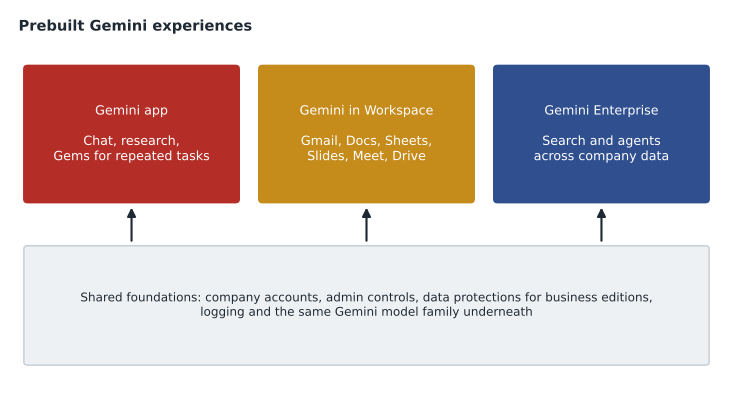
This lesson covers the two most widely used Gemini products for individuals at work: the Gemini app and Gemini for Google Workspace. Both sit at the application layer. Neither needs a developer. The decisions a leader makes about them are about licences, settings, data protection, training and measuring value.
The Gemini app
The Gemini app is Google's general-purpose AI assistant, available on the web and on phones. A person types or speaks a request and Gemini responds: it can answer questions, draft and rewrite text, summarize long documents, brainstorm, explain code, analyse an uploaded spreadsheet, describe an image or help plan a project. Some features, such as deeper research that reads many web sources before answering, are available in higher tiers. The exam guide refers to the app together with its premium tier, which Google has sold under names such as Gemini Advanced; as with every product name in this course, check the current plan names before buying.
For an individual consumer, the Gemini app is personal. For a company, what matters is the business edition: when employees sign in with their work accounts under a company subscription, Google applies enterprise data protections. Google's stated commitments for business editions include that company prompts and responses are not used to train Google's models outside the company's domain and are not reviewed by people for that purpose, and that administrators control the service. Farah's point to Dana was simple: the same kind of tool the store team was already using, but under Birchline's accounts and Birchline's rules.
Gems: saved instructions for repeated tasks
A Gem is a customized version of Gemini that a person creates with saved instructions, and sometimes with reference files, for a task they do often. Instead of typing the same long prompt every week, the person opens the Gem and gives only the new material. Gems are a lightweight way to package good prompting for colleagues who will never read a prompt engineering guide.
Jules built one during the session. His Gem, called Product copy reviewer, had instructions to check a draft product description for Birchline's house style: plain language, metric and imperial sizes together, no claims about waterproofing unless the product had passed the lab test, and a limit of 120 words. Its reference file was the style guide. He pasted in a draft for a new rain shell, and the Gem flagged the phrase "totally waterproof" and suggested "waterproof to the rating on the label".
| Task | Without a Gem | With a Gem |
|---|---|---|
| Weekly sales summary for store managers | Paste the data and retype the format each time | Paste the data; the format is saved |
| Checking product copy against the style guide | Remember every rule | Rules and the guide are saved in the Gem |
| Drafting replies to supplier queries | Explain tone and policy every time | Tone and policy are saved |
Gemini for Google Workspace
Gemini for Google Workspace puts Gemini inside the tools people already use. For Birchline, which runs on Google Workspace, this was the most obvious place to start, because staff would not need to learn a new app or copy material between windows. Google has changed how Gemini is packaged with Workspace more than once, from separate add-ons to features included in Workspace business and enterprise plans, so a leader should check the current plan before budgeting.
| Workspace app | Typical Gemini help | Birchline example |
|---|---|---|
| Gmail | Draft and refine replies, summarize long threads | Summarizing a 40-message supplier thread before a call |
| Docs | Draft, rewrite, change tone, summarize | First draft of the holiday staffing memo |
| Sheets | Organize data, suggest formulas, analyse tables | Explaining a jump in returns in one region |
| Slides | Draft slides and generate images | A first deck for the quarterly store meeting |
| Meet | Take notes, summarize meetings, translate captions | Notes and action items from the weekly operations call |
| Drive | Find and summarize files | Finding last year's tent recall documents |
A side panel in each app lets a person ask Gemini questions about the open file or about other files they can access in Drive and Gmail. Gemini respects Workspace sharing: it can only draw on content the person is already allowed to see. Farah stressed this to Teresa, who had worried that Gemini might show a store manager the payroll file. "It can only show them what they could already open themselves," Farah said. "Which means our sharing settings matter more than ever. If payroll is shared with everyone by mistake, Gemini will find it faster than a person would."
Data protection in business editions
Leaders deciding whether to approve Gemini at work usually ask the same five questions. The answers below summarize Google's published approach for business and enterprise editions in general terms; the contract and the current data protection documentation are what a company actually relies on.
| Question | General answer for business editions | What Birchline checked |
|---|---|---|
| Is our data used to train Google's models? | Google states it is not used to train models outside the customer's domain without permission | The current terms and data processing addendum |
| Do people at Google read our prompts? | Not for model training; access follows the same controls as other Workspace data | The privacy documentation for Workspace with Gemini |
| Does Gemini respect our sharing settings? | Yes; it uses only content the user can access | A sharing clean-up before rollout |
| Can we control who gets it? | Yes; administrators assign licences and turn features on or off | A pilot group first |
| Where is the data processed and stored? | Workspace data regions and residency options depend on the plan | Data region settings for Canadian customer data |
Teresa added one more check of her own. Birchline already had data loss prevention rules in Workspace that blocked emails containing full payment card numbers. She confirmed that the same classification and data protection settings still applied when content was created or summarized with Gemini's help, and she wrote a one-page guide for staff: what to use Gemini for, what not to paste into any tool, and how to report a strange answer.
Measuring value
Dana wanted a number before paying for licences across 1,100 staff. Farah proposed a pilot with 60 people from head office and four stores for eight weeks, with three measures: time saved on common tasks, measured by short weekly surveys and a few timed tasks; adoption, measured by how many pilot users used Gemini at least weekly, which Workspace reports show to administrators; and quality, measured by a sample review of drafts by managers. The pilot runs from January to early March 2027, so its results are still to come; the model below uses illustrative figures to show the arithmetic.
# Illustrative pilot arithmetic (assumed figures, not results).
pilot_users = 60
minutes_saved_per_week = 45        # assumed average from surveys
weeks_per_year = 46                # working weeks
loaded_cost_per_hour = 48.0        # illustrative cost of an hour of staff time
seat_cost_per_user_year = 240.0    # illustrative cost per user

hours_saved = pilot_users * minutes_saved_per_week / 60 * weeks_per_year
value = hours_saved * loaded_cost_per_hour
cost = pilot_users * seat_cost_per_user_year
print(f"Hours saved per year : {hours_saved:8.0f}")
print(f"Value of that time   : {value:8.0f}")
print(f"Cost per year        : {cost:8.0f}")
print(f"Value per unit of cost: {value / cost:6.1f}")Hours saved per year : 2070 Value of that time : 99360 Cost per year : 14400 Value per unit of cost: 6.9
What this code does
Using assumed pilot figures, the program multiplies the number of users by the minutes each saves per week and the working weeks in a year to get total hours saved. It values those hours at an illustrative staff cost and compares that with the yearly cost of the seats. The result, about 6.9 units of value for every unit of cost, is the kind of rough business case a pilot produces.
Farah warned against reading too much into one ratio. Time saved is only valuable if it goes somewhere useful, such as more time on the shop floor, and surveys tend to overstate savings. She also wanted the pilot to record where Gemini was not helpful, because that would shape training. "A tool that saves forty minutes for half the people and wastes ten for the other half needs better training, not a bigger rollout," she said.
Rolling out to people, not just accounts
Turning on a feature is easy; changing how people work is not. Farah's rollout plan had five steps, which also match how the exam thinks about adoption.
- Prepare the ground. Clean up file sharing, confirm data protection settings and write a short acceptable-use guide.
- Start with a pilot group. Choose volunteers from several teams, including sceptics, so the results reflect real work.
- Train on real tasks. Short sessions built around each team's own tasks, such as store schedules or supplier email, teach more than a general demo.
- Name champions. One person in each team collects tips, shares good prompts and Gems, and passes problems back to IT.
- Measure and adjust. Review usage reports and survey results before expanding, and drop or change what is not working.
Where the Gemini app ends and other products begin
Jules asked whether the Gemini app could become the shopping assistant. Farah said no, and explained why the exam often asks a version of this question. The Gemini app and Gemini in Workspace are for employees working with their own files and email. They are not designed to be placed on a public website, connected to Birchline's order system or given rules about which products may be recommended. Those needs belong lower in the stack, on the AI platform. Similarly, if staff want to search across many company systems at once, not just Drive and Gmail, Gemini Enterprise is the better fit, which is the subject of lesson 3.
| Need | Best fit | Why |
|---|---|---|
| An employee drafting a reply in Gmail | Gemini in Gmail | Works inside the app, on content the user can see |
| A repeated personal task with fixed instructions | A Gem in the Gemini app | Saves the instructions for reuse |
| Searching across Drive, the intranet and the ticketing system | Gemini Enterprise | Connects many company sources |
| An assistant for customers on the public website | A custom agent on Agent Platform | Needs a custom interface, tools and rules |
Common mistakes
MistakeAllowing staff to use personal consumer accounts for work data.
InsteadProvide business editions under company accounts, where enterprise data protections and admin controls apply.
MistakeAssuming Gemini can see every file in the company.
InsteadGemini in Workspace uses only content the signed-in person can already access, so review sharing settings.
MistakeJudging a pilot by licences assigned.
InsteadMeasure weekly use, time saved on real tasks and quality of the output.
MistakeUsing the Gemini app as a customer-facing chatbot.
InsteadCustomer-facing assistants with custom tools belong on the AI platform.
Worked problem
Choosing tools for the store operations team
The store operations team wants three things: to summarize supplier price lists, to draft the weekly store bulletin in the same format each time, and to stop using a free consumer chatbot. What should Farah recommend?
Show solution
- Price lists arrive as spreadsheets and email attachments in Workspace. Gemini in Sheets and Gmail can summarize them where they are, under company accounts.
- The bulletin has a fixed format and tone. A Gem with saved instructions and last month's bulletin as a reference file removes the need to retype the prompt.
- Replacing the consumer chatbot needs licences in the business edition, a short acceptable-use guide and a quick training session, so people have an approved alternative.
Answer: Gemini in Workspace for the price lists, a shared Gem for the bulletin, and a pilot of business licences with guidance and training to replace the consumer tool.
Dana approved the pilot that afternoon. Teresa started the sharing clean-up, and found eleven folders shared with everyone in the company that should not have been, including an old store floor plan with alarm codes written on it. "That one would have been bad with or without AI," she said, and fixed it.
Summary and key terms
- The Gemini app is Google's general AI assistant; business editions under company accounts add enterprise data protections and admin control.
- Gems save instructions and reference files for repeated tasks.
- Gemini for Google Workspace brings Gemini into Gmail, Docs, Sheets, Slides, Meet and Drive and uses only content the user can already access, so sharing settings matter.
- Leaders check data protection terms, run a pilot, train people on real tasks, name champions and measure use, time saved and quality.
- Customer-facing assistants and searches across many company systems belong to other products.
- Gemini app
- Google's general-purpose AI assistant on the web and phones.
- Business edition
- A version used under company accounts with enterprise data protections and admin controls.
- Gem
- A saved, customized version of Gemini with instructions and optional files for a repeated task.
- Gemini for Google Workspace
- Gemini features inside Gmail, Docs, Sheets, Slides, Meet and Drive.
- Side panel
- The Gemini pane in a Workspace app for asking about open or accessible files.
- Champion
- A person in a team who helps colleagues adopt a new tool.
Practice problems
Work each problem on paper first, then reveal the answer to check.
Why does Gemini in Workspace make file-sharing mistakes more serious?
Show answer
It can find and summarize anything a user can access, so over-shared files become easier to stumble on.
What is a Gem?
Show answer
A customized Gemini with saved instructions, and optionally files, for a task done often.
Name three measures for a Gemini pilot.
Show answer
Weekly active use, time saved on real tasks and the quality of the output.
Lesson quiz · 5 questions
Score 60% or more to complete this lesson.
Create a free account to save your progress, take quizzes and earn a certificate.