
GCP-111 · Lesson 6 of 12 · 19 min
Vertex AI Studio and prompt management
▶ Video coming soon A video version of this lesson is on the way.
For the sixth session Farah booked a room with a large screen and opened a browser tab that Owen had not seen before. "This is where most generative AI projects really start," she said. "Not with code. With a person typing prompts, trying them on real questions, and keeping track of which version worked." Jules had brought twenty genuine customer questions printed from the service inbox, and they spent the next hour trying them.
The catalogue calls this tool Vertex AI Studio, the name it carried in the Vertex AI era. In the current exam guide and documentation for Gemini Enterprise Agent Platform, the low-code workspace for designing prompts and building agents is Agent Studio. This lesson uses the current name and explains what the studio does, how prompt management works, and how the studio compares with Google AI Studio, a separate tool that the exam guide asks candidates to distinguish.
What the studio is for
Agent Studio is a browser-based workspace on the AI platform for working with models without writing an application first. A person chooses a model from Model Garden, writes instructions and a prompt, adjusts settings, runs the prompt on test inputs and compares the outputs. When a prompt works well, it can be saved, versioned, shared with colleagues and turned into code that developers call from an application, or extended into an agent with tools. Because it runs inside the company's Google Cloud project, the same IAM roles, data protections and audit logs apply as for everything else in that project.
| Studio capability | What it lets a person do | Shopping assistant use |
|---|---|---|
| Prompt design | Write system instructions, prompts and examples | Set the assistant's role, tone and rules |
| Model and settings | Choose a model and adjust settings such as temperature and output length | Compare two Gemini variants on the same prompt |
| Multimodal input | Add images, documents, audio or video to a prompt | Test a customer photo of a broken tent pole |
| Grounding | Connect a prompt to company data or Google Search | Ground answers in the product catalogue |
| Comparison | Run prompts side by side and see differences | Prompt v1 against prompt v2 |
| Saving and versions | Keep named versions of prompts with notes | Record why v3 replaced v2 |
| Code export | Get sample code that calls the same prompt from an application | Hand the prompt to the web developers |
The parts of a good prompt
GCP-110 introduced prompting techniques. In the studio, those techniques take a concrete form. Farah broke Jules's first prompt into parts on the whiteboard.
- System instructions set who the model is and the rules it must always follow: "You are Birchline's outdoor gear assistant. Recommend only products in the provided catalogue. Never give medical advice. If a question is about an order, say you will connect the customer with the order team."
- Context supplies the information for this request, here the product details retrieved from the catalogue and the store stock levels.
- Examples, sometimes called few-shot examples, show the model what a good answer looks like: two or three sample questions with ideal answers in Birchline's style.
- The user's request is the customer's actual question.
- Output format describes the shape of the answer, such as a short paragraph followed by a bulleted packing list with product names and links.
The first version of Jules's prompt was a single sentence: "Help customers with outdoor gear questions." It produced answers that recommended brands Birchline did not sell and gave confident advice about river crossings. The fourth version, with clear system instructions, three examples, grounding in the catalogue and an output format, produced answers the customer service lead rated acceptable on 17 of the 20 printed questions.
Settings that change behaviour
Models have settings, often called parameters, that change how they generate text. GCP-110 explained them; the studio makes them adjustable with sliders and boxes.
| Setting | What it controls | Guidance |
|---|---|---|
| Temperature | How much randomness is used when choosing each next token | Lower for factual, consistent answers; higher for brainstorming |
| Maximum output length | The largest number of tokens the model may produce | Set it to fit the format and control cost |
| Top-p and top-k | How many likely next tokens are considered | Usually left at defaults by non-specialists |
| Safety settings | Thresholds for blocking content in harm categories | Keep strict for customer-facing use |
| Stop sequences | Text that ends generation when produced | Useful for structured output |
For the shopping assistant, Farah suggested a low temperature, so answers to the same question would be consistent, and a maximum length that fit a short paragraph and a list. For the marketing team's brainstorming of product names, the opposite would make sense.
# How temperature reshapes next-token choice (toy example with four candidate words).
import math
scores = {"tent": 2.0, "tarp": 1.2, "hammock": 0.6, "bivy": 0.1}

def probabilities(temperature):
    exps = {w: math.exp(s / temperature) for w, s in scores.items()}
    total = sum(exps.values())
    return {w: v / total for w, v in exps.items()}

for t in (0.2, 1.0, 2.0):
    p = probabilities(t)
    line = "  ".join(f"{w}={v:.2f}" for w, v in p.items())
print(f"temperature {t}: {line}")temperature 0.2: tent=0.98 tarp=0.02 hammock=0.00 bivy=0.00 temperature 1.0: tent=0.54 tarp=0.24 hammock=0.13 bivy=0.08 temperature 2.0: tent=0.39 tarp=0.26 hammock=0.19 bivy=0.15
What this code does
Scores for four candidate words are turned into probabilities with a temperature setting that controls how evenly the chance is spread. At a low temperature tent gets almost all the probability, while higher temperatures give the other words a bigger share. This is how temperature makes a model's output more predictable or more varied.
At a low temperature almost all the probability goes to the top word, so the output is predictable. At a higher temperature the choices spread out, giving more variety and more risk of an odd answer.
Prompt management
A prompt that works is a business asset, like a well-written policy. Prompt management means treating prompts the way a team treats code or important documents: giving them names, saving versions, recording what changed and why, testing each version on the same set of examples, and controlling which version runs in production. Agent Studio supports saving and versioning prompts, and the platform's evaluation tools can score versions against a test set, as lesson 4 showed.
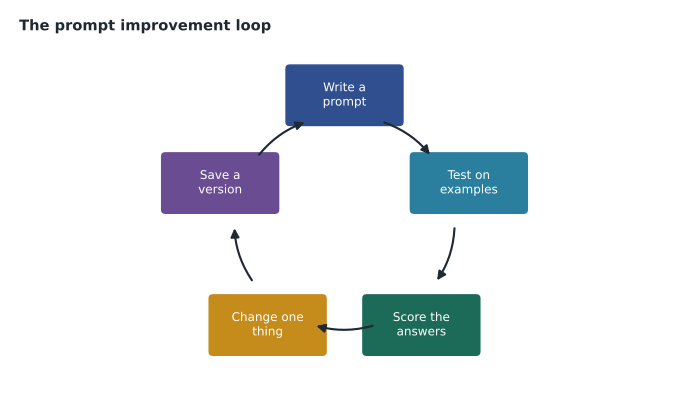
Farah's rules for prompt management at Birchline were short.
- Every production prompt has a name, an owner and a version number.
- Change one thing at a time, then retest on the full test set, so you know what caused any improvement or regression.
- Keep the test set fixed between versions; add new questions only as a deliberate update, and rerun old versions on it too.
- Record the model and settings with the prompt, because the same prompt can behave differently on another model.
- Review prompts when the model is updated, as a new model version can change results.
# A minimal prompt registry entry, the kind of record a team keeps for each version.
prompt_versions = [
    {"name": "shop-assistant", "version": 3, "model": "Gemini (mid-size)", "temperature": 0.2,
     "change": "added rule: never advise on river crossings; refer to guides", "score": 0.88},
    {"name": "shop-assistant", "version": 4, "model": "Gemini (mid-size)", "temperature": 0.2,
     "change": "added output format: paragraph plus packing list", "score": 0.91},
]
best = max(prompt_versions, key=lambda v: v["score"])
for v in prompt_versions:
    print(f"v{v['version']}  score {v['score']:.2f}  {v['change']}")
print(f"Production candidate: v{best['version']}")v3 score 0.88 added rule: never advise on river crossings; refer to guides v4 score 0.91 added output format: paragraph plus packing list Production candidate: v4
What this code does
Two versions of the shopping assistant's prompt are recorded with their model, temperature, what changed and an evaluation score. The program lists each version and picks the one with the higher score. Version 4 becomes the production candidate.
Agent Studio compared with Google AI Studio
The exam guide specifically asks when to use Agent Studio rather than Google AI Studio. Both let people try Gemini models in a browser, which is why they are easy to confuse. The difference is the audience and the environment.
| Google AI Studio | Agent Studio (on Agent Platform) | |
|---|---|---|
| Main audience | Individual developers, students and prototypers | Teams building for an enterprise in Google Cloud |
| Where it runs | A standalone web tool with the Gemini API | Inside the company's Google Cloud project |
| Access and security | Simple sign-in and API keys | IAM roles, organization policies, audit logs, network controls |
| Data and grounding | Mainly what the user uploads or pastes | Company data through Agent Search, RAG APIs and connectors |
| Path to production | Quick prototypes and apps on the Gemini API | Managed deployment, evaluation, monitoring and governance on the platform |
| Typical use | Trying an idea in an afternoon | Building something customers or staff will rely on |
Farah's summary: "AI Studio is a quick sketchpad. Agent Studio is the workshop where the real thing gets built." A developer at Birchline might try an idea in Google AI Studio using only public information, but anything touching customer data or going to production belongs in Agent Studio inside Birchline's projects, where Teresa's controls apply.
Multimodal prompts
Because Gemini models are multimodal, a prompt can include images, documents, audio or video along with text. In the studio, Jules uploaded a customer's photo of a snapped tent pole and asked the model to identify the tent model from the catalogue and say whether a replacement pole was sold. It identified the pole section correctly but guessed the wrong tent model, which became a test case. Multimodal prompts open new uses, such as reading receipts or checking product photos for damage, but they need their own test sets, because a model that is good with text may be weaker with images of a particular kind.
Common mistakes
MistakeWriting one vague sentence and judging the model by the result.
InsteadUse clear instructions, context, examples and an output format.
MistakeChanging several parts of a prompt at once.
InsteadChange one thing per version so you know what made the difference.
MistakePrototyping with customer data in a personal tool.
InsteadUse Agent Studio inside the company's project, where access and data controls apply.
MistakeKeeping the only copy of a good prompt in someone's notes.
InsteadSave named, versioned prompts with their model, settings and test scores.
Who should write prompts
Owen had assumed prompts were a job for developers. Farah disagreed. The people who know what a good answer looks like are often not developers at all: the customer service lead knows which replies calm an angry customer, the buyer knows which product details matter, and the returns lead knows the exceptions to every rule. Agent Studio is designed so that such people can write and test prompts themselves, with developers taking the finished, versioned prompt into the application. At Birchline, Jules wrote the shopping assistant's prompts with Mei Lin from customer service, and the web developers reviewed them for things like output format and length that their code depended on.
This division of work also helps governance. A prompt that tells a customer-facing assistant what it may and may not say is, in effect, a company policy. Birchline decided that changes to production system instructions would need approval from the product owner and a review by Teresa's team, just like changes to the returns policy itself.
Mei also asked how the team would know when a prompt needed changing after launch. Farah's answer was feedback. Every answer the assistant gives carries a simple rating for customers, and a sample of conversations is reviewed each week against the same criteria used in testing. A pattern of low ratings on one kind of question, such as sleeping bag temperature ratings, points to a prompt or grounding problem that the next version should fix, and the test set grows to include those questions.
Worked problem
Improving an unreliable prompt
The assistant sometimes recommends products that Birchline does not sell, and its answers vary in length from one line to a page. What should Jules change, and in what order?
Show solution
- First add a system instruction to recommend only products in the provided catalogue, and ground each request in retrieved catalogue entries. Retest on the full set.
- Then add an output format: a short paragraph followed by a list of up to six products with links, and set a maximum output length. Retest.
- Lower the temperature so the same question produces consistent answers, then retest. Save each version with its score.
Answer: Fix the facts first with instructions and grounding, then the format and length, then consistency through temperature, testing and saving a version after each change.
By the end of the session the shopping assistant prompt was at version 6, and the customer service lead's acceptable rating had reached 18 of 20. The two remaining failures were both about stock at stores that had just changed their opening hours, which pointed to a data problem rather than a prompt problem. "That's the next lesson's topic," Farah said. "Agents, and the tools they use to look things up."
Summary and key terms
- The catalogue's Vertex AI Studio is today's Agent Studio, the low-code workspace on Gemini Enterprise Agent Platform for designing, testing, grounding, comparing, saving and exporting prompts and building agents, all inside the company's project and its controls.
- Good prompts combine system instructions, context, examples, the user's request and an output format.
- Settings such as temperature, output length and safety thresholds change behaviour.
- Prompt management treats prompts as versioned assets tested on a fixed set.
- Google AI Studio is a standalone tool for quick prototyping with the Gemini API; Agent Studio is for enterprise builds.
- Multimodal prompts need their own tests.
- Agent Studio
- The low-code prompt and agent workspace on Gemini Enterprise Agent Platform, formerly Vertex AI Studio.
- Google AI Studio
- A standalone web tool for prototyping with the Gemini API.
- System instructions
- Rules and a role that apply to every request.
- Few-shot examples
- Sample inputs and ideal outputs included in a prompt.
- Temperature
- A setting that controls randomness in generation.
- Prompt management
- Naming, versioning, testing and controlling prompts as assets.
- Multimodal prompt
- A prompt that includes images, audio, video or documents as well as text.
Practice problems
Work each problem on paper first, then reveal the answer to check.
Name the five parts of a well-structured prompt.
Show answer
System instructions, context, examples, the user's request and the output format.
When should a team use Agent Studio rather than Google AI Studio?
Show answer
When the work involves company data or will go to production under enterprise controls.
Why change one thing at a time when improving a prompt?
Show answer
So the team knows which change caused the improvement or the problem.
Lesson quiz · 5 questions
Score 60% or more to complete this lesson.
Create a free account to save your progress, take quizzes and earn a certificate.