
GCP-111 · Lesson 7 of 12 · 19 min
Building agents with Google Cloud tools
▶ Video coming soon A video version of this lesson is on the way.
"A chatbot answers," Farah said at the start of the seventh session. "An agent does." She wrote the shopping assistant's hardest customer question on the board: "Is the 40-litre dry bag in stock near me, and can you hold one until Saturday?" To answer the first half, the assistant must look up the customer's nearest stores and check live stock. To do the second half, it must place a hold in the store system. No amount of prompt writing can do either; the model has to use tools. That makes it an agent.
GCP-110 explained what agents are and how they reason. This lesson covers the Google Cloud tools for building them: the kinds of tools an agent can use, the Google Cloud services and prebuilt AI APIs it can call, the ways to build an agent from no code to full code, and the controls that keep an agent safe. The exam guide lists all of these under the developer tools and agent tooling sections.
What makes an agent
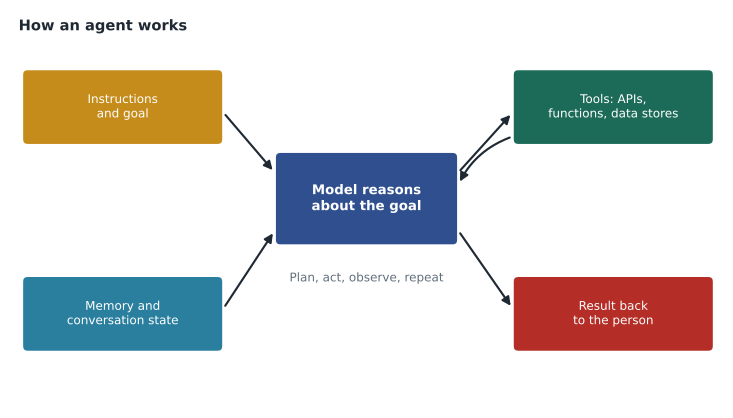
An agent combines a model with instructions, memory and tools. The model reads the goal, decides what to do next, calls a tool, reads the result, and repeats until it can answer or must hand over to a person. This loop is often described as plan, act, observe. Agents can be simple, such as a helper that looks up one record, or complex, such as several agents that each handle one part of a process and pass work between them.
The four kinds of agent tools
The exam guide names four types of tools an agent can use. The names come from Google's agent documentation; what matters is the job each type does.
| Tool type | What it is | Shopping assistant example |
|---|---|---|
| Extensions | Prebuilt, managed connections that let a model call a specific external API in a standard way | A connection to a mapping service to find the nearest stores |
| Functions | Descriptions of functions the model can ask the application to run; the application runs them and returns results | check_stock(product_id, store_id), hold_item(product_id, store_id, customer_id) |
| Data stores | Collections of company data the agent can search to ground its answers | The product catalogue and buying guides, indexed with Agent Search |
| Plugins | Packaged add-ons that extend an agent with capabilities from Google or partners | A partner plugin for shipping estimates |
Function calling deserves special attention because it explains how an agent stays under the company's control. The model does not run the function itself. It produces a structured request saying which function it wants and with which values; the application decides whether to run it, runs it with its own permissions, and returns the result. That gives Birchline a place to enforce rules, such as refusing to place more than two holds per customer per day, regardless of what the model asks for.
# Illustrative function calling: the model proposes, the application decides.
import json
stock = {("DRYBAG40", "S014"): 3, ("DRYBAG40", "S022"): 0}
holds = []

def check_stock(product_id, store_id):
    return {"in_stock": stock.get((product_id, store_id), 0)}

def hold_item(product_id, store_id, customer_id):
    if sum(1 for h in holds if h["customer"] == customer_id) >= 2:
        return {"ok": False, "reason": "two holds per customer per day"}
    if stock.get((product_id, store_id), 0) < 1:
        return {"ok": False, "reason": "out of stock"}
    holds.append({"customer": customer_id, "product": product_id, "store": store_id})
    return {"ok": True}

allowed = {"check_stock": check_stock, "hold_item": hold_item}
# Requests a model might produce, as structured data:
proposed = [
    {"name": "check_stock", "args": {"product_id": "DRYBAG40", "store_id": "S014"}},
    {"name": "hold_item", "args": {"product_id": "DRYBAG40", "store_id": "S014", "customer_id": "C77"}},
    {"name": "hold_item", "args": {"product_id": "DRYBAG40", "store_id": "S014", "customer_id": "C77"}},
    {"name": "hold_item", "args": {"product_id": "DRYBAG40", "store_id": "S014", "customer_id": "C77"}},
    {"name": "cancel_order", "args": {"order_id": "10482"}},
]
for call in proposed:
    fn = allowed.get(call["name"])
    result = fn(**call["args"]) if fn else {"ok": False, "reason": "tool not allowed"}
print(call["name"], json.dumps(result))check_stock {"in_stock": 3}
hold_item {"ok": true}
hold_item {"ok": true}
hold_item {"ok": false, "reason": "two holds per customer per day"}
cancel_order {"ok": false, "reason": "tool not allowed"}What this code does
The application defines the tools the model may use: checking stock and placing a hold, with the hold limited to two per customer and only when stock is available. Requests from the model are run only if the tool is on the allowed list. The output shows two holds succeeding, a third refused by the limit and a cancel request refused because that tool is not allowed.
The last proposed call shows why the application, not the model, holds the keys. GCP-102 recorded Birchline's decision that the shopping assistant would have no permission to change orders. Here that rule is enforced simply: cancel_order is not in the list of allowed tools, so the request fails whatever the model says.
Google Cloud services and prebuilt AI APIs as tools
Agents often use other Google Cloud services as tools. The exam guide lists a set that a leader should recognize.
| Service or API | What it gives an agent |
|---|---|
| Cloud Storage and databases | Files and records to read or update, such as product images or store hours |
| Cloud Run and Cloud Run functions | A place to run the code behind a function tool, scaling automatically |
| Agent Platform | Models, grounding, evaluation and the agent runtime itself |
| Speech-to-Text and Text-to-Speech | Turning a phone caller's speech into text and replies back into speech |
| Translation and Document Translation | Answering in another language, or translating manuals and forms |
| Document AI | Extracting fields from receipts, invoices and forms |
| Cloud Vision and Video Intelligence | Recognizing objects, text and scenes in images and video |
| Natural Language | Finding sentiment, entities and categories in text |
| Google Cloud API Library | The catalogue of many more Google APIs that can become tools |
These prebuilt AI APIs are an important idea in their own right. They give ready-made machine learning for common tasks, such as reading text from a receipt or translating a sentence, through a simple API call. No training is needed. Before 2023 they were how most companies used AI on Google Cloud; today they are often tools inside agents. For a returns agent, Document AI could read a photographed receipt and pass the date and store number to the agent, which then checks the returns policy.
Ways to build an agent
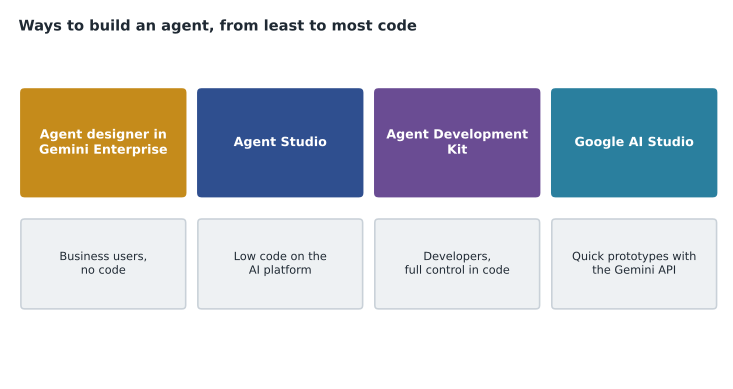
Google offers several ways to build an agent, suited to different people and needs.
| Option | Who uses it | Strengths | Limits |
|---|---|---|---|
| Agent designer in Gemini Enterprise | Business users | No code; uses connected company data; shared with colleagues in Gemini Enterprise | Mainly for internal helpers; fewer custom tools |
| Agent Studio | Analysts and developers | Low code; grounding, tools and testing on the platform | Complex logic may still need code |
| Agent Development Kit (ADK) | Developers | Open-source framework; full control over logic, tools, memory and multi-agent designs; deploys to the platform's agent runtime | Needs software skills and testing |
| Google AI Studio | Individual developers | Fast prototyping with the Gemini API | Not the enterprise build environment |
The Agent Development Kit is open source and works with models beyond Gemini, which fits the open approach the exam guide stresses. Agents built with it, or with other open frameworks, can run on the platform's managed agent runtime, which handles scaling, session memory and monitoring. Agents can also talk to other agents and tools through open protocols; Google has backed an agent-to-agent protocol, and many tools now expose themselves through the Model Context Protocol. Leaders do not need protocol details for the exam, only the idea that agents from different builders can work together.
For Birchline, the choice followed the stack logic from lesson 1. The returns helper, which only reads policies and drafts replies, could be built by the returns lead in Gemini Enterprise's designer. The shopping assistant, which calls store systems and faces customers, would be built by developers with the ADK, tested in Agent Studio and run on the platform's agent runtime.
Keeping agents safe and under control
Because agents act, mistakes can have consequences beyond a wrong sentence. Teresa insisted on five controls for any agent that took actions, and they mirror good practice that exam scenarios reward.
- Least privilege for tools. The agent's service account can call only the functions it needs, here check_stock and hold_item, and nothing that changes orders or payments.
- Rules in code, not only in prompts. Limits such as two held items per customer per day are enforced by the application around each tool, because a prompt instruction can be ignored or manipulated.
- Human hand-off. The agent passes to a person when it is unsure, when a customer is upset, or when a request falls outside its tools.
- Screening inputs and outputs. Prompts and responses pass through Model Armor, covered in lesson 10, to catch prompt injection attempts and unsafe content.
- Logging and review. Every tool call is logged with its inputs and result, and a sample of conversations is reviewed weekly.
Common mistakes
MistakeCalling any assistant that answers questions an agent.
InsteadAn agent uses tools to take actions or fetch live information; a chatbot that only answers from its prompt is not one.
MistakeLetting the model run functions directly with broad permissions.
InsteadThe application runs each function with a narrowly scoped identity and checks the request first.
MistakeBuilding every agent with code.
InsteadUse the no-code designer or Agent Studio when they meet the need; use the ADK for complex, customer-facing agents.
MistakeRelying only on prompt instructions to stop harmful actions.
InsteadEnforce limits in the code around each tool, and leave dangerous tools out entirely.
Testing an agent before customers meet it
Agents need more testing than chat assistants, because they act. Farah's test plan for the shopping assistant had four parts. Happy-path tests check that ordinary requests work: finding a product, checking stock, holding an item. Edge-case tests cover unusual but legitimate situations: a store that has just closed, a product with no stock anywhere, a customer who asks for three holds. Adversarial tests, sometimes called red teaming, try to make the agent misbehave: asking it to cancel an order, to reveal another customer's details, or to ignore its instructions. Load tests check that it stays fast during a sale.
Every tool call in testing is logged with its inputs and outputs, so the team can see not just what the agent said but what it did. A test passes only if both are right. One early test showed the agent calling check_stock eleven times for a single question, once for every store in the region; the team added a function that searched nearby stores in one call and set a cap on tool calls per question.
Owen noticed that the plan said nothing about which model the agent used. "That's deliberate," Farah said. "The tests describe what the agent must do. If we change the model, the same tests tell us whether it still does it."
The plan also covered what happens when a tool fails. If the store system does not respond, the agent should say that stock information is unavailable right now and offer a link to the store page, rather than guessing. Failure behaviour is easy to forget in a demonstration, where every system works, and it is often what customers remember.
Worked problem
Choosing tools for a receipt-checking agent
The returns team wants an agent that reads a photo of a receipt, checks whether the item is still within the return window, and drafts a reply. Which tools and building option fit?
Show solution
- Reading fields such as date, store and items from a photographed receipt is a job for Document AI, a prebuilt AI API, called as a tool.
- Checking the return window needs the returns policy as a data store for grounding, plus a function that calculates days since purchase.
- The agent only reads and drafts; it does not issue refunds. It can be built in Agent Studio by an analyst with a developer's help for the function, and offered to staff through Gemini Enterprise.
Answer: Document AI as a tool, the returns policy as a data store, a simple date function, built in Agent Studio and shared through Gemini Enterprise, with no refund-issuing tool.
Owen asked whether the shopping assistant could also answer the phone. Farah said yes, in principle: Speech-to-Text and Text-to-Speech could turn it into a voice agent. "But customer service on the phone is its own product family," she said. "We'll look at it in lesson 11."
Summary and key terms
- An agent combines a model with instructions, memory and tools, looping through plan, act and observe.
- Tool types are extensions, functions, data stores and plugins.
- With function calling, the model proposes a call and the application decides and runs it, which is where business rules are enforced.
- Agents can call Google Cloud services and prebuilt AI APIs such as Speech-to-Text, Translation, Document AI, Vision and Natural Language.
- Agents can be built with the no-code designer in Gemini Enterprise, low-code Agent Studio, the open-source Agent Development Kit, or prototyped in Google AI Studio, and run on the platform's agent runtime.
- Safe agents use least privilege, rules in code, human hand-off, input and output screening, and logging.
- Agent
- A system that uses a model and tools to work towards a goal.
- Function calling
- A model proposing a structured function request that the application runs.
- Extension
- A managed connection that lets a model call a specific external API.
- Data store
- Company data an agent can search to ground answers.
- Prebuilt AI API
- A ready-made machine learning service for a common task, such as translation.
- Agent Development Kit (ADK)
- Google's open-source framework for building agents in code.
- Agent runtime
- The managed service on the platform that runs and scales agents.
Practice problems
Work each problem on paper first, then reveal the answer to check.
Who runs a function in function calling?
Show answer
The application, after checking the model's request.
Name three prebuilt AI APIs an agent might use.
Show answer
Any three of Speech-to-Text, Text-to-Speech, Translation, Document AI, Cloud Vision, Video Intelligence and Natural Language.
Why enforce limits in code rather than only in the prompt?
Show answer
Prompts can be ignored or manipulated; code around the tool always applies.
Lesson quiz · 5 questions
Score 60% or more to complete this lesson.
Create a free account to save your progress, take quizzes and earn a certificate.