
GCP-111 · Lesson 11 of 12 · 18 min
Integrating generative AI into business applications
▶ Video coming soon A video version of this lesson is on the way.
The eleventh session took place in the customer service office, a long room on the second floor where twenty-two agents answered email, chat and the phone. Mei Lin, the customer service manager, had agreed to show Owen and Jules a typical hour. In that hour her team handled 140 contacts: about half were "where is my order" questions, a quarter were returns, and the rest were product questions, complaints and the occasional customer who wanted to tell someone about a great canoe trip. "Most of these are the same twenty questions," Mei said. "My best people spend their day on things a machine could answer, and the hard cases wait."
So far the course has looked at products one at a time. Real value usually comes from putting generative AI inside the business processes and applications a company already runs. This lesson covers the Customer Engagement Suite for customer service, common patterns for adding generative AI to existing applications, and the practical concerns of integration: APIs, data, workflows, people and measurement.
The Customer Engagement Suite
The Customer Engagement Suite is Google Cloud's set of products for customer service and contact centres. The exam guide lists four parts.
| Part | What it does | At Birchline |
|---|---|---|
| Conversational Agents | Virtual agents that talk with customers on chat, voice and messaging, using generative AI and defined flows | Answer order status and returns questions on chat and phone |
| Agent Assist | Helps human agents during a conversation with suggested replies, relevant knowledge articles and summaries | Suggest the right returns policy and draft a reply while the agent talks |
| Conversational Insights | Analyses conversations afterwards to find topics, sentiment, trends and reasons for contact | Show that a delivery partner's delays cause a spike in complaints |
| Google Cloud Contact Center as a Service | A cloud-based contact centre platform for routing calls, chats and messages to the right agent | Possible future replacement for Birchline's old phone system |
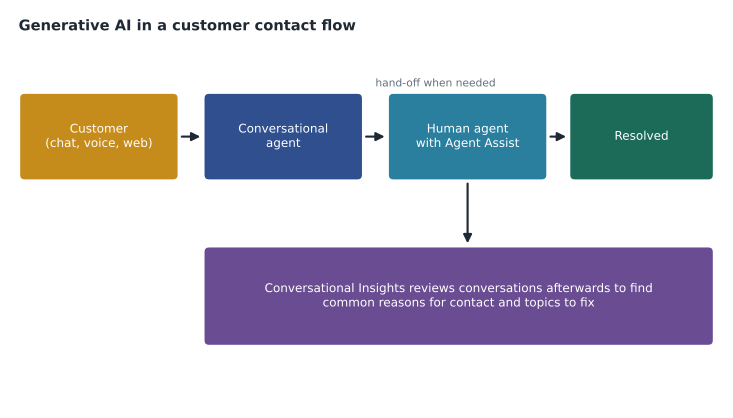
Farah explained how the parts fit together. A conversational agent handles the simple, frequent questions completely, such as order status, by calling Birchline's order system as a tool. When a question is complex, the customer is upset, or the customer asks for a person, it hands off to a human with a summary, so the customer does not have to repeat themselves. Agent Assist then helps the human agent find the right answer quickly. After the conversation, Conversational Insights adds it to the analysis that shows managers what customers contact the company about and why.
Mei's question was whether customers would hate talking to a machine. Farah's answer was that customers mostly dislike machines that waste their time: menus that go in circles, answers that miss the point, and no way to reach a person. A well-designed virtual agent answers simple questions faster than a queue and always offers a way out. "Measure customer satisfaction separately for conversations the agent finished and conversations it handed off," she said. "If either one drops, you'll know where to look."
The same pattern beyond customer service
The customer service flow shows a general pattern that works in many business processes: let AI handle routine work end to end, help people with complex work, and analyse the results to improve the process. Owen listed other Birchline processes where the pattern fits.
| Process | AI handles routine work | AI helps people with complex work | AI analyses results |
|---|---|---|---|
| Customer service | Order status, simple returns | Suggested replies for complaints | Reasons for contact and trends |
| Product content | First drafts of product descriptions | Copy review against the style guide | Which descriptions lead to returns |
| Store support | Answers to policy questions from store staff | Drafting incident reports | Common store issues by region |
| Buying office | Summaries of supplier emails and price lists | Comparing supplier proposals | Price trends across suppliers |
How generative AI gets into existing applications
Not every integration needs a new chat window. Farah described four common ways to add generative AI to applications Birchline already runs.
- Inside the tools people already use. Gemini in Workspace and Gemini Enterprise bring AI to email, documents and search with no new application.
- Behind an existing screen. A button in the returns system that drafts the reply email, or a summary that appears at the top of a long ticket. The application calls a model on the platform through an API.
- As a new conversational front end. The shopping assistant on the website, or a virtual agent on the phone line.
- As a step in an automated process. A nightly job that tags new product reviews, or a workflow that extracts fields from supplier invoices with Document AI and passes them to the finance system.
Each way calls models through APIs. Applications send a request with the prompt and data and receive a response. On Google Cloud, those calls typically go to the AI platform from code running on Cloud Run, Cloud Run functions, GKE or Compute Engine, and APIs can be managed and secured through Apigee, Google Cloud's API management platform, which GCP-102 mentioned for partner APIs. Model Armor can screen traffic at these points.
# Illustrative only: an application calling a model through the platform's API.
# Authentication uses the application's service account, not a key in the code.
POST https://REGION-aiplatform.googleapis.com/v1/projects/bl-shop-prod/locations/REGION/publishers/google/models/MODEL_ID:generateContent
{
  "contents": [{"role": "user", "parts": [{"text": "Draft a reply to this return request: ..."}]}],
  "generationConfig": {"temperature": 0.2, "maxOutputTokens": 400}
}
Designing the workflow, not just the model call
Mei's best agent, Hamid, pointed out a problem with the draft-reply button the team had mocked up. "If it drafts a reply and I have to read every word to check it, I haven't saved anything," he said. Farah agreed that integration is mostly about workflow design. Good integrations make it easy for people to check and correct AI output, show the sources used, and keep a person responsible for anything consequential.
- Show sources. A drafted reply should show which policy it relied on, so the agent can check in one click.
- Make editing easy. The draft goes into the normal reply box, not a separate window.
- Keep a human in the loop where it matters. Refunds above a limit, complaints about safety, and anything legal go to a person, always. GCP-112 covers human-in-the-loop design in more depth.
- Capture feedback. A simple thumbs up or down, and the edits agents make, show where the AI needs improving.
- Fail gracefully. If the model is slow or unavailable, the application still works without it.
Data and systems integration
Generative AI is only as useful as the data and systems it can reach. The shopping assistant needs the product catalogue, store stock, store hours and the customer's own order history; the service agent needs orders, returns and the knowledge base. Integration work includes giving AI secure, narrowly scoped access to these systems through APIs and tools, keeping data fresh, and respecting privacy rules about which data may be used for which purpose. Ravi's team estimated that most of the shopping assistant's build effort would go into data and integration rather than prompts.
# Illustrative estimate: where the shopping assistant build effort goes (person-weeks).
effort = {
    "Data preparation and product data connection": 6,
    "Store systems tools (stock, hours, holds)": 5,
    "Prompt design and evaluation": 3,
    "Security review and Model Armor setup": 2,
    "Website integration and testing": 4,
    "Monitoring, feedback and launch": 2,
}
total = sum(effort.values())
for task, weeks in sorted(effort.items(), key=lambda kv: -kv[1]):
    bar = "#" * weeks
    print(f"{task:44} {weeks:2} {bar}")
print(f"{'Total':44} {total:2}")
data_and_integration = effort["Data preparation and product data connection"] + effort["Store systems tools (stock, hours, holds)"] + effort["Website integration and testing"]
print(f"Data and integration share: {data_and_integration} of {total} person-weeks")Data preparation and product data connection 6 ###### Store systems tools (stock, hours, holds) 5 ##### Website integration and testing 4 #### Prompt design and evaluation 3 ### Security review and Model Armor setup 2 ## Monitoring, feedback and launch 2 ## Total 22 Data and integration share: 15 of 22 person-weeks
What this code does
Estimated build effort for the shopping assistant, in person-weeks, is listed by task and sorted from largest to smallest with a simple text bar for each. Data preparation and connecting product data is the biggest piece at 6 weeks, followed by store systems tools at 5. The point is that the AI model itself is a small part of the work compared with data, integration and testing.
Measuring business results
An integration is successful when it improves a business measure, not when it uses a clever model. Mei and Farah agreed measures for the customer service pilot planned for spring 2027 before any building started.
| Measure | What it shows | Starting point |
|---|---|---|
| Containment rate | Share of conversations the virtual agent resolves without a person | None today; target to be set after a month of data |
| Average handling time | How long human agents spend per contact | About 7 minutes |
| First-contact resolution | Share of issues solved in the first contact | Measured monthly |
| Customer satisfaction | Short survey after contact, split by AI-only and handed-off | Measured monthly |
| Agent experience | Agents' own ratings of Agent Assist suggestions | New measure |
Farah warned about one common trap: a high containment rate is not good if customers give up rather than getting answers. Containment should always be read together with satisfaction and repeat contacts.
Common mistakes
MistakeAdding a chat window where a button in the existing screen would do.
InsteadPick the integration pattern that fits the work, often inside existing tools or screens.
MistakeMeasuring only how many conversations the virtual agent handled.
InsteadCombine containment with satisfaction, repeat contacts and resolution.
MistakeHiding the sources behind an AI draft.
InsteadShow sources and make editing easy so people can check quickly.
MistakeUnderestimating data and integration work.
InsteadPlan for most effort to go into data, systems and testing, not prompts.
Bringing people along
Integration changes jobs, and people notice. Mei involved her team from the start. Two experienced agents sat in on the design sessions for Agent Assist and wrote many of the example answers. The team chose which question types the virtual agent would handle first, starting with order status, which they found the most repetitive. Mei also promised that time saved would go to longer, better conversations with customers who needed help, not to cutting staff, and she reported each month on how that time was used.
Farah pointed out that this is not only kindness but good practice. People who helped design a tool trust it more, use it better and report its problems sooner. The agents' feedback in the first weeks of any pilot is usually the fastest way to find where prompts, data or workflows need fixing. GCP-112 looks at change management and adoption in more depth.
Hamid asked what happens to his job if the virtual agent handles half the contacts. Mei's answer was specific: two agents would move to a new team handling product advice and complaints about faulty gear, which had long waits, and one would help maintain the knowledge articles that Agent Assist and the virtual agent rely on. Clear answers like this, given early, reduce the fear that slows adoption.
Worked problem
Designing the customer service rollout
Mei's team gets 140 contacts an hour; about half are order status questions and a quarter are returns. Which Customer Engagement Suite parts should come first, and how should success be judged?
Show solution
- Order status is frequent, simple and answerable from the order system. A conversational agent with an order-lookup tool can resolve most of these end to end, with hand-off for problems.
- Returns often need judgement. Agent Assist, suggesting the right policy and a draft reply to human agents, helps without removing people from the decision.
- Conversational Insights should run from the start to show reasons for contact and to measure change. Success is judged by containment together with satisfaction, handling time and repeat contacts.
Answer: A conversational agent for order status, Agent Assist for returns, Conversational Insights throughout, judged by containment alongside satisfaction, handling time and repeat contacts.
As they left, Hamid asked whether the AI would replace his team. Mei answered before Farah could. "It'll take the twentieth "where's my order" of the hour off your plate," she said. "The customer whose tent failed on a mountain still gets you."
Summary and key terms
- The Customer Engagement Suite includes Conversational Agents for automated conversations, Agent Assist for helping human agents, Conversational Insights for analysing conversations, and Google Cloud Contact Center as a Service for routing contacts.
- A general pattern is to let AI handle routine work, help people with complex work, and analyse results.
- Generative AI enters applications inside existing tools, behind existing screens, as new conversational front ends, or as steps in automated processes, through APIs often managed with Apigee.
- Good integrations show sources, make editing easy, keep humans responsible for consequential decisions, capture feedback and fail gracefully.
- Most effort goes into data and systems, and success is judged by business measures.
- Customer Engagement Suite
- Google Cloud's set of products for customer service and contact centres.
- Conversational Agents
- Virtual agents that converse with customers on chat, voice and messaging.
- Agent Assist
- A tool that helps human agents with suggestions, knowledge and summaries during conversations.
- Conversational Insights
- Analysis of conversations to find topics, sentiment and reasons for contact.
- Contact Center as a Service
- Google Cloud's cloud-based platform for routing customer contacts.
- Containment rate
- The share of conversations a virtual agent resolves without a person.
- Apigee
- Google Cloud's API management platform.
Practice problems
Work each problem on paper first, then reveal the answer to check.
Which Customer Engagement Suite part helps human agents during a conversation?
Show answer
Agent Assist.
Name two ways to add generative AI to an existing application.
Show answer
Any two of: inside existing tools, behind an existing screen, as a new conversational front end, or as a step in an automated process.
Why read containment rate alongside satisfaction?
Show answer
A high containment rate can hide customers giving up without getting answers.
Lesson quiz · 5 questions
Score 60% or more to complete this lesson.
Create a free account to save your progress, take quizzes and earn a certificate.