
CSCO-122 · Lesson 7 of 12 · 23 min
Security policies and user awareness
▶ Video coming soon A video version of this lesson is on the way.
Northfield Community Centre runs on a small staff and a large group of volunteers. When Brightline took over its IT in the summer of 2026, Keisha found a shared front-desk password written on a card taped under the keyboard, volunteers using their personal email to send registration forms, and no written rules about anything. Nobody was careless on purpose. They had simply never been told what was expected. In November the centre's director, Grace Okonjo, asked Brightline to help write a short set of security policies and train the staff and volunteers on them. Keisha brought Jordan to the planning meeting and gave him a job: listen for what people actually do, because a policy that ignores how people work will be ignored in return.
This lesson explains how security policies are organized, which policies small organizations need most, how to write rules people will follow, and how awareness training builds the habits that technical controls cannot. The exam groups these topics with risk management, because policies are how an organization turns its risk decisions into everyday behaviour.
Policies, standards, procedures and guidelines
Security documents form a hierarchy, and the exam expects you to know what belongs at each level.
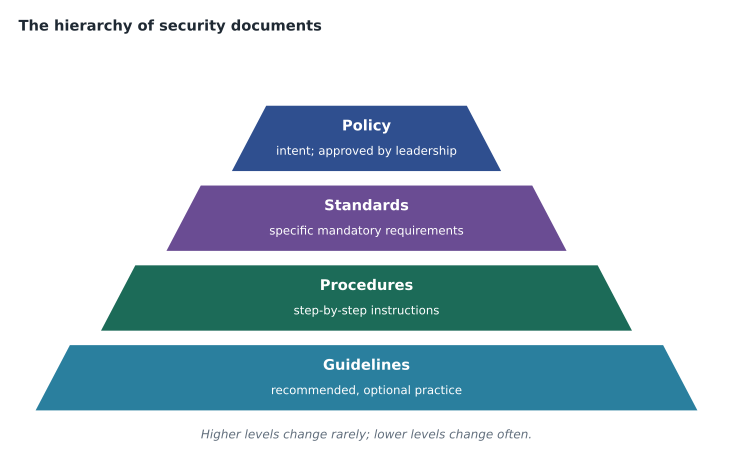
- A policy states what the organization requires and why, in broad terms, and is approved by leadership. Example: all accounts that access personal information must use multi-factor authentication.
- A standard sets specific, mandatory requirements that support a policy. Example: passwords must be at least 15 characters, and the approved MFA methods are an authenticator app or a security key.
- A procedure gives step-by-step instructions for doing a task in a way that meets the standard. Example: how a technician enrols a new volunteer in MFA.
- A guideline offers recommended practice that is not mandatory. Example: tips for creating a memorable passphrase.
Keeping the levels separate makes documents easier to maintain. Policies change rarely and need leadership approval. Standards change as technology changes. Procedures change whenever a tool or screen changes, and the technicians who use them can update them. If every rule is written into the policy itself, a small change to a login screen means sending the whole policy back to the board.
The policies a small organization needs
Large organizations have dozens of security policies. A community centre needs a handful, each short enough to read in a few minutes. Keisha's starting set for Northfield had seven.
- Acceptable use policy: what staff and volunteers may and may not do with the organization's devices, accounts, network and data. Everyone signs it.
- Account and password policy: unique accounts for every person, no shared passwords, MFA where available, and how passwords are stored and reset.
- Data classification and handling policy: which information is public, internal or confidential, and how each kind may be stored, shared and disposed of.
- Personal device policy: whether personal phones and laptops may access work data, and the conditions, such as the application management approach from Lesson 1.
- Remote access and public Wi-Fi policy: how to connect safely from home or on the road.
- Incident reporting policy: what to report, how, and the promise that reporting honestly will not be punished.
- Onboarding and offboarding procedure: how accounts and access are granted when someone starts and removed the day they leave.
Other common policies include a clean desk policy, which requires sensitive papers and unlocked screens not to be left unattended; a data retention policy, which says how long records are kept and how they are destroyed; a change management policy, introduced in Lesson 2; and a vendor or third-party security policy for suppliers who reach the organization's systems.
Writing rules people will follow
Jordan's notes from the planning meeting showed why the old habits existed. The front desk had one PC and up to six volunteers on a busy day, so a shared password was the only way they knew to let everyone use it. Volunteers used personal email because they had no work accounts. Telling them to stop without giving them another way would only drive the behaviour underground.
Keisha's approach had four principles. First, make the secure way the easy way: Brightline gave each volunteer a simple account with a short sign-in using a security key kept on a lanyard at the desk, and set the front-desk PC to switch users quickly. Second, explain the reason for each rule in one sentence, because people follow rules they understand. Third, keep documents short and in plain language. Fourth, assign an owner and a review date to every policy, so it does not go stale.
Policies also need enforcement and exceptions. Technical controls can enforce many rules automatically: MFA cannot be skipped if the system requires it. For rules that cannot be enforced technically, the policy says what happens when they are broken, from a reminder to removal of access. Exceptions follow the same pattern as baseline exceptions in Lesson 1: documented, approved by an owner and reviewed.
Data classification
Classification tells people how carefully to treat information. A simple scheme with three or four levels works best for small organizations.
| Level | Examples at Northfield | Handling rules |
|---|---|---|
| Public | Program schedules, the website, published newsletters | May be shared freely |
| Internal | Staff schedules, room bookings, meeting notes | Share only with staff and volunteers; store in work accounts |
| Confidential | Registration forms with names, addresses, birth dates and emergency contacts | Work accounts only; never personal email; encrypt when sent; limit access to those who need it |
| Restricted | Payment details and records about children or health needs | Only named roles; extra controls; report any exposure immediately |
Classification connects directly to privacy law. Personal information such as the registration forms is protected under federal and provincial privacy laws, and a breach involving it may have to be reported to the Office of the Privacy Commissioner of Canada or a provincial commissioner. Knowing where such data lives, and keeping it out of personal email, makes both protection and incident response far easier.
Joiners, movers and leavers
Many breaches involve accounts that should not have existed: a former employee's account still active, a volunteer from three years ago who can still read shared folders, a contractor who kept a password. The joiners, movers and leavers process prevents this. Joiners get exactly the access their role needs. Movers have old access removed when they change roles, not just new access added. Leavers have their accounts disabled on their last day, their devices collected and any shared passwords they knew changed. Northfield's new procedure gave the director a one-page checklist for each case and a monthly report from Brightline listing every active account for her to review.
Security awareness training
Technical controls stop many attacks, but people still decide whether to click, whether to share a password on the phone and whether to report something odd. Security awareness training builds those habits. Effective programs share a few features.
- Short and frequent beats long and annual. A few minutes each month keeps topics fresh.
- Relevant examples work best. Volunteers learned to spot fake registration emails and phone calls pretending to be the city's recreation office, not generic examples from banks they did not use.
- Clear actions: every session ends with what to do, such as using the report button in email or calling Brightline.
- A positive reporting culture: people who report mistakes quickly are thanked, because early reports limit damage.
- Measurement: track completion, reporting rates and, where used, simulated phishing results, and use them to improve the training rather than to shame people.
Simulated phishing campaigns send realistic but harmless test emails to staff to measure how many click and how many report. Used well, they show where training is needed. Used badly, they create resentment. Brightline's rules were that the organization's leadership must approve each campaign, tests must never imitate sensitive situations such as pay cuts or health emergencies, results are shared as group trends, and anyone who clicks gets a short, friendly lesson rather than a reprimand.
Social engineering defences
Social engineering is manipulating people into giving away information or access. CSCO-121 described the main types. The policy side of defence is about verification: never act on an unexpected request for money, passwords or data without confirming it through a separate, known channel. A volunteer who gets a call from someone claiming to be Brightline and asking for the front-desk security key should hang up and call Brightline's published number. A bookkeeper who receives an email from a supplier announcing new bank details should phone the supplier using the number on file, not the one in the email. Writing these rules into policy gives staff permission to slow down and say no, even to someone who sounds important.
Rolling out and reviewing the policies
A policy that sits in a folder protects nobody. Northfield's rollout had three parts. Each staff member and volunteer received a one-page summary of the rules that applied to them, written as plain actions: use your own account, keep registration forms in the work drive, report anything odd to Brightline. Everyone signed the acceptable use policy at a short session where they could ask questions. And the full documents were stored in one shared location with a version number and date, so that nobody worked from an old copy.
Policies also age. New tools arrive, laws change, and incidents reveal gaps. Keisha set a review date twelve months out for each document and added three triggers for an early review: a security incident, a significant change in the organization's systems, or a change in a law that applies to it. Each review is recorded, even when nothing changes, because the record shows auditors, insurers and the board that the policies are living documents rather than paperwork written once and forgotten. When Northfield's insurer next asks whether it has written security policies reviewed within the past year, Grace will be able to answer yes and attach the list.
Worked problem
Measuring an awareness campaign
Northfield runs its first simulated phishing email to 40 staff and volunteers in October 2026. Eight people click the link and 6 report it. After two short training sessions, a second test in November goes to the same 40 people. Four click and 18 report. How did the click and report rates change?
Show solution
- October: 8 of 40 clicked, which is 1 in 5, and 6 of 40 reported, which is 3 in 20.
- November: 4 of 40 clicked, which is 1 in 10, and 18 of 40 reported, which is 9 in 20.
- Clicks halved, from 8 to 4. Reports tripled, from 6 to 18.
- The rising report rate is the more important result, because quick reports let Brightline block a real campaign for everyone.
Answer: Clicks fell from 1 in 5 to 1 in 10 and reports rose from 3 in 20 to 9 in 20. Brightline reports both as group trends, not individual results.
Worked problem
Placing rules at the right level
Grace drafts one document that says: "Everyone must protect personal information. Passwords must be at least 15 characters. To reset a password, open the account portal, choose Forgot password and follow the prompts. Consider using a passphrase made of four random words." Split it into the four document types.
Show solution
- Policy: everyone must protect personal information.
- Standard: passwords must be at least 15 characters.
- Procedure: the password reset steps in the account portal.
- Guideline: the suggestion to use a passphrase of four random words.
Answer: Each sentence belongs to a different level, so each can be approved and updated by the right people at the right pace.
Common mistakes
MistakeWriting rules without asking how people work.
InsteadObserve real workflows and make the secure way the easy way.
MistakePutting technical details in the policy.
InsteadKeep policies broad; place specifics in standards and procedures.
MistakeRemoving new access but not old access when people change roles.
InsteadReview and remove old access for movers, not only leavers.
MistakeUsing phishing simulations to shame individuals.
InsteadShare group trends, get leadership approval and follow clicks with friendly training.
MistakeTreating training as a yearly checkbox.
InsteadRun short, frequent, relevant sessions and measure reporting as well as clicks.
Summary and key terms
- Policies state intent, standards set mandatory specifics, procedures give steps and guidelines offer recommendations.
- Small organizations need a short core set: acceptable use, accounts and passwords, data handling, personal devices, remote access, incident reporting and onboarding and offboarding.
- Rules work when the secure way is easy, the reason is clear, documents are short and each has an owner and review date.
- Data classification tells people how to handle information and links to privacy and breach-reporting duties.
- The joiners, movers and leavers process prevents leftover access.
- Awareness training should be short, frequent, relevant and measured, with a positive reporting culture and careful use of phishing simulations.
- Policy
- A high-level statement of requirements and intent approved by leadership.
- Standard
- Specific mandatory requirements that support a policy.
- Procedure
- Step-by-step instructions for carrying out a task.
- Guideline
- Recommended but optional practice.
- Acceptable use policy
- Rules for how people may use the organization's devices, accounts and data.
- Data classification
- Labelling information by sensitivity to set handling rules.
- Joiners, movers and leavers
- The process for granting, changing and removing access as people start, change roles and leave.
- Simulated phishing
- Harmless test emails used to measure and improve awareness.
Practice problems
Work each problem on paper first, then reveal the answer to check.
Which document type would state that MFA is required for all accounts holding personal information?
Show answer
A policy.
Where do step-by-step instructions for enrolling a user in MFA belong?
Show answer
In a procedure.
Why does Keisha insist on making the secure way the easy way?
Show answer
People bypass rules that make their work harder, so secure options must also be convenient.
What three things happen on a leaver's last day?
Show answer
Accounts are disabled, devices are collected and any shared passwords they knew are changed.
Why is the report rate important in phishing tests?
Show answer
Quick reports let defenders block a real campaign before it spreads.
How should a bookkeeper verify a supplier's change of bank details?
Show answer
Call the supplier on the number already on file, not one given in the email.
Lesson quiz · 5 questions
Score 60% or more to complete this lesson.
Create a free account to save your progress, take quizzes and earn a certificate.