
CSCO-122 · Lesson 12 of 12 · 25 min
Practice: endpoint and incident scenarios
▶ Video coming soon A video version of this lesson is on the way.
By mid-November, Jordan had spent two afternoons a week with Keisha for most of the autumn. His CCST Cybersecurity exam was planned for the spring of 2027, after his IT Support exam, and Keisha wanted to see whether he could put the pieces of this course together. She wrote six short scenarios on index cards, each based loosely on something Brightline had seen, and set them face down on the table. Pick one, she said, and talk me through it as if it were happening now. Tell me what you check, what you do first, who you tell and what you write down. This lesson works through the same six cards. Try each one yourself before reading the analysis.
The scenarios mix endpoint security, vulnerability management, risk, monitoring, incident response, evidence and recovery, because real problems never arrive sorted by exam domain. For each card, the analysis follows the same pattern: understand the situation, decide what matters most, act in the right order, communicate and document.
Card 1: the lost laptop
Suppose a Riverside Family Law associate phones the help desk at 8:15 on a weekday morning. She left her firm laptop on a bus the evening before and has not been able to recover it. The laptop holds drafts of client documents and has saved sign-ins to the firm's email and document system.
Start with the baseline from Lesson 1. Was full-disk encryption on and the recovery key escrowed? The device-management console shows that it was, and that the laptop last checked in at 18:52 the previous evening. Was the screen lock set? The baseline requires a lock after five minutes. These facts change the risk dramatically: an encrypted, locked laptop protects the data on its disk even if someone else has it.
The actions follow quickly. Mark the device as lost in the console and send a remote lock and wipe command, which will run if the laptop ever connects. Revoke the associate's active sessions and reset her password from a clean device, because saved sign-in tokens could otherwise be used if the laptop were unlocked somehow. Check the sign-in logs since 18:52 for any use of her account from an unfamiliar device. Then record the event in the incident log, including the encryption status and the analysis of whether personal information was at real risk.
Worked problem
Is the lost laptop a reportable breach?
The laptop was encrypted with the key escrowed, the screen was locked, the account sessions were revoked within an hour of the report, and the logs show no sign-ins from unknown devices. Should Brightline advise the firm to report a breach to a privacy regulator?
Show solution
- Identify the data at risk: client documents and personal information about clients.
- Assess the risk: strong encryption and a locked screen mean the data cannot practically be read without the associate's credentials.
- Account access was cut off quickly, and the logs show no misuse.
- The risk of significant harm is therefore low, so a regulator report is probably not required, but the decision belongs to the firm with legal advice, and the analysis is recorded.
- Remind the firm that its professional duties to clients may require its own internal review, regardless of privacy law.
Answer: Probably not reportable, because encryption and quick session revocation make harm unlikely, but the firm makes the decision with advice and the reasoning is recorded.
Card 2: a ransom note at the bakery
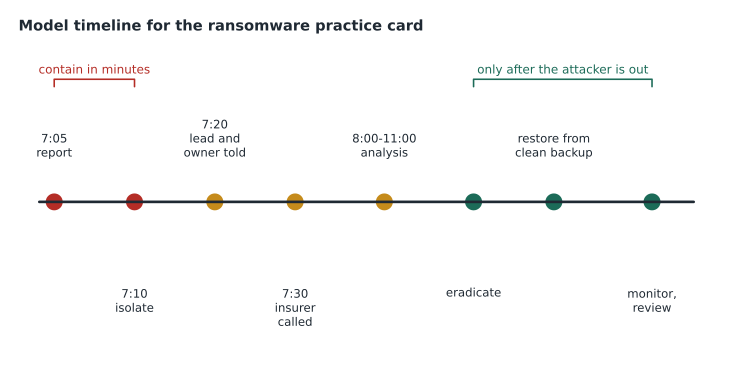
Suppose the Kettle & Crumb office manager calls at 7:05 one morning. The office laptop shows a message saying its files have been encrypted and giving instructions for payment. Some shared folders she can see from the laptop have files with an unfamiliar extension.
This is a high or critical incident from the first minute, because ransomware spreads and the shared folders suggest it already has. The first priority is containment: isolate the laptop through EDR, and isolate or disconnect the file storage it reaches. The office manager should not turn the laptop off or try to open more files; she should photograph the screen and step away. Keisha, as incident lead, takes over and Owen calls the owner. Because the bakery has cyber insurance, the insurer's incident line is called early, since the policy may require it and may provide specialist help.
Next comes analysis: what was encrypted, how far did it spread, and how did it get in? The EDR timeline will show which process encrypted files and what started it. Eradication removes the attacker's access and closes the way in. Recovery follows the plan from Lesson 11: rebuild the laptop, restore the shared folders from the immutable offsite backup after confirming the backup is clean, and monitor closely afterwards. The point-of-sale terminals, on their own isolated network segment from Lesson 6, should be unaffected, and checking that quickly tells the owner whether the shops can open.
Notification depends on what the analysis finds. If the attackers copied files containing employee or customer personal information before encrypting them, which many ransomware groups now do, the bakery may have duties under privacy law, as Lesson 9 explained. If card data were involved, payment card rules apply. Jordan's role in a real case would be to keep notes, collect evidence as instructed and handle help-desk calls, not to negotiate or decide on notification.
Card 3: a critical finding on the firewall
Suppose a vendor advisory and a government alert both report that a vulnerability in the clinic's firewall model is being actively exploited, with a CVSS base score of 9.8. Prairie Paws' last quarterly scan was clean, and the next is not due for two months.
The scan schedule is irrelevant; threat intelligence has changed the risk now. Check the firewall's current software version against the advisory. If it is affected, use the emergency patch path from Lesson 2: schedule the update for that evening, record the version before and after, and confirm the device works afterwards. If the update cannot be applied immediately, apply the vendor's recommended mitigation, such as disabling the affected feature or restricting management access, and record it. Because exploitation is active, also check the firewall's logs for signs that someone already used the flaw, and escalate to Keisha if anything looks wrong. Finally, add the outcome to the client's next report.
Card 4: a 3 a.m. account
Suppose the SIEM raises two alerts from the Northfield Community Centre file server at 3:02 one morning. A new user account named svc-update was created, added to the local Administrators group and, four minutes later, the security log was cleared.
These are Windows events 4720, 4732 and 1102 from Lesson 8, and together they are a strong sign of an intruder. Nobody at Northfield works at 3 a.m. and Brightline did not schedule any change. This is not a case for careful waiting: escalate immediately. While the incident lead is reached, isolate the server if the plan allows, so that the attacker loses access, and preserve evidence in order of volatility from Lesson 10, starting with the EDR collection of processes and connections. The cleared local log matters less than it might, because the same events were already copied to the SIEM, which is exactly why central logging exists.
Worked problem
Building a short incident timeline
The SIEM shows these events on the Northfield server: 02:47 successful remote sign-in for the director's account from an unfamiliar address; 03:02 account svc-update created; 03:02 svc-update added to Administrators; 03:06 security log cleared; 03:11 EDR alert for a remote access tool. Put the events in order and identify the likely first compromise.
Show solution
- 02:47 successful sign-in from an unfamiliar address: the likely point of entry, using the director's credentials.
- 03:02 new account created and made an administrator: the attacker building a way back in.
- 03:06 log cleared: an attempt to hide the activity.
- 03:11 remote access tool detected: a second way back in.
- So the investigation should ask how the director's password was obtained and whether MFA was enforced on that account, and the director's password and sessions must be reset along with removing svc-update and the tool.
Answer: The director's account sign-in at 02:47 is the likely first compromise; everything after it is the attacker securing and hiding access.
Card 5: the same email at three clients
Suppose three Brightline clients report the same email within an hour: a message claiming to be from a parcel delivery company, with a link to track a package. One user at Kettle & Crumb clicked the link and entered her email password on the page that opened.
There are two problems: a campaign affecting several clients, and one confirmed credential theft. For the bookkeeper, treat it as a compromised account: reset the password from a clean device, revoke sessions, check for new mail rules and sign-ins from unfamiliar places, and confirm MFA is on. For the campaign, collect the indicators from Lesson 4, such as the sender address, the link's domain and the message subject, and add them to every client's mail filter and web filter. Search all mailboxes for the same message and remove copies that have not yet been opened. Finally, thank the users who reported it, because their reports turned one compromise into a contained event rather than several.
Card 6: the volunteer who left
Suppose Northfield's monthly account review, introduced in Lesson 7, shows a volunteer account that signed in last week. The volunteer left in August.
Disable the account at once and check what it accessed since August using the sign-in and file logs. Ask the director whether anyone could have been using it legitimately, such as a staff member who borrowed the credentials, which would itself be a policy breach. If the access looks hostile or touched confidential registration data, escalate it as a possible incident. Whatever the answer, the leaver procedure failed, so fix the process as well as the account, and record the event so the next review checks that the fix worked.
Putting it together for the exam
Keisha's last advice was about how to think on the exam itself. CCST questions often describe a short scenario and ask for the best next step or the best choice among several reasonable ones. Read the scenario for the clues that decide priority: did something succeed or only fail, is an attack still happening, is sensitive data involved, and is the system exposed? Prefer answers that contain or preserve before answers that clean or rebuild, answers that follow a documented process over improvised ones, and answers that escalate when the situation is beyond a technician's authority. CSCO-190 covers booking the exam, the item types and timing. This course has given you the content: endpoints that are hardened and patched, vulnerabilities found and prioritized, risks recorded and decided, logs that tell a story, incidents handled in order, evidence that can be trusted and backups that actually restore.
Worked problem
Choosing the best next step
A technician sees an EDR alert that a program on a reception PC is encrypting files in a shared folder right now. Which is the best next step: run a full antivirus scan, isolate the PC through EDR, restore the folder from backup, or email the office manager to ask what she was doing?
Show solution
- Encryption in progress means damage is spreading every second.
- A full scan takes time and does not stop the spread.
- Restoring now would overwrite good backups with encrypted files or be encrypted again.
- Email may be slow or compromised, and asking does not stop the damage.
- Isolating the PC stops the encryption from reaching more files and preserves evidence.
Answer: Isolate the PC through EDR first; then escalate, investigate and recover.
Common mistakes
MistakeReacting before checking basic facts such as encryption and logs.
InsteadGather the key facts quickly; they decide the severity.
MistakeRestoring backups while the attacker may still have access.
InsteadContain and eradicate first; restore onto clean systems.
MistakeWaiting for the next scheduled scan after an exploitation alert.
InsteadAct on threat intelligence immediately with the emergency path.
MistakeFixing an account but not the process that left it open.
InsteadCorrect the process and verify the fix at the next review.
MistakeChoosing cleanup answers on the exam when an attack is active.
InsteadContain or preserve first, then clean and recover.
Summary and key terms
- Real problems mix domains, so use a consistent pattern: understand, prioritize, act in order, communicate and document.
- Encryption, escrowed keys and quick session revocation decide how serious a lost device is.
- Ransomware calls for immediate containment, early calls to leadership and the insurer, and restoration only onto clean systems.
- Threat intelligence about active exploitation overrides the normal patch and scan schedule.
- Account creation, group changes and cleared logs at odd hours call for immediate escalation and preservation.
- Campaigns are contained by fixing the compromised account and sharing indicators across every client.
- On the exam, look for the clues that set priority and prefer containment, documented process and escalation.
- Scenario question
- An exam item that describes a situation and asks for the best action.
- Best next step
- The action that most reduces harm at that moment, usually containment when an attack is active.
- Session revocation
- Signing out all active sessions so stolen tokens stop working.
- Indicator sharing
- Spreading IOCs from one incident to other systems or organizations to block repeats.
- Incident timeline
- An ordered list of events that shows how an incident unfolded.
- Clean restore
- Restoring data onto rebuilt systems from a backup confirmed to be free of malware.
Practice problems
Work each problem on paper first, then reveal the answer to check.
Why does full-disk encryption change the response to a lost laptop?
Show answer
It means the data on the disk cannot practically be read, which lowers the risk of harm.
What is the first action when ransomware is actively encrypting files?
Show answer
Isolate the affected device and storage to stop the spread.
Why call the insurer early in a ransomware incident?
Show answer
The policy may require prompt notice and may provide specialist responders.
Which three Windows events together suggest an intruder in Card 4?
Show answer
4720 account created, 4732 added to Administrators and 1102 log cleared.
After a phishing campaign, what should be done besides fixing the compromised account?
Show answer
Share the indicators with every client's filters and remove unopened copies from mailboxes.
What should a technician do when a departed volunteer's account is still active?
Show answer
Disable it, review its activity, escalate if needed and fix the leaver process.
Lesson quiz · 5 questions
Score 60% or more to complete this lesson.
Create a free account to save your progress, take quizzes and earn a certificate.