
CSCO-122 · Lesson 4 of 12 · 23 min
Vulnerability assessment basics
▶ Video coming soon A video version of this lesson is on the way.
Every quarter, Brightline runs a vulnerability scan for each client that pays for its security plan. Prairie Paws Veterinary Clinic was due at the end of October 2026, and Keisha asked Jordan to prepare it with her. Before touching any tool, she opened a folder and showed him a signed letter. It was the clinic owner's written authorization, naming the networks and devices Brightline could scan, the dates and times allowed, the people to contact if anything went wrong and the people who would receive the results. No letter, no scan, she said. Scanning someone's network without permission is not a favour to them. Depending on what you do, it can break the law, and it can certainly break the trust a client has in you.
This lesson explains what vulnerabilities are, where information about them comes from, how vulnerability scanning works, and how scanning fits into a larger vulnerability management program. Lesson 5 picks up where this one ends, with the scan report on the table.
Vulnerabilities, threats and risk
The words vulnerability, threat and risk are often mixed up, and the exam expects you to keep them apart. A vulnerability is a weakness that could be exploited: a software flaw, a missing patch, a weak password, a misconfigured service or a door left unlocked. A threat is something that could exploit a weakness, such as a criminal group, a careless insider, malware or a flood. Risk combines the two with impact: the likelihood that a threat will exploit a vulnerability and the harm that would follow. An unpatched server that is not connected to anything has a vulnerability but little risk. The same server exposed to the internet and holding client records has a high risk.
An exploit is the code or technique that takes advantage of a vulnerability. A zero-day vulnerability is one that the vendor does not yet know about or has not yet fixed, so there is no patch to install. Most real-world risk for small businesses, however, comes from vulnerabilities that are already known and fixable, which is why vulnerability management focuses on finding and fixing them quickly.
Where vulnerability information comes from
Publicly known vulnerabilities are catalogued so that everyone can refer to them the same way.
- CVE, the Common Vulnerabilities and Exposures list, gives each publicly disclosed vulnerability an identifier such as CVE-2026-12345. The program is sponsored by the United States government and run by the MITRE Corporation with partner organizations called CVE Numbering Authorities, which include major software vendors.
- The National Vulnerability Database, run by the US National Institute of Standards and Technology, adds analysis to CVE entries, including severity scores and the affected product versions.
- CWE, the Common Weakness Enumeration, classifies the underlying types of flaw, such as improper input validation or use of hard-coded credentials.
- CVSS, the Common Vulnerability Scoring System, rates how severe a vulnerability is on a scale from 0 to 10. Lesson 5 explains how the score is built.
- Vendor security advisories describe each flaw in the vendor's products and the fix, often with workarounds.
Vulnerability information is only half the story. The other half is threat intelligence: information about who is attacking, what they target and which vulnerabilities they are actually using. The exam asks you to use threat intelligence to identify potential vulnerabilities in a network, which in practice means checking reliable sources against your own inventory.
Threat intelligence for a small provider
Large companies buy commercial threat-intelligence feeds. Small providers like Brightline rely mostly on free, trustworthy public sources, and they are very good.
- The Canadian Centre for Cyber Security publishes alerts and advisories about serious vulnerabilities and active campaigns, and CISA in the United States publishes its Known Exploited Vulnerabilities catalogue, which Canadian organizations also use.
- Vendor advisories and mailing lists warn of flaws in the specific products a client uses.
- Information sharing and analysis centres exist for sectors such as finance, health and energy, and some serve small businesses.
- The Exploit Prediction Scoring System, or EPSS, published by the Forum of Incident Response and Security Teams (FIRST), estimates the probability that a vulnerability will be exploited in the next 30 days.
- Frameworks such as MITRE ATT&CK describe attacker tactics and techniques in a common language, which helps defenders check whether they can detect each technique.
Indicators of compromise, or IOCs, are a specific kind of threat intelligence: file hashes, domain names, IP addresses or email subjects linked to known attacks. Defenders load them into email filters, firewalls and EDR tools to block or detect the same attack elsewhere. After the Riverside phishing attempt in Lesson 3, Keisha shared the sender's domain and the document's hash with the other clients' mail filters, a small example of turning one incident into protection for everyone.
Threat intelligence is only useful if someone matches it against what the organization actually runs. Keisha kept a simple spreadsheet for each client listing its internet-facing devices, its main applications and their versions, generated from the asset inventory. When an alert arrived about a firewall model, a VPN product or a popular accounting package, she could see within a minute which clients were affected and open tickets for them. Jordan's job each morning was to read the new advisories from the sources above and check them against that list. Most days nothing matched. On the days something did, the match often mattered more than any finding in the quarterly scan, because it described a weakness attackers were using that week.
What a vulnerability scanner does
A vulnerability scanner is a tool that checks systems for known weaknesses. It does not try to break in. Instead, it discovers which devices are present, identifies which services and software versions they run, and compares what it finds with a database of known vulnerabilities and misconfigurations. Common commercial scanners include Tenable Nessus, Qualys and Rapid7 InsightVM, and OpenVAS is a widely used open-source option. Many EDR and device-management tools also report missing patches and vulnerable software from the agent on each device.
Types of scans
Scans differ in where they run from, what access they have and how they collect information.
| Scan type | What it means | Strengths and limits |
|---|---|---|
| External | Run from the internet against the public-facing addresses | Shows what an outside attacker sees; misses internal weaknesses |
| Internal | Run from inside the network | Finds weaknesses an intruder or insider could reach |
| Unauthenticated | Checks devices without logging in | Quick view of exposed services; misses many missing patches |
| Authenticated (credentialed) | Logs in with an approved account to read installed software and settings | Far more accurate; the scan account must be protected carefully |
| Agent-based | Software on each device reports its own state | Works for laptops away from the office; needs the agent installed everywhere |
| Web application | Checks websites and web apps for common flaws | Needs careful scheduling; can affect fragile applications |
Brightline's plan for Prairie Paws combined an external scan of the clinic's two public addresses, an internal authenticated scan of both locations and the agent data from its device-management tool. Keisha explained that authenticated scans are much more accurate, because the scanner can read exactly which software versions are installed rather than guessing from what a service displays on the network. The scan account was a dedicated account, used only for scanning, with a long random password stored in Brightline's password vault and disabled between scans.
Scanning safely and legally
A vulnerability scan is normally gentle, but it is not harmless. Old printers, medical devices, point-of-sale terminals and industrial controllers can crash when probed in unexpected ways. A scan also generates traffic and log entries that can look like an attack to the client's own security tools. For these reasons, every scan Brightline ran followed a short set of rules.
- Get written authorization that defines the scope, timing and contacts.
- Exclude or handle fragile devices carefully, using a safe-checks setting or scanning them separately.
- Schedule scans outside busy hours, but when someone is available to respond.
- Tell the client's security monitoring in advance, so the scan is not mistaken for an attack.
- Protect the results, which are a map of the client's weaknesses.
Scanning is not the same as penetration testing. A penetration test is an authorized simulated attack in which testers try to exploit weaknesses to show what an attacker could actually achieve. It requires a formal contract, rules of engagement and specialist skills, and it is well beyond the CCST level. Jordan's job was to understand the difference and to know that both must always be authorized in writing. In Canada, the Criminal Code's offence of unauthorized use of a computer can apply to probing systems without permission.
Worked problem
Defining the scope of a scan
Prairie Paws has a main clinic with 12 PCs, a server, two label printers, a reception kiosk and an X-ray workstation supplied by an imaging vendor, plus a second location with 4 PCs and one printer. The imaging vendor's contract says only the vendor may change the X-ray workstation. What should the scan scope include?
Show solution
- List all devices: 12 + 1 + 2 + 1 + 1 = 17 at the main clinic and 4 + 1 = 5 at the second location, 22 in total.
- Include the 21 devices Brightline manages in the internal authenticated scan.
- For the X-ray workstation, ask the clinic to obtain the imaging vendor's permission before any scan; if permission is not given, exclude it and record the exclusion.
- Add the clinic's public addresses for an external scan.
- Write the final scope, dates and contacts into the authorization letter.
Answer: Scan 21 managed devices plus the public addresses, and scan the X-ray workstation only with the vendor's written permission. Record any exclusion.
Asset inventory comes first
A scan can only assess what it can find, and a vulnerability program can only fix what someone owns. Every program therefore starts with an asset inventory: a list of every device, its location, its owner, the software it runs and how important it is. The scan's discovery phase often reveals devices nobody listed, such as a forgotten wireless access point or a staff member's personal smart speaker on the clinic network. Unknown devices are a finding in their own right, because nobody is patching them.
Asset criticality matters later, when results are prioritized. A missing patch on the clinic's practice-management server, which holds every client and patient record, matters more than the same missing patch on the computer used to play videos in the waiting room. Keisha had Jordan add a simple criticality rating, high, medium or low, to each device in the inventory before the scan ran.
Vulnerability management as a program
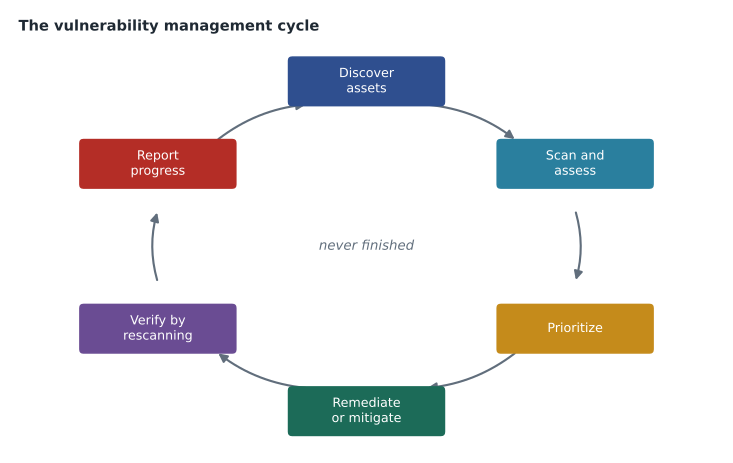
The exam objective asks you to explain vulnerability management, not just scanning. Vulnerability management is the ongoing program of discovering assets, assessing them for weaknesses, prioritizing what to fix, fixing or reducing the weaknesses, verifying the fixes and reporting progress. Scanning is one step in that cycle. A scan that produces a report nobody acts on adds no security at all. Brightline measured its program with a few simple numbers: how many critical and high findings were open, how many days on average it took to fix them, and how many devices were missing from the scan.
Worked problem
Working out a time to remediate
Four high-severity findings at Prairie Paws were opened on October 29, 2026. They were fixed on November 2, November 4, November 5 and November 9. What was the average number of days to remediate?
Show solution
- Days open: November 2 is 4 days after October 29, November 4 is 6 days, November 5 is 7 days and November 9 is 11 days.
- Total: 4 + 6 + 7 + 11 = 28 days.
- Average: 28 ÷ 4 = 7 days.
Answer: The average time to remediate was 7 days.
Common mistakes
MistakeScanning a client network without written authorization.
InsteadAlways obtain signed permission defining scope, timing and contacts.
MistakeTreating a vulnerability scan as a penetration test.
InsteadScanners identify known weaknesses; penetration tests are separately contracted simulated attacks.
MistakeRelying only on unauthenticated scans.
InsteadUse authenticated or agent-based scans for accurate software and patch data.
MistakeScanning fragile devices without care.
InsteadUse safe settings, separate schedules or exclusions, and get vendor permission.
MistakeRunning scans with no inventory.
InsteadStart with an asset inventory that records owners and criticality.
Summary and key terms
- A vulnerability is a weakness, a threat is something that could exploit it, and risk combines likelihood and impact.
- CVE identifies vulnerabilities, NVD adds analysis, CWE classifies weakness types and CVSS scores severity.
- Threat intelligence such as government alerts, the KEV list, EPSS, vendor advisories and IOCs shows which weaknesses attackers actually use.
- Scanners discover devices and compare their software with known vulnerabilities; authenticated and agent-based scans are most accurate.
- Every scan needs written authorization and care with fragile devices; penetration testing is a separate, contracted activity.
- Vulnerability management is a cycle built on an asset inventory with owners and criticality.
- Vulnerability
- A weakness that could be exploited.
- Threat
- Anything that could exploit a vulnerability and cause harm.
- Exploit
- Code or a technique that takes advantage of a vulnerability.
- Zero-day
- A vulnerability with no available fix, often unknown to the vendor.
- CVE
- A standard identifier for a publicly disclosed vulnerability.
- Authenticated scan
- A scan that logs in to read installed software and settings.
- Threat intelligence
- Information about attackers, their targets and the weaknesses they use.
- Indicator of compromise (IOC)
- A piece of evidence, such as a hash or domain, linked to a known attack.
Practice problems
Work each problem on paper first, then reveal the answer to check.
Explain the difference between a vulnerability and a threat.
Show answer
A vulnerability is a weakness; a threat is something that could exploit it.
What does a CVE identifier provide?
Show answer
A common name for one publicly disclosed vulnerability so everyone refers to it the same way.
Why is an authenticated scan more accurate?
Show answer
It can read installed software versions and settings directly instead of inferring them from network responses.
Give two reasons to notify a client's monitoring team before a scan.
Show answer
So the scan is not mistaken for an attack, and so someone can respond if a device is affected.
Why is an unknown device found by a scan a problem?
Show answer
Nobody owns or patches it, so it can hold unmanaged vulnerabilities.
How does a penetration test differ from a vulnerability scan?
Show answer
It is an authorized simulated attack that tries to exploit weaknesses, under a formal contract.
Lesson quiz · 5 questions
Score 60% or more to complete this lesson.
Create a free account to save your progress, take quizzes and earn a certificate.