
CSCO-122 · Lesson 1 of 12 · 24 min
Endpoint security and hardening
▶ Video coming soon A video version of this lesson is on the way.
On a grey Monday in November, Keisha Moreau set a laptop on the meeting-room table at Brightline IT Services in Saskatoon and asked Jordan Pelletier a simple question: where does an attack usually land? Jordan had just finished the first half of his cybersecurity preparation with her, the part covered in CSCO-121, so he answered with what he had learned about firewalls, segmentation and secure Wi-Fi. Keisha nodded and then tapped the laptop. The network is the road, she said, but this is the house. Most attacks that hurt small businesses end up on a device somebody uses every day: a laptop, a desktop, a phone, a tablet or a server. If that device is weak, a good network only slows the attacker down. This course, CSCO-122, is about the house: securing endpoints, finding their weaknesses, managing risk and handling incidents when something goes wrong.
Jordan's first assignment was a real one. Riverside Family Law, one of Brightline's clients, had bought eleven new laptops for its lawyers and staff, and Owen Larkin had promised the firm that every one would be set up to a written security standard before it was handed out. Keisha wanted Jordan to help write that standard and then check each laptop against it. By the end of this lesson you will know what such a standard contains and why each item is there.
What counts as an endpoint
An endpoint is any device at the edge of a network that people or programs use to do work. Desktops and laptops are the obvious ones. Phones and tablets are endpoints too, and so are servers, point-of-sale terminals, printers, smart TVs in meeting rooms, security cameras, door controllers and the label printers at Prairie Paws Veterinary Clinic. Anything with an operating system, a network connection and the ability to run software can be attacked, and anything that can be attacked needs to be secured to a level that matches its risk.
Endpoints are attractive targets for three reasons. They are numerous, so an attacker only needs one weak device. They are used by people, who click links, open attachments and plug in unknown USB drives. And they hold or reach valuable data: email, documents, saved passwords and connections to cloud services. For these reasons, the Cisco CCST Cybersecurity exam treats endpoint security as one of its five main areas, alongside security principles, network security, vulnerability and risk management, and incident handling.
Attack surface
Keisha introduced a phrase Jordan would hear often: attack surface. The attack surface of a device is the sum of all the ways it could be reached or misused. Every open network port, every running service, every installed application, every user account and every physical port adds to it. Hardening is the practice of shrinking the attack surface so that fewer things can go wrong. A laptop that runs only the software its user needs, with no unused services listening on the network, no extra administrator accounts and no forgotten browser plug-ins, gives an attacker very little to work with.
The idea sounds obvious, but new devices rarely arrive that way. Manufacturers install trial software, games, helper utilities and support tools. Operating systems turn on features that suit many customers but not every business. A hardening standard lists what to remove, what to turn off and what to turn on, so that every device starts from the same known, reviewed state.
Security baselines
A security baseline is a documented set of configuration settings that every device of a given type must meet. Baselines turn good intentions into something that can be checked. Rather than writing one from nothing, most organizations start from a published source. The Center for Internet Security publishes free benchmarks for Windows, macOS, Linux, browsers and many applications, with each setting explained and graded by level. Operating system vendors publish their own security baselines, and governments publish guidance too: the Canadian Centre for Cyber Security offers practical guidance and its Baseline Cyber Security Controls for small and medium organizations.
Keisha's advice was to adopt a published baseline and then document every place where Brightline chose to differ, along with the reason. Riverside's lawyers needed a particular document-management add-in that a strict benchmark setting would block, so the standard recorded that exception, who approved it and when it would be reviewed. An exception with an owner and a review date is a managed risk. An exception that nobody wrote down is a hole.
The core hardening steps
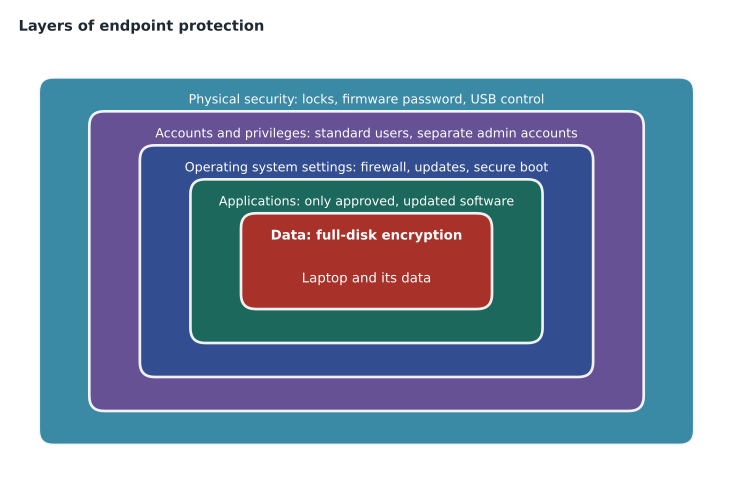
Jordan and Keisha built the Riverside standard around a set of core steps that appear, in some form, in nearly every baseline.
- Remove what is not needed. Uninstall trial software and unused applications, disable unused services, and remove or disable default and guest accounts.
- Apply least privilege. Everyday users work in standard accounts. Administrator rights are kept in separate accounts used only for administration.
- Turn on the built-in protections. Enable the host firewall, the operating system's anti-malware protection, and features that protect memory and the boot process.
- Encrypt the disk. Full-disk encryption means a lost or stolen laptop does not expose the data stored on it.
- Control what can run. Application allowlisting, or at least blocking programs from running in user download folders, stops many unwanted programs.
- Lock down physical and removable access. Set a firmware password, disable booting from USB, and control or block removable storage.
- Keep it updated. Operating system, applications, drivers and firmware all receive security updates, which Lesson 2 covers in detail.
- Log and monitor. Turn on the event logging that the security team needs, which Lesson 8 covers.
Each step reduces a different part of the attack surface. Removing software reduces what can be exploited. Least privilege limits the damage if the user is tricked, because a program running as a standard user cannot change system files or install drivers. Encryption protects data at rest. Allowlisting and removable-media controls block whole categories of unwanted programs. Together they form layers, so that a failure in one place does not mean a failure everywhere.
Least privilege in practice
Of all the steps, removing everyday administrator rights is the one small businesses resist most and the one that helps most. Keisha told Jordan about a client that had insisted every staff member keep local administrator rights because it was convenient. When one user ran a fake software update from a website, the program installed itself as a service and disabled the anti-malware tool, all of which required administrator rights. On a standard account, the same click would have produced a prompt asking for administrator credentials, which the user did not have.
The practical pattern is simple. Each user has a standard account for email, documents and browsing. Technicians who need to administer devices use separate administrator accounts, and those accounts are not used to read email or browse the web. Where a business has no central directory, each laptop's local administrator password should be unique and stored securely. On Windows, Microsoft's Local Administrator Password Solution (LAPS) rotates and stores those passwords automatically when devices are managed centrally.
Encryption and the boot process
Full-disk encryption scrambles everything on a drive so that it can be read only after the device is unlocked. Windows uses BitLocker, macOS uses FileVault, and most Linux distributions offer LUKS. Modern laptops include a Trusted Platform Module, a small security chip that stores encryption keys and checks that the boot process has not been tampered with. Secure Boot, a firmware feature, allows only signed boot software to start, which blocks a class of malware that tries to load before the operating system.
Encryption keys must be backed up before anyone needs them. When BitLocker detects a firmware change or a suspicious boot, it asks for a long recovery key. If nobody saved that key, the data is effectively gone. The Riverside standard therefore required each recovery key to be escrowed in the firm's device-management console and recorded on the device's asset record, never on a sticky note in the laptop bag.
Mobile devices and device management
Riverside's lawyers also read client email on their phones. Keisha explained that phones and tablets are endpoints with the same needs: a screen lock, encryption, current updates and control over which apps can reach company data. Mobile device management, or MDM, is software that lets an organization enrol devices, push settings, require a passcode, install or remove work apps, and locate, lock or wipe a lost device. Many MDM products also manage laptops, so a single console can enforce the baseline across every device type.
For phones that staff own personally, a lighter approach often works better. Mobile application management protects only the work apps and the data inside them, so the company can wipe its email and documents from a phone without touching the owner's photos. Riverside chose this approach for personal phones and full MDM for the two phones the firm owned. Lesson 7 returns to the policy side of personal devices.
Checking devices against the baseline
A baseline that is never checked drifts. Settings get changed to fix a problem and never changed back, software gets installed for a project and never removed, and new devices are set up by a busy technician who skips a step. The exam expects a technician to know how to verify that endpoints meet security policies and standards. In practice this means three things: an inventory that lists every device, a tool that reports each device's settings, and a regular comparison between the two.
Device-management consoles report compliance automatically for the settings they manage. Built-in tools help too. On Windows, the Security app shows the state of the firewall, anti-malware protection and device encryption, and the command line can confirm specific settings. Jordan used a short checklist on each Riverside laptop and recorded the results in the ticket for that device.
manage-bde -status C:
netsh advfirewall show allprofiles state
net localgroup administrators
wmic qfe list brief
Jordan noticed that the last command, which lists installed updates, is an older tool that newer versions of Windows are phasing out in favour of PowerShell and the Settings app. Keisha said that was a good catch: the commands change from version to version, but the questions stay the same. Is the disk encrypted? Is the firewall on? Who is an administrator? Is the device up to date?
Worked problem
Measuring baseline compliance
Riverside's eleven laptops are checked against an eight-item baseline. Nine laptops pass all eight items. One fails the encryption check because its recovery key was never escrowed, and one fails two items: a leftover trial program and a local administrator account for a former contractor. How many of the 88 checks passed, and what should happen next?
Show solution
- Total checks: 11 laptops × 8 items = 88.
- Failures: 1 + 2 = 3, so 88 − 3 = 85 checks passed.
- Expressed per device, 9 of 11 laptops are fully compliant.
- Each failure becomes a ticket with an owner: escrow the recovery key after confirming encryption, uninstall the trial program, and disable and then delete the contractor account.
- Recheck the two laptops after the fixes and record the result, so the evidence of compliance is complete.
Answer: 85 of 88 checks passed and 9 of 11 laptops were fully compliant. The three failures are fixed through tickets and rechecked before the laptops are issued.
Worked problem
Choosing an approach for personal phones
Four Riverside lawyers want to read client email on personal phones. The firm must be able to remove its data if a phone is lost or a lawyer leaves, but the lawyers refuse to let the firm erase their personal photos. What approach meets both needs?
Show solution
- Full MDM would let the firm wipe the whole phone, which the lawyers refuse.
- Mobile application management protects only work apps: email, calendar and the document app.
- Policies can require a passcode, block copying data out of work apps and allow a selective wipe of work data.
- The firm documents the arrangement in its personal-device policy, which each lawyer signs.
Answer: Use mobile application management with a selective wipe of work data, plus a signed personal-device policy.
Common mistakes
MistakeTreating hardening as a one-time setup task.
InsteadBaselines drift; devices must be rechecked regularly and after changes.
MistakeLetting users keep administrator rights for convenience.
InsteadDaily work happens in standard accounts; administration uses separate accounts.
MistakeTurning on disk encryption without saving recovery keys.
InsteadEscrow every recovery key centrally before the device is issued.
MistakeWriting exceptions only in an email.
InsteadRecord each exception in the standard with an owner, a reason and a review date.
MistakeForgetting printers, cameras and kiosks.
InsteadEvery networked device is an endpoint and belongs in the inventory and baseline.
Summary and key terms
- An endpoint is any device that people or programs use at the edge of the network, including phones, printers and kiosks.
- Hardening shrinks the attack surface by removing what is not needed and turning on built-in protections.
- A security baseline is a documented, checkable set of settings, usually adapted from a published benchmark, with recorded exceptions.
- Least privilege, full-disk encryption with escrowed keys, application control and removable-media control are core steps.
- MDM enforces settings across laptops and phones; application management protects work data on personal phones.
- Compliance must be verified regularly against an inventory, and failures handled as tickets.
- Endpoint
- A device at the edge of a network, such as a laptop, phone, server, printer or kiosk.
- Attack surface
- All the ways a device or system could be reached or misused.
- Hardening
- Reducing the attack surface by removing, disabling and configuring.
- Security baseline
- A documented minimum configuration that every device of a type must meet.
- Least privilege
- Giving each account only the rights it needs for its job.
- Full-disk encryption
- Encrypting an entire drive so data cannot be read without unlocking the device.
- Trusted Platform Module (TPM)
- A security chip that stores keys and measures the boot process.
- Mobile device management (MDM)
- Software that enrols devices and enforces settings, apps and remote wipe.
Practice problems
Work each problem on paper first, then reveal the answer to check.
Name three endpoints in a veterinary clinic other than desktops.
Show answer
For example, label printers, a reception kiosk, phones, tablets or a network printer.
Why does removing administrator rights reduce damage from a malicious download?
Show answer
The program runs with the user's limited rights, so it cannot install services, change system files or disable protections.
What must be done before issuing a laptop with full-disk encryption?
Show answer
Escrow its recovery key in a secure central location and record it against the asset.
What is the difference between MDM and mobile application management?
Show answer
MDM manages the whole device; application management protects only work apps and their data.
Why should baseline exceptions have review dates?
Show answer
So that temporary exceptions are revisited and do not become permanent unmanaged risks.
List three questions a technician answers when checking a laptop against a baseline.
Show answer
Is the disk encrypted? Is the firewall on? Who has administrator rights? Is it fully updated?
Lesson quiz · 5 questions
Score 60% or more to complete this lesson.
Create a free account to save your progress, take quizzes and earn a certificate.