
CSCO-121 · Lesson 9 of 12 · 21 min
Wireless security
▶ Video coming soon A video version of this lesson is on the way.
The Northfield Community Centre runs two wireless networks: NorthfieldGuest for the public, used by everyone from seniors at the Tuesday computer class to teenagers waiting for basketball, and a staff network for the front desk and the office. Since the evil twin scare described in lesson 4, the centre's manager had asked Brightline to review the whole wireless setup. Keisha sent Jordan with Dev Anand and a checklist. By the end of the visit, the checklist had more crosses than ticks: the staff network used an old security mode, the passphrase had not changed in four years and was written on a sticky note at the front desk, and the guest network let every connected device see every other one.
Wireless networks extend the network through walls and into parking lots, so anyone within range can try to connect or listen. This lesson covers how wireless security developed, the difference between personal and enterprise modes, the threats specific to Wi-Fi, and how to design guest and staff networks for organizations like the community centre and Riverside Family Law.
From WEP to WPA3
The first Wi-Fi security standard, Wired Equivalent Privacy or WEP, was badly flawed and can be broken quickly with free tools; it must never be used. Wi-Fi Protected Access, WPA, was an interim fix using a method called TKIP, and it too is obsolete. WPA2, introduced in 2004, uses AES encryption with a mode called CCMP and was the standard for well over a decade. Its main weakness in personal mode is that an attacker who captures the brief handshake when a device joins can try to guess the passphrase offline, so a weak passphrase can be cracked without the attacker ever being noticed.
WPA3, introduced in 2018, improves on WPA2 in several ways. In personal mode it replaces the old pre-shared key handshake with Simultaneous Authentication of Equals, SAE, which resists offline guessing because each guess requires a live interaction with the network. It also provides forward secrecy, so capturing traffic today and learning the passphrase later does not let an attacker decrypt the old traffic. WPA3 requires protected management frames, which make some disruption attacks harder. WPA3-Enterprise offers an optional 192-bit security mode for sensitive environments. For open networks, Wi-Fi Enhanced Open, based on Opportunistic Wireless Encryption, encrypts each user's traffic even without a password.
| Standard | Encryption | Status | Notes |
|---|---|---|---|
| WEP | RC4 | Broken; never use | Can be cracked in minutes |
| WPA | TKIP | Obsolete | Interim fix for WEP hardware |
| WPA2 | AES-CCMP | Acceptable where WPA3 is not available | Personal mode open to offline passphrase guessing |
| WPA3 | AES (CCMP or GCMP) | Current; preferred | SAE, forward secrecy, protected management frames |
| Enhanced Open (OWE) | AES | For open networks | Encrypts traffic without a password; does not authenticate users |
Many networks run WPA3 and WPA2 together in a transition mode so that older devices can still connect. This is a practical compromise, but it keeps some WPA2 weaknesses for the devices that use it. Keisha's advice is to use WPA3 only on networks where every device supports it, use transition mode where needed, and plan to retire devices that support only WPA2.
Personal and enterprise modes
Personal mode, also called pre-shared key or PSK mode, uses one passphrase for everyone. It is simple and suits homes and very small offices, but it has serious drawbacks for organizations. Everyone who has ever been told the passphrase can join, including former staff. Changing it means updating every device. And there is no record of which person connected. A long, random passphrase helps against guessing, but it does not fix the sharing problem.
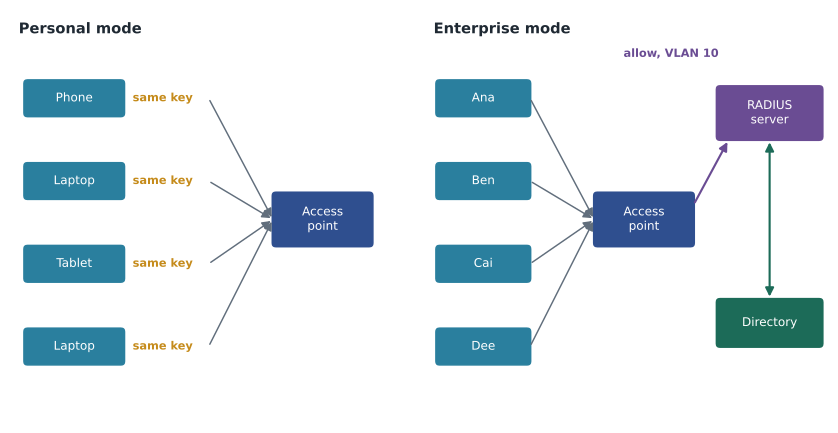
Enterprise mode uses IEEE 802.1X, introduced in lesson 6. Each user or device has its own credentials, such as a username and password or, better, a certificate. The access point passes the authentication to a RADIUS server, which checks the credentials against a directory and tells the access point whether to allow the device and which VLAN to place it in. The exchange uses the Extensible Authentication Protocol, EAP, which comes in several methods. EAP-TLS uses certificates on both sides and is the strongest common choice. PEAP and EAP-TTLS protect a password exchange inside a TLS tunnel. Whatever the method, devices must be configured to check the server's certificate, or an attacker running a fake access point could collect credentials.
Enterprise mode solves the problems of personal mode. A departing employee's account is disabled and they can no longer join. Each connection is logged against a named user. Different users can be placed in different VLANs. For Riverside Family Law, Brightline has proposed WPA3-Enterprise with certificates issued to the firm's laptops and phones, so that only firm-managed devices can join the staff network, and a RADIUS server tied to the firm's directory.
import math
def passphrase_bits(words, list_size):
    return words * math.log2(list_size)
def random_chars_bits(length, alphabet):
    return length * math.log2(alphabet)
print(f"4 random words from 7,776: {passphrase_bits(4, 7776):.1f} bits")
print(f"6 random words from 7,776: {passphrase_bits(6, 7776):.1f} bits")
print(f"10 random characters from 62: {random_chars_bits(10, 62):.1f} bits")
print(f"16 random characters from 62: {random_chars_bits(16, 62):.1f} bits")4 random words from 7,776: 51.7 bits 6 random words from 7,776: 77.5 bits 10 random characters from 62: 59.5 bits 16 random characters from 62: 95.3 bits
The program estimates the strength of randomly chosen passphrases in bits. Each extra bit doubles the number of guesses an attacker would need. A passphrase of six random words from a list of 7,776 words gives about 77.5 bits, far more than a typical human-chosen password. The estimate applies only if the words or characters are chosen at random; a passphrase based on the centre's name and the year would be much weaker than its length suggests.
Wireless threats
Wireless networks face the general threats from lesson 4 plus some of their own. A rogue access point is an unauthorized access point connected to the organization's network, sometimes installed innocently by a staff member who wanted better coverage, which can bypass the firewall entirely. An evil twin imitates a legitimate network to lure users. Deauthentication attacks send forged management frames that disconnect devices, either to disrupt service or to force devices to reconnect to an evil twin; protected management frames in WPA3 reduce this risk. Jamming floods the radio channel with noise, an availability attack that is hard to prevent but easy to notice.
Eavesdropping is a risk on open networks and on networks with weak security. Devices themselves are a threat too: phones and laptops remember networks they have joined before and may connect automatically to a fake network with a familiar name, such as a common coffee shop name. Wi-Fi Protected Setup, WPS, a feature meant to make joining easy with a button or a PIN, has had serious weaknesses and should be turned off. Hiding the network name and filtering by hardware address are sometimes recommended as security measures, but both are easily bypassed, because network names and hardware addresses can be observed and imitated. They may reduce casual connections but are not real controls.
Wireless intrusion prevention systems, built into many business access points, scan the airwaves for rogue access points, evil twins and attacks, and alert administrators. Regular walk-around surveys with a laptop or phone app can find unexpected networks in smaller sites.
Designing guest networks
A guest network gives visitors internet access without exposing the organization. The guest network should be a separate SSID mapped to a separate VLAN in the guest zone from lesson 6, with firewall rules that allow internet access and deny all internal zones. Client isolation, also called peer-to-peer blocking, stops guests from reaching each other's devices, which matters on a busy public network. A captive portal can show terms of use and, if needed, collect a sign-in or an access code. Bandwidth limits keep one user from swamping the connection. If the guest network has no password at all, Enhanced Open protects visitors' traffic from eavesdropping by other visitors.
Guest passphrases, where they are used, should be changed regularly and should never be the same as the staff passphrase. Signs that advertise the guest network's name help visitors avoid evil twins. At the community centre, Brightline proposed a captive portal with the centre's logo and the exact network name, so that staff can tell visitors "if you do not see our logo, you are on the wrong network".
Securing the infrastructure
Access points and wireless controllers need the same protection as any network device. Change default administrator passwords, manage them over HTTPS or SSH from the management zone, keep firmware updated, and disable unused services. Place access points where they cover the intended area without spilling far outside, and adjust transmit power so that the signal in the parking lot is weaker than in the building. Physical security matters: an access point mounted within reach in a public hall can be unplugged, reset or swapped. Ceiling mounts and locking brackets help.
Coverage and security interact. Too few access points leads staff to install their own, creating rogue access points. Too much power extends the attack surface. A site survey, measuring signal strength across the building, helps get both right. CSCO-112 covers wireless networking from the infrastructure side.
| Finding at the community centre | Risk | Fix |
|---|---|---|
| Staff network uses WPA2 personal with a four-year-old passphrase | Former staff and anyone who saw the sticky note can join | Move staff to WPA3-Enterprise, or at least a new long random passphrase changed when staff leave |
| Passphrase written at the front desk | Disclosure to visitors | Remove it; distribute through a password manager |
| Guest devices can see each other | Attacks between visitors | Enable client isolation |
| Guest and staff on the same VLAN with different SSIDs | Guests can reach staff PCs | Separate VLANs and firewall rules |
| WPS enabled on the office access point | Weak PIN-based joining | Disable WPS |
| Access point in the gym within reach | Tampering and resets | Move to the ceiling with a locking bracket |
Newer Wi-Fi bands and security
Recent Wi-Fi generations push security forward. Networks in the 6 GHz band, used by Wi-Fi 6E and Wi-Fi 7 equipment, require WPA3 or Enhanced Open; WPA2 is not permitted there. This means that buying new access points is often the easiest way to move a site to WPA3, and that very old client devices will simply not see the newest networks. When Brightline replaces access points for a client, it plans a short period of transition mode on the 2.4 and 5 GHz bands for older devices, then turns transition mode off once the device inventory shows that everything supports WPA3.
Device inventories matter for wireless planning. Label printers, barcode scanners, payment terminals and medical devices often have older wireless chips and may never receive WPA3 updates. Such devices can be placed on a separate SSID and VLAN with tight firewall rules, so that their weaker security does not expose the rest of the network, until they can be replaced.
Worked problem
Choosing a security mode
Riverside Family Law has nine staff, each with a firm laptop and phone, and a directory of user accounts. Visitors need internet access in the meeting room. Which wireless design fits?
Show solution
- Staff need individual access that ends when someone leaves, so use enterprise mode with 802.1X.
- Use WPA3-Enterprise with EAP-TLS and certificates issued to firm-managed devices; devices must verify the RADIUS server's certificate.
- Place staff in the staff VLAN after authentication.
- Create a separate guest SSID in the guest zone with internet-only access, client isolation and a captive portal or a regularly changed passphrase.
Answer: WPA3-Enterprise with certificates for staff, and an isolated guest network for visitors.
Common mistakes
MistakeUsing WEP or WPA because older devices need it.
InsteadBoth are broken or obsolete; replace or isolate devices that need them.
MistakeRelying on hidden SSIDs or MAC filtering.
InsteadBoth are easily bypassed and are not real controls.
MistakeSharing one personal-mode passphrase across a whole organization.
InsteadUse enterprise mode so access is individual and revocable.
MistakeConfiguring 802.1X clients without server certificate checks.
InsteadDevices must verify the RADIUS server to avoid fake access points.
MistakeLeaving guests on the staff VLAN with a different SSID.
InsteadA separate SSID needs a separate VLAN and firewall rules.
Summary and key terms
- WEP and WPA are broken or obsolete; WPA2 is acceptable; WPA3 is preferred.
- WPA3 adds SAE, which resists offline guessing, forward secrecy and protected management frames; Enhanced Open encrypts open networks.
- Personal mode shares one passphrase; enterprise mode uses 802.1X, EAP and RADIUS for individual, logged, revocable access.
- EAP-TLS with certificates is the strongest common enterprise method; clients must validate the server.
- Wireless threats include rogue access points, evil twins, deauthentication, jamming and eavesdropping; disable WPS.
- Guest networks need their own VLAN, internet-only rules, client isolation and often a captive portal.
- WPA3
- The current Wi-Fi security standard, with SAE and forward secrecy.
- SAE
- Simultaneous Authentication of Equals, the WPA3 personal handshake that resists offline guessing.
- Enterprise mode
- Wi-Fi security using 802.1X and a RADIUS server for individual credentials.
- EAP-TLS
- An EAP method using certificates on both client and server.
- Rogue access point
- An unauthorized access point connected to the organization's network.
- Evil twin
- A fake access point imitating a legitimate network.
- Client isolation
- A setting that stops wireless clients from communicating with each other.
- Captive portal
- A web page that guests must view or sign in to before getting internet access.
Practice problems
Work each problem on paper first, then reveal the answer to check.
Why is WPA2 personal vulnerable to offline guessing?
Show answer
An attacker who captures the join handshake can test passphrases without contacting the network.
What does SAE change in WPA3 personal?
Show answer
Each guess needs a live exchange, which resists offline guessing.
Which components does WPA3-Enterprise use for authentication?
Show answer
802.1X, EAP and a RADIUS server, usually tied to a directory.
Why is hiding the SSID not real security?
Show answer
The name can still be observed in traffic from devices that join.
What does client isolation prevent?
Show answer
Guests reaching each other's devices.
How many bits does a passphrase of five random words from a 7,776-word list give?
Show answer
About 64.6 bits.
Lesson quiz · 5 questions
Score 60% or more to complete this lesson.
Create a free account to save your progress, take quizzes and earn a certificate.