
CSCO-121 · Lesson 8 of 12 · 21 min
Secure protocols and encryption basics
▶ Video coming soon A video version of this lesson is on the way.
While reviewing Prairie Paws Veterinary Clinic's network, Jordan found that the clinic's older label printers were still managed over Telnet and their configuration pages were served over plain HTTP. He mentioned it to Keisha almost as an aside. She stopped what she was doing. "Anyone on that network can read the admin password as it goes by," she said. "Telnet sends everything, including the password, as plain text." They added it to the clinic's list of fixes, and Keisha spent the rest of the afternoon walking Jordan through the protocols that should replace the old ones.
Many of the internet's foundational protocols were designed when networks were small and users trusted each other. They send data, including passwords, without encryption and without proving who is at the other end. Modern secure protocols add encryption for confidentiality, integrity checks to detect tampering, and authentication so that each side knows who it is talking to. This lesson pairs the old protocols with their secure replacements, explains how TLS protects web traffic, introduces certificates and VPNs, and distinguishes data in transit from data at rest. Lesson 11 explains the cryptography underneath.
Insecure protocols and their replacements
The exam expects you to recognize common protocols, their usual port numbers and which ones are insecure. A port number identifies a service on a host; well-known services use standard ports, although administrators can change them. Changing a port does not make a protocol secure. The fix for an insecure protocol is to replace it with a secure one or to wrap it in an encrypted tunnel.
| Insecure protocol | Usual port | Problem | Secure replacement | Usual port |
|---|---|---|---|---|
| Telnet | TCP 23 | Remote command line in plain text, including passwords | SSH | TCP 22 |
| HTTP | TCP 80 | Web traffic readable and changeable in transit | HTTPS (HTTP over TLS) | TCP 443 |
| FTP | TCP 20 and 21 | Files and passwords in plain text | SFTP (over SSH) or FTPS (FTP over TLS) | TCP 22 or 990 |
| TFTP | UDP 69 | No authentication at all | SFTP or SCP | TCP 22 |
| SNMP v1 and v2c | UDP 161 and 162 | Community strings sent in plain text | SNMPv3 with authentication and encryption | UDP 161 and 162 |
| POP3 and IMAP | TCP 110 and 143 | Mail and passwords in plain text | POP3S and IMAPS (over TLS) | TCP 995 and 993 |
| SMTP submission without TLS | TCP 25 | Mail readable in transit | Submission with TLS | TCP 587 or 465 |
| LDAP | TCP 389 | Directory queries and binds in plain text | LDAPS or LDAP with StartTLS | TCP 636 or 389 |
| DNS | UDP and TCP 53 | Queries visible; answers can be forged | DNSSEC for integrity; DNS over TLS or HTTPS for privacy | 53; 853; 443 |
| RDP without protections | TCP 3389 | Often exposed to the internet and attacked | RDP through a VPN or gateway with multi-factor sign-in | Varies |
A few points deserve emphasis. SFTP and FTPS sound alike but are different protocols: SFTP is a file transfer subsystem of SSH, while FTPS is the old FTP protocol wrapped in TLS. SNMP, used to monitor network devices, is everywhere in small networks and is often left on its insecure versions with default community strings such as public; SNMPv3 should be used, or SNMP should be turned off if nothing needs it. DNSSEC adds digital signatures to DNS answers so that resolvers can detect forgeries, but it does not hide queries; DNS over TLS and DNS over HTTPS encrypt queries for privacy. Remote Desktop exposed directly to the internet has been one of the most common ways ransomware groups get in, which is why it belongs behind a VPN or a gateway with multi-factor sign-in.
How TLS protects a connection
Transport Layer Security, TLS, is the protocol that puts the S in HTTPS and secures mail, directory and many other connections. Its predecessor SSL is obsolete, and the older TLS versions 1.0 and 1.1 are deprecated; current systems should use TLS 1.2 or, preferably, TLS 1.3. When a browser connects to a site over HTTPS, the two sides perform a handshake. The browser says which versions and algorithms it supports. The server replies with its choice and its certificate. The browser checks the certificate. The two sides then agree on fresh session keys using a key exchange method, and from then on all data is encrypted and protected against tampering with those keys.
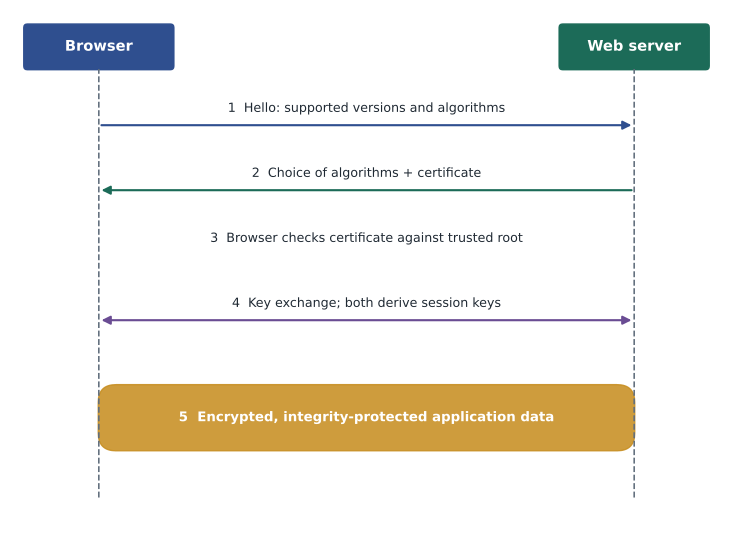
TLS provides three things. Confidentiality comes from symmetric encryption of the data with session keys. Integrity comes from authenticated encryption, which detects any change to the data in transit. Authentication of the server comes from the certificate: the browser checks that the certificate was issued for the name in the address bar by an authority the browser trusts, that it has not expired and that the server holds the matching private key. TLS can also authenticate the client with a certificate, a setup called mutual TLS, which is common between servers and in some VPN and wireless designs.
Users usually see TLS only as a padlock, or as a warning when something is wrong. Certificate warnings deserve attention. A warning can mean the certificate has expired, was issued for a different name, or was not issued by a trusted authority. Sometimes the cause is innocent, such as a misconfigured internal device, but on public Wi-Fi a warning on a well-known site may mean that someone is intercepting traffic, as in the evil twin example in lesson 4. Teach users to stop and report rather than click through.
Certificates and public key infrastructure
A digital certificate binds a public key to an identity, such as a website's domain name, and is signed by a certificate authority, or CA. Browsers and operating systems ship with a list of trusted root CAs. A root CA usually signs intermediate CAs, which sign the certificates that servers use, forming a chain of trust. When the browser checks a certificate, it follows the chain up to a root it trusts. The whole system of CAs, certificates, policies and revocation is called a public key infrastructure, or PKI.
Certificates expire, and most public web certificates are now valid for little more than a year or less, with the industry moving toward even shorter lifetimes. Automated renewal, for example with the ACME protocol used by free certificate authorities, prevents the outages that expired certificates cause. Certificates can also be revoked before they expire, for example if a private key is stolen. Organizations often run an internal CA for devices and Wi-Fi authentication; lesson 9 returns to this. For a support technician, the practical skills are reading a certificate's name and expiry date, recognizing a self-signed certificate, and knowing that a private key must never be shared.
from datetime import date
certs = {"portal.riversidelaw.example": date(2027, 2, 14),
         "booking.northfield.example": date(2026, 11, 28),
         "printer-admin.prairiepaws.example": date(2026, 10, 2)}
today = date(2026, 11, 16)
for name, expires in sorted(certs.items(), key=lambda kv: kv[1]):
    days = (expires - today).days
    status = "EXPIRED" if days < 0 else "renew soon" if days <= 30 else "ok"
print(f"{name:<36} {expires} {days:>4} days {status}")printer-admin.prairiepaws.example 2026-10-02 -45 days EXPIRED booking.northfield.example 2026-11-28 12 days renew soon portal.riversidelaw.example 2027-02-14 90 days ok
Brightline tracks the certificates on client systems with a simple report like the one above. The clinic's printer admin page has an expired certificate, which is part of why browsers complained about it; the community booking site needs renewal within two weeks.
Virtual private networks
A virtual private network, or VPN, creates an encrypted tunnel across an untrusted network such as the internet. A site-to-site VPN joins two networks, for example the bakery's three shops, so that traffic between them is protected; the tunnel runs between the firewalls and users do not notice it. A remote-access VPN connects one user's device to the organization's network, for example a lawyer working from home. VPNs commonly use IPsec, a suite that protects IP packets, or TLS, which many remote-access products use because it passes easily through other networks.
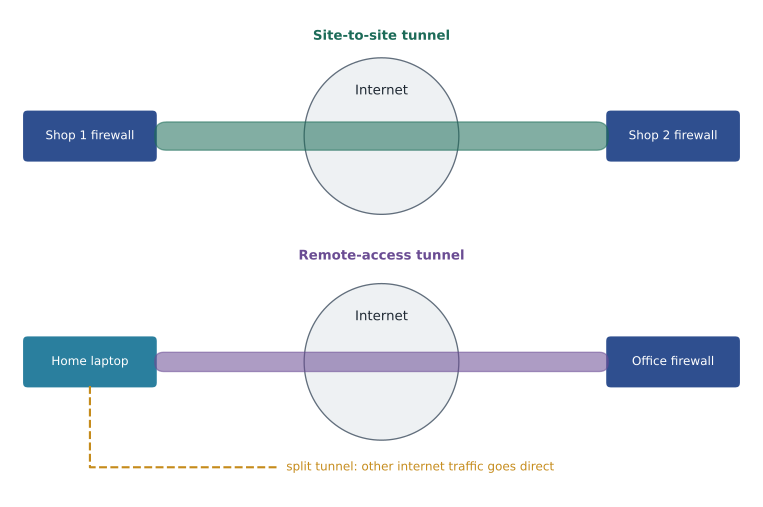
Two design choices affect security. With full tunnelling, all of the remote user's traffic, including ordinary web browsing, goes through the tunnel and the organization's filters. With split tunnelling, only traffic for the organization's networks uses the tunnel and other traffic goes straight to the internet, which saves bandwidth but means the organization's web filtering does not protect the device. The second choice is authentication: a VPN that accepts only a password is a target for the password attacks in lesson 4, so VPN access should require multi-factor sign-in. Keeping VPN gateways patched is critical, because flaws in VPN products have repeatedly been exploited at scale.
Many organizations are moving from traditional VPNs toward zero trust network access, which connects a user to specific applications rather than to a whole network, after checking the user and the device each time. The idea is the zero trust approach from lesson 1 applied to remote access.
Data in transit, at rest and in use
Data needs protection in three states. Data in transit is moving across a network; TLS, SSH and VPNs protect it. Data at rest is stored on a disk, in a database, on a USB stick or in a backup; full-disk encryption such as BitLocker or FileVault, encrypted databases and encrypted backups protect it. Data in use is being processed in memory; it is the hardest to protect and relies on access control, secure systems and, in some cloud settings, special hardware that keeps memory encrypted.
The states lead to different risks. A laptop left in a taxi is a data-at-rest risk, and full-disk encryption turns a reportable breach into a lost piece of hardware. A login page served over HTTP is a data-in-transit risk. Riverside Family Law's document management system needs both: TLS for lawyers reaching it from outside, and encryption of the stored files. CSCO-122 covers endpoint encryption in more detail.
Securing email in transit
Email travels between servers as well as between a user and a server, and each hop can be protected separately. Mail clients submit messages to their server over TLS on ports 587 or 465 and read mail over IMAPS or POP3S. Between servers, mail usually uses opportunistic TLS with the STARTTLS command on port 25, which encrypts the connection when both sides support it but falls back to plain text when they do not. Standards such as MTA-STS let a domain require TLS for incoming mail. None of this encrypts the message end to end; for that, the sender must encrypt the message itself, for example with S/MIME, or use a secure portal, which is how Riverside Family Law sends sensitive documents to clients.
Worked problem
Fixing the clinic's printers
The Prairie Paws label printers are managed over Telnet and HTTP, and SNMP v2c is enabled with the community string public. What should Brightline change?
Show solution
- Disable Telnet and enable SSH for command-line management, if the printers support it.
- Disable the HTTP admin page and enable HTTPS with a valid certificate.
- Disable SNMP v2c; enable SNMPv3 with authentication and encryption if monitoring is needed.
- Place the printers' management interfaces in the management zone so that only admin workstations can reach them.
- If the printers cannot support secure protocols, plan to replace them and, meanwhile, restrict management access tightly.
Answer: Replace each insecure protocol with its secure equivalent, restrict management access by zone, and plan replacement for devices that cannot be secured.
Common mistakes
MistakeThinking a non-standard port makes Telnet safe.
InsteadMoving a port does not add encryption; replace Telnet with SSH.
MistakeTreating SFTP and FTPS as the same.
InsteadSFTP runs over SSH; FTPS is FTP over TLS.
MistakeAssuming DNSSEC encrypts DNS queries.
InsteadDNSSEC signs answers for integrity; DNS over TLS or HTTPS provides privacy.
MistakeClicking through certificate warnings on public Wi-Fi.
InsteadA warning may indicate interception; stop and report.
MistakeAllowing VPN sign-in with a password alone.
InsteadRequire multi-factor sign-in and keep VPN gateways patched.
Summary and key terms
- Many old protocols send data and passwords in plain text; secure replacements add encryption, integrity and authentication.
- Key pairs: Telnet to SSH, HTTP to HTTPS, FTP to SFTP or FTPS, SNMP v1 and v2c to SNMPv3, POP3 and IMAP to their TLS versions, LDAP to LDAPS.
- TLS 1.2 and 1.3 protect connections through a handshake, certificate check and session keys.
- Certificates bind public keys to identities and are trusted through a chain to a root CA in a PKI.
- VPNs create encrypted tunnels, site-to-site or remote access; require multi-factor sign-in and consider split tunnelling carefully.
- Protect data in transit with TLS, SSH and VPNs, and data at rest with disk, database and backup encryption.
- SSH
- Secure Shell, an encrypted protocol for remote command lines and file transfer, usually on TCP port 22.
- TLS
- Transport Layer Security, the protocol that encrypts and authenticates connections such as HTTPS.
- Certificate
- A signed document binding a public key to an identity.
- Certificate authority
- A trusted organization that issues and signs certificates.
- PKI
- Public key infrastructure, the system of CAs, certificates and policies.
- VPN
- Virtual private network, an encrypted tunnel across an untrusted network.
- Split tunnelling
- Sending only organizational traffic through a VPN and other traffic directly to the internet.
- Data at rest
- Stored data, protected by encryption of disks, databases and backups.
Practice problems
Work each problem on paper first, then reveal the answer to check.
What should replace Telnet, and on which port does it usually run?
Show answer
SSH, on TCP port 22.
Which port does HTTPS usually use?
Show answer
TCP 443.
What does a browser check in a server certificate?
Show answer
The name, the expiry date, the chain to a trusted root and possession of the private key.
What is the difference between site-to-site and remote-access VPNs?
Show answer
Site-to-site joins networks; remote access connects a single device.
Which control protects data on a lost laptop?
Show answer
Full-disk encryption.
Why should RDP not be exposed directly to the internet?
Show answer
It is heavily attacked; it belongs behind a VPN or gateway with multi-factor sign-in.
Lesson quiz · 5 questions
Score 60% or more to complete this lesson.
Create a free account to save your progress, take quizzes and earn a certificate.