
CSCO-121 · Lesson 6 of 12 · 22 min
Network security devices and zones
▶ Video coming soon A video version of this lesson is on the way.
Kettle & Crumb Bakery has three shops, and until this autumn every device in each shop shared one flat network: the point-of-sale terminals, the office laptop, the receipt printers, the staff tablets, the smart thermostat and the free Wi-Fi that customers used while they waited for their coffee. Keisha described it to Jordan as a house where every room opens onto every other room and the front door is the only lock. If any one device was compromised, nothing stood between it and the payment terminals. Brightline's project for November was to divide the network into zones, and Jordan was assigned to help Dev Anand, the network technician, draw the plan.
This lesson introduces the devices that enforce security on a network and the idea of dividing a network into zones with different levels of trust. Lesson 7 looks at firewalls and access control lists in detail; lesson 9 covers wireless. Together they make up the core of the exam's network security domain.
Why networks are divided
A flat network is easy to build and easy to attack. Every device can talk to every other device, so malware that lands on one computer can scan for and reach all the others, and a guest who joins the Wi-Fi can see the same printers and file shares as staff. Segmentation divides the network into separate parts and controls the traffic between them. It supports confidentiality, because sensitive systems are reachable only from where they need to be; integrity, because fewer devices can change them; and availability, because a problem in one segment is less likely to spread to the others.
Segmentation also simplifies compliance. The payment card industry's data security standard, PCI DSS, applies to systems that store, process or transmit card data and to systems connected to them. If the bakery's card terminals sit on the same flat network as everything else, the whole network may be in scope for assessment. If the terminals sit in a separate, well-controlled zone, the scope shrinks, and so does the cost and effort of staying compliant. Keisha warned that segmentation reduces scope only if the separation really works; a single rule that allows everything between zones undoes it.
Security zones
A zone is a part of the network whose devices share a level of trust and a set of rules. Traffic within a zone is usually allowed more freely; traffic between zones passes through a control point, such as a firewall, that applies a policy. Typical zones in a small or medium organization include the untrusted internet; a screened subnet, often still called a demilitarized zone or DMZ, for servers that the public must reach, such as a web server; the internal or trusted zone for staff devices and internal servers; a guest zone for visitors; a management zone for the interfaces of network devices; and zones for special devices such as payment terminals, cameras or building controls.
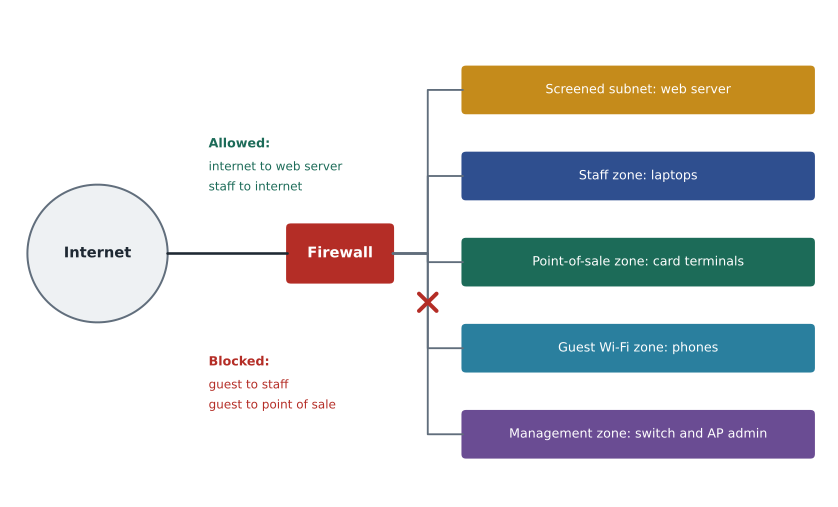
The trust levels guide the rules. Traffic from a more trusted zone to a less trusted one, such as staff browsing the internet, is usually allowed with inspection. Traffic from a less trusted zone to a more trusted one, such as the internet reaching an internal server, is denied unless a specific need has been approved. Traffic between zones of equal trust still needs a reason. The screened subnet exists because a public web server is likely to be attacked; placing it in its own zone means that if it is compromised, the attacker is still outside the internal network.
| Zone | Typical devices | Trust | Example policy |
|---|---|---|---|
| Internet | Everything outside | Untrusted | No inbound connections except to approved public services |
| Screened subnet (DMZ) | Public web or mail servers | Low | Reachable from the internet on specific ports; cannot start connections to internal zones |
| Staff (internal) | Office laptops and desktops | Medium to high | May reach the internet and approved internal servers |
| Point of sale | Card terminals, POS server | High and restricted | May reach only the payment processor and the POS server |
| Guest | Visitors' phones and laptops | Untrusted | Internet only; no access to any internal zone |
| Management | Switch, firewall and access point admin interfaces | Highest | Reachable only from admin workstations, over secure protocols |
How segments are built
Segments can be physical, using separate switches and cables, but in most networks they are logical. A virtual LAN, or VLAN, divides one physical switch into several separate broadcast domains. Devices in different VLANs cannot talk to each other directly; traffic between them must pass through a router or firewall, which is where the policy is applied. Each VLAN usually has its own IP subnet, so the bakery might use one address range for staff, another for point of sale and another for guests. CSCO-111 and CSCO-112 cover VLANs and subnets in detail.
Large organizations and cloud platforms go further with microsegmentation, which applies rules to individual workloads or devices rather than to whole subnets, and with software-defined networking, which manages those rules centrally. The principle is the same: allow only the traffic that is needed. At the far end of the scale is an air gap, where a highly sensitive system has no network connection to anything else at all. Air gaps are rare in small businesses, but backups stored offline are a form of the same idea.
import ipaddress
zones = {"staff": "10.20.10.0/24", "pos": "10.20.20.0/24",
         "guest": "10.20.30.0/24", "mgmt": "10.20.99.0/24"}
nets = {z: ipaddress.ip_network(n) for z, n in zones.items()}
def zone_of(ip):
    a = ipaddress.ip_address(ip)
    return next((z for z, n in nets.items() if a in n), "outside")
for ip in ["10.20.20.14", "10.20.30.201", "10.20.99.2", "192.0.2.80"]:
print(ip, "->", zone_of(ip))10.20.20.14 -> pos 10.20.30.201 -> guest 10.20.99.2 -> mgmt 192.0.2.80 -> outside
The program above uses the bakery's planned address ranges to identify which zone a device belongs to. Firewalls and monitoring tools do exactly this when they apply zone policies or label log entries. An address outside every range is treated as coming from outside the network.
Network security devices
Several kinds of device enforce or monitor security on a network. Small organizations often buy one appliance that does many of these jobs, called a unified threat management device or a next-generation firewall, while large organizations may use separate systems for each.
| Device | What it does | Typical position |
|---|---|---|
| Firewall | Allows or blocks traffic according to rules | Between zones and at the internet edge |
| Next-generation firewall | Adds application awareness, user identity and intrusion prevention to a firewall | Internet edge and core |
| Intrusion detection system (IDS) | Watches traffic and raises alerts on suspicious patterns | On a copy of traffic, out of the path |
| Intrusion prevention system (IPS) | Watches traffic and blocks suspicious packets in real time | In the traffic path |
| Proxy server | Makes requests on behalf of clients, filtering and logging them | Between users and the internet |
| Web filter | Blocks access to harmful or unwanted categories of website | Edge device, proxy or cloud service |
| VPN gateway | Terminates encrypted tunnels from remote users or sites | Internet edge |
| Network access control (NAC) | Checks devices and users before letting them onto the network | Switches and wireless, with a policy server |
| Load balancer | Spreads traffic across servers and can absorb some attacks | In front of server groups |
| Honeypot | A decoy system that attracts and records attackers | Isolated segment |
The difference between detection and prevention is worth remembering. An IDS sees a copy of traffic and can only raise an alert; it cannot stop anything, but it also cannot break traffic if it makes a mistake. An IPS sits in the path and can drop packets, which stops attacks but means a false positive blocks legitimate traffic. Both rely on signatures, which match known attack patterns, and on anomaly detection, which flags behaviour that differs from a normal baseline. Signatures are precise but miss new attacks; anomaly detection can catch new attacks but produces more false alarms.
All these devices produce logs. Logs from firewalls, IPS, VPN gateways, servers and endpoints are most useful when they are collected in one place, where they can be searched and correlated. A security information and event management system, or SIEM, does this, and a SOC analyst spends much of the day looking at its alerts. CSCO-122 covers monitoring and logs.
Network access control
Network access control decides whether a device may join the network at all, and which segment it lands in. The standard most often used on wired and wireless networks is IEEE 802.1X. A device that connects to a switch port or an enterprise Wi-Fi network must authenticate, usually with a certificate or a username and password, before the port allows normal traffic. A policy server, often using the RADIUS protocol, checks the credentials and can tell the switch to place the device in a particular VLAN. Some NAC systems also check the device's health, such as whether its anti-malware is running and its updates are current, and quarantine devices that fail.
For small offices, simpler measures give some of the same benefit: disabling unused switch ports, limiting the hardware addresses allowed on a port with port security, keeping network equipment in locked cabinets, and using separate wireless networks with strong authentication for staff. Lesson 9 covers wireless authentication and lesson 10 covers RADIUS and AAA.
Segmentation beyond the office
Zones are not only about switches in a back room. Cloud services have their own versions: virtual networks, security groups that act as firewalls around each server, and private endpoints that keep traffic off the public internet. The same principles apply. Put public services in a zone of their own, keep management interfaces off the internet, and allow only the traffic that each system needs. A common mistake is to build a carefully zoned office network and then expose a cloud database directly to the internet with a weak password.
Remote workers complicate the picture because their laptops spend most of their time outside any zone the organization controls. Host-based firewalls, covered in lesson 7, a VPN or zero trust access service, covered in lesson 8, and endpoint protection, covered in CSCO-122, carry the zone's protection with the device. Riverside Family Law's lawyers work from courthouses, client offices and home, so the firm's protection depends far more on these device-level controls than on its small office firewall.
Testing that segmentation works
A zone design on paper is only a plan until it is tested. After the bakery's cutover, Dev planned to connect a laptop to the guest network and try to reach the POS server, a staff laptop and the firewall's management page, recording that each attempt failed. He would repeat the test from the staff network against the POS zone. These tests are part of the bakery's PCI DSS evidence, and they catch configuration mistakes before an attacker does. They must be done with the client's written approval and recorded in the change ticket.
Worked problem
Drawing the bakery's zones
Dev and Jordan must place each of the bakery's devices into a zone. The devices are: card terminals and the POS server; the office laptop; staff tablets used for orders; receipt printers; the smart thermostat; customer Wi-Fi; and the admin interfaces of the firewall, switches and access points.
Show solution
- Card terminals, the POS server and the receipt printers they use go into the point-of-sale zone, which may reach only the payment processor and each other.
- The office laptop and staff tablets go into the staff zone with internet access.
- The thermostat goes into a building-devices zone that may reach only its cloud service, because such devices are often poorly secured.
- Customer Wi-Fi goes into the guest zone: internet only, with client isolation so that guests cannot reach each other.
- Admin interfaces go into a management zone reachable only from Dev's admin laptop over secure protocols.
Answer: Five zones replace one flat network. The firewall rules between them follow the principle of allowing only what each device needs.
Common mistakes
MistakeBelieving VLANs alone provide security.
InsteadVLANs separate traffic, but a router or firewall must enforce policy between them.
MistakePlacing a public web server on the internal network.
InsteadPublic servers belong in a screened subnet so that a compromise does not reach internal systems.
MistakeConfusing IDS and IPS.
InsteadAn IDS only alerts; an IPS sits in the path and can block.
MistakeAssuming segmentation shrinks PCI DSS scope automatically.
InsteadScope shrinks only if the separation is effective and tested.
MistakeLetting guest Wi-Fi share the staff network with a different password.
InsteadGuests need a separate zone with internet-only access.
Summary and key terms
- Segmentation divides a network into zones so that a compromise in one part does not spread freely.
- Typical zones are internet, screened subnet, internal staff, guest, management and special zones such as point of sale.
- Traffic between zones passes through a firewall or router that enforces policy; less trusted to more trusted is denied by default.
- VLANs and subnets build logical segments; microsegmentation applies rules per workload.
- Security devices include firewalls, IDS, IPS, proxies, web filters, VPN gateways, NAC and SIEM.
- 802.1X with RADIUS lets the network authenticate devices before giving them access.
- Segmentation
- Dividing a network into parts with controlled traffic between them.
- Zone
- A group of network segments sharing a trust level and policy.
- Screened subnet
- A zone for public-facing servers, separated from internal networks; also called a DMZ.
- VLAN
- A virtual LAN that separates traffic on shared switches.
- IDS
- Intrusion detection system, which alerts on suspicious traffic.
- IPS
- Intrusion prevention system, which can block suspicious traffic in the path.
- NAC
- Network access control, which checks devices before admitting them.
- SIEM
- Security information and event management, which collects and correlates logs.
Practice problems
Work each problem on paper first, then reveal the answer to check.
Why is a flat network risky?
Show answer
Any compromised device can reach every other device.
Where should a public web server be placed?
Show answer
In a screened subnet (DMZ).
What must sit between VLANs to enforce security policy?
Show answer
A router or firewall applying rules.
What is the key difference between an IDS and an IPS?
Show answer
An IPS sits in the path and can block; an IDS only alerts.
Which standard authenticates devices on switch ports and enterprise Wi-Fi?
Show answer
IEEE 802.1X.
How can segmentation reduce PCI DSS scope?
Show answer
By isolating card systems so that other systems are not connected to them.
Lesson quiz · 5 questions
Score 60% or more to complete this lesson.
Create a free account to save your progress, take quizzes and earn a certificate.