
CSCO-121 · Lesson 4 of 12 · 21 min
Common attack types and how they work
▶ Video coming soon A video version of this lesson is on the way.
Keisha keeps a binder she calls the rogues' gallery. Each page describes one kind of attack in plain words: what it is, what it looks like from the defender's side, and which controls stop it. She started the binder when she was a tier 1 analyst and found that alerts were much easier to triage once she could put a name to what she was seeing. She gave Jordan a copy and told him that the goal was recognition, not cleverness. "You do not need to know how to build a lock pick to know that the scratches on the lock are a bad sign."
This lesson follows the binder. It explains the main families of attack at the level the exam expects: enough to recognize them in a scenario and to choose sensible defences. It does not teach anyone how to carry out an attack. Social engineering gets its own lesson next, because it is the most common way attacks begin.
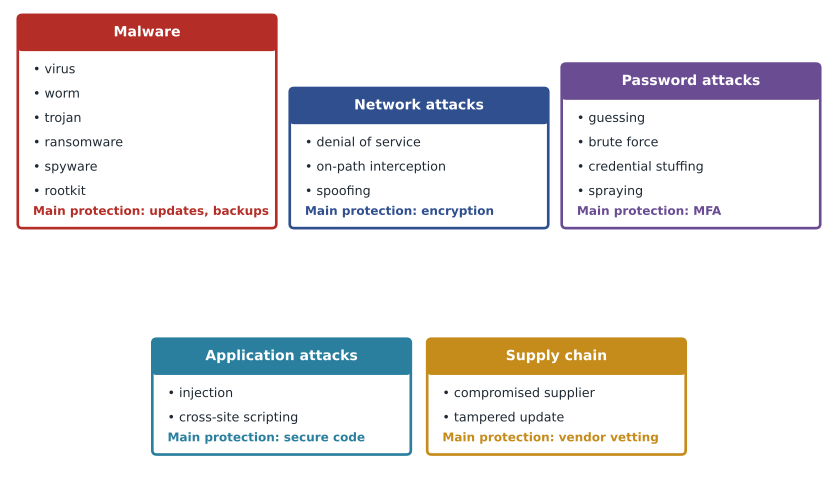
Malware
Malware is software written to cause harm. The exam expects you to know the main kinds by how they spread and what they do. A virus attaches itself to a legitimate file or program and spreads when that file is shared and opened. A worm spreads on its own across a network by taking advantage of vulnerabilities, without anyone opening anything, which is why worms can spread extremely fast. A trojan pretends to be something useful, such as a free utility or a fake software update, and carries a harmful payload. Spyware secretly gathers information, such as keystrokes or browsing activity. Adware shows unwanted advertising and often comes bundled with free software.
Ransomware encrypts files or locks systems and demands payment to restore them. Modern ransomware groups often copy data before encrypting it and then threaten to publish it, a tactic called double extortion, so a good backup alone does not solve the problem. A rootkit hides deep in the operating system to conceal itself and other malware from security tools. A backdoor provides a hidden way back into a system. A botnet is a large group of infected devices controlled remotely, often used to send spam or to flood targets with traffic. Fileless malware runs in memory or abuses built-in system tools rather than installing obvious files, which makes it harder to spot.
Defences against malware are layered: keep software updated so that worms find fewer vulnerabilities, use anti-malware and endpoint detection tools, limit user privileges so that malware runs with less power, filter email attachments and web downloads, back up data to a place the malware cannot reach, and train staff. CSCO-122 covers endpoint protection in depth. From the network side, separating networks into zones, covered in lesson 6, limits how far a worm or ransomware can spread.
Denial of service
A denial-of-service attack, or DoS, tries to make a system unavailable by overwhelming it or by triggering a fault. A distributed denial-of-service attack, or DDoS, does the same thing from many sources at once, usually a botnet, which makes it much harder to block. Some attacks flood a network link with so much traffic that legitimate requests cannot get through. Others exhaust a server's resources, for example by opening many half-finished connections. Others target an application with requests that are expensive to process. All of them attack availability.
From the defender's side, a DoS looks like a sudden, unexplained surge of traffic or connection attempts, slow or failed services, and alerts from monitoring. Defences include filtering at the internet provider, DDoS protection services that absorb large floods, rate limiting, firewalls that drop malformed traffic, enough capacity to handle normal peaks, and plans for keeping essential services running. A small business usually relies on its internet provider or a cloud service for DDoS protection, because a flood large enough to matter will saturate the business's own connection before its firewall can do anything.
On-path attacks and spoofing
An on-path attack, often called a man-in-the-middle attack, places the attacker between two parties so that traffic flows through them. The attacker can read unencrypted traffic, change it, or impersonate one side to the other. On a local network this can happen when an attacker tricks devices into sending traffic to the wrong machine, for example by abusing the Address Resolution Protocol, which maps IP addresses to hardware addresses on a local network and was designed without any authentication. On public Wi-Fi, an attacker may set up a fake access point with a convincing name, sometimes called an evil twin, so that people connect to it instead of the real one.
Spoofing means forging an identity: a fake source IP address on packets, a forged sender address on an email, a fake hardware address, or a fake caller ID. DNS spoofing or poisoning tries to make a name such as a bank's website resolve to the wrong address. Many core internet protocols were designed decades ago for networks of trusted users and do not check identity by default; this is one of the weaknesses of the TCP/IP suite the exam refers to. The main defences are encryption with authentication, such as TLS for websites and VPNs, which make interception useless and impersonation detectable; switch features that check address mappings; secured wireless; and email authentication standards, covered in lesson 5.
Password attacks
Many attacks aim at passwords, because a valid password is the easiest way in. Guessing tries common passwords such as a season and a year. A brute-force attack tries large numbers of combinations, either online against a sign-in page or offline against stolen password hashes. A dictionary attack uses lists of real words and leaked passwords. Credential stuffing takes usernames and passwords leaked from one website and tries them on others, betting that people reuse passwords. Password spraying tries one or two very common passwords against many accounts, which avoids the account lockouts that many attempts on a single account would trigger.
From the defender's side, these attacks show up as patterns in sign-in logs: many failures for one account, a few failures each for many accounts from the same source, or successful sign-ins from unusual places right after a large leak elsewhere. Defences include multi-factor authentication, which makes a stolen password insufficient on its own; long, unique passwords stored in a password manager; checking new passwords against lists of known leaked passwords; account lockout or increasing delays after failures; alerts on unusual sign-ins; and storing passwords only as salted, slow hashes, covered in lesson 11.
log = """2026-11-09 02:14:01 FAIL user=reception src=203.0.113.50
2026-11-09 02:14:03 FAIL user=dr.olsen src=203.0.113.50
2026-11-09 02:14:05 FAIL user=billing src=203.0.113.50
2026-11-09 02:14:07 FAIL user=tech2 src=203.0.113.50
2026-11-09 08:02:44 FAIL user=dr.olsen src=198.51.100.7
2026-11-09 08:02:59 OK   user=dr.olsen src=198.51.100.7"""
from collections import defaultdict
users = defaultdict(set)
for line in log.splitlines():
    parts = line.split()
    if parts[2] == "FAIL":
        users[parts[4].split("=")[1]].add(parts[3].split("=")[1])
for src, names in users.items():
    flag = "possible password spraying" if len(names) >= 3 else "normal mistake"
print(src, len(names), "accounts failed:", flag)203.0.113.50 4 accounts failed: possible password spraying 198.51.100.7 1 accounts failed: normal mistake
The short program above reads sign-in records of the kind a firewall or cloud service keeps and counts how many different accounts failed from each source address. One source failing against four accounts within seconds, at two in the morning, is the signature of password spraying. One failure followed by a success is just a doctor mistyping. Tools do this automatically, but understanding the logic helps you read their alerts.
Application attacks
Web applications and other software that accept input from users can be attacked through that input. In an injection attack, the attacker supplies input that the application mistakenly treats as part of a command, for example a database query; SQL injection is the best-known form. In cross-site scripting, the attacker gets a website to deliver harmful script to other visitors' browsers. Other application weaknesses include broken access control, where a user can reach data that belongs to someone else by changing a number in a web address, and buffer overflows, where input larger than expected overwrites memory.
The defences belong mostly to developers: validating and encoding input, using parameterized queries, checking authorization on every request, and keeping frameworks updated. Organizations that buy rather than build software defend by choosing reputable products, applying updates promptly, and placing a web application firewall in front of exposed applications. For a support technician, the main lesson is to report strange behaviour in a web application rather than ignore it, and never to test an application by entering unusual input without permission.
Supply chain and other attacks
A supply chain attack compromises a trusted supplier to reach its customers, for example by inserting malicious code into a software update or by breaking into a managed-services provider that has remote access to many clients. This is a real concern for Brightline itself: as a provider with access to 40 client networks, it is an attractive target. Keisha's defences include multi-factor sign-in on every Brightline tool, separate accounts for each client, strict control over the remote-management software and careful vetting of the tools Brightline installs.
Other attacks you should recognize include physical attacks, such as plugging a malicious USB device into a reception computer; attacks on internet-connected devices with weak default settings; and advanced persistent threats, where a skilled group gains access and stays hidden for months. The common thread is that each attack needs a path in, a vulnerability to use and something to gain. Defence in depth means making each of those harder.
| Attack | Property mainly affected | What defenders may see | Key defences |
|---|---|---|---|
| Ransomware | Availability and confidentiality | Mass file changes, ransom notes, outbound data transfer | Patching, least privilege, offline backups, segmentation |
| DDoS | Availability | Traffic surge from many sources, services slow | Provider filtering, DDoS service, capacity |
| On-path interception | Confidentiality and integrity | Certificate warnings, unexpected gateway, duplicate addresses | Encryption with authentication, secured wireless |
| Password spraying | Confidentiality | Few failures each across many accounts from one source | Multi-factor sign-in, leaked-password checks, alerts |
| SQL injection | Confidentiality and integrity | Odd database errors, unusual queries in logs | Parameterized queries, updates, web application firewall |
| Supply chain | All three | Unexpected behaviour after a trusted update | Vendor vetting, monitoring, least privilege for tools |
Indicators that an attack is under way
Defenders talk about indicators of compromise, the traces an attack leaves behind, such as a known malicious file hash, a connection to a known bad address or a new administrator account nobody created. Indicators of attack are earlier signs of behaviour in progress, such as a burst of failed sign-ins or a workstation suddenly scanning the network. Security tools match both against threat intelligence and baselines of normal activity. A tier 1 analyst's job is largely to decide which indicators are real and which are harmless coincidences, and to escalate the real ones quickly.
Worked problem
Naming the attack
Northfield Community Centre staff report that the public Wi-Fi list shows two networks called NorthfieldGuest. One has a strong signal near the front door and gives a browser warning about an invalid certificate when people visit their email. What kind of attack is likely, and what should Brightline do?
Show solution
- Two networks with the same name, one recently appeared, suggest an evil twin, a fake access point.
- The certificate warning suggests that traffic is being intercepted: an on-path attack.
- Brightline should tell staff and visitors not to use the duplicate network, record what was seen, and escalate to Keisha.
- Longer term, the staff network should use WPA3-Enterprise and the guest network should tell visitors how to recognize the real network.
Answer: This is likely an evil twin access point used for an on-path attack. Escalate, warn users, record details and strengthen the wireless design.
Common mistakes
MistakeCalling all malware a virus.
InsteadViruses need a host file and a user action; worms spread on their own; trojans disguise themselves.
MistakeThinking backups alone defeat modern ransomware.
InsteadDouble extortion also threatens to publish stolen data.
MistakeAssuming a small firewall can stop a large DDoS.
InsteadLarge floods saturate the internet link; provider-level protection is needed.
MistakeIgnoring a certificate warning on public Wi-Fi.
InsteadIt may indicate interception; stop and report.
MistakeTreating many small failures across accounts as normal.
InsteadThat pattern suggests password spraying.
Summary and key terms
- Malware includes viruses, worms, trojans, ransomware, spyware, rootkits, backdoors and botnets, distinguished by how they spread and what they do.
- DoS and DDoS attacks target availability; large floods need provider-level defences.
- On-path attacks intercept traffic; spoofing forges identities; many old protocols lack authentication.
- Password attacks include guessing, brute force, credential stuffing and spraying; multi-factor sign-in is the strongest single defence.
- Injection and cross-site scripting abuse application input; secure coding and updates defend.
- Supply chain attacks use trusted suppliers, including managed-services providers, to reach targets.
- Worm
- Malware that spreads across networks on its own by exploiting vulnerabilities.
- Trojan
- Malware disguised as legitimate software.
- Ransomware
- Malware that encrypts or locks data and demands payment.
- DDoS
- A distributed denial-of-service attack launched from many sources.
- On-path attack
- An attack where the attacker sits between two parties and can read or change traffic.
- Credential stuffing
- Trying leaked username and password pairs on other services.
- Password spraying
- Trying a few common passwords against many accounts.
- Injection
- Supplying input that an application wrongly treats as a command.
Practice problems
Work each problem on paper first, then reveal the answer to check.
What distinguishes a worm from a virus?
Show answer
A worm spreads on its own across networks; a virus needs a host file and a user action.
What is double extortion?
Show answer
Ransomware that both encrypts data and threatens to publish stolen copies.
Which protocol weakness lets an attacker redirect traffic on a local network?
Show answer
ARP has no authentication, so its address mappings can be forged.
What log pattern suggests password spraying?
Show answer
A few failures each across many accounts from one source.
What is the strongest single defence against stolen passwords?
Show answer
Multi-factor authentication.
Why are managed-services providers attractive supply chain targets?
Show answer
They have trusted access to many client networks.
Lesson quiz · 5 questions
Score 60% or more to complete this lesson.
Create a free account to save your progress, take quizzes and earn a certificate.