
COMP-110 · Lesson 2 of 12 · 25 min
Notational systems and units of measure
▶ Video coming soon A video version of this lesson is on the way.
Ruth Ingram, the Northgate branch manager, emails the help desk with a complaint that Lorna has seen many times before. The branch paid for a 500-megabit internet plan, but a large software update for the public-access computers, a file of 2 gigabytes, still took more than half a minute to download. "Are we being cheated?" she asks. Lorna forwards the email to Noor with one line: "Work out how long it should take, then reply." Answering properly takes two pieces of knowledge that Tech+ tests directly: the number systems computers use to represent data, and the units used to measure how much data there is and how fast it moves. Both trip people up, because computers count in powers of two while people count in tens, and because bits and bytes look almost identical on a price sheet.
Why computers use binary
Inside a computer, every piece of data is represented by circuits that are either on or off, charged or not charged, magnetized one way or the other, or carrying light or dark. Two states are easy to build reliably and easy to tell apart even when there is electrical noise. Each two-state value is called a bit, short for binary digit, and is written as 0 or 1. On its own a bit can represent only two things: yes or no, true or false, on or off. Combine bits and the possibilities multiply. Two bits can make four patterns (00, 01, 10, 11), three bits can make eight, and eight bits can make 256. Every extra bit doubles the number of patterns, which is why sizes in computing keep landing on numbers like 8, 16, 32, 64, 256 and 1024.
A group of eight bits is called a byte, and it is the basic unit for measuring storage. One byte is enough to store a single character in the most common text encodings for English, a small whole number from 0 to 255, or one colour channel of one pixel in a photo. A group of four bits, half a byte, is sometimes called a nibble; it matters mainly because each hexadecimal digit represents exactly four bits, as you will see shortly.
Decimal, binary and place value
The number system people use every day is decimal, or base 10. It has ten digits, 0 to 9, and each position in a number is worth ten times the position to its right. In 352, the 2 is in the ones place, the 5 is in the tens place and the 3 is in the hundreds place, so the number means 3 hundreds plus 5 tens plus 2 ones. Binary, or base 2, works the same way with only two digits. Each position is worth twice the one to its right: ones, twos, fours, eights, sixteens and so on. The binary number 1011 means 1 eight plus 0 fours plus 1 two plus 1 one, which is 11 in decimal.
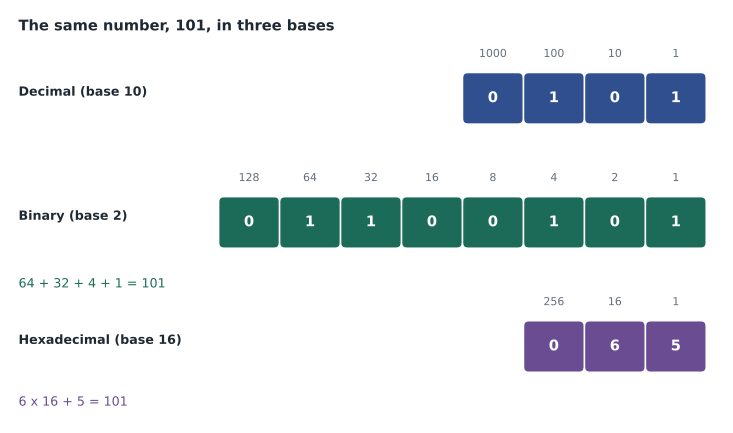
To convert binary to decimal, write the place values above the bits and add up the values wherever there is a 1. For the byte 01100101, the place values from left to right are 128, 64, 32, 16, 8, 4, 2 and 1. The 1s sit under 64, 32, 4 and 1, so the value is 64 + 32 + 4 + 1 = 101. To convert decimal to binary, work from the largest place value down: ask whether it fits, write 1 and subtract if it does, write 0 if it does not, and move to the next place. For 200: 128 fits (72 left), 64 fits (8 left), 32 does not, 16 does not, 8 fits (0 left), and 4, 2 and 1 do not. That gives 11001000.
def to_binary(n, width=8):
    bits = ''
    for value in [128, 64, 32, 16, 8, 4, 2, 1][-width:]:
        if n >= value:
            bits += '1'
            n -= value
        else:
            bits += '0'
    return bits

def to_decimal(bits):
    total = 0
    for bit in bits:
        total = total * 2 + int(bit)
    return total

print(to_binary(200), to_decimal('11001000'))
print(to_binary(101), to_decimal('01100101'))
print(bin(200), int('11001000', 2))11001000 200 01100101 101 0b11001000 200
What this code does
It converts whole numbers to 8-bit binary by checking each place value from 128 down to 1 and writing a 1 when that value fits. It also converts binary back to decimal by doubling a running total and adding each bit. The output shows the hand method matches Python's own built-in conversions for 200 and 101.
Try it yourself
Binary to decimal
Write a function to_decimal(bits) that takes a string of 0s and 1s and returns its decimal value as an integer. Do the arithmetic yourself with a loop rather than calling int(bits, 2).
def to_decimal(bits):
    total = 0
    # your loop here
    return total
Hexadecimal
Long binary numbers are hard for people to read and easy to copy wrongly, so technicians often write them in hexadecimal, or base 16. Hexadecimal needs sixteen digits, so it uses 0 to 9 and then the letters A to F for the values 10 to 15. Each position is worth sixteen times the one to its right: ones, sixteens, 256s and so on. The useful property is that one hexadecimal digit stands for exactly four bits, so a byte is always two hexadecimal digits. The byte 01100101 splits into 0110 and 0101, which are 6 and 5, so it is written 65 in hexadecimal. The byte 11111111 is FF, and 00000000 is 00.
You will meet hexadecimal constantly as a support technician. Every network adapter has a MAC address, a hardware identifier written as six bytes in hexadecimal, such as 3C-52-82-1A-7F-04. Newer internet addresses (IPv6, covered in lesson 6) are written in hexadecimal groups. Colours on web pages are written as three hexadecimal bytes for red, green and blue, so #FF0000 is pure red. Error codes in Windows and in printer displays are often shown in hexadecimal, such as 0x80070005, where the 0x prefix simply means the number that follows is hexadecimal. Recognizing the notation is usually more important than converting it by hand.
| Decimal | Binary | Hexadecimal |
|---|---|---|
| 0 | 0000 | 0 |
| 5 | 0101 | 5 |
| 9 | 1001 | 9 |
| 10 | 1010 | A |
| 11 | 1011 | B |
| 12 | 1100 | C |
| 13 | 1101 | D |
| 14 | 1110 | E |
| 15 | 1111 | F |
Try it yourself
Decimal to hexadecimal
Write to_hex(n) that returns the two-digit hexadecimal string, in capitals, for a number from 0 to 255. For example, to_hex(101) returns 65 and to_hex(255) returns FF. Use divmod to find the sixteens and the ones.
DIGITS = '0123456789ABCDEF'

def to_hex(n):
    return ''
Octal and other notations
Octal, or base 8, uses the digits 0 to 7, and each octal digit stands for three bits. It is less common today, but you will still see it in one important place: file permissions on Linux and macOS, where a setting such as 755 means read, write and execute for the owner, and read and execute for everyone else. Tech+ mainly expects you to recognize binary, decimal and hexadecimal and to know why each is used. When you see a number in documentation, look for clues to its base: a 0x prefix or letters A to F mean hexadecimal, a long string of only 0s and 1s is probably binary, and a trailing b or h is sometimes used to mark binary or hexadecimal in older documents.
Characters and encoding
Text is stored as numbers too. A character encoding is a table that assigns a number to each character. ASCII, one of the oldest, uses seven bits to represent 128 characters: the English letters in upper and lower case, digits, punctuation and some control codes. In ASCII, capital A is 65, lowercase a is 97, and the digit 0 is 48. ASCII has no room for accented letters, other alphabets or emoji, so modern systems use Unicode, a standard that assigns a number, called a code point, to well over a hundred thousand characters from writing systems around the world. UTF-8 is the most widely used way of storing Unicode: it uses one byte for the ASCII characters and two to four bytes for everything else, so plain English text stays compact while French names such as Hélène and Anaïs still display correctly.
Encoding problems show up on the help desk as strange characters. When a file saved in one encoding is opened as if it were another, accented letters turn into pairs of odd symbols, and a patron's name on a library card may print wrongly. The fix is usually to open or import the file with the correct encoding, which is nearly always UTF-8 today, rather than retyping the data.
for ch in ['A', 'a', '0', 'é']:
    code = ord(ch)
    size = len(ch.encode('utf-8'))
print(ch, code, hex(code), 'bytes in UTF-8:', size)A 65 0x41 bytes in UTF-8: 1 a 97 0x61 bytes in UTF-8: 1 0 48 0x30 bytes in UTF-8: 1 é 233 0xe9 bytes in UTF-8: 2
What this code does
It looks up the number a computer stores for each of four characters, shown both in decimal and in hexadecimal. It also counts how many bytes each character takes in UTF-8 encoding. The output shows ordinary English letters and digits take one byte while the accented é takes two.
Units of storage
Storage is measured in bytes, with prefixes for larger amounts. A kilobyte (KB) is about a thousand bytes, a megabyte (MB) about a million, a gigabyte (GB) about a billion, a terabyte (TB) about a trillion, and a petabyte (PB) about a thousand terabytes. A short email is a few kilobytes, a high-quality photo a few megabytes, a feature-length film a few gigabytes, and a large backup drive several terabytes. Petabytes are the scale of cloud providers and large research archives.
There is a catch that causes many help desk tickets. Drive makers and most network specifications use the decimal meanings: a kilobyte is exactly 1000 bytes and a gigabyte is exactly 1,000,000,000 bytes. Operating systems have traditionally used binary meanings, where each step is 1024 times the last because 1024 is the power of two closest to 1000. To keep the two apart, the binary units have their own names: kibibyte (KiB, 1024 bytes), mebibyte (MiB), gibibyte (GiB) and tebibyte (TiB). A drive sold as 1 TB holds 1,000,000,000,000 bytes, which is about 931 GiB, so Windows, which shows binary units but labels them GB, reports it as roughly 931 GB. Nothing is missing; the same amount is being counted two ways. macOS has used decimal units since 2009, so the same drive appears as about 1 TB there.
Try it yourself
Advertised and reported size
Write reported_gib(tb) that takes a drive size in decimal terabytes, as sold, and returns its size in gibibytes (what Windows labels GB), rounded to the nearest whole number. A terabyte is 10**12 bytes and a gibibyte is 2**30 bytes.
def reported_gib(tb):
    return 0
Units of speed and throughput
Network and internet speeds are measured in bits per second, not bytes. A kilobit per second (Kbps) is a thousand bits per second, a megabit per second (Mbps) a million and a gigabit per second (Gbps) a billion. Internet plans, Wi-Fi ratings and network cards all use these units. File sizes, on the other hand, are shown in bytes. Because a byte is eight bits, a connection of 500 Mbps can move at most about 500 ÷ 8 = 62.5 megabytes per second. The lowercase b for bits and the uppercase B for bytes are easy to miss, and mixing them up gives answers that are eight times too large or too small.
Real downloads are also slower than the connection's rated speed. Some capacity is used by the protocols that carry the data, other devices may be sharing the connection, Wi-Fi adds its own limits, and the server sending the file may not be able to send it as fast as your connection could receive it. A useful rule of thumb on a good wired connection is to expect perhaps 80 to 90 out of every 100 units of the rated speed for a large download, and less on Wi-Fi or at busy times.
Worked problem
Answering the branch manager
The branch has a 500 Mbps plan. A 2 GB software update took 38 seconds to download. Is the connection performing as it should?
Show solution
- Convert the file to bits: 2 GB is 2,000,000,000 bytes, and 2,000,000,000 × 8 = 16,000,000,000 bits.
- At the full rated speed of 500,000,000 bits per second, the ideal time is 16,000,000,000 ÷ 500,000,000 = 32 seconds.
- The actual time, 38 seconds, means the download ran at about 16,000,000,000 ÷ 38 ≈ 421 Mbps, or about 84 out of every 100 units of the rated speed.
- That is normal for a real download after protocol overhead and other traffic.
Answer: The connection is performing normally. The ideal time is 32 seconds, and 38 seconds corresponds to about 421 Mbps, which is typical.
Try it yourself
Download time
Write download_seconds(size_gb, speed_mbps) that returns the ideal time in seconds to download a file of size_gb decimal gigabytes over a connection of speed_mbps megabits per second, ignoring overhead. Round to one decimal place.
def download_seconds(size_gb, speed_mbps):
    return 0
Processor speed and other units
Processors are rated in hertz, cycles per second. A modern processor runs at a few gigahertz (GHz), meaning a few billion cycles per second. Clock speed alone does not decide how fast a processor is; the number of cores, the amount of work done per cycle and the cache all matter, as lesson 3 explains. Other units you will see include milliseconds (ms) for network delay, called latency, where a video call feels smooth below about 100 ms; dots per inch (dpi) for printer and scanner resolution; and pixels for screen resolution, such as 1920 × 1080. Tech+ expects you to choose the right unit for a quantity and to convert between related units.
Noor replies to Ruth with the calculation, a note that 421 megabits per second is a healthy result for a 500-megabit plan, and a short explanation of the difference between megabits and megabytes. Ruth writes back an hour later to say she had been reading the 2 GB as if it were 2 gigabits all along. Lorna adds the explanation to the knowledge base under the title "Why downloads seem slow: bits and bytes."
Common mistakes
MistakeConfusing Mbps with MBps.
InsteadLowercase b is bits; uppercase B is bytes; divide bits by 8 to get bytes.
MistakeThinking a new drive is missing space.
InsteadDrive makers count in 1000s and Windows counts in 1024s.
MistakeTreating hexadecimal letters as typos.
InsteadA to F are digits worth 10 to 15 in base 16.
MistakeExpecting downloads at exactly the rated speed.
InsteadProtocol overhead and shared traffic make real speeds lower.
MistakeRetyping data with strange characters.
InsteadReopen or import the file with the correct encoding, usually UTF-8.
Summary and key terms
- Computers store everything as bits; eight bits make a byte, and each extra bit doubles the number of patterns.
- Binary, decimal and hexadecimal are place-value systems with bases 2, 10 and 16.
- One hexadecimal digit is four bits, so a byte is two hex digits; hex appears in MAC addresses, IPv6, colours and error codes.
- ASCII and Unicode map characters to numbers; UTF-8 is the common way to store Unicode.
- Storage is measured in bytes; drive makers use steps of 1000 and many operating systems use 1024.
- Network speed is measured in bits per second; divide by 8 to compare with file sizes in bytes.
- Bit
- A single binary digit, 0 or 1.
- Byte
- Eight bits; the basic unit of storage.
- Hexadecimal
- Base 16 notation using 0 to 9 and A to F; one digit is four bits.
- Unicode
- A standard that gives a number to characters from the world's writing systems.
- Gibibyte
- Two to the power of 30 bytes, about 1.07 billion bytes.
- Throughput
- The amount of data actually moved per second.
- Latency
- The delay before data starts to arrive, usually in milliseconds.
Practice problems
Work each problem on paper first, then reveal the answer to check.
Convert 11001000 to decimal.
Show answer
200.
Convert 13 to binary and to hexadecimal.
Show answer
1101 and D.
Write 255 in hexadecimal.
Show answer
FF.
How many patterns can 10 bits make?
Show answer
1024.
A 1 Gbps link: what is its best-case speed in megabytes per second?
Show answer
About 125 MB/s.
Why does a 500 GB drive show as about 466 GB in Windows?
Show answer
Windows divides by 1024 three times; the maker divides by 1000.
Which encoding should you try first for a file with garbled accents?
Show answer
UTF-8.
Lesson quiz · 5 questions
Score 60% or more to complete this lesson.
Create a free account to save your progress, take quizzes and earn a certificate.