
COMP-110 · Lesson 10 of 12 · 23 min
Cloud computing and virtualization basics
▶ Video coming soon A video version of this lesson is on the way.
Fairhaven's server room at the central library is small: two racks, an air conditioner that hums loudly on hot days, and a battery backup that gives about fifteen minutes when the power fails. Ten years ago it held twenty separate servers. Today it holds three physical machines, and on them Dez runs fourteen virtual servers. The library's email, office apps and file sharing moved to a cloud service years ago, its catalogue is hosted by a vendor, and the new room-booking system is a subscription website. Lorna wants Noor to understand how all of this fits together, because patrons and staff now ask questions like "where is my file actually stored?" and "why does the catalogue go down when our internet does?" Tech+ added virtualization and cloud technologies as a new objective, and this lesson covers the ideas behind both.
What virtualization is
Virtualization means using software to create a virtual version of something physical: most often a whole computer. A virtual machine, or VM, is a software-defined computer with its own virtual processor, memory, storage and network adapter. It runs a complete operating system, called the guest, which behaves as if it were on its own hardware. The physical computer that runs the VMs is called the host. Several VMs can run on one host at once, each isolated from the others, so a problem in one does not affect the rest.
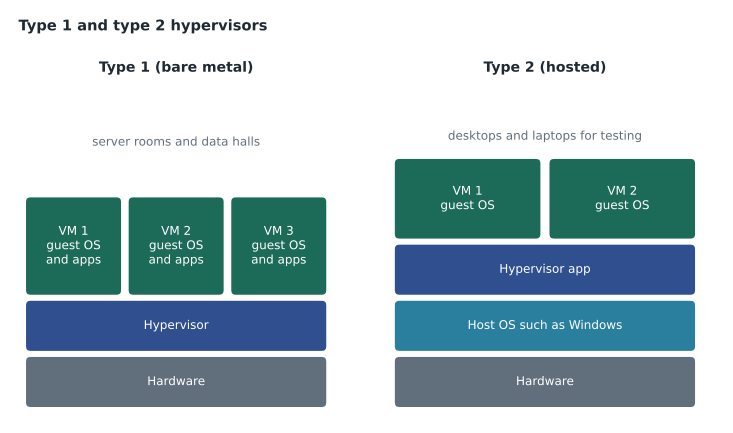
The software that creates and runs VMs is called a hypervisor. A type 1 hypervisor, also called bare-metal, runs directly on the host's hardware with no general-purpose operating system underneath; it is used in data centres and server rooms, and it is what Dez uses for the library's fourteen virtual servers. A type 2 hypervisor runs as an application on top of an ordinary operating system, such as Windows or macOS; it is used on desktops and laptops for testing, training and running software built for another operating system. Noor uses a type 2 hypervisor on her laptop to practise with Linux without changing her Windows installation.
Why organizations virtualize
Most physical servers spend much of their time idle, waiting for work. Virtualization puts several workloads on one host, which uses the hardware more fully and saves money, space, electricity and cooling. It also makes servers easier to manage. A VM is stored as a set of files, so it can be copied, backed up or moved to another host. A snapshot records a VM's exact state at a moment in time, so Dez can take a snapshot before installing an update and return to it in minutes if the update goes wrong. New servers can be created from templates in minutes rather than ordered and installed over weeks. And testing is safer, because a test VM can be thrown away without affecting anything else.
Virtualization has requirements. The host processor must support hardware virtualization, which is usually switched on in the UEFI firmware settings and called something like Intel VT-x or AMD-V. The host needs enough RAM and storage for all of its VMs at once, because each guest operating system needs its own share. A single host failure takes down every VM on it, so production systems usually run on several hosts with shared storage, so that VMs can move to a healthy host. Each VM is also a full computer from a security point of view: it needs its own updates, antivirus and backups.
Containers and virtual desktops
Containers are a lighter form of virtualization. Instead of a whole guest operating system, a container packages an application with only the libraries and settings it needs, and shares the host's kernel with other containers. Containers start in seconds and use far fewer resources than VMs, which is why modern web applications are often built as many small containers. Tech+ only expects you to know that containers exist and how they differ from VMs.
Virtual desktop infrastructure, or VDI, runs users' desktops as VMs in a data centre or the cloud, and users connect to them from any device over the network. A staff member could use the same desktop from a branch PC, a home laptop or a tablet. VDI centralizes management and keeps data off the devices, but it needs a reliable network, and if the connection is slow, the desktop feels slow.
| Approach | What is virtualized | Typical use |
|---|---|---|
| Virtual machine (type 1 host) | A whole computer, on server hardware | Running many servers in a server room |
| Virtual machine (type 2 host) | A whole computer, on a desktop or laptop | Testing, training, running another OS |
| Container | An application and its libraries, sharing the host kernel | Modern web applications |
| Virtual desktop (VDI) | A user's desktop, run centrally | Using the same desktop from many devices |
What the cloud is
Cloud computing means using computing resources, such as servers, storage, databases, networking and software, over the internet from a provider, instead of owning and running them yourself. The provider owns large data centres full of hosts running virtualization, and rents out capacity to many customers. A widely used definition, from the US National Institute of Standards and Technology, lists five essential characteristics. On-demand self-service: customers can set up resources themselves, without waiting for the provider's staff. Broad network access: resources are reached over the network from many kinds of device. Resource pooling: the provider's hardware is shared among many customers. Rapid elasticity: capacity can grow or shrink quickly to match demand. Measured service: use is metered, and customers usually pay for what they use.
Elasticity is the characteristic that most changes how organizations plan. A library's website traffic jumps when the summer reading program opens and when the tax-help clinics are booked in the spring. With its own servers, the library would have to buy enough hardware for the busiest week and leave it idle the rest of the year. In the cloud, the website can add capacity for the busy weeks and release it afterwards, paying only for what it used.
normal = 2
peak = 6
peak_weeks = 6
weeks = 52
own = peak * weeks
cloud = normal * (weeks - peak_weeks) + peak * peak_weeks
print('Server-weeks if we buy for the peak:', own)
print('Server-weeks if we scale with demand:', cloud)
print('Share of capacity saved:', round((own - cloud) / own, 2))Server-weeks if we buy for the peak: 312 Server-weeks if we scale with demand: 128 Share of capacity saved: 0.59
What this code does
It compares two ways of providing servers over a year: buying six servers for the whole year, or running two normally and six only during the six busiest weeks. It counts server-weeks for each approach. The output shows 312 against 128, a saving of about 0.59 of the capacity.
Cloud service models
Cloud services are grouped into three main service models, according to how much the provider manages. Infrastructure as a service, or IaaS, rents the basic building blocks: virtual machines, storage and networks. The customer installs and manages the operating systems and applications, much like running their own server room without the hardware. Platform as a service, or PaaS, adds the operating system, runtime and database, so developers only deploy their code and data. Software as a service, or SaaS, delivers a complete application, usually through a browser, and the customer simply uses it; email, office suites, the library's room-booking site and the hosted catalogue are all SaaS.
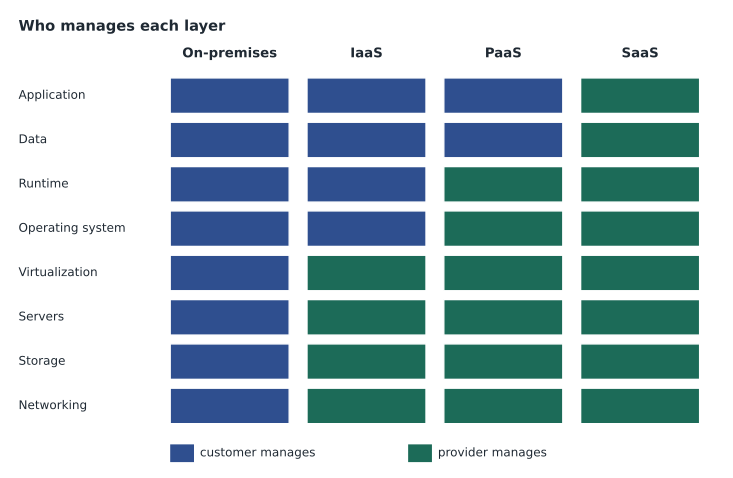
The models matter for support because they decide who fixes what. If a SaaS application is down for everyone, the help desk cannot fix it; it reports the problem to the provider and keeps users informed. If an IaaS virtual machine has a broken operating system update, that is the customer's problem to fix, because the customer manages the operating system. This division of duties is called the shared responsibility model, and every cloud contract spells it out. Whatever the model, the customer is always responsible for its own data, for who has access to it, and for using the service securely.
Cloud deployment models
Clouds are also described by who uses them. A public cloud is run by a provider for many customers over the internet; the big providers include Amazon Web Services, Microsoft Azure and Google Cloud. A private cloud is cloud-style infrastructure used by one organization only, either in its own data centre or hosted for it by a provider. A hybrid cloud combines the two, such as keeping some servers on site and moving others to a public cloud, with connections between them; Fairhaven is hybrid, with its fourteen virtual servers at central and its email and office apps in a public cloud. A community cloud is shared by several organizations with common needs, such as a group of library systems or government agencies.
Benefits and risks
The cloud's benefits are real: no hardware to buy up front, capacity that grows and shrinks with demand, access from anywhere, built-in redundancy across several data centres, and providers whose security teams are larger than most organizations could afford. Its risks are real too. Everything depends on the internet connection, which is why the library's catalogue becomes unreachable at a branch whose internet is down even though the catalogue itself is fine. Costs can grow unexpectedly when usage is not watched. Moving away from one provider can be hard, which is called vendor lock-in. And the organization must know where its data is stored and which laws apply.
That last point matters for a public library holding patron records. In Canada, public bodies such as libraries are covered by provincial privacy laws, and some provinces, including Nova Scotia, have rules about storing personal information outside the country; Fairhaven's cloud contracts specify Canadian data centres for patron data. The practical point for the help desk is simple: never move patron or staff data into a cloud service that the library has not approved.
Cloud services the help desk sees every day
Most staff never think of the cloud as infrastructure; they meet it through a few familiar services. Cloud storage and sync keep files in step across a desktop, a laptop and a phone, and the most common tickets are sync conflicts, where the same file was changed in two places, and storage limits. Cloud email and calendars mean that mail is not stored on the computer at all, so a new laptop is ready as soon as the user signs in. Collaboration tools let several people edit one document at once. Cloud backup services copy files off site automatically. In each case, the help desk's job shifts from repairing servers to managing accounts, permissions, sync and devices, and to knowing how to reach the provider's support and status pages when the service itself is at fault.
Cloud services are also paid for differently. Instead of buying a server every five years, the library pays a monthly or yearly fee for each service, often per user. That makes costs predictable but means unused accounts cost money, so removing accounts for staff who leave is a budget task as well as a security one. Marcus reviews cloud bills each quarter and flags any service whose costs have grown unexpectedly, because elastic services can quietly scale up when nobody is watching.
Worked problem
Who fixes it?
Three tickets arrive. (a) The room-booking website shows an error for every branch. (b) A virtual server that Dez runs on the library's own hosts will not start after an update. (c) A staff member cannot open a shared spreadsheet in the cloud office suite, though colleagues can. Who is responsible for each, and what should the help desk do?
Show solution
- (a) The room-booking site is SaaS and is failing for everyone, so the provider is responsible. Check the provider's status page, report the outage, and tell branches it is being handled.
- (b) The library runs its own hypervisor and guest operating systems, so this is the library's problem. Dez can return the VM to the snapshot taken before the update.
- (c) The service works for others, so the problem is probably the user's access or device. Check the file's sharing permissions, the user's sign-in and the browser before contacting the provider.
- In each case, record the decision and the result in the ticket.
Answer: (a) the SaaS provider, (b) the library's own systems team, using the snapshot, and (c) the help desk, starting with the user's permissions and sign-in.
Common mistakes
MistakeThinking the cloud means data is nowhere in particular.
InsteadCloud data lives in specific data centres governed by contracts and laws.
MistakeAssuming the provider is responsible for everything.
InsteadUnder shared responsibility the customer always owns its data and access.
MistakeTreating a VM as needing no maintenance.
InsteadEach guest OS needs updates, security tools and backups.
MistakeRunning VMs without enough RAM on the host.
InsteadEvery guest needs its own share of memory.
MistakeBlaming the cloud service when one branch is offline.
InsteadCheck the branch's internet connection first.
Summary and key terms
- Virtualization runs software-defined computers, called VMs, on a physical host under a hypervisor.
- Type 1 hypervisors run on bare hardware; type 2 run as an application on an operating system.
- Virtualization improves hardware use and adds snapshots, templates and easy moves, but each VM needs care.
- Containers package applications sharing the host kernel; VDI runs desktops centrally.
- Cloud computing rents resources with self-service, network access, pooling, elasticity and metering.
- IaaS, PaaS and SaaS differ in how much the provider manages; responsibility is shared.
- Public, private, hybrid and community clouds differ in who uses them; data location and law matter.
- Virtual machine
- A software-defined computer running its own operating system on a host.
- Hypervisor
- Software that creates and runs virtual machines.
- Snapshot
- A saved state of a virtual machine that can be returned to.
- Container
- A packaged application that shares the host's kernel.
- Elasticity
- The ability to add or remove capacity quickly to match demand.
- IaaS
- Infrastructure as a service: rented virtual machines, storage and networks.
- SaaS
- Software as a service: a complete application delivered over the internet.
- Hybrid cloud
- A combination of on-site or private systems and a public cloud.
Practice problems
Work each problem on paper first, then reveal the answer to check.
What is the difference between a host and a guest?
Show answer
The host is the physical computer; the guest is the operating system running in a VM.
Which type of hypervisor runs directly on hardware?
Show answer
Type 1.
Name the five essential characteristics of cloud computing.
Show answer
On-demand self-service, broad network access, resource pooling, rapid elasticity and measured service.
Is a web-based office suite IaaS, PaaS or SaaS?
Show answer
SaaS.
In IaaS, who updates the operating system?
Show answer
The customer.
Why does a branch lose its hosted catalogue when its internet fails?
Show answer
Cloud services are reached over the internet, so the branch cannot reach them.
What firmware setting must be on for a type 2 hypervisor to run VMs well?
Show answer
Hardware virtualization, such as Intel VT-x or AMD-V.
Lesson quiz · 5 questions
Score 60% or more to complete this lesson.
Create a free account to save your progress, take quizzes and earn a certificate.