
CMPUT-421 · Lesson 1 of 12 · 34 min
What human-computer interaction is and why it matters
Human-computer interaction (HCI) is the study and practice of designing, building and evaluating interactive computing systems for people to use, and of understanding the phenomena that surround that use. It sits where computing science meets psychology, design, sociology and ergonomics. For a computing scientist, HCI answers a question that the rest of the curriculum mostly leaves aside: given software that is correct, fast and secure, will the people it is for be able to use it to do what they need, without errors, frustration or harm? A program that passes every unit test can still fail that test badly.
This course treats HCI as a discipline with theory, models and measurement, not as taste. Lessons 2 and 3 cover what is known about human perception, cognition and motor control, including models such as Fitts's law and the keystroke-level model that predict performance before anything is built. Lessons 4 to 7 cover how to understand users and turn that understanding into designs and prototypes. Lessons 8 and 9 cover evaluation, with and without users, including the statistics of small usability studies. Lesson 10 covers accessibility, lesson 11 interfaces beyond the desktop, including AI-based ones, and lesson 12 the ethics of persuasive and deceptive design, ending with an end-to-end project.
Several neighbouring courses touch parts of this territory, and this course points to them rather than repeating them. CMPUT-301 covers requirements engineering and the software process. CMPUT-401 covers product discovery, interviewing and contextual inquiry, and A/B testing from a product manager's point of view. CMPUT-404 covers semantic HTML and the basics of web accessibility. ROB-430 applies human factors, including Fitts's law and situation awareness, to robots. PSYC-355 and PSYC-258 go much further into perception and cognition. Here the focus is on the methods a computing scientist uses to design and evaluate interfaces of any kind.
A short history of interactive computing
Early computers were operated by specialists through switches, punched cards and batch jobs; interaction, in today's sense, barely existed. The idea of the computer as a partner in thought came from a handful of visionaries. Vannevar Bush's 1945 essay 'As We May Think' imagined the memex, a desk that stored and linked a person's documents. J. C. R. Licklider's 1960 paper 'Man-Computer Symbiosis' argued that computers should work interactively with people in real time. Ivan Sutherland's Sketchpad (1963) let a user draw on a screen with a light pen, with constraints and object instances, and is often called the first graphical user interface.
On 9 December 1968, Douglas Engelbart and his team at the Stanford Research Institute gave a 90-minute demonstration, later called the mother of all demos, that showed the mouse, windows, hypertext, shared-screen collaboration and video conferencing. At Xerox PARC in the 1970s, researchers including Alan Kay, Butler Lampson, Chuck Thacker and Larry Tesler built the Alto and then the Star (1981), with bitmapped displays, overlapping windows, icons, menus, a pointer and the desktop metaphor. Apple's Lisa and Macintosh (1984) and later Microsoft Windows brought these ideas to a mass market.
HCI as a research field took shape at the same time. The first ACM CHI conference (Conference on Human Factors in Computing Systems) was held in 1983, the year Stuart Card, Thomas Moran and Allen Newell published The Psychology of Human-Computer Interaction, which introduced the GOMS family of models (lesson 3). Donald Norman's The Psychology of Everyday Things (1988), later The Design of Everyday Things, popularized affordances, mappings and the gulfs of execution and evaluation (lesson 4). Ben Shneiderman coined the term direct manipulation in 1983. Jakob Nielsen and Rolf Molich introduced heuristic evaluation in 1990 (lesson 8). The web (Tim Berners-Lee, 1989–1991), the smartphone with multi-touch (the iPhone, 2007) and, since late 2022, conversational interfaces built on large language models have each reopened basic questions about how people and computers should communicate.
Usability, user experience and why they matter
The international standard ISO 9241-11 (revised 2018) defines usability as the extent to which a system, product or service can be used by specified users to achieve specified goals with effectiveness, efficiency and satisfaction in a specified context of use. Each word matters. Usability is not a property of an interface alone but of an interface used by particular people for particular goals in a particular context: a dense trading terminal can be highly usable by expert traders and baffling to a newcomer. Effectiveness is whether users achieve their goals accurately and completely. Efficiency is the resources spent doing so, usually time and effort. Satisfaction covers users' physical, cognitive and emotional responses, including comfort and the absence of frustration.
Jakob Nielsen's widely used breakdown adds two components that matter for real products: learnability (how easily first-time users accomplish basic tasks) and memorability (how easily returning users re-establish proficiency), alongside efficiency, errors and satisfaction. User experience (UX) is a broader term. ISO 9241-210 defines it as a person's perceptions and responses resulting from the use and anticipated use of a system, which includes emotions, beliefs, preferences and expectations before, during and after use. Usability is part of UX; aesthetics, trust, identity and meaning are other parts.
Why should a computing scientist care? First, because poor usability causes real harm. In January 2018, an employee at the Hawaii Emergency Management Agency sent a false ballistic missile alert to phones across the state; the investigations that followed pointed to, among other factors, a drop-down menu in which the test and live alert options sat side by side with similar labels, and to the lack of a simple way to send a correction. Medication infusion pumps whose number entry accepts a misplaced decimal point have been linked to overdoses. Electronic health records that bury allergy information cost clinicians time and attention. Second, because usability is economically decisive: users abandon applications they cannot learn, support calls cost money, and errors in enterprise software propagate. Third, because interaction design increasingly shapes what people see, believe and choose, which raises ethical questions taken up in lesson 12.
A fourth reason is that usability problems are cheapest to fix early. A problem found with a paper prototype costs minutes to fix; the same problem found after release can require redesign, retraining and data migration. Large public software projects that failed partly because the people who would use them were not involved early, such as payroll and benefits systems whose workflows did not match how staff actually worked, are standard cautionary tales in software engineering courses. Human-centred design exists to bring users in from the start.
Human-centred design
ISO 9241-210 describes human-centred design as an iterative process with four activities, repeated until the design meets its requirements. Understand and specify the context of use: who the users are, what tasks they do, and the technical, physical and social environment. Specify the user requirements. Produce design solutions, from early concepts to finished products. Evaluate the designs against the requirements, with users wherever possible. The standard adds principles: the design is based on an explicit understanding of users, tasks and environments; users are involved throughout; the design is driven and refined by user-centred evaluation; the process is iterative; the design addresses the whole user experience; and the team includes multidisciplinary skills and perspectives.
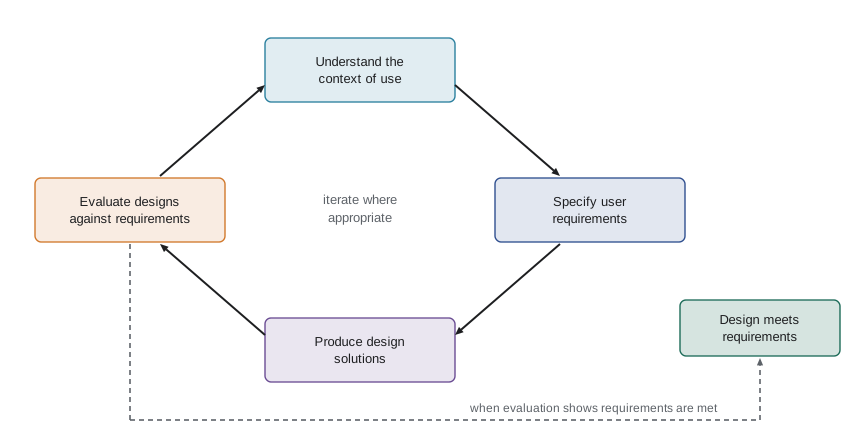
This cycle maps onto the course. Lessons 5 and 6 cover understanding context and specifying requirements, lesson 7 producing design solutions, and lessons 8 and 9 evaluation. It also maps onto agile software processes (CMPUT-301): each sprint can include a small round of research, design and evaluation, provided someone keeps the larger picture of who the users are and what they need. Related names for similar ideas include user-centred design, design thinking (popularized by the design firm IDEO and Stanford's d.school) and the double diamond of the UK Design Council, which alternates divergent and convergent thinking twice, first to find the right problem and then to find the right solution.
The running example: RideLine
Throughout the course, examples use RideLine, the invented trip-planning and fare app of an invented regional transit agency. RideLine lets riders plan trips across buses and light rail, see real-time arrivals, buy fares and passes, and report problems. Its users range from daily commuters who want the next departure in two taps, to occasional riders and visitors who do not know the fare zones, to older adults, people with low vision who use screen readers, wheelchair users who need step-free routes, and riders with limited data plans or older phones. The agency is redesigning the app because its ratings are poor, its support line is overwhelmed with fare questions, and an accessibility complaint has been filed. Every method in the course is applied to some part of that redesign.
Before any redesign, the team needs a baseline. The program below computes the three ISO 9241-11 components from an invented log of a small baseline study in which eight participants tried one task in the current app. It also illustrates two measurement choices that later lessons explain: reporting the geometric mean of task times, which are right-skewed, and keeping failed attempts in the effectiveness figure while reporting times for completers only.
# Usability in the ISO 9241-11 sense: effectiveness, efficiency and satisfaction,
# computed from an invented log of 8 participants doing one task in the RideLine app
# ("buy a day pass and add it to your phone wallet").
import statistics as st
sessions = [  # (participant, completed?, seconds, errors, ease rating 1-7 from a one-question survey)
    ("P1", True, 74, 0, 6), ("P2", True, 121, 2, 4), ("P3", False, 240, 5, 2),
    ("P4", True, 66, 0, 7), ("P5", True, 98, 1, 5), ("P6", True, 143, 3, 4),
    ("P7", False, 240, 4, 1), ("P8", True, 81, 1, 6),
]
done = [s for s in sessions if s[1]]
completion = len(done) / len(sessions)
times = [s[2] for s in done]
geo = st.geometric_mean(times)       # task times are skewed; the geometric mean is a better summary
errors = sum(s[3] for s in sessions) / len(sessions)
ease = st.mean(s[4] for s in sessions)
print(f"effectiveness: {len(done)}/{len(sessions)} completed = {completion:.0%}")
print(f"efficiency:    arithmetic mean time {st.mean(times):.1f} s, geometric mean {geo:.1f} s (completers only)")
print(f"               mean errors per attempt {errors:.2f}")
print(f"               time-based efficiency {st.mean([1 / s[2] if s[1] else 0 for s in sessions]) * 60:.2f} goals per minute")
print(f"satisfaction: mean ease rating {ease:.2f} of 7")effectiveness: 6/8 completed = 75%
efficiency: arithmetic mean time 97.2 s, geometric mean 93.6 s (completers only)
mean errors per attempt 2.00
time-based efficiency 0.50 goals per minute
satisfaction: mean ease rating 4.38 of 7Six of eight participants completed the task, a completion rate of 75 per cent, which sounds acceptable until one remembers that every failure is a rider who could not buy a ticket. The completers' times are skewed by two slow sessions, which pull the arithmetic mean above the geometric mean. With eight participants these numbers are imprecise: lesson 9 shows how to put confidence intervals on a completion rate from so small a sample, and why the interval here would run from roughly 40 to 94 per cent. Even so, the baseline gives the redesign a measurable target.
HCI as a discipline: theories, models and methods
HCI draws on several kinds of knowledge. Theories and laws from psychology describe human capabilities: how quickly people can point, how much they can hold in working memory, how attention is captured. Predictive engineering models, such as Fitts's law and GOMS, turn those regularities into estimates of task time for a proposed design. Design principles and heuristics, such as Norman's and Nielsen's, distil experience into guidance. Empirical methods, from interviews to controlled experiments, gather evidence about particular users and designs. And frameworks from the social sciences, such as activity theory and distributed cognition, treat interaction as embedded in work practices, organizations and culture.
Researchers have described HCI's history as a series of waves. The first wave, in the 1980s, treated the user as an information processor and borrowed methods from human factors and cognitive psychology. The second wave, in the 1990s, studied groups and workplaces, bringing in computer-supported cooperative work, participatory design (with roots in Scandinavian workplace democracy projects) and ethnography. The third wave, since the 2000s, has turned to experience, emotion, culture and everyday life outside work. These waves did not replace one another; a modern HCI practitioner uses information-processing models to estimate pointing times in the morning and ethnographic observation to understand a hospital ward in the afternoon.
For computing scientists, HCI also has a technical side that is easy to forget: building the tools and toolkits that make interfaces possible. Window systems, event-driven programming, the model-view-controller pattern (developed at PARC for Smalltalk), constraint-based layout, undo systems, input device drivers, accessibility application programming interfaces and front-end frameworks are all HCI contributions. Several lessons include small programs that model or check interfaces, because treating an interface as an object of computation, a state machine to be checked or a layout to be measured, is one of the distinctive things a computing scientist brings to design.
Worked examples
Worked problem
Applying the ISO definition
A university course-registration system lets 92 per cent of students register correctly, but the median student takes 25 minutes and rates the experience 2 out of 7. Assess its usability using the three ISO 9241-11 components.
Show solution
- Effectiveness is fairly high: 92 per cent of students achieve the goal, though 8 per cent fail.
- Efficiency is poor: 25 minutes for a task that should take a few minutes suggests unnecessary steps or confusion.
- Satisfaction is very low: a median rating of 2 out of 7 signals frustration.
- Usability is a combination of all three for these users, goals and context, so the system is not usable enough even though most students eventually succeed.
Answer: High effectiveness does not make a system usable when efficiency and satisfaction are poor; all three components must be assessed.
Worked problem
Context of use
Describe the context of use for a RideLine feature that shows real-time arrivals at a stop.
Show solution
- Users: commuters, occasional riders, visitors, older adults, screen reader users, people with limited data.
- Tasks: check when the next bus arrives, decide whether to walk to another stop, check for disruptions.
- Environment: outdoors at a stop, in rain or bright sun, often one-handed while holding a bag or a child, possibly with poor network coverage, under time pressure.
- Consequences: large type, high contrast, glanceable layout, offline tolerance and minimal steps follow directly from this context.
Answer: The context (who, what and where) drives concrete design requirements; the same arrivals feature for a desk dashboard would look very different.
Worked problem
Cost of late discovery
A team estimates that fixing a navigation problem costs 2 hours at the paper-prototype stage, 4 times as much after the visual design, 10 times as much after coding and 30 times as much after release. How many hours does each stage cost?
Show solution
- Paper prototype: 2 hours.
- After visual design: 2 × 4 = 8 hours.
- After coding: 2 × 10 = 20 hours.
- After release: 2 × 30 = 60 hours, before counting support calls and user frustration.
Answer: 2, 8, 20 and 60 hours; the multipliers are illustrative, but the direction is the core argument for early, iterative evaluation.
Common mistakes
MistakeUsability is a fixed property of the interface.
InsteadUsability depends on specified users, goals and context of use; the same interface can be usable for experts and unusable for newcomers.
MistakeIf users eventually complete the task, the design is usable.
InsteadEfficiency and satisfaction matter too; slow, frustrating success is a usability failure.
MistakeHCI is about making interfaces look attractive.
InsteadAesthetics are part of user experience, but HCI is about whether people can achieve their goals effectively, efficiently and safely, measured with evidence.
MistakeTest with users once, at the end.
InsteadHuman-centred design evaluates early and repeatedly, when problems are cheap to fix.
MistakeThe developers are typical users, so their judgement is enough.
InsteadDevelopers know the system too well and differ from most users in skills and context; involve real users.
Summary and key terms
- HCI studies the design, implementation and evaluation of interactive systems for human use, drawing on computing, psychology, design and the social sciences.
- Key milestones include Sketchpad (1963), the Engelbart demo (1968), the Xerox Alto and Star, the Macintosh (1984), the web and multi-touch smartphones.
- ISO 9241-11 defines usability as effectiveness, efficiency and satisfaction for specified users, goals and contexts of use.
- User experience is broader than usability and includes perceptions and emotions before, during and after use.
- Human-centred design (ISO 9241-210) iterates through understanding context, specifying requirements, producing designs and evaluating them with users.
- Usability problems are cheapest to fix early, and poor usability can cause serious harm.
- HCI combines theories of human capability, predictive models, design principles and empirical methods, and computing scientists also build the tools that interfaces depend on.
- Usability
- The extent to which specified users can achieve specified goals with effectiveness, efficiency and satisfaction in a specified context of use (ISO 9241-11).
- User experience
- A person's perceptions and responses resulting from the use and anticipated use of a system.
- Context of use
- The users, goals, tasks, resources and environments in which a system is used.
- Effectiveness
- The accuracy and completeness with which users achieve their goals.
- Efficiency
- The resources, such as time and effort, used in relation to the results achieved.
- Satisfaction
- The extent to which users' responses to using a system meet their needs and expectations.
- Human-centred design
- An iterative approach that bases design on an explicit understanding of users and evaluates designs with them.
- Learnability
- How easily first-time users can accomplish basic tasks.
- Direct manipulation
- Interaction through continuous visible representation of objects and rapid, reversible actions on them.
- Baseline
- Measurements of the current design that later designs are compared against.
Practice problems
Work each problem on paper first, then reveal the answer to check.
Name the three components of usability in ISO 9241-11.
Show answer
Effectiveness, efficiency and satisfaction.
Why is usability said to depend on context?
Show answer
Because the same interface can be easy for some users, goals or environments and hard for others.
What did the 1968 Engelbart demonstration show?
Show answer
The mouse, windows, hypertext, collaborative editing and video conferencing, among other ideas.
List the four activities of the ISO 9241-210 human-centred design cycle.
Show answer
Understand the context of use, specify user requirements, produce design solutions, evaluate the designs.
Why report the geometric mean of task times?
Show answer
Task times are right-skewed, and the geometric mean is less affected by a few very slow attempts.
Give one difference between usability and user experience.
Show answer
User experience includes perceptions and emotions before and after use, such as anticipation, trust and identity, not only performance during use.
What two components did Nielsen add to the usability definition beyond efficiency, errors and satisfaction?
Show answer
Learnability and memorability.
Why are developers poor stand-ins for users?
Show answer
They know the system and its model intimately and usually differ from users in skills, goals and context.
What contribution did the model-view-controller pattern make to HCI?
Show answer
It separated data, presentation and input handling, making interactive interfaces easier to build and change.
In the RideLine baseline, why are failed attempts excluded from the time figures but included in effectiveness?
Show answer
A failed attempt has no meaningful completion time, but excluding it from effectiveness would hide the failure.
Lesson quiz · 5 questions
Score 60% or more to complete this lesson.
Create a free account to save your progress, take quizzes and earn a certificate.