
CINE-320 · Lesson 7 of 12 · 25 min
Observational shooting and coverage for the edit
Observational shooting is the heart of documentary cinematography. The camera follows real events as they unfold, and the cinematographer must capture them in a way that lets an editor build scenes with a beginning, middle and end, even though nothing was planned or repeated. The difference between footage that can be cut into compelling scenes and footage that is merely a record lies in coverage: the variety of shots, angles and details that give the editor choices. This lesson explains how to think like an editor while shooting, how to cover a scene in real time, how to use cutaways, transitions and establishing shots, how frame rate and shutter choices create slow motion and texture, and how to build trust so that subjects forget the camera.
Becoming invisible
Observational filming depends on subjects behaving as they would if the camera were not there, or as close to that as possible. Complete invisibility is impossible, but subjects habituate to a camera that is present every day, behaves predictably and does not demand attention. Practical habits help: spend time with subjects before filming, sometimes without a camera; keep the kit small and quiet; avoid bright lights and large crews; do not ask people to repeat actions; and keep filming through ordinary moments so that the camera becomes part of the furniture. Many observational filmmakers find that the best material comes after weeks of presence, when subjects stop performing.
At the same time, observational filmmakers must respect boundaries. Subjects should know when they are being filmed and be able to ask for the camera to stop. Lesson 9 discusses consent and ethics in detail; for now, note that habituation is not the same as forgetting consent.
Thinking like an editor
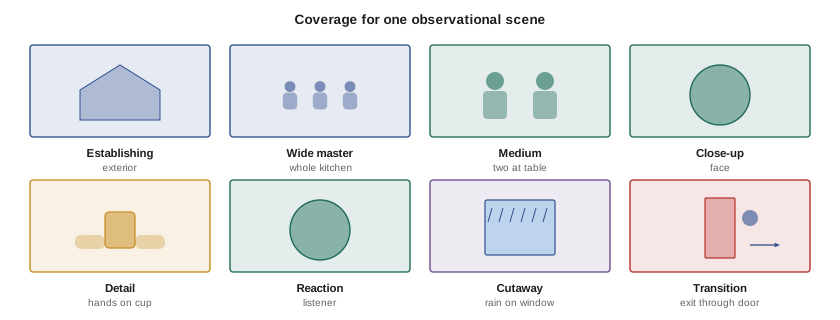
An editor building a scene needs to show where we are, who is involved, what happens and how people react, and to control time by compressing or expanding it. To give them that, the cinematographer covers each scene with a variety of shot sizes and angles:
- Establishing shots: wide frames that show the location, often shot before or after the action, including exteriors, signs and arrivals.
- Master or wide shots: frames that show the whole action and the geography of the people involved.
- Medium shots: frames that show individuals or small groups interacting.
- Close-ups: faces and expressions that carry emotion and reactions.
- Details or inserts: hands, objects, screens, documents and actions that clarify what is happening.
- Reactions: listeners' faces, which are essential for cutting dialogue scenes and compressing conversations.
- Cutaways: shots of related action or the environment that let the editor cut away and back without jump cuts.
- Transitions: entrances and exits, doors closing, vehicles departing and changes of light that help scenes begin and end.
Covering a scene in real time
Because events cannot be repeated, the operator covers a scene by moving between shot sizes and subjects as it unfolds. A common strategy is to start wide to establish geography, move to the speaker as a conversation begins, catch reactions when the speaker pauses or someone responds, grab details during lulls, and return to the wide shot when the dynamic changes. The operator listens constantly: the next person to speak is often signalled by an intake of breath, a shift in posture or a glance. Moving the camera toward a listener just before they reply produces natural-feeling coverage.
The operator also shoots for sequences rather than isolated shots. A sequence might show a subject making breakfast, leaving the house, driving to work and arriving. Each step needs a few shots that cut together: a wide of the kitchen, a close-up of the kettle, the subject's face, the door opening, the car interior, the destination. Shooting action from multiple angles when it repeats naturally, such as a worker performing the same task many times, gives the editor matching action to cut on.
| Element | Purpose | When to shoot |
|---|---|---|
| Establishing exterior | Locates the scene | Before or after the action |
| Wide master | Shows geography and relationships | At the start and when dynamics change |
| Medium shots | Shows interaction | During conversation |
| Close-ups | Emotion and reaction | Key lines and responses |
| Details | Clarifies action, compresses time | During lulls or repeated actions |
| Cutaways | Allows edits without jump cuts | Throughout, especially in long talk |
| Transitions | Begins and ends the scene | Entrances, exits, changes of light |
| Room tone | Smooths sound edits | Thirty seconds when the scene ends |
Continuity and screen direction
Even in observational filming, basic continuity principles help the editor. Keep track of the axis of action, the line between two people talking, and stay on one side of it when possible so that their eyelines match in the edit. If you must cross the line, do so with a visible camera move or a neutral shot that lets the audience follow. When a subject walks out of frame, let them exit completely and hold the empty frame for a moment; when they enter a new shot, start with an empty frame or let them enter. These clean entrances and exits give editors natural cutting points. Shooting the same action in a wide and then in a close-up, when it repeats, allows match cuts.
How long to hold and when to cut
Documentary operators should hold each framing long enough for the editor to use it: about ten seconds for a significant shot, longer for establishing and atmospheric shots, and through entire lines of dialogue for speakers. Constantly searching or zooming produces unusable footage. Equally, rolling continuously on an empty scene wastes media and logging time (Lesson 1). Many operators roll through entire scenes but make deliberate, steady framings within them, with clear moves between. Keep rolling after a scene seems to end: some of the most revealing moments come when people relax.
Frame rates and slow motion
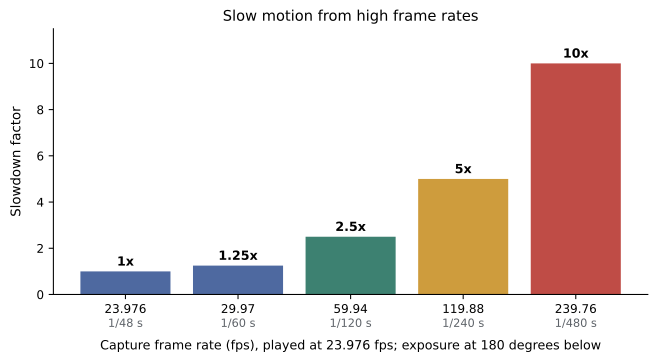
Most North American documentaries are delivered at 23.976 fps (often called 24p) or 29.97 fps, depending on the platform and the look. Shooting at higher frame rates and conforming to the delivery rate produces slow motion, used for emotional emphasis, to reveal fast action or to create a poetic texture. The slowdown factor is:
The exposure time also changes. With a 180° shutter, the exposure time is half the frame interval:
Worked problem
Planning a slow-motion shot
A cinematographer wants a 4-second action, a dancer's leap, to last about 10 seconds on screen in a 23.976 fps delivery. What capture frame rate is needed, what is the exposure time with a 180° shutter, and how does exposure change compared with normal 24 fps capture?
Show solution
- Required slowdown: \( 10 \div 4 = 2.5 \).
- Capture rate: \( 23.976 \times 2.5 \approx 60 \) fps, so 59.94 fps is suitable.
- Exposure time at 180°: \( 0.5 \times \frac{1}{59.94} \approx \frac{1}{120} \) s.
- Compared with \( \frac{1}{48} \) s at 24 fps, the exposure is \( \frac{120}{48} = 2.5 \) times shorter, a loss of \( \log_2(2.5) \approx 1.3 \) stops that must be recovered with aperture, ISO or less ND.
Answer: About 60 fps, an exposure of about 1/120 s and roughly 1.3 stops less light than at 24 fps.
High frame rates have costs: they multiply data rates and storage (Lesson 3), may crop the sensor or reduce resolution, require more light, and can introduce flicker under artificial light (Lesson 5). Sound is not recorded usefully at high frame rates, so slow-motion shots are silent. Use slow motion sparingly and with purpose; overused, it can make real events feel staged or sentimental, which raises ethical questions about manipulating reality.
Shutter angle also affects texture. A narrower shutter, such as 45° or 90°, makes motion crisp and staccato, which can heighten tension or chaos; a wider shutter gives smoother motion blur. Documentary operators often stick to 180° for a natural look, adjusting only for flicker or creative effect.
Time-lapse and hyperlapse
Time-lapse compresses time by capturing frames at intervals, showing clouds moving, cities waking or construction progressing. The interval depends on the speed of change and the desired on-screen duration. Hyperlapse adds camera movement between frames. Both are valuable for transitions and establishing context. Lesson 11 includes time-lapse calculations with other specialty techniques.
Working with the editor
Communication with the editor improves coverage. Watch early cuts and listen to the editor's notes: missing reactions, lack of establishing shots, too few cutaways or shots that are too short. Keep shooting notes or voice memos describing key moments, and mark important events with timecode or clip markers in camera. Many productions hold regular screenings of rushes so the camera team can learn what is working. Over a long production, the cinematographer's coverage evolves to serve the story that is emerging in the edit.
Shooting a sequence: an example
Imagine filming a baker opening her shop at dawn. Arrive before she does and shoot the exterior in the blue light, the empty street and the sign. Film her arrival from inside or across the street, letting her enter frame. Inside, start wide as she turns on lights and ovens, then move to details: hands kneading dough, flour dusting the counter, the oven door opening, bread being shaped. Catch her face as she works and any glances toward the clock or the window. When the first customer arrives, cover the exchange with a two-shot, then the customer's face and her reaction. Finish with the shop filling up and a wide from outside as the sun rises. Each step has a shot that leads into the next, and repeated actions such as kneading or shaping give you many chances to capture matching angles.
Avoiding staging
Observational purists avoid asking subjects to do anything for the camera, but in practice many documentaries involve small requests, such as asking someone to walk through a door again because the camera was not ready. Such requests change the footage from observed to staged, even if only slightly, and repeated or significant staging can mislead audiences. Many filmmakers draw a line between asking people to continue normal activities in a convenient place and asking them to recreate events. Discuss where the line falls for your film with the director, and be honest with the audience if scenes are reconstructed.
Covering events with multiple cameras
At public events, concerts, ceremonies and meetings, a second camera can capture the wide shot or the audience while the main camera follows the key subject. Coordinate positions in advance so the cameras do not appear in each other's frames, and agree which camera has priority on which subjects. Use common timecode and identical settings, and assign one operator to stay wide whenever the action changes. Multi-camera coverage of events gives editors enormous flexibility, but it also doubles the footage, so plan storage and logging accordingly.
Above all, think in scenes rather than shots: every scene needs a way in, a development and a way out, and the operator who shoots with that structure in mind gives the editor a story to tell.
Common mistakes
MistakeShooting only the speaker in conversations.
InsteadCapture reactions and listeners, which the editor needs to cut.
MistakeZooming and searching constantly.
InsteadHold steady, purposeful framings for at least ten seconds.
MistakeForgetting establishing shots and transitions.
InsteadShoot exteriors, entrances and exits to begin and end scenes.
MistakeOverusing slow motion.
InsteadUse high frame rates sparingly and for clear reasons.
MistakeStopping the camera as soon as a scene seems over.
InsteadKeep rolling as people relax and record room tone.
Summary and key terms
- Observational shooting relies on habituation and respect for subjects' boundaries.
- Coverage gives editors establishing shots, wides, mediums, close-ups, details, reactions, cutaways and transitions.
- Operators cover scenes in real time by listening and anticipating who speaks next.
- Clean entrances, exits and the axis of action help editors build continuity.
- Hold significant framings long enough to be usable and keep rolling after scenes seem to end.
- Slowdown equals capture rate divided by playback rate; higher rates shorten exposure.
- Communication with the editor refines coverage throughout a production.
- Coverage
- The variety of shots captured to allow a scene to be edited.
- Establishing shot
- A wide frame that shows where a scene takes place.
- Cutaway
- A shot of related action used to bridge edits.
- Insert
- A close detail of an object or action.
- Reaction shot
- A shot of a listener's response.
- Axis of action
- The line between interacting subjects that defines screen direction.
- Match cut
- A cut between two shots of the same action from different angles.
- Slowdown factor
- Capture frame rate divided by playback frame rate.
- Shutter angle
- The fraction of the frame interval during which the sensor is exposed, expressed in degrees.
- Room tone
- A recording of a location's ambient sound with no speech.
Practice problems
Work each problem on paper first, then reveal the answer to check.
Name five types of coverage shots.
Show answer
Establishing, wide, medium, close-up, detail, reaction, cutaway, transition.
Why are reaction shots essential?
Show answer
They let editors compress and cut dialogue.
How long should a significant framing be held?
Show answer
At least about ten seconds.
Slowdown for 100 fps played at 25 fps?
Show answer
4 times.
Exposure time at 120 fps with 180° shutter?
Show answer
1/240 s.
Capture rate for a 3 s action to last 9 s at 23.976 fps?
Show answer
About 72 fps; 71.93 fps if available.
Stops lost going from 1/48 s to 1/240 s?
Show answer
About 2.3 stops.
What does a narrow shutter do to motion?
Show answer
Makes it crisp and staccato.
Why let subjects exit frame completely?
Show answer
It gives editors clean cutting points.
What helps subjects habituate to the camera?
Show answer
Consistent presence, small kit and not demanding repeats.
Lesson quiz · 5 questions
Score 60% or more to complete this lesson.
Create a free account to save your progress, take quizzes and earn a certificate.