
CINE-320 · Lesson 12 of 12 · 27 min
Workflow, delivery and capstone shoot plan
A documentary can take years to make, and in that time the footage passes through many hands and many systems. Hours of irreplaceable material shot on location must be copied safely, organized so that editors can find moments months later, transcribed, synchronized, graded, mixed and finally delivered to broadcasters, streamers and festivals that each have their own technical requirements. A lost card or a corrupted drive can destroy a scene that will never happen again. This final lesson covers data management on location, metadata and logging, working with editors and post-production, deliverables and accessibility requirements, and archiving. It ends with a capstone exercise in which you build a complete shoot plan for a short documentary, drawing together the skills of the whole course.
Data management on location
On small documentary crews, the camera operator or an assistant usually acts as the data manager, sometimes called a DIT or data wrangler on larger productions. The core principles are simple and must be followed without exception:
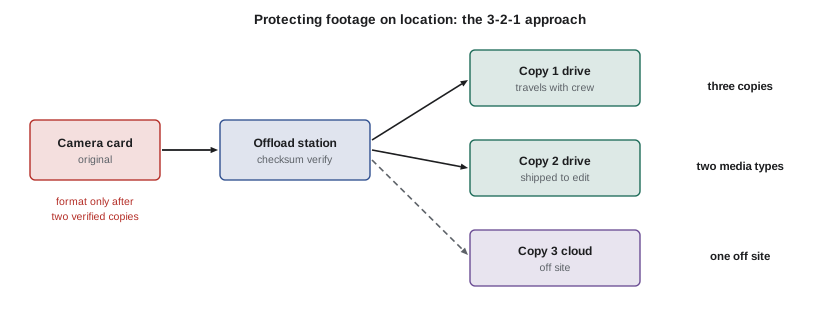
- Never format a card until its contents exist in at least two verified copies on separate drives.
- Use offload software that performs checksum verification, comparing a mathematical fingerprint such as MD5 or xxHash of the source and each copy, rather than simply dragging files in a file browser.
- Keep a consistent folder structure and naming convention, for example by date, camera and card number, such as 2026-03-14_A_003.
- Label cards and drives physically and log each offload: what was copied, when, by whom and whether verification succeeded.
- Store copies in different places: one copy travels with the crew, another stays at the base or goes to the edit, and, when bandwidth allows, a third is uploaded to secure cloud storage.
This approach is often summarized as the 3-2-1 rule: three copies of the data, on two different types of media, with one copy off site.
Worked problem
Planning offload time
At the end of a shoot day, the crew has about 934 GB of footage (the figure from Lesson 3). The card reader delivers about 400 MB/s, and the offload software writes to two drives at the same time, then reads both copies back to verify checksums at about the same speed. How long will the offload take?
Show solution
- Copy time: \( 934{,}000 \div 400 \approx 2{,}335 \) seconds, about 39 minutes, writing to both drives simultaneously.
- Verification: reading back the copies adds roughly another 39 minutes if the drives are read one after the other at 400 MB/s, or less if they are read in parallel.
- Total: about 60 to 80 minutes, plus time to log and label.
Answer: Plan for at least an hour and a quarter of offloading after a heavy shoot day, or offload in stages during breaks.
Slow drives, USB hubs and laptops on battery power can stretch these times dramatically, which is why many crews offload at lunch and after each major scene rather than leaving everything to the end of the day.
Metadata, logging and transcription
A documentary with a high shooting ratio (Lesson 1) is unusable unless footage can be found. Good metadata starts on location: camera clip names, reel or card numbers, timecode, scene descriptions, people present and key moments noted in camera or in a shot log. Many crews dictate voice memos or keep simple spreadsheets during the day, marking times of important events. Releases should be cross-referenced to the people who appear in each scene.
In post-production, footage is often transcribed, either by people or by automated speech recognition, and the transcripts become searchable databases that editors and producers use to build stories. Editing systems can attach transcripts, keywords and markers to clips. Sensitive material, such as recordings of anonymous sources, must be stored and transcribed securely, and automated services should be checked for privacy and data residency requirements.
From the field to the edit
The camera team's choices shape post-production. Consistent frame rates and resolutions avoid conversions; matched picture profiles across cameras simplify grading (CINE-310); timecode synchronization speeds up syncing sound; and clearly documented LUTs and settings allow editors to view footage correctly (CINE-202). Editors usually work with proxies generated from the camera originals and reconnect to the originals for the final grade and conform. The camera team should send a technical note to the edit at the start of the production describing cameras, codecs, frame rates, colour profiles, LUTs, audio track assignments and naming conventions.
Deliverables
When the film is finished, it must be delivered in formats and with documents specified by the broadcaster, streamer or distributor. Deliverables lists can run to dozens of items. Common technical deliverables include:
- A master file in a high-quality format, such as ProRes 422 HQ or an Interoperable Master Format (IMF) package, at the specified resolution, frame rate and colour space, with HDR and SDR versions where required.
- Audio stems: separate dialogue, music and effects tracks, plus full mixes in stereo and sometimes 5.1 surround, meeting loudness specifications (Lesson 8).
- A music and effects (M&E) mix without dialogue for foreign-language versions.
- Textless versions of shots that carry titles or subtitles.
- Closed captions and subtitles in specified formats.
- Described video or audio description tracks where required.
- A Digital Cinema Package (DCP) for theatrical screenings and many festivals.
Legal and documentary deliverables include releases, music cue sheets and licences, archival licences, fair dealing or fair use opinions, chain of title documents, E&O insurance certificates (Lesson 9) and credits. Broadcasters and streamers perform quality control (QC) on technical deliverables, checking for picture and sound faults, illegal levels, sync problems, dropped frames and incorrect metadata. Failed QC delays delivery and payment, so it is worth running your own checks first.
In Canada, broadcasters such as CBC/Radio-Canada, TVO, Knowledge Network and Bell Media publish technical delivery specifications. The CRTC requires licensed broadcasters to caption programming, generally to 100 % of programs over the broadcast day, under quality standards for English- and French-language captioning, and requires described video for a portion of prime-time programming on many services. Productions financed by the Canada Media Fund, Telefilm Canada or provincial agencies must also meet those funders' delivery and reporting requirements, including Canadian content certification.
| Category | Item | Purpose |
|---|---|---|
| Picture | Master file or IMF package | Broadcast and streaming source |
| Picture | Textless elements | Versioning and localization |
| Sound | Stems and full mixes | Mixing and versioning |
| Sound | M&E mix | Foreign-language versions |
| Accessibility | Captions, subtitles, described video | Access for deaf, hard of hearing, blind and low-vision audiences |
| Theatrical | DCP | Cinemas and festivals |
| Legal | Releases, licences, chain of title, E&O | Rights and insurance |
| Documentation | Cue sheets, credits, technical reports | Royalties and QC |
Archiving the production
After delivery, the production's assets must be archived: camera originals, project files, graded masters, stems and documentation. Documentaries often find new life years later in new edits, retrospectives or as archival footage for other films, and the participants' stories may become historically important. Archive to more than one medium and location, record what formats and software were used, and plan to migrate data to new media every few years, because drives and tapes fail and formats become obsolete. Some productions deposit their materials with institutions such as national or university archives.
Capstone: building a shoot plan
The capstone brings together everything in this course. Choose a real subject for a short observational documentary of about 10 minutes, such as a small business, a community event, a craftsperson or a sports team, and prepare a complete shoot plan containing the elements below. If possible, shoot a scene and an interview, then review your footage against your plan.
- Story and approach: a one-paragraph synopsis, the documentary mode or modes (Lesson 1) and a visual treatment with references.
- Crew and roles: who will direct, shoot and record sound, and how they will communicate (Lesson 2).
- Kit list: camera, lenses, supports, sound, lighting and accessories, with reasons (Lessons 3 to 5 and 8).
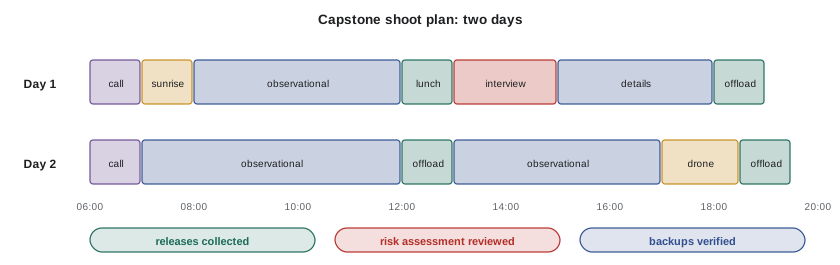
- Schedule: shoot days, call times, interview times, sunrise and sunset, and data offloads.
- Interview design: location, framing, eyeline, one or two cameras and lighting diagram (Lesson 6).
- Coverage plan: key scenes and the coverage needed for each, including establishing shots, details and transitions (Lesson 7).
- Ethics and consent: how you will explain the project, which releases you need, how you will handle sensitive moments and any trauma-informed measures (Lesson 9).
- Safety: a risk assessment with likelihood, severity and controls (Lesson 9).
- Archival and rights: any archival material, music or artworks, and how they will be cleared (Lesson 10).
- Specialty capture: any drone, time-lapse or other specialty shots, with regulatory checks (Lesson 11).
- Data and budget: storage, batteries, offload plan and a day budget (Lessons 2 to 4 and this lesson).
Worked problem
Capstone data and power summary
For a two-day capstone shoot, you expect 3 hours per day of observational footage at 150 Mb/s (H.265) and a 1-hour interview in ProRes 422 HQ HD (176 Mb/s) on day 1. The camera package draws 18 W and runs about 6 hours per day from 98 Wh batteries with 85 % usable capacity. How much storage, including two copies, and how many batteries per day do you need?
Show solution
- Observational footage: \( 0.45 \times 150 \times 3 \times 2 \approx 405 \) GB over two days.
- Interview: \( 0.45 \times 176 \times 1 \approx 79 \) GB.
- Total original footage: about 484 GB; with two backup copies, about 968 GB of drive space, so two 1 TB drives (one per copy) are sufficient with a little margin.
- Energy per day: \( 18 \times 6 = 108 \) Wh; usable per battery \( 98 \times 0.85 \approx 83 \) Wh, so \( 108 \div 83 \approx 1.3 \) batteries; carry three per day for margin.
Answer: About 484 GB of footage, two 1 TB backup drives, and three batteries per day.
Reviewing the capstone
After the shoot, review your footage honestly. Did you capture the coverage the editor needs? Is the sound intelligible? Did the visual treatment hold up under real conditions? Were the participants comfortable, and did the consent process work? Did your data plan protect every clip? Documentary cinematographers improve by reflecting on these questions after every project. The habits you build now, of planning carefully, shooting purposefully, protecting people and protecting footage, will serve you throughout a career filming the real world.
Working with post-production supervisors
On larger documentaries, a post-production supervisor coordinates the workflow from the edit to delivery, managing schedules, vendors, budgets and the deliverables list. The cinematographer usually attends the grade (CINE-310) and may review the conform and QC reports for picture issues. Staying involved through finishing ensures that the visual approach planned at the start survives to the final master, and that decisions such as noise reduction, stabilization or reframing are made with the cinematographer's input.
Version control and backups during editing
During editing, project files change daily and represent weeks of work. Editing systems save automatic backups, but productions should also back up project files to a separate location every day and keep dated versions so that a corrupted project or mistaken change can be reversed. When several editors and assistants share material over a network or cloud system, clear rules on folder structures and permissions prevent accidental deletion of media.
Common mistakes
MistakeDragging files without checksum verification.
InsteadUse offload software that verifies every copy.
MistakeKeeping all copies in the same bag.
InsteadSeparate copies physically and keep one off site.
MistakeLeaving metadata until post-production.
InsteadLog clips, people and moments on location.
MistakeIgnoring delivery specifications until the end.
InsteadRead the broadcaster's or streamer's specs before shooting.
MistakeTreating archiving as optional.
InsteadArchive originals, projects and masters on multiple media and migrate them.
Summary and key terms
- Never format cards until two verified copies exist; use checksums and consistent naming.
- The 3-2-1 rule keeps three copies on two media types with one off site.
- Metadata, logs and transcripts make high shooting ratios manageable.
- Technical notes from the camera team smooth editing, grading and conform.
- Deliverables include masters, stems, M&E, captions, described video, DCPs and legal documents.
- Canadian and US regulators and platforms set captioning, description and technical requirements.
- A complete shoot plan links story, crew, kit, schedule, coverage, ethics, safety, rights and data.
- Data wrangler
- The crew member who manages footage offloads and backups.
- Checksum
- A mathematical fingerprint used to verify that copies match the source.
- 3-2-1 rule
- Three copies on two media types with one off site.
- Metadata
- Descriptive information attached to clips.
- Conform
- Reconnecting an edit to the original camera files for finishing.
- Stems
- Separate dialogue, music and effects audio tracks.
- M&E
- A music and effects mix without dialogue.
- DCP
- A Digital Cinema Package for theatrical projection.
- IMF
- Interoperable Master Format, a component-based delivery package.
- QC
- Quality control checks on deliverables.
Practice problems
Work each problem on paper first, then reveal the answer to check.
When can a card be formatted?
Show answer
Only after two verified copies exist.
What does a checksum verify?
Show answer
That a copy matches the source exactly.
Copy time for 500 GB at 250 MB/s?
Show answer
2,000 seconds, about 33 minutes.
What is the 3-2-1 rule?
Show answer
Three copies, two media types, one off site.
Why send a technical note to the edit?
Show answer
To document cameras, codecs, frame rates, LUTs and audio tracks.
Name four technical deliverables.
Show answer
Master, stems, M&E, captions, textless, DCP.
Name three legal deliverables.
Show answer
Releases, licences, chain of title, E&O certificate, cue sheets.
Storage for 2 hours at 150 Mb/s?
Show answer
About 135 GB.
Why migrate archives?
Show answer
Media fail and formats become obsolete.
Name five elements of a shoot plan.
Show answer
Story, crew, kit, schedule, coverage, ethics, safety, rights, data, budget.
Lesson quiz · 5 questions
Score 60% or more to complete this lesson.
Create a free account to save your progress, take quizzes and earn a certificate.