
BAS-310 · Lesson 6 of 12 · 22 min
Device instances, network numbers and addressing
▶ Video coming soon A video version of this lesson is on the way.
After the break on October 20, Prakash turned the whiteboard round to a page he had prepared: Ninefield Tower's numbering plan. In BAS-210, Callie had given the new box controller on the seventh floor MAC address 23 and device instance 107023, because Ninefield's plan was 100,000, plus 1,000 times the floor, plus the MAC address. "You followed the plan," Prakash said. "Tonight you learn why there is a plan, and why the replacement controller in VAV-7-14 had also arrived as device 1."
Three different numbers
A BACnet device is identified by three numbers that do three different jobs, and most addressing faults come from confusing them.
| Number | Unique across | Range | Used for |
|---|---|---|---|
| Device instance | The whole BACnet internetwork | 0 to 4,194,302 | Identifying the device itself, whatever network it is on |
| Network number | The whole BACnet internetwork | 1 to 65,534 | Identifying one network, such as one MS/TP trunk or one BACnet/IP network |
| MAC address | One network only | MS/TP 0 to 254; on IP, an address and port | Delivering a message to the device on its own network |
The device instance is the device's name, in numbers. It is the instance number of its Device object, and no two devices that can reach each other may share it, even if they are on different trunks in different buildings. The network number and MAC address together are the device's address: they say how to get a message to it. A device can be moved from one trunk to another, getting a new address, and keep its device instance; front ends and supervisory controllers that refer to it by instance then find it again by asking Who-Is.
The device instance has 22 bits, which gives 4,194,304 values. The top value, 4,194,303, is reserved as a wildcard that means "whatever device answers", used for example when a tool talks to a device whose instance it does not yet know, so the usable range is 0 to 4,194,302. Network number 65,535 is reserved as the broadcast to all networks, and 0 means the local network, so usable network numbers run from 1 to 65,534.
What the MAC address looks like on each network
On MS/TP the MAC address is one octet, the 0 to 254 of lesson 4. On BACnet/IP it is six octets: the device's four-octet IP address followed by the two-octet UDP port. Tools show it either as 10.40.12.10:47808 or as six hexadecimal octets. Reading the hexadecimal form is a small skill worth having, because analyzers often show it that way.
Worked problem
Reading a BACnet/IP MAC address
An analyzer shows the source of a message as the six octets 0A 28 0C 0A BA C0. What IP address and port does that represent?
Show solution
- IP address: 0A = 10, 28 = 40, 0C = 12, 0A = 10, so 10.40.12.10.
- Port: BA C0 hexadecimal = 11 × 4,096 + 10 × 256 + 12 × 16 + 0 = 45,056 + 2,560 + 192 = 47,808.
Answer: 10.40.12.10, port 47808: the Tilden Hall supervisory controller from lesson 5's BDT.
A message to a device on a remote network carries the destination network number and the destination MAC address inside it, in the network layer, while the virtual link or MS/TP layer carries the address of the next hop, usually a router. Analyzers display both, which is why a capture on Tilden's IP network can show a message addressed to network 1202, MAC 14: it is on its way through the supervisory controller to a VAV controller on the second trunk.
Planning device instances
Because device instances must be unique across the whole internetwork, they must be planned for the whole internetwork, not trunk by trunk. Controllers usually arrive with a default instance, often a fixed number such as 1 or a number built from the MAC address, and a site where every installer accepts the default soon has duplicates. Quillon used two kinds of plan, depending on the building.
At Ninefield, where each office floor has its own MS/TP trunk, the plan was by floor: 100,000, plus 1,000 times the floor number, plus the device's MAC address. Floor 7 devices are 107000 to 107127, and a technician who sees 107023 knows at once where to look. Plant and penthouse devices on BACnet/IP used a reserved block, 100900 to 100999, and devices on the penthouse trunks used 111000 to 111999, counting the penthouse as floor 11.
At Harcastle, where every building has its own trunks behind its own supervisory controller, the plan was by network: 1,000 times the network number, plus the MAC address. The network numbers themselves were planned by building, as the next section shows, so device 1202014 is MAC 14 on network 1202, Tilden's second trunk. A plan built from the network number has the advantage that the instance alone tells a technician which trunk to put an analyzer on; its disadvantage is that moving a device to another trunk means changing its instance.
Worked problem
Instances from two numbering plans
Work out the device instances for: (a) a VAV controller at MAC 9 on Ninefield's fourth floor, (b) the RTU-1 controller on Ninefield's new podium trunk at MAC 1, counting the podium as floor 1, (c) a fan coil controller at MAC 37 on Harcastle network 1501, Morrow House's trunk. Check each is within the allowed range.
Show solution
- (a) 100,000 + 1,000 × 4 + 9 = 104,009.
- (b) 100,000 + 1,000 × 1 + 1 = 101,001.
- (c) 1,000 × 1,501 + 37 = 1,501,037.
- All are below 4,194,302.
Answer: Ninefield instances 104009 and 101001, Harcastle instance 1501037. Both plans stay well inside the range, and each number tells a technician where the device lives.
Planning network numbers
Network numbers need the same care. Every BACnet network in an internetwork, each MS/TP trunk and each BACnet/IP network, needs its own number, and every router port is configured with the number of the network it connects to. Two routers that both claim a network number for different networks give conflicting directions, and messages go to the wrong place or nowhere.
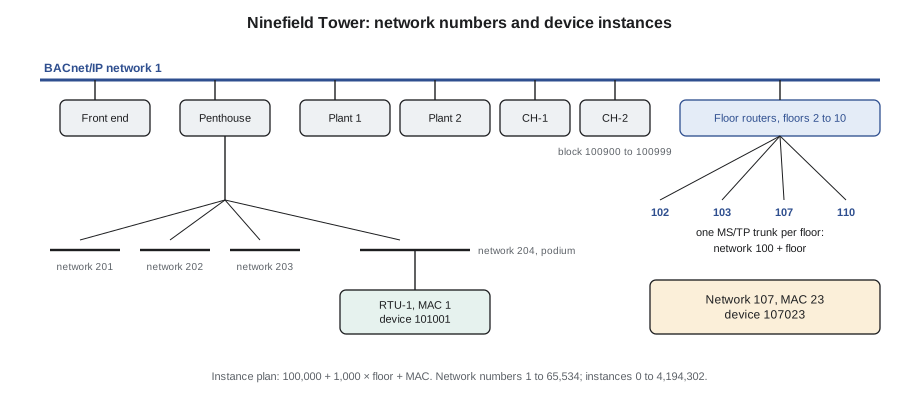
| Network number | Ninefield Tower | Harcastle College |
|---|---|---|
| 1 | BACnet/IP, building controls network | BACnet/IP, campus controls network across all subnets |
| 102 to 110 | MS/TP trunk on each office floor, 100 plus the floor | Not used |
| 201, 202, 203 | Penthouse MS/TP trunks: air handlers, plant and the podium protocol converter | Not used |
| 204 | New MS/TP trunk for the podium rooftop unit controllers | Not used |
| 1201, 1202, 1203 | Not used | Tilden Hall MS/TP trunks 1 to 3 |
| 1501 | Not used | Morrow House MS/TP trunk |
A BACnet/IP network that spans several IP subnets joined by BBMDs, like Harcastle's, is still one BACnet network with one network number. The BBMDs make the subnets behave as one network for broadcasts. Separate BACnet/IP networks with different numbers, joined by BACnet routers, are possible but rare in buildings.
Network numbers and device instances only have to be unique within one internetwork. Ninefield and Harcastle are separate systems that never exchange messages, so both use network 1. If an owner later joins two sites into one system, for example by connecting them to one corporate front end, any overlaps must be found and renumbered first, which is why some companies, Quillon included, keep a register of the instance and network blocks used at every site they look after.
When numbers collide
| Fault | What the front end shows | How to confirm |
|---|---|---|
| Two devices with the same instance | Values from one device appear under the other; a device flips between two addresses; writes reach the wrong device | Who-Is for that instance returns two I-Am replies from different addresses |
| Two networks with the same number | Devices on one trunk vanish when another router starts; routing errors | Two routers answer for the same network with I-Am-Router-To-Network |
| Device instance changed after integration | Points, trends and graphics for that device all go offline at once | Device answers Who-Is with a new instance |
| MAC address duplicated on a trunk | Intermittent loss of many devices on that trunk | Two replies at one MAC in router diagnostics or a capture (lesson 4) |
The seventh-floor replacement controller in September had both faults at once: MAC address 3, a duplicate on the trunk, and device instance 1, a duplicate of a controller in a tenant's lab elsewhere in the building that had also been left at its factory setting. Fixing the MAC cured the trunk; giving the controller instance 107014, per the plan, cured the second problem, which had shown up as the lab controller's points flickering on the front end every few minutes. Prakash only found the second fault because he asked the front end's discovery tool for every device answering to instance 1, and two did.
Changing numbers safely
Changing a device's instance or a router's network number on a working system has knock-on effects. Supervisory controllers, front ends and other controllers that read or write the device by instance lose it until they rediscover it, and some keep its old instance in their databases until someone updates them. Trends tied to the old instance stop, and graphics show it offline. The safe order is the one Quillon wrote into its procedures: plan the new numbers, record which other devices refer to the old ones, make the change at a quiet time, rediscover from the front end, update every reference, and check that trends and graphics are live again.
Callie noticed that the plan on the whiteboard left gaps: no Ninefield device used MAC addresses above 40, and none of Harcastle's networks used numbers 1204 to 1499. "On purpose," Prakash said. "A numbering plan with no room to grow is just a list."
Keeping an addressing register
An addressing plan is only useful if the record of what is actually installed is kept up to date. Quillon keeps an addressing register for each site as a simple table in the job file, one row per device, updated whenever a device is added, replaced or moved.
| Column | Example (Ninefield) |
|---|---|
| Device instance | 107023 |
| Device name | NF.7.VAV-7-23 |
| Network number | 107 |
| MAC address | 23 |
| Model and firmware | The product and its firmware version at the last backup |
| Location | Seventh floor, ceiling above the east meeting room |
| Date and initials | When the row last changed and who changed it |
The plan's capacity is easy to check. With 1,000 instance numbers set aside for each floor and MS/TP masters limited to MAC addresses 0 to 127, every possible master on a floor's trunk already has its own instance, with hundreds of numbers spare in each floor's block for devices on other networks if a floor ever needs them. The network numbers are just as roomy: Ninefield uses fewer than 20 of the 65,534 available, so a future tenant fit-out with its own trunk can be given a number in the same pattern without renumbering anything.
Comparing the register with the network
A register can drift from reality, especially on a building where fit-out contractors replace devices, as happened with VAV-7-14 in July. The check is a discovery sweep compared against the register. A Who-Is limited to one floor's instance range, sent from the front end or a laptop tool, returns an I-Am from every device in that range; each answer carries the device instance and, through the network layer, the network number and MAC address it came from. Any device that answers but is not in the register, any registered device that does not answer, and any device whose network number or MAC address differs from the register needs explaining before it causes a fault.
Running the sweep floor by floor, rather than across the whole building at once, keeps the broadcast traffic small and makes the answers easy to compare. At Callie's suggestion, Prakash added the sweep to Quillon's annual service visit checklist for Ninefield after the September 21 trunk fault, so that the next device installed with a factory default address is found within a year rather than when it causes trouble.
Common mistakes
MistakeAccepting a controller's default device instance.
InsteadAssign every device an instance from the site plan before connecting it.
MistakePlanning device instances trunk by trunk.
InsteadPlan them for the whole internetwork, and keep a register of blocks used.
MistakeGiving two router ports the same network number.
InsteadGive every MS/TP trunk and BACnet/IP network its own number.
MistakeChanging a device instance without updating references.
InsteadRecord every reference first, rediscover, and update trends and graphics.
MistakeTreating the MAC address as the device's identity.
InsteadThe MAC is only the address on one network; the instance is the identity.
Summary and key terms
- A device has an instance (identity), and an address made of a network number and a MAC address.
- Device instances run from 0 to 4,194,302 and must be unique across the internetwork; 4,194,303 is a wildcard.
- Network numbers run from 1 to 65,534 and must be unique across the internetwork; 65,535 is the global broadcast.
- On BACnet/IP the MAC is the IP address and port, six octets; on MS/TP it is one octet.
- Numbering plans by floor or by network make an instance tell you where a device is.
- Duplicate instances and network numbers cause misdirected data and devices that vanish.
- Changing numbers on a working system needs references, trends and graphics updated.
- Device instance
- The instance number of a device's Device object, its identity on the internetwork.
- Internetwork
- All the BACnet networks joined by routers that can exchange messages.
- Network number
- The number identifying one BACnet network in an internetwork.
- MAC address
- A device's address on its own network.
- Wildcard instance
- Instance 4,194,303, meaning whichever device answers.
- Numbering plan
- A written rule for assigning device instances and network numbers on a site.
- Virtual MAC
- On BACnet/IP, the six-octet address made from the IP address and UDP port.
Practice problems
Work each problem on paper first, then reveal the answer to check.
Using Ninefield's plan, what is the instance of a controller at MAC 14 on floor 9?
Show answer
100,000 + 9,000 + 14 = 109,014.
Using Harcastle's plan, which network and MAC is device 1203022?
Show answer
Network 1203, Tilden's third trunk, MAC 22.
Decode the BACnet/IP MAC 0A 28 0F 0A BA C0.
Show answer
10.40.15.10, port 47808: the Morrow House BBMD.
Who-Is for instance 104009 gets two I-Am replies from different addresses. What is the fault?
Show answer
A duplicate device instance.
Can Ninefield and Harcastle both use network number 1? Why?
Show answer
Yes, they are separate internetworks that never exchange messages.
Lesson quiz · 5 questions
Score 60% or more to complete this lesson.
Create a free account to save your progress, take quizzes and earn a certificate.