
BAS-310 · Lesson 2 of 12 · 22 min
BACnet objects and properties
▶ Video coming soon A video version of this lesson is on the way.
The following Tuesday, September 29, Callie came to the second network night straight from a day at Harcastle's central steam plant with Nell Nakagawa. Prakash had one of the bench VAV controllers open on the laptop in a generic BACnet browser, the kind of tool that knows nothing about any manufacturer and shows only what the standard defines. "Your controller's own software shows you its world," he said. "This shows you what every other BACnet device sees. If something isn't here, nothing else in the building can use it." The screen showed a tree: one device at the top and, under it, a list of objects with names like ZN-T, DMPR-CMD and FLOW.
Everything is an object
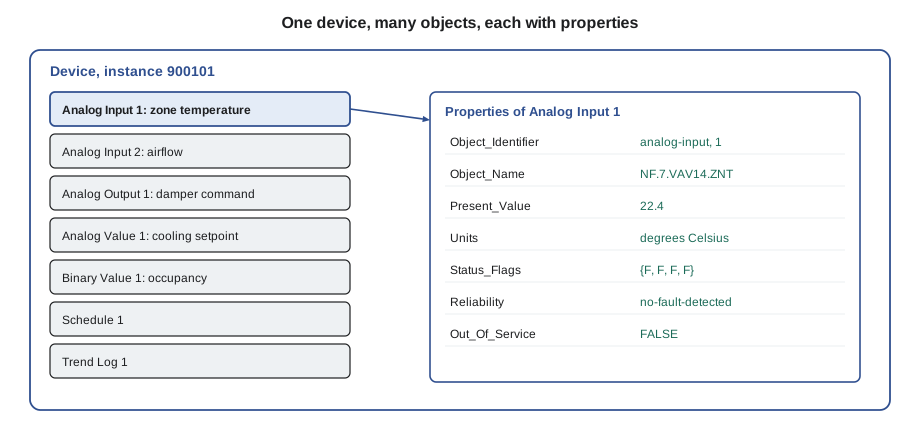
BACnet describes the data in a device as a collection of objects. An object is a standard container for one piece of information or one function: a temperature measured by an input, a damper command, a schedule, a trend log. Every object has a type, chosen from the list the standard defines, and a set of properties, each holding one fact about the object. A temperature sensor becomes an Analog Input object; its current reading is that object's Present_Value property, its engineering unit is its Units property, and whether it is working is its Reliability property.
The power of this idea is that the container is the same whatever is inside it. A front end does not need to know that Quillon's VAV controller wires its zone sensor to terminal UI1, or that a chiller measures its leaving water temperature with an RTD. It only needs to know that each is an Analog Input, and it can read the Present_Value, Units and Status_Flags of either in exactly the same way.
Identifying an object
Each object is identified within its device by its Object_Identifier, which combines the object type with an instance number, written in tools as something like analog-input,1 or AI-1. The instance number only has to be unique among objects of the same type in the same device, so almost every controller has an AI-1. To name an object anywhere on a network, a client needs both the device and the object identifier: device 900101, analog-input 1.
Objects also have an Object_Name, a text string that must be unique within the device. Names are for people and for tools that search by name. Quillon followed the naming convention Sophie had set out in BAS-210, building names from the site, the equipment and the point, so that the RTU-1 discharge temperature on Ninefield's network was NF.RTU1.DA-T. Because names and identifiers are both carried on the network, a well-named device is far easier to integrate than one full of names like AI_003.
The standard object types
The standard defines more than sixty object types. A technician meets a dozen of them every day.
| Object type | Abbreviation | Represents |
|---|---|---|
| Analog Input | AI | A measured value from a physical input, such as a temperature or pressure |
| Analog Output | AO | A command to a physical output, such as a valve or damper signal |
| Analog Value | AV | A numeric value inside the controller, such as a setpoint or calculation |
| Binary Input | BI | An on/off input, such as a fan status or alarm contact |
| Binary Output | BO | An on/off output, such as a start relay |
| Binary Value | BV | An on/off value inside the controller, such as an occupancy flag |
| Multi-state Input, Output, Value | MSI, MSO, MSV | A value with a few named states, such as Off, Low, High or a mode |
| Schedule | SCH | A weekly schedule with exceptions |
| Calendar | CAL | A list of dates, such as holidays, used by schedules |
| Trend Log | TL | A stored history of another property's values |
| Notification Class | NC | A list of who receives alarms and events, and at what priority |
| Device | DEV | The device itself: one per device, describing it as a whole |
Manufacturers may also create proprietary object types and proprietary properties for features the standard does not cover, such as a particular tuning parameter. Proprietary items are legal, but other manufacturers' tools usually cannot interpret them, so anything the building system needs to share should be mapped onto standard objects.
The properties that matter most
Each object type has required properties that every device must provide and optional ones it may provide. The PICS says which optional properties a product supports. The properties below are the ones a technician reads most.
| Property | What it holds |
|---|---|
| Object_Identifier | Object type and instance number |
| Object_Name | Unique text name within the device |
| Present_Value | The current value: the reading, command or setting |
| Units | The engineering unit, chosen from the standard list |
| Status_Flags | Four true or false flags: IN_ALARM, FAULT, OVERRIDDEN and OUT_OF_SERVICE |
| Event_State | Whether the object is normal or in an alarm or fault state |
| Reliability | Whether the value can be trusted, and if not, why |
| Out_Of_Service | Whether the value has been disconnected from the physical point |
| COV_Increment | How much an analog value must change before change-of-value subscribers are told |
| Priority_Array and Relinquish_Default | For commandable objects, the sixteen command slots and the fallback value (lesson 7) |
Status_Flags gives a quick summary of an object's health. IN_ALARM means an alarm condition is active. FAULT means the Reliability property shows a problem. OVERRIDDEN means the value is being forced by something outside BACnet, such as a hand switch on an output card. OUT_OF_SERVICE mirrors the Out_Of_Service property. A front end that colours points by their Status_Flags lets an operator see bad data at a glance.
Reliability gives the reason for a fault. NO_FAULT_DETECTED is normal. OPEN_LOOP and SHORTED_LOOP are what a controller reports when a thermistor input reads an open or shorted circuit, as Callie had seen in BAS-120 when the Tilden outdoor sensor was wired to the wrong input type. OVER_RANGE, UNDER_RANGE and COMMUNICATION_FAILURE are also common. A Present_Value with a Reliability other than NO_FAULT_DETECTED should not be used for control.
Out of service: a powerful and dangerous property
Setting Out_Of_Service to true on an input disconnects its Present_Value from the physical sensor. The value then holds still and can be written, so a technician can simulate a cold outdoor temperature to test a heating sequence, as BAS-220 described for testing logic. On an output, Out_Of_Service disconnects the physical output from the Present_Value, so the program can run while the real valve or damper stays where it is.
That makes Out_Of_Service the most useful testing tool in BACnet and one of the most dangerous. An input left out of service feeds a frozen value to every program that reads it, indefinitely. Quillon's rule was that any object put out of service must be recorded on the work order and restored before the technician leaves, and the front end's daily report listed every object with OUT_OF_SERVICE set, in the same spirit as the override report Callie would run at Tilden in November.
Device 900101  'BENCH.VAV1'  (Quillon protocol rack, sample)
  analog-input,1    BENCH.VAV1.ZN-T      22.4   °C     flags {F,F,F,F}  NO_FAULT_DETECTED
  analog-input,2    BENCH.VAV1.FLOW      148    L/s    flags {F,F,F,F}  NO_FAULT_DETECTED
  analog-input,3    BENCH.VAV1.DA-T      -      °C     flags {F,T,F,F}  OPEN_LOOP
  analog-output,1   BENCH.VAV1.DMPR-CMD  42.0   0-100  flags {F,F,F,F}  NO_FAULT_DETECTED
  analog-value,1    BENCH.VAV1.CLG-SP    24.0   °C     flags {F,F,F,F}
  binary-value,1    BENCH.VAV1.OCC       active        flags {F,F,F,F}
  schedule,1        BENCH.VAV1.SCHED
  trend-log,1       BENCH.VAV1.ZN-T-TL
Callie spotted the fault straight away: AI-3, the discharge air temperature, had FAULT set and a Reliability of OPEN_LOOP. Prakash had left the sensor unplugged on purpose. "See how the browser shows no value at all," he said. "Some devices keep showing the last good reading, some show a limit value. Never trust a Present_Value without checking its flags." On the network, Units travels as a number from the standard's list of engineering units; the browser turns that number into a symbol for people to read.
The Device object
Every BACnet device contains exactly one Device object, which describes the device itself. Its instance number is the device's identity on the whole network, and lesson 6 explains how those numbers are planned. Its properties tell a client how to talk to it.
| Device property | Why it matters |
|---|---|
| Object_Identifier | The device instance, which must be unique on the whole internetwork |
| Vendor_Name and Vendor_Identifier | Who made it |
| Model_Name, Firmware_Revision, Application_Software_Version | What it is and what it runs, for records and support |
| Protocol_Revision | Which revision of the BACnet standard it follows |
| Object_List | Every object in the device, so a client can discover them |
| Max_APDU_Length_Accepted and Segmentation_Supported | How big a message it can take, and whether it can split large ones |
| APDU_Timeout and Number_Of_APDU_Retries | How long it waits for an answer and how often it retries |
| Max_Master and Max_Info_Frames | MS/TP settings, for devices on MS/TP (lesson 4) |
Reading the Device object is the first step of any integration. A front end that discovers a device reads its Object_List, then reads the name, type and units of every object in it. On an MS/TP trunk with dozens of devices that discovery can take minutes, which is one reason lesson 3's services matter.
Change of value
Analog objects that support change-of-value reporting have a COV_Increment property. A client can subscribe to the object, and the device then sends a notification whenever the Present_Value changes by at least the increment since the last notification, or when the Status_Flags change. Choosing the increment is a judgement: too small and the network fills with notifications about noise; too large and the client misses changes that matter.
Worked problem
How many notifications a change-of-value subscription sends
A zone temperature has a COV_Increment of 0.5 K. It was last reported at 22.0 °C and rises steadily to 24.3 °C over an afternoon. How many change-of-value notifications are sent, and at which values?
Show solution
- A notification goes out each time the value has moved 0.5 K from the last one reported.
- Values: 22.5, 23.0, 23.5 and 24.0 °C. The next would be at 24.5 °C, which is never reached.
Answer: Four notifications. A client polling the same point once a minute would have made several hundred reads over the afternoon to learn the same thing.
Before the evening ended, Prakash plugged the discharge sensor back in and asked Callie to watch the flags. FAULT cleared, Reliability returned to NO_FAULT_DETECTED and a temperature appeared. "Objects and properties are the nouns," he said. "Next week, the verbs."
Reliability values a technician meets
When a point's FAULT flag is set, the Reliability property says why. The standard defines a list of values, and controllers use a subset of them. A technician who knows the common ones can often tell from the front end alone whether to bring a meter, a sensor or a laptop.
| Reliability value | Usual meaning | First thing to check |
|---|---|---|
| no-fault-detected | The value is believed good | Nothing; the point is healthy |
| open-loop | The input circuit is open, such as a broken sensor wire | Wiring and terminals at both ends |
| shorted-loop | The input circuit is shorted | Pinched or crushed cable, water in a box |
| over-range or under-range | The reading is outside the configured range | Sensor type and input configuration |
| no-sensor | The input expects a sensor that is not there | Whether the sensor was ever installed |
| communication-failure | A value from another device or network has stopped arriving | The network, the other device or a gateway |
| unreliable-other | A fault the device cannot describe more exactly | The product documentation |
Reliability also explains a point that looks normal but is wrong. A temperature input configured for one thermistor type and wired to another will usually read a plausible but offset value with no fault at all, because the circuit is neither open nor shorted. Reliability only reports what the device can detect. That is why the calibration checks taught in BAS-120, comparing a reading with a trusted instrument, are still needed on a network that reports its own faults.
Reading a point at a glance
Callie's working routine for any point that looks odd on a graphic takes four properties in order. First Status_Flags: if any flag is set, the point is not in normal control. Then Reliability, which explains a FAULT. Then Out_Of_Service, which explains a value frozen while the input changes. Finally, for a commandable point, Priority_Array, which shows who is holding it. Most strange values are explained before the fourth property is read, and the routine takes less than a minute with any BACnet workstation or tool.
Common mistakes
MistakeTrusting a Present_Value without looking at its Status_Flags and Reliability.
InsteadCheck FAULT, OUT_OF_SERVICE and Reliability before using or reporting a value.
MistakeLeaving an input out of service after a test.
InsteadRecord every Out_Of_Service change on the work order and restore it before leaving.
MistakeIdentifying an object by its instance number alone.
InsteadUse the device instance plus the object type and instance.
MistakeSharing important data through proprietary objects.
InsteadMap shared data onto standard object types and properties.
MistakeSetting a COV_Increment smaller than the sensor's noise.
InsteadChoose an increment that ignores noise but catches changes that matter.
Summary and key terms
- BACnet represents data as objects of standard types, each with standard properties.
- An object is identified by its type and instance within a device; device instance plus object identifier names it anywhere.
- Object_Name must be unique within a device and should follow a site naming convention.
- Present_Value, Units, Status_Flags, Reliability and Out_Of_Service are the properties read most often.
- Out_Of_Service disconnects a value from the physical point and is essential for testing but dangerous if left on.
- Every device has one Device object describing its identity, capabilities and communication settings.
- Change-of-value subscriptions report analog changes larger than the COV_Increment.
- Object
- A standard container in a BACnet device for one value or function.
- Property
- One fact about an object, such as its Present_Value or Units.
- Object identifier
- The combination of object type and instance number that identifies an object in a device.
- Present_Value
- The property that holds an object's current value.
- Status_Flags
- Four flags summarizing an object's state: in alarm, fault, overridden and out of service.
- Reliability
- A property stating whether a value can be trusted and, if not, why.
- Out_Of_Service
- A property that disconnects an object's value from its physical point.
- Device object
- The single object in each device that describes the device itself.
- COV_Increment
- The change an analog value must make before change-of-value subscribers are notified.
Practice problems
Work each problem on paper first, then reveal the answer to check.
A value last reported at 18.0 °C with a COV_Increment of 0.25 K falls to 17.1 °C. How many notifications?
Show answer
17.75, 17.5 and 17.25 °C: three notifications.
An AI shows FAULT true and Reliability SHORTED_LOOP. What should a program do with its value?
Show answer
Not use it for control; use a fallback and raise an alarm.
Which property lists every object in a device?
Show answer
The Device object's Object_List.
Why might two controllers both have an AI-1 without conflict?
Show answer
Object instances only need to be unique within their own device.
What does setting Out_Of_Service on an analog output do?
Show answer
Disconnects the physical output, so the program runs but the device does not move.
Lesson quiz · 5 questions
Score 60% or more to complete this lesson.
Create a free account to save your progress, take quizzes and earn a certificate.