
AWS-109 · Lesson 7 of 12 · 22 min
Domain 4 review: billing, pricing and support
▶ Video coming soon A video version of this lesson is on the way.
Domain 4 has the smallest weight on the exam, 12, and that is exactly why Gwen gives it a full session. "Candidates skip it," she says, "and then lose four or five questions they could have answered with an hour of study." She invites Lorraine Beaudry, the CFO, who has her own reasons to care. Since the pilot accounts were opened in October, Lorraine has been watching the AWS bill each week, and she has questions about discounts, budgets and what the support plan actually buys. Kwame, who had planned to skim this domain, sits in the front row.
This lesson reviews the three task statements in Domain 4: pricing models, billing and cost management resources, and technical resources and support options. AWS-104 covered them in full. Prices in this lesson's examples are illustrative, not current AWS prices; the exam tests how pricing works, not specific numbers.
How AWS charges
AWS pricing rests on a few principles. You pay as you go for what you use, with no long-term contract required for most services. You can save by committing to a level of use. And for many services, the more you use, the less you pay per unit, through volume tiers. The three main things that drive cost are compute, storage and outbound data transfer. Data transfer is a frequent exam topic: inbound data transfer from the internet into AWS is generally free, data transfer out to the internet is charged, and transfer between Regions or between Availability Zones can also be charged, while transfer within the same Availability Zone over private addresses is often free. When a question asks how to reduce data transfer cost for global users, CloudFront is a common answer because it serves cached content from edge locations.
The AWS Free Tier lets new customers try services at no charge within limits. It has included always-free offers for some services, offers that last for a period after sign-up, and short-term trials. AWS revised the Free Tier for new accounts in 2025, adding credits, so check the current terms; for the exam, remember that free offers exist and have limits, and that usage beyond them is billed normally.
Compute purchase options
Amazon EC2 offers several ways to buy capacity, and this is one of the most tested topics in Domain 4. On-Demand Instances are paid by the second or hour with no commitment; they suit short, unpredictable or new workloads. Savings Plans offer lower prices in exchange for committing to a consistent amount of compute spending, measured in dollars per hour, for one or three years; Compute Savings Plans apply across instance families, Regions and even Fargate and Lambda, while EC2 Instance Savings Plans give larger discounts for a specific instance family in a Region. Reserved Instances also give a discount for a one-year or three-year term on a specific instance configuration; Savings Plans are the more flexible modern option, but Reserved Instances remain on the exam. Spot Instances use spare AWS capacity at a large discount, but AWS can reclaim them with two minutes' notice, so they suit fault-tolerant, flexible or interruptible work. Dedicated Hosts give you a whole physical server, which helps with software licences tied to physical cores or with compliance needs; Dedicated Instances run on hardware dedicated to one customer. Capacity Reservations reserve capacity in an Availability Zone without a discount on their own.
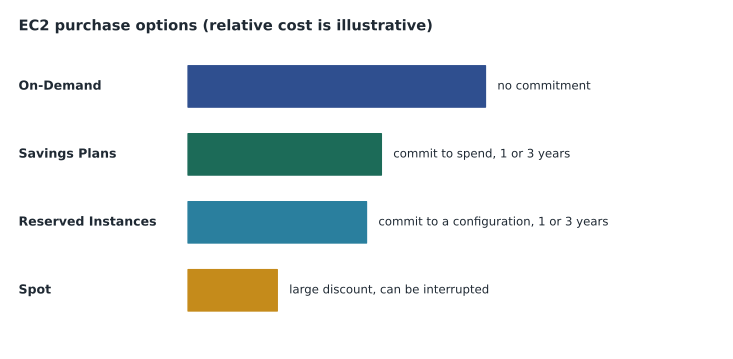
| Option | Commitment | Best for |
|---|---|---|
| On-Demand | None | Short, spiky or new workloads |
| Savings Plans | A spend per hour for 1 or 3 years | Steady compute use with flexibility across instance types |
| Reserved Instances | A specific configuration for 1 or 3 years | Steady use of a known instance type |
| Spot Instances | None, but can be interrupted | Fault-tolerant, flexible, interruptible jobs |
| Dedicated Hosts | On-Demand or reserved | Per-core licensing or compliance needs |
# Illustrative yearly cost of one server running all year (prices are examples only)
hours = 24 * 365
on_demand = 0.20          # USD per hour, illustrative
discounts = {"On-Demand": 0.0, "Savings Plan, 1 year": 0.30, "Savings Plan, 3 years": 0.50}
for name, d in discounts.items():
print(name, round(hours * on_demand * (1 - d)), "USD per year (illustrative)")On-Demand 1752 USD per year (illustrative) Savings Plan, 1 year 1226 USD per year (illustrative) Savings Plan, 3 years 876 USD per year (illustrative)
What this code does
It works out the yearly cost of one server running all 8,760 hours of the year at an illustrative On-Demand rate, then applies example discounts for 1-year and 3-year Savings Plans. It prints the three yearly totals. Longer commitments give larger discounts for workloads that run all the time.
Lorraine follows the arithmetic and asks the obvious question: why not commit for three years on everything? Gwen explains the trade-off. A commitment saves money only if you actually use what you commit to. VetLedger's application servers run all day, every day, so a Savings Plan sized to their steady use makes sense once the pilot shows the right size. The development environment is switched off at night and at weekends, so On-Demand fits it better. Nightly image-processing jobs that can restart if interrupted are a good fit for Spot. Matching each workload to an option is exactly what the exam asks.
Billing and cost management tools
Task statement 4.2 covers the tools for understanding and controlling cost. The AWS Billing and Cost Management console shows bills and payments. AWS Cost Explorer visualizes past spending and forecasts future costs, with filters by service, account or tag. AWS Budgets lets you set custom cost or usage budgets and sends alerts when you approach or exceed them; Lorraine has set one budget per clinic. AWS Cost Anomaly Detection uses machine learning to spot unusual spending. The AWS Pricing Calculator estimates the cost of a planned architecture before you build it. AWS Cost and Usage Reports, now delivered through AWS Data Exports, provide the most detailed billing data for analysis. Cost allocation tags, such as a tag for each clinic, let you break costs down by business unit.
AWS Organizations manages multiple accounts centrally. Its consolidated billing feature combines the bills of all accounts in an organization into one payment and lets usage across accounts count together toward volume discounts and Savings Plans. Service control policies in Organizations set the maximum permissions for accounts. Cascade Ridge's plan has separate accounts for management, production, development and security logging, all under one organization and one bill.
| Question | Tool |
|---|---|
| What did we spend last month, by service? | AWS Cost Explorer |
| Alert me if a clinic's spending passes its limit | AWS Budgets |
| What will this new design cost before we build it? | AWS Pricing Calculator |
| Flag unusual spending automatically | AWS Cost Anomaly Detection |
| One bill for all our accounts, with combined discounts | AWS Organizations consolidated billing |
| Break costs down by clinic | Cost allocation tags |
| Most detailed line-by-line billing data | Cost and Usage Reports through AWS Data Exports |
Support plans and technical resources
Task statement 4.3 covers where to get help. Every account has the Basic support plan at no extra cost, which includes account and billing support, documentation, AWS re:Post, the AWS Health Dashboard and a core set of Trusted Advisor checks. Paid plans add technical support from AWS engineers, faster response times and the full set of Trusted Advisor checks; the higher plans add a designated technical account manager, or TAM, who provides proactive guidance. AWS has revised its plan line-up over time. Many study materials, and the exam guide, describe Basic, Developer, Business, Enterprise On-Ramp and Enterprise plans. In November 2026 AWS's support plans page listed Basic, Business Support+, Enterprise Support and Unified Operations, with response times for critical issues that get faster at each level and a TAM included at the Enterprise level and above. The exam tests the pattern: higher plans give faster response, more Trusted Advisor checks and, at the top, a TAM and proactive help. Check AWS's current page for plan names and details.
Other resources appear in Domain 4 questions. AWS Trusted Advisor inspects your account and recommends improvements in categories such as cost optimization, security, fault tolerance, performance and service limits. The AWS Health Dashboard shows AWS events that may affect your resources. AWS re:Post is a community question-and-answer site, and the AWS Knowledge Center answers common questions. AWS Professional Services and the AWS Partner Network provide consulting and partner expertise. AWS Marketplace is a catalogue of third-party software you can buy and run on AWS, often billed through your AWS bill. The exam guide also lists AWS IQ, a marketplace for hiring certified freelancers; AWS has changed some of these programs over time, so check which are still offered before relying on one.
Keeping costs under control in practice
Lorraine's questions lead Gwen to a short list of cost habits, several of which appear on the exam as "which action would reduce cost". Rightsize first: look at the actual use of each instance and choose a smaller type if it is mostly idle; Cost Explorer and AWS Compute Optimizer recommend sizes. Turn off what is not in use, such as development environments at night, and schedule them to start again in the morning. Use the right storage class, with life cycle rules moving old data to cheaper tiers. Delete unattached EBS volumes and old snapshots that nobody needs. Commit to Savings Plans only for steady use, after the pilot shows what steady looks like. Use Spot for interruptible jobs. Put CloudFront in front of content delivered to many users, which can reduce data transfer out from the origin.
Visibility comes before control. Tagging every resource with an owner, an environment and a clinic lets Lorraine see who is spending what. Budgets with alerts give early warning. Cost Anomaly Detection catches surprises, such as a test instance left running at a large size. Trusted Advisor's cost optimization checks list idle load balancers, underused instances and similar waste. Consolidated billing in AWS Organizations means all accounts share volume discounts and Savings Plans benefits, which can lower the total even when no single account changes.
Lorraine's last question is whether AWS will ever surprise her with a bill she cannot explain. Gwen's honest answer is that it can happen if nobody watches, which is why the group's plan has three safeguards: a budget alert for each clinic and for the whole organization, a monthly cost review using Cost Explorer filtered by tag, and anomaly detection turned on from the first day of the pilot. The exam asks about these tools one at a time; real cost control uses them together.
One more pricing idea appears on the exam: the total cost of ownership. Comparing the cost of running a workload on premises with the cost of running it on AWS means counting everything on both sides: hardware, software, power, space, staff time and the cost of idle capacity on premises; compute, storage, data transfer and support on AWS. Gwen built that comparison for the board in September, and it is the reason the migration was approved. The AWS Pricing Calculator handles the AWS side; the on-premises side comes from the group's own accounts.
Worked problem
Choosing the tool for Lorraine
Lorraine has three requests: an email when the Lethbridge clinic's monthly AWS spending passes its budget, an estimate of what the disaster recovery copy in the second Region will cost before Gwen builds it, and a chart of the last six months of spending by service. Which tool fits each?
Show solution
- An alert on a spending threshold for one clinic is AWS Budgets, using a cost allocation tag for the clinic.
- An estimate before building is the AWS Pricing Calculator.
- A chart of past spending by service is AWS Cost Explorer.
Answer: AWS Budgets, the AWS Pricing Calculator and AWS Cost Explorer.
Common mistakes
MistakeAssuming all data transfer is charged.
InsteadInbound transfer from the internet is generally free; outbound and cross-Region transfer is charged.
MistakeChoosing Spot for a workload that cannot be interrupted.
InsteadSpot can be reclaimed at short notice; use it only for interruptible work.
MistakeCommitting to Savings Plans for workloads that run part-time.
InsteadCommit only to steady usage; use On-Demand for intermittent work.
MistakeConfusing Cost Explorer with the Pricing Calculator.
InsteadCost Explorer shows past and forecast spending; the Pricing Calculator estimates before you build.
MistakeExpecting a technical account manager on every paid plan.
InsteadA designated TAM comes with the enterprise-level plans.
Summary and key terms
- Domain 4 carries a weight of 12; skipping it can cost the pass.
- Compute, storage and outbound data transfer drive cost; inbound transfer is generally free.
- On-Demand has no commitment; Savings Plans and Reserved Instances discount steady use; Spot discounts interruptible work.
- Cost Explorer, Budgets, Cost Anomaly Detection and the Pricing Calculator analyse, control and estimate cost.
- Organizations consolidated billing gives one bill and shared volume discounts.
- Support plans rise from Basic to enterprise levels with faster response, full Trusted Advisor and a TAM; check current plan names.
- On-Demand Instance
- EC2 capacity paid by the second or hour with no commitment.
- Savings Plan
- A pricing model that discounts compute in exchange for a one- or three-year spending commitment.
- Spot Instance
- Spare EC2 capacity at a large discount that AWS can reclaim with short notice.
- AWS Budgets
- A service for setting cost or usage limits and receiving alerts.
- Consolidated billing
- An AWS Organizations feature combining accounts into one bill with shared discounts.
- Technical account manager
- A designated AWS contact who gives proactive guidance on enterprise-level support plans.
Practice problems
Work each problem on paper first, then reveal the answer to check.
Is inbound data transfer from the internet usually charged?
Show answer
No, it is generally free.
Which purchase option suits a job that can be interrupted?
Show answer
Spot Instances.
Which tool estimates cost before you build?
Show answer
AWS Pricing Calculator.
Which tool sends an alert when spending passes a threshold?
Show answer
AWS Budgets.
What does consolidated billing provide?
Show answer
One bill for many accounts and combined usage for volume discounts.
Which support plan is free?
Show answer
Basic.
Which resource recommends improvements across cost, security and limits?
Show answer
AWS Trusted Advisor.
Lesson quiz · 5 questions
Score 60% or more to complete this lesson.
Create a free account to save your progress, take quizzes and earn a certificate.