
AWS-109 · Lesson 10 of 12 · 22 min
Time management on exam day
▶ Video coming soon A video version of this lesson is on the way.
Kwame's first timed practice set does not go well. He answers the first thirty questions in twenty minutes, feels confident, then spends nine minutes on a single multiple-response question about support plans, panics, and finishes with five questions unanswered. His score is lower than his untimed diagnostic, even though he knows more now. Gwen is not surprised. "Time is a skill," she says. "You have plenty of it on this exam, but only if you spend it on purpose." This lesson covers booking and the rules of the day, and then builds a timing plan for the 90 minutes.
Booking the exam
You book through your AWS Certification account, which connects to Pearson VUE, the delivery partner. You choose either a testing centre or online proctoring, a date, and a time. Make sure the name in your certification account matches your government-issued identification exactly; a mismatch can mean you are turned away and lose the fee. Book early enough to get the slot you want, particularly for testing centres, and read the confirmation email for the rules that apply to your appointment. AWS allows rescheduling and cancellation up to a deadline before the appointment; check the current policy when you book, because late changes may forfeit the fee. Candidates whose first language is not English can request extra time through an accommodation in their account before booking, and accommodations for disabilities are also available on request.
Mateo has chosen a testing centre in Calgary because he does not trust the clinic group's home internet connections and wants a quiet room. Kwame has chosen online proctoring from home because the nearest testing centre is a long drive and he has a quiet study with a good connection. Both choices are reasonable; the right one depends on your situation.
| Item | Testing centre | Online proctored |
|---|---|---|
| Where | A Pearson VUE centre | Your own quiet, private room |
| Check-in | At the centre with ID; belongings in a locker | Online: photos of ID and room, system check |
| Equipment | Provided | Your computer, webcam, microphone and reliable internet |
| Breaks | Unscheduled breaks allowed, but the clock keeps running and you must check in again | No breaks; you must stay in view of the camera |
| Main risk | Travel time and traffic | Technical problems, interruptions or room rule violations |
The rules of the day
AWS's policies, checked for this course in November 2026, say that scheduled breaks are not configured for AWS certification exams. At a testing centre you may take an unscheduled break, but the exam timer keeps running, you cannot leave the building, and you must repeat check-in to return. For online and kiosk exams, no breaks are permitted at all: you cannot stand up or leave the camera's view for any reason. Plan accordingly: use the washroom before you start, have water if the rules allow it, and treat the 90 minutes as one continuous session.
For online exams, prepare the room and the computer the day before. Run the system test that Pearson VUE provides on the computer and network you will use. Clear the desk and the area around it; no notes, phones, second monitors or other people. Close other applications. Have your identification ready. Arrive at the check-in window early, because the check-in steps take time. If your connection drops, the proctor will try to reconnect you; contact support if they cannot. Kwame plans a full rehearsal in his study a week before the exam, at the same time of day as his appointment.
How the exam screen works
The exam interface shows one question at a time. AWS's policies note a Flag for Review button that marks a question for later, and you can move to the next or previous question at any time unless the exam tells you otherwise. Before you finish, a review screen lets you see all questions, incomplete ones, or flagged ones. You can leave comments on questions, but comments use exam time, so AWS recommends flagging and commenting after you have answered everything. Use the flag freely: it is the key to the timing plan below.
A timing plan for 90 minutes
Gwen's plan has three parts: a per-question cap, checkpoints, and a review reserve. With 65 questions in 90 minutes, the average is about 83 seconds per question. Keep a reserve of 15 minutes at the end for review, which leaves about 69 seconds per question on the first pass. Set a soft cap of about two minutes on any single question: if you reach it, choose your best answer, flag the question, and move on. Never leave a question blank while you move on; an answered and flagged question is safe if time runs out, a blank one is not.
Checkpoints tell you whether you are on track without watching the clock constantly. Gwen suggests three: question 22 by about minute 25, question 44 by about minute 50, and question 65 by about minute 75, leaving 15 minutes for review. If you are ahead at a checkpoint, relax. If you are behind, speed up by moving on from hard questions sooner, not by reading less carefully.
# Checkpoints for 65 questions in 90 minutes with a review reserve
questions, minutes, reserve = 65, 90, 15
pace = (minutes - reserve) / questions   # minutes per question on the first pass
for q in (22, 44, 65):
    print("Question", q, "by about minute", round(q * pace))
print("Seconds per question on first pass:", round(pace * 60))Question 22 by about minute 25 Question 44 by about minute 51 Question 65 by about minute 75 Seconds per question on first pass: 69
What this code does
It sets pacing checkpoints for 65 questions in 90 minutes while keeping 15 minutes for review: it divides the remaining 75 minutes by 65 questions and multiplies by question numbers 22, 44 and 65. It prints the minute each checkpoint should be reached by and the seconds per question on the first pass. Checking the clock at these points shows early whether you are falling behind.
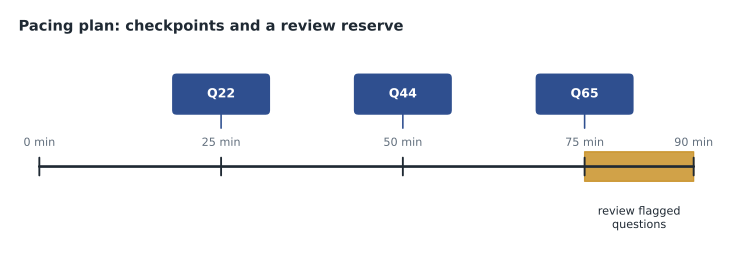
The calculation shows the checkpoints for the 15-minute reserve. Some candidates prefer a smaller reserve, such as 10 minutes, which gives about 74 seconds per question on the first pass; the important thing is to decide in advance and practise with the same plan, so that exam day feels familiar.
Using the review reserve
When you reach the end of the first pass, open the review screen and filter for flagged questions. Work through them in order. For each, reread the question as if for the first time, using the four-part routine from lesson 2. Change an answer only if you can say why the new answer is better: you noticed a constraint you missed, or you remembered a fact. Research on multiple-choice tests suggests that considered changes are more often from wrong to right than the reverse, but changes made from vague unease are coin tosses. If you have time left after the flagged questions, check that no question is unanswered, then review any you remember as tricky.
Rehearsing the plan before the day
A timing plan only works if it is familiar. Gwen asks both candidates to use the same plan on every full practice set from now on: the same soft cap, the same checkpoints, the same review reserve. The first time, it will feel awkward to leave a question you have not finished thinking about. By the third practice set, flagging and moving on should feel normal, and the checkpoints should come round without surprise. If a practice set shows you are consistently far ahead or behind at the checkpoints, adjust the plan then, not on exam day.
Rehearse the setting too. Mateo plans to take one practice set at a public library desk with headphones off and his phone in a locker, to get used to working without his usual comforts. Kwame plans to take one at the same time of day as his booked exam, in the same room, on the same computer, after running the Pearson VUE system test, so that nothing about the real day is new. Both plan to practise with water only, no snacks and no breaks, because that is what the exam allows.
Practise the first five minutes in particular. Nerves are strongest at the start, and a shaky first few questions can unsettle the whole session. Gwen suggests a short routine for the opening: read the on-screen instructions calmly, note the start time on the whiteboard or noteboard if one is provided, take one slow breath, and read the first question with the four-part routine even if it looks easy. Starting deliberately sets the pace for the rest of the exam.
Plan for the unexpected as well. If a testing centre runs late, the clock does not start until your exam does, so stay calm. If an online session has a technical problem, follow the proctor's instructions and contact Pearson VUE support if the session cannot resume; do not try to fix things by leaving the camera's view. If you feel unwell during an exam, tell the proctor. Knowing in advance what you will do if something goes wrong takes much of the fear out of it, and fear is what wastes time.
Kwame writes his plan on a single card: "69 seconds. Two-minute cap: answer, flag, move. Q22 at 25, Q44 at 50, Q65 at 75. Fifteen minutes for flags. No blanks." He reads it before every practice set and plans to read it again in the car park, or in his case the kitchen, before check-in.
After the session, Mateo works through the arithmetic one more time on paper so he can do it without a calculator: 90 minutes minus 15 for review leaves 75; 75 divided by 65 is a little over one minute each. Two minutes is about twice the average, which is why it works as a cap: one long question costs roughly the time of one extra question, not five. If he is ever unsure of the plan in the exam, that single comparison is enough to keep him moving.
Worked problem
Rescuing Kwame's timing
In his practice set, Kwame answered 30 questions in 20 minutes, spent 9 minutes on one question, and ran out of time with 5 unanswered. How would Gwen's plan have changed the result?
Show solution
- The two-minute soft cap would have stopped the long question at two minutes: an answer chosen, the question flagged, seven minutes saved.
- The first checkpoint, question 22 by minute 25, would have told him he was well ahead, so there was no need to rush the first thirty.
- With seven minutes saved and a steadier pace, he would have reached question 65 with time for review instead of leaving five blanks.
- Even if the long question stayed wrong, five extra answered questions, each with at least a one-in-four chance by guessing alone, would likely have added marks.
Answer: Cap, flag and move on; use checkpoints; and never leave blanks. The plan turns lost minutes into answered questions.
Gwen adds a word on nerves. Most candidates feel a jolt of anxiety on the first few questions, which often seem harder than they are. Expect it, take a slow breath, and use the reading routine. If a question makes no sense at all, it may be one of the unscored questions AWS is trialling; answer it, flag it if you like, and move on without letting it shake you. Your score depends on the 50 scored questions, and you cannot tell which they are, so treat every question calmly and the same.
Common mistakes
MistakeSpending many minutes on one hard question.
InsteadUse a soft cap of about two minutes, answer, flag and move on.
MistakeLeaving questions blank to come back to.
InsteadAlways choose an answer before moving on; flag it to revisit.
MistakePlanning a break during an online exam.
InsteadOnline exams allow no breaks; at testing centres the clock keeps running.
MistakeChanging answers from vague unease.
InsteadChange an answer only when you can say why the new one is better.
MistakeSkipping the system test for an online exam.
InsteadRun it on the same computer and network the day before.
Summary and key terms
- Book through your AWS Certification account with Pearson VUE; your account name must match your ID.
- Choose a testing centre or online proctoring based on your situation; check reschedule and cancellation deadlines.
- No scheduled breaks: at a centre the clock keeps running; online, no breaks at all.
- Use Flag for Review and the review screen; comments use exam time.
- Plan about 69 seconds per question on the first pass with a two-minute soft cap and checkpoints at questions 22, 44 and 65.
- Keep a review reserve, change answers only for a reason, and never leave blanks.
- Pearson VUE
- The company that delivers AWS certification exams at testing centres and online.
- Online proctoring
- Taking an exam at home while a remote proctor watches through your webcam.
- Flag for Review
- A button that marks a question so you can return to it from the review screen.
- Soft cap
- A time limit you set for any one question before answering, flagging and moving on.
- Checkpoint
- A planned question number to reach by a set time, used to check pace.
- Review reserve
- Minutes kept at the end to revisit flagged questions.
Practice problems
Work each problem on paper first, then reveal the answer to check.
Who delivers AWS certification exams?
Show answer
Pearson VUE.
Are breaks allowed in an online AWS exam?
Show answer
No.
What happens to the clock during a break at a testing centre?
Show answer
It keeps running.
What is the average time per question for CLF-C02?
Show answer
About 83 seconds.
What should you do when a question passes your soft cap?
Show answer
Choose the best answer, flag it and move on.
Name the three checkpoints in Gwen's plan.
Show answer
Question 22 by minute 25, question 44 by minute 50, question 65 by minute 75.
When should you change an answer during review?
Show answer
Only when you can say why the new answer is better.
Lesson quiz · 5 questions
Score 60% or more to complete this lesson.
Create a free account to save your progress, take quizzes and earn a certificate.