
AWS-103 · Lesson 7 of 12 · 18 min
Monitoring and management: CloudWatch, CloudTrail and Config
▶ Video coming soon A video version of this lesson is on the way.
On the night of July 18, 2026, the server room at the emergency hospital overheated and VetLedger stopped. Nobody knew until a technician at the front desk tried to look up a patient's medication history and the screen froze. Mateo found out from a phone call at 2:40 in the morning. The post-incident report had one line that Dr. Kaur underlined: "We had no alarm." Gwen opens this session by reading that line out. "In AWS you will have so many signals that the problem becomes choosing which ones wake you up. Let us make sure the right ones do."
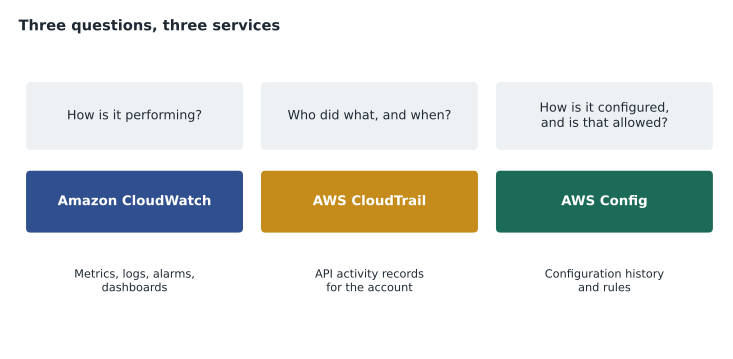
This lesson covers the three services the exam groups as monitoring and governance, each answering a different question: Amazon CloudWatch (how are my resources performing?), AWS CloudTrail (who did what, and when?) and AWS Config (how is everything configured, and does that follow our rules?). It then tours the management services that sit around them: Systems Manager, Trusted Advisor, the Health Dashboard, Compute Optimizer, Organizations, Control Tower, CloudFormation and Service Catalog.
Amazon CloudWatch
Amazon CloudWatch collects and acts on metrics and logs from AWS resources and applications. A metric is a series of numbers over time, such as an instance's processor use, a load balancer's request count, a database's free storage or a Lambda function's errors. Many AWS services send basic metrics to CloudWatch automatically at no extra charge. Applications can publish custom metrics of their own, such as BookVet's bookings per minute, and the CloudWatch agent can collect memory and disk metrics and log files from inside EC2 instances and on-site servers.
- Alarms watch a metric and change state when it crosses a threshold for a set number of periods, for example processor use above 80 for three consecutive five-minute periods. An alarm can notify people through Amazon SNS, trigger an Auto Scaling action, recover or reboot an instance, or start an automated fix.
- Dashboards show chosen metrics and alarms together on one screen, across Regions and accounts.
- CloudWatch Logs stores, searches and retains log data from applications, Lambda functions, VPC flow logs and many services. Logs Insights lets you query logs with a simple language to find, for example, every failed sign-in in the last hour.
- Synthetics canaries run scripts on a schedule that act like a user, such as loading the BookVet home page and making a test booking, so problems are noticed before clients notice them.
Gwen and Mateo design the alarms that would have caught July 18. A canary loads VetLedger's sign-in page every minute; if it fails three times in a row, an alarm notifies the on-call phone through SNS. Alarms watch the load balancer's healthy host count (below two means one zone or server is in trouble), RDS free storage and processor use, and BookVet's API error rate. Dr. Kaur asks that the on-call vet also be told when the practice system is down, so the emergency hospital switches to its paper fallback forms straight away.
# An alarm fires when M of the last N datapoints breach the threshold.
def alarm_state(datapoints, threshold, m, n):
    window = datapoints[-n:]
    breaching = sum(1 for x in window if x > threshold)
    return "ALARM" if breaching >= m else "OK"

cpu = [41, 55, 62, 85, 88, 79, 91, 93]     # five-minute averages (example values)
print("3 of 3 above 80:", alarm_state(cpu, 80, 3, 3))
print("3 of 5 above 80:", alarm_state(cpu, 80, 3, 5))
print("3 of 3 above 90:", alarm_state(cpu, 90, 3, 3))3 of 3 above 80: OK 3 of 5 above 80: ALARM 3 of 3 above 90: OK
What this code does
It mimics a CloudWatch alarm rule that goes into the ALARM state when at least M of the last N readings break a threshold. Using eight sample CPU readings, it checks three different rules. Only "3 of the last 5 above 80" fires, which shows how the choice of M, N and threshold controls how sensitive an alarm is to brief spikes.
Requiring several breaching periods avoids waking someone for a brief spike. Choosing M of N, such as three of five, catches a problem that flickers above and below the threshold.
AWS CloudTrail
AWS CloudTrail records actions taken in an AWS account as events: who made a request (which user or role), when, from which IP address, to which service, what they asked for and whether it succeeded. Because almost everything in AWS is done through API calls, whether from the console, the CLI, an SDK or another service, CloudTrail gives an audit trail of nearly all account activity.
- Event history shows the last 90 days of management events in each Region, with no setup and no charge.
- A trail delivers events continuously to an S3 bucket for long-term storage, optionally to CloudWatch Logs for alerting, and can cover all Regions and every account in an organization.
- Management events record control-plane actions such as creating an instance, changing a security group or deleting a bucket. Data events, such as reading individual S3 objects or invoking Lambda functions, are higher volume and are recorded only if you turn them on.
- CloudTrail Lake stores events in a managed data store and lets you query them with SQL.
Hannah wants an organization-wide trail sending every account's events to a locked-down log archive account, with log file integrity validation turned on so that any tampering with the files could be detected, and with S3 data events recorded for the imaging bucket so that every view of a client's records can be traced. That last point matters for privacy: if a client asks who looked at their pet's records, the answer should not depend on memory.
Gwen offers a test question. "An administrator deleted a security group yesterday afternoon and nobody knows who. Which service tells you?" CloudTrail, Mateo says. "And which service would have told you that the change left a database exposed?" That is the next topic.
AWS Config
AWS Config records the configuration of AWS resources and how it changes over time, and evaluates those configurations against rules. Where CloudTrail tells you that a call was made, Config tells you what the resource looked like before and after, how it relates to other resources, and whether its current state is allowed.
- The configuration history of each resource shows every change, linked to the CloudTrail event that caused it.
- Config rules check resources continuously or on a schedule. AWS provides many managed rules, such as S3 buckets must block public access, EBS volumes must be encrypted, or root user access keys must not exist; you can write custom rules too.
- Conformance packs bundle rules into a set for a framework or internal standard, deployable across accounts.
- Remediation actions can fix a noncompliant resource automatically through Systems Manager, for example turning encryption back on.
Cascade Ridge will start with about twenty managed rules, chosen by Hannah from a conformance pack for good security practice, plus a rule requiring the four tags that Lorraine's cost reports depend on (the billing course, AWS-104, covers tags in detail). Noncompliant resources appear on a dashboard; a few, such as an S3 bucket losing its public-access block, will be fixed automatically.
| Scenario wording | Service |
|---|---|
| Track processor use and send a notification when it is high | Amazon CloudWatch |
| Find out which user terminated an instance last Tuesday | AWS CloudTrail |
| See how a security group's rules have changed over the last month | AWS Config |
| Continuously check that all EBS volumes are encrypted | AWS Config rules |
| Search application logs for errors | Amazon CloudWatch Logs |
| Keep an audit record of API activity for seven years | An AWS CloudTrail trail to S3 |
Managing systems: AWS Systems Manager
AWS Systems Manager is a collection of tools for operating EC2 instances and on-site servers at scale. Session Manager gives browser or command-line shell access to instances without opening remote ports or managing keys, with every session logged. Patch Manager scans for and installs operating system updates on a schedule. Run Command runs a script on many machines at once. Parameter Store keeps configuration values and secrets for applications to read. Inventory lists the software installed on each machine. Automation runs predefined runbooks for common tasks.
For Mateo this is the replacement for his nights of patching. Patch Manager will patch the VetLedger instances in a maintenance window on Sunday nights, one Availability Zone at a time so that the load balancer keeps serving clinics from the other zone.
Advice and health: Trusted Advisor, Health Dashboard and Compute Optimizer
- AWS Trusted Advisor inspects an account and recommends improvements in categories including cost optimization, performance, security, fault tolerance, service limits and operational excellence. A core set of checks is available to everyone; the full set comes with Business Support and above.
- The AWS Health Dashboard shows the status of AWS services and, in the account view, events that affect your own resources, such as scheduled maintenance on a host running one of your instances or a service problem in your Region.
- AWS Compute Optimizer analyses usage metrics and recommends better-sized EC2 instances, Auto Scaling groups, EBS volumes and Lambda memory settings. This is how Gwen's "second size is a measurement" from lesson 1 actually happens.
Governing many accounts and deploying consistently
- AWS Organizations groups accounts under a management account, with consolidated billing and service control policies that set the maximum permissions allowed in member accounts.
- AWS Control Tower sets up a well-architected multi-account environment, called a landing zone, with guardrails (preventive and detective controls) already in place, built on Organizations, Config and CloudTrail.
- AWS CloudFormation deploys infrastructure from templates, so the same network, servers and settings can be created repeatably and reviewed like code (lesson 11).
- AWS Service Catalog lets administrators publish approved products, such as a standard secure S3 bucket or a preapproved development environment, that teams can launch themselves.
Gwen expects Cascade Ridge to set up its accounts with Control Tower during the December pilot, so the organization trail, the log archive account and a baseline of Config rules come set up from day one rather than added later.
Alarms that people trust
Gwen has seen monitoring fail in a way that has nothing to do with technology: too many alarms. When a phone buzzes twenty times a night for problems that fix themselves, people start ignoring it, and then they miss the one that matters. Her rules for Cascade Ridge are short. Every alarm that wakes someone must need a person to act. Everything else goes to a dashboard or a daily email. Each alarm's description says what it means and what to do first, written for someone who has just been woken up. And after each real incident, the team asks whether an alarm fired early enough, and adjusts it.
Composite alarms help. A composite alarm combines other alarms with AND and OR logic, so the on-call phone is paged only when, for example, both the canary is failing and the load balancer has no healthy hosts, rather than every time one test request times out.
Worked problem
Investigating a public bucket
A Config rule reports that an S3 bucket in the development account now allows public access. Hannah needs to know what changed, who changed it, and to make sure it is fixed quickly. Which services help at each step?
Show solution
- AWS Config shows the bucket's configuration history: the public-access block was removed at a specific time, and links to the CloudTrail event.
- AWS CloudTrail shows which role made the change, from which address and through which tool.
- A Config remediation action, or an administrator, restores the public-access block; CloudWatch can alarm on future occurrences of the same CloudTrail event.
- If the account is in an organization, a service control policy can prevent anyone except administrators from removing the block in future.
Answer: Config for what changed and whether it is allowed, CloudTrail for who did it, remediation and alarms to fix and catch it next time, and Organizations to prevent it.
Common mistakes
MistakeUsing CloudWatch to find out who deleted a resource.
InsteadCloudTrail records who made API calls; CloudWatch records performance metrics and logs.
MistakeExpecting CloudTrail to show what a resource's settings were last week.
InsteadAWS Config records configuration history and compliance.
MistakeSetting an alarm to fire on a single high datapoint.
InsteadRequire several breaching periods to avoid alerts for brief spikes.
MistakeAssuming CloudTrail data events are recorded by default.
InsteadData events such as S3 object reads must be turned on for a trail.
MistakePatching servers by logging in to each one.
InsteadUse Systems Manager Patch Manager with maintenance windows.
Summary and key terms
- Amazon CloudWatch collects metrics and logs, raises alarms that can notify people or take action, shows dashboards and runs synthetic canaries.
- AWS CloudTrail records API activity as events, with 90 days of event history and trails for long-term storage and organization-wide coverage.
- AWS Config records configuration history and evaluates resources against rules and conformance packs, with optional automatic remediation.
- Systems Manager operates instances at scale through Session Manager, Patch Manager and other tools.
- Trusted Advisor, the Health Dashboard and Compute Optimizer give recommendations and status.
- Organizations, Control Tower, CloudFormation and Service Catalog govern accounts and deploy resources consistently.
- Amazon CloudWatch
- The AWS service for metrics, logs, alarms and dashboards.
- CloudWatch alarm
- A watch on a metric that changes state and acts when a threshold is breached.
- AWS CloudTrail
- The service that records API activity in an account.
- Trail
- A CloudTrail configuration that delivers events to S3 and optionally CloudWatch Logs.
- AWS Config
- The service that records resource configurations and checks them against rules.
- Conformance pack
- A bundle of Config rules and remediation actions deployed as a set.
- AWS Systems Manager
- A collection of tools for managing instances and servers at scale.
- AWS Trusted Advisor
- A service that recommends improvements to cost, security, performance and resilience.
- AWS Health Dashboard
- The service that reports AWS service health and events affecting your resources.
- AWS Control Tower
- A service that sets up a governed multi-account landing zone.
Practice problems
Work each problem on paper first, then reveal the answer to check.
Which service answers who made an API call?
Show answer
AWS CloudTrail.
How long does CloudTrail event history keep management events without a trail?
Show answer
90 days.
Which service checks that resources follow configuration rules over time?
Show answer
AWS Config.
Lesson quiz · 5 questions
Score 60% or more to complete this lesson.
Create a free account to save your progress, take quizzes and earn a certificate.