
AWS-103 · Lesson 11 of 12 · 18 min
Developer and deployment tools
▶ Video coming soon A video version of this lesson is on the way.
Kwame deploys BookVet the way he has for four years: he connects to the rented server, copies the new files over, restarts the web service and refreshes the page to see whether it still works. Once, a typo took the booking site down for a Saturday morning, the busiest time of the week. Gwen does not tease him about it; most small teams work this way. "In AWS we can make every change go through the same steps every time," she says. "Tested, recorded and reversible."
This lesson covers how people and programs work with AWS (the console, the command line, SDKs and infrastructure as code), the AWS developer tools that build, test, deploy and trace applications, AWS Amplify for web and mobile front ends, and three groups the exam lists in the same task: end-user computing services, IoT services and the ways to get help, which lead into the billing and support course.
Ways to work with AWS
Every action in AWS, whether creating a bucket or changing a security group, is ultimately a call to an AWS API. There are several ways to make those calls, and the exam asks you to choose between them.
| Method | What it is | Best for |
|---|---|---|
| AWS Management Console | The web interface | Learning, exploring, one-off tasks and viewing dashboards |
| AWS CLI | A command-line tool for every AWS service | Scripts and repeatable administrative tasks |
| AWS SDKs | Libraries for languages such as Python, JavaScript, Java and .NET | Applications that call AWS services from code |
| Infrastructure as code (IaC) | Templates or programs that describe infrastructure, such as AWS CloudFormation and the AWS CDK | Creating whole environments repeatably and reviewing changes like code |
| AWS CloudShell | A browser-based shell with the CLI already installed and signed in | Quick command-line work without installing anything |
The exam guide frames this as a choice between one-time operations and repeatable processes. Creating one test bucket to try something can be done in the console. Building the production network, the load balancer, the Auto Scaling group and the database for VetLedger should be done with infrastructure as code, because it will need to be built again in the disaster recovery Region, in a development account and perhaps one day after a mistake.
Infrastructure as code: CloudFormation and the CDK
AWS CloudFormation creates and manages AWS resources from templates written in YAML or JSON. A template describes the desired resources and their settings; CloudFormation works out the order in which to create them and builds them as a unit called a stack. Updating the template and the stack changes only what is different, and deleting the stack removes everything it created. Change sets preview what an update will do before it happens, and drift detection reports where someone has changed a resource by hand.
The AWS Cloud Development Kit (AWS CDK) lets developers define infrastructure in familiar programming languages such as Python or TypeScript, which the CDK turns into CloudFormation templates. Kwame, who writes Python every day, likes the CDK. Mateo, who reads YAML more easily than Python, likes plain templates. Both produce CloudFormation stacks, and Gwen tells them to agree on one before the pilot.
Resources:
  ImagingBucket:
    Type: AWS::S3::Bucket
    Properties:
      BucketName: crvp-imaging-archive
      VersioningConfiguration:
        Status: Enabled
      PublicAccessBlockConfiguration:
        BlockPublicAcls: true
        BlockPublicPolicy: true
        IgnorePublicAcls: true
        RestrictPublicBuckets: true
The AWS developer tools
AWS offers a set of developer services that together form a continuous integration and continuous delivery (CI/CD) pipeline: every change is built, tested and deployed automatically, the same way every time.
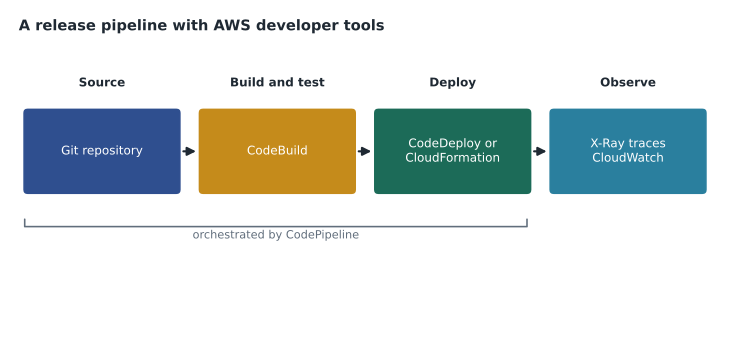
- AWS CodeCommit hosts private Git repositories. AWS stopped offering it to new customers in 2024 and then, in November 2025, returned it to general availability; many teams also connect pipelines to repositories on GitHub, GitLab or Bitbucket.
- AWS CodeBuild is a fully managed build service that compiles source code, runs tests and produces packages or container images, scaling automatically and charging by build minute, with no build servers to manage.
- AWS CodeDeploy automates deployments to EC2 instances, on-site servers, Lambda functions and ECS services, with strategies such as rolling updates and blue/green deployments that shift traffic to a new version and can roll back automatically if health checks fail.
- AWS CodePipeline orchestrates the whole release process: when code changes, it runs the build, test, approval and deploy stages in order, stopping if a stage fails.
- AWS CodeArtifact stores software packages and dependencies, such as Python and npm packages, for builds to use.
- AWS X-Ray traces requests as they travel through an application's components, such as API Gateway, Lambda functions and DynamoDB, showing where time is spent and where errors occur. It is the exam's answer for troubleshooting performance in distributed applications; X-Ray traces also appear in CloudWatch.
Older study material also mentions AWS Cloud9, a browser-based development environment. AWS stopped offering Cloud9 to new customers in 2024 and now points developers to its IDE plugins and other tools. Gwen tells Mateo to recognize the name and move on.
For BookVet, Kwame's new process starts in a Git repository. Each change triggers CodePipeline: CodeBuild runs the tests and builds a container image (for the rehosted version) or the Lambda packages (for phase 2); a manual approval step lets Kwame or Mateo confirm before production on Saturdays; and the deploy stage shifts traffic gradually. Had this existed last year, the Saturday typo would have failed the tests and never reached production.
# A canary-style deployment: shift traffic in steps and roll back if errors rise.
steps = [10, 25, 50, 100]                  # share of traffic per 100 users sent to the new version
error_rate_by_step = [0.4, 0.5, 3.8, None]  # errors per 100 requests observed (example values)
LIMIT = 1.0

for share, errors in zip(steps, error_rate_by_step):
    print(f"send {share} of every 100 requests to the new version")
    if errors is not None and errors > LIMIT:
        print(f"errors {errors} per 100 exceed {LIMIT}: roll back to the old version")
        break
else:
print("new version now serves all traffic")send 10 of every 100 requests to the new version send 25 of every 100 requests to the new version send 50 of every 100 requests to the new version errors 3.8 per 100 exceed 1.0: roll back to the old version
What this code does
It simulates a canary deployment that sends more and more traffic to a new version, 10, 25, 50 and finally all of every 100 requests, while watching the error rate at each step. If errors go above 1 in every 100 requests, it stops and rolls back to the old version. In the example the errors jump at the halfway step, so the rollout is reversed before most users are affected.
AWS Amplify: web and mobile front ends
AWS Amplify helps front-end web and mobile developers build, connect and host applications quickly. Amplify Hosting deploys and hosts web applications from a Git repository with a built-in pipeline and global content delivery, and Amplify's libraries and tools add features such as sign-in, data access and file storage backed by AWS services. When the exam asks for the service that lets developers build and deploy full-stack web or mobile applications quickly, the answer is Amplify.
Kwame plans to host the new BookVet front end on Amplify Hosting in phase 2, with the booking API behind it built from API Gateway and Lambda.
End-user computing: WorkSpaces, AppStream 2.0 and Secure Browser
Some services deliver desktops and applications to people rather than running back-end systems. The exam groups them as services that present the output of virtual machines on end-user devices.
- Amazon WorkSpaces provides managed virtual desktops, Windows or Linux, that staff reach from almost any device, with data kept in AWS rather than on the device.
- Amazon AppStream 2.0 streams individual desktop applications to a web browser, so users run a Windows application without installing it.
- Amazon WorkSpaces Secure Browser gives users a browser hosted in AWS to reach internal websites and software-as-a-service tools, so that no data is stored on the user's own device.
Andre sees an immediate use. Relief vets who work a few shifts a month at different clinics currently need a clinic laptop. With WorkSpaces or Secure Browser, they could reach VetLedger from any approved device without client records being stored on it. Hannah likes that a lost laptop would no longer be a privacy incident.
IoT services
The Internet of Things (IoT) means connected devices such as sensors, meters and machines. AWS IoT Core lets devices connect securely to AWS and exchange messages, at the scale of billions of devices, and routes their data to other services with rules. Related services manage fleets of devices and analyse their data. The vaccine fridge sensors from lesson 9 would connect through IoT Core: each sensor publishes a temperature reading every few minutes, and an IoT rule sends readings to Data Firehose and raises an alarm through SNS if any fridge stays above its safe range.
Getting help: support and other resources
The last part of this task is knowing where to get help, which the billing and support course covers in depth. In brief: AWS Support plans range from Basic, included for everyone, to Developer, Business, Enterprise On-Ramp and Enterprise, with faster response times, more channels and access to architectural guidance as the plans rise. AWS re:Post is a community question-and-answer site. AWS Professional Services and the AWS Partner Network provide expert help for projects, and AWS Marketplace sells third-party software that runs on AWS. AWS Trusted Advisor, from lesson 7, gives automated recommendations. Cascade Ridge is using an independent consultant (Gwen) for this project, and will need to choose a support plan before the cutover.
Environments and accounts for releases
A pipeline needs somewhere safe to test. Gwen's design uses three environments for BookVet, each in its own AWS account under the company's organization: development, where Kwame experiments freely with small budgets; staging, an exact copy of production built from the same templates, where every release is tested with sample data; and production. Because every environment is built from the same CloudFormation templates, staging really does match production, which is the whole point of testing there.
The pipeline deploys first to staging, runs automated tests against it, waits for approval, then deploys to production. Permissions follow the same pattern: Kwame can change development directly, but only the pipeline's own role can change production. That way every production change is tested, recorded in CloudTrail and repeatable, and the Saturday-morning typo becomes a failed test in staging on a Thursday afternoon.
Secrets such as the messaging provider's API key are never written in the code or the templates. They are stored in AWS Secrets Manager or Systems Manager Parameter Store, and the functions read them at run time using their IAM roles. Kwame's old server had the key in a text file next to the code; Hannah is quietly delighted.
Mateo's notes for this lesson end with a short list of which tool answers which question: the console for looking, the CLI for scripting, SDKs for applications, CloudFormation or the CDK for building environments, CodePipeline for releasing, X-Ray for tracing, Amplify for front ends, WorkSpaces for desktops and IoT Core for devices.
Worked problem
Choosing access methods and tools
For each task, choose the best method or service: (1) a one-time look at last month's bill; (2) rebuilding the production network identically in the disaster recovery Region; (3) running BookVet's tests automatically on every change; (4) finding why some booking API calls take three seconds; (5) giving relief vets access to VetLedger from personal laptops without storing data on them.
Show solution
- (1) The AWS Management Console.
- (2) Infrastructure as code: the same CloudFormation template or CDK app deployed in the second Region.
- (3) AWS CodeBuild, run by AWS CodePipeline when the repository changes.
- (4) AWS X-Ray, which traces each request through API Gateway, Lambda and DynamoDB.
- (5) Amazon WorkSpaces or WorkSpaces Secure Browser.
Answer: Console, CloudFormation or CDK, CodeBuild with CodePipeline, X-Ray and WorkSpaces.
Common mistakes
MistakeBuilding production environments by hand in the console.
InsteadUse infrastructure as code so environments can be rebuilt, reviewed and repeated.
MistakeConfusing CodeBuild with CodeDeploy.
InsteadCodeBuild compiles and tests; CodeDeploy releases to servers, Lambda or containers; CodePipeline orchestrates the stages.
MistakeUsing CloudWatch metrics alone to find which service in a request chain is slow.
InsteadUse AWS X-Ray to trace requests across components.
MistakeAnswering Amazon WorkSpaces when only one application needs to be streamed.
InsteadAmazon AppStream 2.0 streams individual applications; WorkSpaces provides whole desktops.
MistakeEditing CloudFormation-managed resources by hand.
InsteadChange the template and update the stack; drift detection reports manual changes.
Summary and key terms
- AWS is used through the Management Console, the AWS CLI, AWS SDKs, CloudShell and infrastructure as code; repeatable processes suit IaC.
- AWS CloudFormation builds stacks from templates, and the AWS CDK defines infrastructure in programming languages.
- CodeCommit hosts Git repositories, CodeBuild builds and tests, CodeDeploy deploys with rolling or blue/green strategies, CodePipeline orchestrates releases, CodeArtifact stores packages and X-Ray traces requests.
- AWS Amplify builds and hosts web and mobile front ends.
- WorkSpaces, AppStream 2.0 and WorkSpaces Secure Browser deliver desktops, applications and browsers to users.
- AWS IoT Core connects devices.
- Support plans, re:Post, partners and Marketplace provide help.
- Infrastructure as code
- Describing infrastructure in templates or code so it can be created repeatably.
- AWS CloudFormation
- The AWS service that builds and manages stacks of resources from templates.
- AWS CDK
- A framework for defining infrastructure in programming languages that produces CloudFormation templates.
- AWS CodeBuild
- A managed service that compiles code and runs tests.
- AWS CodeDeploy
- A service that automates application deployments.
- AWS CodePipeline
- A service that orchestrates release pipelines.
- AWS X-Ray
- A service that traces requests through distributed applications.
- AWS Amplify
- Tools and hosting for building full-stack web and mobile applications.
- Amazon WorkSpaces
- Managed virtual desktops.
- AWS IoT Core
- A service that connects devices to AWS and routes their messages.
Practice problems
Work each problem on paper first, then reveal the answer to check.
Which service traces requests across Lambda, API Gateway and DynamoDB?
Show answer
AWS X-Ray.
Which service orchestrates build, test and deploy stages?
Show answer
AWS CodePipeline.
Which service streams a single desktop application to a browser?
Show answer
Amazon AppStream 2.0.
Lesson quiz · 5 questions
Score 60% or more to complete this lesson.
Create a free account to save your progress, take quizzes and earn a certificate.