
AWS-103 · Lesson 3 of 12 · 20 min
Object, block and file storage
▶ Video coming soon A video version of this lesson is on the way.
The largest thing Cascade Ridge owns, measured in bytes, is not the practice system. It is the imaging archive: about 38 TB of digital radiographs and ultrasound studies, growing by roughly 6 TB a year, on a storage array whose support ends in June 2027. The migration plan says the archive will be relocated into Amazon S3. Mateo has used S3 for one thing so far, a bucket for his own test files, and he does not yet know why the plan says S3 rather than a big disk attached to a server.
Gwen starts with a question. "When the emergency hospital needs an X-ray from 2019, does it need to change one byte in the middle of the file, or does it need the whole file?" The whole file, Mateo says; radiographs are never edited, only viewed. "Then the archive is objects," Gwen says, "and objects belong in object storage." This lesson explains the three kinds of storage AWS offers, object, block and file, the main service for each, the S3 storage classes and lifecycle rules, and the services that move, cache and back up data.
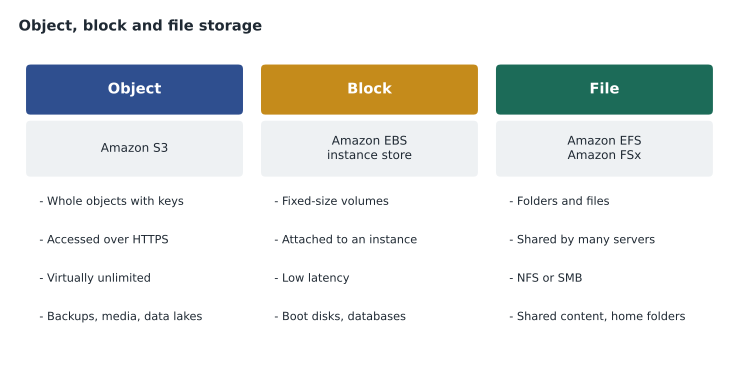
Three kinds of storage
- Object storage keeps each piece of data as a whole object, with a key (its name), the data itself and metadata describing it. Objects are written and read as wholes over HTTPS and cannot be partly changed in place; to update one you upload a new version. Object storage scales almost without limit and is the cheapest way to keep large amounts of data. Amazon S3 is the AWS object store.
- Block storage divides a disk into fixed-size blocks that an operating system formats with a file system, exactly like the disk inside a laptop. It gives low latency and allows small changes anywhere in a file, which databases and operating systems need. A block volume is normally attached to one server at a time. Amazon EBS and EC2 instance store are AWS block storage.
- File storage presents folders and files over a network protocol such as NFS (common on Linux) or SMB (common on Windows), so that many servers or users can share the same files at once. Amazon EFS and the Amazon FSx family are AWS file storage.
Amazon S3: buckets, objects and durability
Amazon Simple Storage Service (Amazon S3) stores objects in buckets. A bucket is created in one Region and has a name that is unique across all of AWS. Inside it, objects are identified by keys such as imaging/2019/04/case-88213/lateral.dcm; the slashes look like folders but are simply part of the key. A single object can be up to 5 TB, and a bucket can hold any number of objects.
S3 is designed for 99.999999999 durability, often called eleven nines, by storing data redundantly across several devices in at least three Availability Zones for most storage classes. In practical terms, AWS designed S3 so that losing an object to hardware failure is extraordinarily unlikely. Durability is not the same as availability, which measures whether you can reach the data at a given moment, and neither protects against a person deleting the wrong thing. For that, S3 offers versioning, which keeps previous versions of an object when it is overwritten or deleted, and Object Lock, which can prevent objects from being deleted or changed for a set retention period.
S3 is private by default. New buckets block public access, and access is granted through IAM policies and bucket policies, both covered in the security course. Data is encrypted at rest by default. Hannah Weiss, the privacy and security lead, wants three more settings on the imaging bucket: versioning, S3 Block Public Access confirmed at the account level, and replication of every new object to a second bucket in the disaster recovery Region, ca-west-1 in Calgary.
aws s3 mb s3://crvp-imaging-archive --region REGION
aws s3api put-bucket-versioning --bucket crvp-imaging-archive --versioning-configuration Status=Enabled
aws s3 cp ./case-88213/ s3://crvp-imaging-archive/imaging/2019/04/case-88213/ --recursive
S3 storage classes
Not all data is read equally often. A radiograph from this morning may be opened ten times today; one from 2016 may never be opened again, but must be kept for years under veterinary record-keeping rules. S3 offers several storage classes that trade a lower storage price for higher retrieval charges, minimum storage periods or slower access.
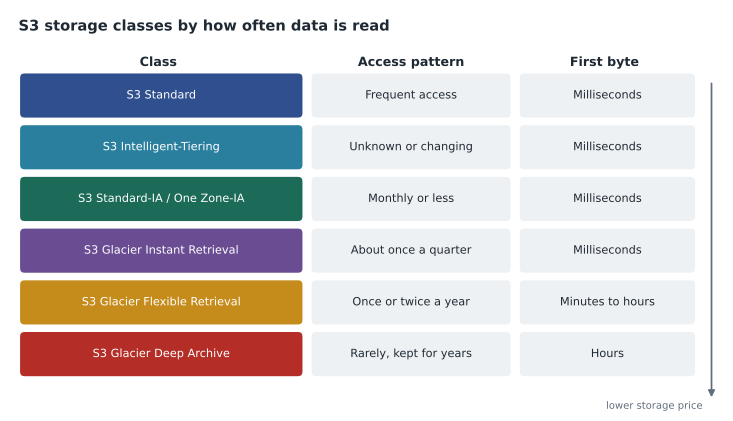
| Storage class | Best for | Points to remember |
|---|---|---|
| S3 Standard | Frequently accessed data | The default; no retrieval charge; data in at least three Availability Zones |
| S3 Intelligent-Tiering | Data with unknown or changing access patterns | Moves objects between access tiers automatically for a small monitoring charge |
| S3 Standard-Infrequent Access | Data read less than about once a month that must be available immediately | Lower storage price, a charge per gigabyte retrieved, a 30-day minimum |
| S3 One Zone-Infrequent Access | Re-creatable infrequent data | Stored in one Availability Zone only, so cheaper but less resilient |
| S3 Glacier Instant Retrieval | Archive data read about once a quarter that needs millisecond access | Very low storage price, higher retrieval charge, 90-day minimum |
| S3 Glacier Flexible Retrieval | Archives read once or twice a year | Retrieval in minutes to hours; free bulk retrievals |
| S3 Glacier Deep Archive | Data kept for years for compliance and rarely read | The lowest storage price; retrieval within hours; 180-day minimum |
| S3 Express One Zone | The most performance-sensitive applications | Very low latency in a single chosen Availability Zone |
The exam often describes a pattern and asks for the class. "Unknown or changing access" points to Intelligent-Tiering. "Long-term archive, retrieval within hours is acceptable, lowest cost" points to Glacier Deep Archive. "Infrequent but must be available immediately" points to Standard-IA, or Glacier Instant Retrieval if access is rarer still. "Can be re-created if lost" allows One Zone-IA.
One older name needs care. Before S3 had Glacier storage classes, AWS offered a separate archive service with vaults, also called Glacier. AWS stopped offering that original vault service to new customers in late 2025. The S3 Glacier storage classes, used inside ordinary S3 buckets, continue and are what questions about archive storage now mean.
Lifecycle rules
Choosing a class for each object by hand would be impossible for 38 TB. S3 Lifecycle rules do it automatically: they transition objects to cheaper classes as they age and can expire (delete) them when they are no longer needed. Rules can apply to a whole bucket or to objects with a given key prefix or tag, and can also clean up old versions and unfinished uploads.
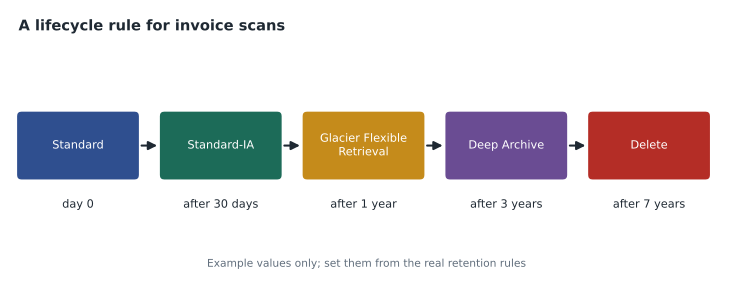
For the imaging archive, Dr. Kaur explains the real access pattern: images are viewed heavily in the first few weeks of a case, sometimes when the animal comes back months later, and very rarely after that, but referral hospitals occasionally ask for a study from years ago and want it the same day. That last point rules out Deep Archive for the main copy, because retrieval can take many hours. Gwen proposes Standard for 30 days, then Standard-IA, then Glacier Instant Retrieval after a year, with Intelligent-Tiering considered as an alternative if the pattern proves less predictable. The record-keeping period comes from the provincial or state rules for veterinary records, which Hannah is confirming, so no deletion rule is set yet.
# Pick an S3 storage class from an access pattern (simplified teaching rules).
def choose_class(reads_per_year, need_ms_access, recreatable, pattern_known=True):
    if not pattern_known:
        return "S3 Intelligent-Tiering"
    if reads_per_year >= 12:
        return "S3 Standard"
    if reads_per_year >= 4:
        return "S3 One Zone-IA" if recreatable else "S3 Standard-IA"
    if need_ms_access:
        return "S3 Glacier Instant Retrieval"
    return "S3 Glacier Flexible Retrieval" if reads_per_year >= 1 else "S3 Glacier Deep Archive"

cases = [("new case images", 100, True, False), ("images 6 months old", 6, True, False),
         ("images 3 years old", 0.5, True, False), ("old tape copies kept for audit", 0, False, False),
         ("preview thumbnails", 6, True, True)]
for name, reads, ms, recreate in cases:
print(f"{name:32s} -> {choose_class(reads, ms, recreate)}")new case images -> S3 Standard images 6 months old -> S3 Standard-IA images 3 years old -> S3 Glacier Instant Retrieval old tape copies kept for audit -> S3 Glacier Deep Archive preview thumbnails -> S3 One Zone-IA
What this code does
It turns simplified teaching rules into a decision: given how often data is read in a year, whether it must open in milliseconds and whether it could be recreated, it picks an S3 storage class. Unknown access patterns go to Intelligent-Tiering, frequently read data to Standard, and rarely read data down through the infrequent-access and Glacier classes. Five example data sets show new images staying in Standard, old images moving to Glacier classes and recreatable thumbnails using the cheaper One Zone option.
Worked problem
Estimating the archive storage bill
Using illustrative prices per GB-month of 0.023 for Standard, 0.0125 for Standard-IA and 0.004 for Glacier Instant Retrieval, estimate the monthly storage charge if, of 38,000 GB, 500 GB is under 30 days old, 5,500 GB is between 30 days and a year old, and 32,000 GB is older. Ignore request and retrieval charges.
Show solution
- Standard: 500 GB times 0.023 is 11.50.
- Standard-IA: 5,500 GB times 0.0125 is 68.75.
- Glacier Instant Retrieval: 32,000 GB times 0.004 is 128.00.
- Total: 11.50 plus 68.75 plus 128.00 is 208.25 a month, compared with 874.00 if everything stayed in Standard at 0.023.
Answer: About 208 dollars a month with lifecycle rules against about 874 without, on these illustrative prices. Real prices vary by Region and change over time.
Block storage: Amazon EBS and instance store
Amazon Elastic Block Store (Amazon EBS) provides network-attached block volumes for EC2 instances. A volume is created in one Availability Zone and attached to an instance in the same zone; it keeps its data when the instance stops and can be detached and attached to another instance. EBS offers SSD-backed types for most workloads, such as general purpose gp3 and provisioned IOPS io2 for demanding databases, and cheaper HDD-backed types for large sequential workloads such as logs. Volumes can be resized and changed between types while in use.
EBS snapshots are point-in-time backups of a volume, stored by AWS in S3 behind the scenes and incremental after the first. Snapshots can be copied to other Regions and used to create new volumes, which is how a server's disks are recreated elsewhere in a disaster.
Instance store is different: disks physically attached to the host computer under some instance types. It is very fast, but temporary. Its data is lost if the instance stops, terminates or the underlying disk fails. It suits caches, scratch space and buffers, never the only copy of anything important. Mateo writes "instance store = scratch" in his notes, underlined twice.
File storage: Amazon EFS and Amazon FSx
Amazon Elastic File System (Amazon EFS) is a managed NFS file system for Linux workloads. It grows and shrinks automatically as files are added and removed, can be mounted by thousands of instances, containers and Lambda functions at once, and stores data across several Availability Zones by default. EFS also has storage classes and lifecycle management for files that are rarely read.
Amazon FSx provides fully managed file systems built on popular file system software. FSx for Windows File Server offers SMB shares integrated with Microsoft Active Directory, which suits Windows applications and user home folders. FSx for Lustre gives very high performance for computing jobs and machine learning. FSx for NetApp ONTAP and FSx for OpenZFS bring those familiar platforms to AWS for companies that already use them.
Cascade Ridge has a Windows file share today holding forms, policies and scanned paperwork, used by every clinic. The migration plan retires the tape backups, but not the share. Gwen proposes FSx for Windows File Server, joined to the company's directory, so that staff see the same drive letters and permissions as today.
Hybrid, transfer and backup services
Several services connect on-site storage to AWS or move data in bulk.
- AWS Storage Gateway runs as a virtual machine or appliance on site and gives local servers access to AWS storage through familiar protocols, keeping a local cache of recently used data. The S3 File Gateway presents S3 as an NFS or SMB share, the FSx File Gateway caches FSx for Windows shares, the Volume Gateway presents block volumes backed up to AWS, and the Tape Gateway replaces physical tape libraries with virtual tapes stored in S3 and its archive classes. The exam often describes Storage Gateway as a cached or hybrid file service.
- AWS DataSync moves large amounts of data online between on-site storage and AWS storage services, handling scheduling, encryption, integrity checks and retries.
- For offline transfer of very large data sets, AWS historically shipped rugged Snow Family devices. AWS stopped offering Snow devices to new customers and now points to DataSync over a fast connection, AWS Data Transfer Terminals (sites where customers bring their own drives to upload data), or partner services.
- AWS Backup centrally manages backups across services, including EBS, EC2, RDS, DynamoDB, EFS, FSx and S3, with backup plans, retention rules, cross-Region and cross-account copies and reports. It replaces the patchwork of per-service backup settings and, for Cascade Ridge, the weekly tape trip to the CFO's house.
For the initial 38 TB copy, Gwen's plan uses DataSync over the planned dedicated connection (lesson 6), running for several nights, with the old array kept read-only until every study has been verified in S3. Lorraine is relieved that the plan for disaster recovery no longer depends on her garage.
Common mistakes
MistakeUsing instance store for a database's only copy of its data.
InsteadInstance store is lost when the instance stops or fails; use EBS for persistent block storage.
MistakePutting a shared folder used by many servers on an EBS volume.
InsteadEBS volumes attach to one instance at a time in normal use; use EFS or FSx for shared file storage.
MistakeChoosing Glacier Deep Archive for data that must be readable the same morning.
InsteadDeep Archive retrieval takes hours; use Glacier Instant Retrieval or Standard-IA when fast access matters.
MistakeTreating eleven nines of durability as protection against accidental deletion.
InsteadDurability protects against hardware loss; use versioning, Object Lock and backups against human error.
MistakeMoving data to cheaper classes by hand.
InsteadUse S3 Lifecycle rules or Intelligent-Tiering so classes change automatically.
Summary and key terms
- Object storage keeps whole objects with keys and metadata; block storage provides low-latency volumes for one server; file storage shares folders over NFS or SMB.
- Amazon S3 stores objects in Regional buckets, is designed for eleven nines of durability and is private by default, with versioning, Object Lock and replication available.
- Storage classes range from S3 Standard through Intelligent-Tiering, the infrequent access classes and the Glacier classes, and lifecycle rules move objects between them automatically.
- Amazon EBS provides persistent volumes and snapshots; instance store is fast but temporary.
- Amazon EFS and Amazon FSx provide managed file systems.
- Storage Gateway, DataSync, Data Transfer Terminals and AWS Backup handle hybrid access, transfer and backup.
- Amazon S3
- The AWS object storage service, organized in buckets.
- Storage class
- An S3 option that trades storage price against access speed and retrieval charges.
- S3 Lifecycle
- Rules that move objects to other classes or delete them as they age.
- Versioning
- An S3 setting that keeps earlier versions of objects when they change or are deleted.
- Amazon EBS
- Persistent block storage volumes for EC2 instances.
- Instance store
- Temporary block storage physically attached to the host of some instances.
- Amazon EFS
- A managed, elastic NFS file system.
- Amazon FSx
- Managed file systems such as Windows File Server, Lustre, NetApp ONTAP and OpenZFS.
- AWS Storage Gateway
- A hybrid service giving on-site systems cached access to AWS storage.
- AWS Backup
- A central service for managing backups across AWS services.
Practice problems
Work each problem on paper first, then reveal the answer to check.
Which S3 class suits data with unknown access patterns?
Show answer
S3 Intelligent-Tiering.
What happens to instance store data when an instance stops?
Show answer
It is lost.
Which service provides SMB file shares integrated with Active Directory?
Show answer
Amazon FSx for Windows File Server.
Lesson quiz · 5 questions
Score 60% or more to complete this lesson.
Create a free account to save your progress, take quizzes and earn a certificate.