
AWS-103 · Lesson 1 of 12 · 22 min
Compute: EC2, instance types and pricing options
▶ Video coming soon A video version of this lesson is on the way.
Two weeks ago the board of Cascade Ridge Veterinary Partners approved the migration plan that Gwen Halvorsen and Mateo Ruiz wrote in the first course of this program. The plan says what moves, in what order and why. It does not yet say which AWS services each piece will use. "That is the next job," Gwen tells Mateo at their Monday session in the Calgary head office. "For the next twelve sessions we are going to walk through the services the exam calls core, and for each one we will decide whether Cascade Ridge needs it. By the end you will have a service map for the whole design, and you will know the third domain of the exam, Cloud Technology and Services, which carries the largest weight of the four."
They start with compute, because the first system to move, the VetLedger practice management application, needs servers. In the old server room it runs on two Windows machines that Mateo bought six years ago. In AWS the same job is done by Amazon Elastic Compute Cloud, almost always shortened to Amazon EC2. This lesson explains what an EC2 instance is, how instance types are named and chosen, how instances scale and sit behind load balancers, and how the different ways of paying for EC2 change the bill.
What EC2 is
Amazon EC2 rents virtual servers, called instances, by the second or by the hour. You choose an operating system, a size and a location, and within minutes you have a server you can log in to, install software on and connect to a network. Nothing has to be ordered, shipped, racked or cabled. When the server is no longer needed you terminate it and the charges stop.
EC2 is the most flexible compute service AWS offers, and also the one that leaves the most work with the customer. Under the shared responsibility model from the previous course, AWS runs the data centres, the physical hosts and the hypervisor that divides each host into instances. The customer is responsible for everything from the guest operating system up: patching Windows or Linux, installing and updating the application, configuring the firewall rules on the instance, managing who can log in, and backing up the data. Gwen puts it plainly: "With EC2 you get a server, not a service. If you would have had to do it on your own server, you still have to do it on EC2."
Every instance is built from a few parts, and exam questions often describe one of them without naming it.
| Part | What it is | At Cascade Ridge |
|---|---|---|
| Amazon Machine Image (AMI) | A template containing the operating system and, optionally, installed software, used to launch instances | A Windows Server AMI for the VetLedger application servers |
| Instance type | The size and kind of virtual hardware: vCPUs, memory, network and storage options | Chosen from measurements of the current servers |
| Amazon EBS volume | A network-attached disk that holds the operating system and data and survives a restart | The C: drive and an application data drive |
| Security group | A stateful virtual firewall that controls traffic to and from the instance | Allows traffic only from the load balancer and the office network |
| Key pair or Session Manager | The way administrators sign in, either with a key or through AWS Systems Manager without opening a remote port | Session Manager, so no remote-desktop port faces the internet |
| IAM role (instance profile) | Permissions the software on the instance uses to call other AWS services | Lets the application write reports to an S3 bucket without stored passwords |
Instances live in a single Availability Zone. That one fact drives much of what follows: if a design must survive the loss of an Availability Zone, it needs instances in at least two of them, plus something that sends traffic only to the healthy ones.
Instance types and how they are named
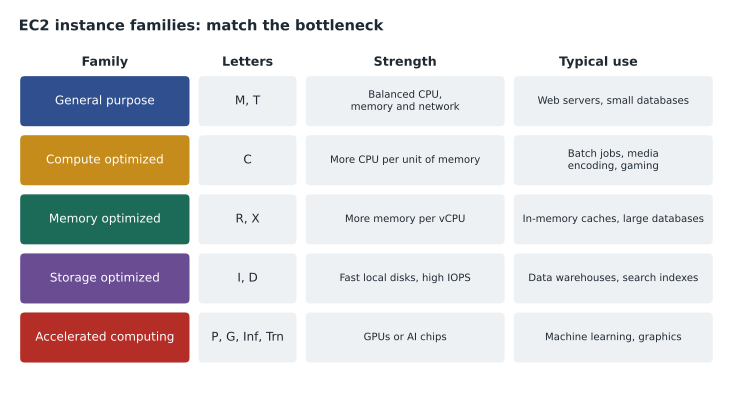
AWS offers hundreds of instance types, grouped into families by the balance of resources they provide. The exam does not expect you to memorize sizes, but it does expect you to recognize which family suits a described workload. The rule Gwen teaches is to find the bottleneck: the resource the application runs out of first.
- General purpose instances, such as the M and T families, balance processor, memory and networking. They suit web servers, small and medium databases, development environments and most business applications. The T family is burstable: it earns credits while idle and spends them during short busy spells, which suits workloads that are quiet most of the day.
- Compute optimized instances, the C family, give more processor power for each gigabyte of memory. They suit batch processing, scientific modelling, media encoding, high-traffic web front ends and game servers.
- Memory optimized instances, such as R and X, give more memory for each processor. They suit in-memory caches, real-time analytics and large relational databases that keep their working set in memory.
- Storage optimized instances, such as I and D, come with large, fast local disks for workloads that read and write huge amounts of data on local storage, such as data warehouses, search engines and distributed file systems.
- Accelerated computing instances, such as P, G, Inf and Trn, add graphics processors or AWS-designed machine learning chips (Inferentia for running models, Trainium for training them). They suit machine learning, video rendering and other work that benefits from specialized hardware.
An instance type name such as m7g.large packs several facts together. The letter m is the family. The number 7 is the generation; newer generations usually give better performance for the price. Letters after the number describe options: g means an AWS Graviton processor (an Arm-based chip designed by AWS), i an Intel processor, a an AMD processor, and others mark extra features such as local disks or enhanced networking. After the dot comes the size: nano, micro, small, medium, large, xlarge, 2xlarge and upward. Each step up roughly doubles the processors and memory, and roughly doubles the price.
Mateo measured the two VetLedger servers over a month. The busiest one used four processor cores at most, rarely more than half their capacity, but its 32 GB of memory was usually full because of the database caching inside the application. The instance family follows from that: memory matters more than processor. Since the SQL Server database itself will move to a managed service (lesson 4), the application servers need less memory than today's machines, and Gwen suggests starting with a general purpose instance with 16 GB and watching the metrics for a month. "The first size you pick in the cloud is a guess," she says. "The second one is a measurement." Changing size later means stopping the instance, choosing a new type and starting it again, which takes minutes rather than a hardware order.
Elasticity: Auto Scaling and load balancers
On premises, Mateo bought servers big enough for the busiest day of the year, and they sat mostly idle the rest of the time. In the cloud, capacity can follow demand. This ability to add and remove resources automatically as load changes is called elasticity, and the exam links it directly to Amazon EC2 Auto Scaling.
An Auto Scaling group is a collection of identical instances, launched from a launch template that records the AMI, instance type, security groups and other settings. You set a minimum, a maximum and a desired number of instances, and policies that change the desired number, for example adding an instance when average processor use stays high for a few minutes and removing one when it falls. Auto Scaling also replaces instances that fail health checks, so the group heals itself. Spreading the group across two or three Availability Zones gives high availability as well as elasticity.
Many identical instances need a single front door. Elastic Load Balancing provides it: a managed load balancer that receives requests and spreads them across healthy targets in several Availability Zones. There are three main types.
| Load balancer | Works at | Typical use |
|---|---|---|
| Application Load Balancer | Layer 7, understanding HTTP and HTTPS requests | Web applications and APIs, with routing by path or host name |
| Network Load Balancer | Layer 4, handling TCP and UDP connections | Very high throughput, low latency, static IP addresses |
| Gateway Load Balancer | Layer 3, passing traffic through appliances | Inserting third-party firewalls and inspection appliances |
For VetLedger, Gwen's design places two application instances in different Availability Zones behind an Application Load Balancer, in an Auto Scaling group with a minimum of two. If one Availability Zone has a problem at three in the morning, the load balancer stops sending clinic traffic there and the group launches a replacement in the healthy zone. Dr. Simone Kaur, who runs the emergency hospital, asked for exactly this after the July outage, when an overheated server room took the practice system down for three hours.
Paying for EC2: the purchase options
The same instance can cost very different amounts depending on how it is bought. This is one of the most tested ideas in the whole exam, because it connects compute to the billing domain. Lorraine Beaudry, the CFO, joins this part of the session.
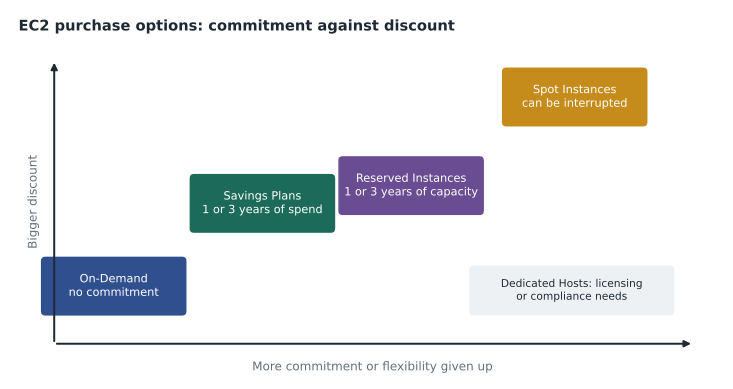
- On-Demand Instances are paid by the second (for Linux and Windows) or by the hour, with no commitment. They cost the most per hour but are right for short, unpredictable or new workloads, and for anything you have not yet measured.
- Savings Plans give a lower rate in return for committing to a steady amount of compute spending per hour for one or three years. Compute Savings Plans apply automatically across instance families, sizes, Regions and operating systems, and also to AWS Fargate and AWS Lambda. EC2 Instance Savings Plans give a deeper discount but are tied to one instance family in one Region.
- Reserved Instances are the older commitment model: a one- or three-year commitment to a specific instance configuration in a Region, paid all upfront, partly upfront or with no upfront payment. Standard Reserved Instances give the bigger discount; Convertible ones allow exchanges for other configurations. AWS now recommends Savings Plans for most new commitments, but Reserved Instances still appear on the exam and are also offered for some database and other services.
- Spot Instances use spare EC2 capacity at a steep discount, but AWS can take them back with a two-minute notice when it needs the capacity. They suit fault-tolerant, flexible work such as batch jobs, image processing, testing and containers that can be restarted, and never a single database that must stay up.
- Dedicated Hosts are whole physical servers reserved for one customer, giving visibility of sockets and cores for software licences that are counted that way, and for some compliance requirements. Dedicated Instances run on hardware dedicated to one customer without that host-level visibility. On-Demand Capacity Reservations reserve capacity in a specific Availability Zone without a long-term discount.
Lorraine asks the obvious question: why not buy everything as Spot? Gwen's answer is the core of the exam topic. The discount always buys something from you. A Savings Plan buys your commitment, so it suits the steady baseline you are confident will run for years. Spot buys your willingness to be interrupted, so it suits work that can stop and resume. On-Demand buys nothing from you, so you pay the full rate for full flexibility. Most mature AWS bills mix all three.
For Cascade Ridge the plan is simple. Run everything On-Demand during the pilot and the first two months after cutover, measure actual use, then cover the steady baseline (the VetLedger servers, which run around the clock) with a Compute Savings Plan. The nightly conversion of radiograph images into smaller preview files, which can restart without harm, is a candidate for Spot later.
# Illustrative prices only; real prices vary by Region, instance type and date.
hours_month = 730
on_demand = 0.20        # dollars per hour for one instance (example)
savings_plan = 0.13     # committed rate per hour, 3-year plan (example)
spot = 0.07             # typical Spot rate per hour (example)

for name, rate in [("On-Demand", on_demand), ("Savings Plan", savings_plan), ("Spot", spot)]:
    monthly = rate * hours_month * 2          # two instances, always on
    print(f"{name:13s} {monthly:8.2f} per month for two instances")

saving = 1 - savings_plan / on_demand
print(f"Savings Plan discount: {round(saving * 100)} out of 100")On-Demand 292.00 per month for two instances Savings Plan 189.80 per month for two instances Spot 102.20 per month for two instances Savings Plan discount: 35 out of 100
What this code does
It multiplies three illustrative hourly prices, On-Demand, a 3-year Savings Plan and Spot, by 730 hours and two always-on instances to get a monthly cost for each. It then works out the Savings Plan discount compared with On-Demand. The comparison shows how much commitment or interruptible capacity can lower the bill for the same servers.
Worked problem
Choosing a purchase option for each workload
Cascade Ridge has three EC2 workloads after migration: (a) two VetLedger application servers that must run around the clock for at least three years; (b) a nightly job that converts new radiographs into preview images and can be restarted if interrupted; (c) a two-week load test of BookVet before cutover. Which purchase option suits each?
Show solution
- Workload (a) is steady, long-lived and predictable, so a commitment discount fits: a Compute Savings Plan sized to its baseline use, bought after a month of measurement.
- Workload (b) is flexible and fault tolerant, so Spot Instances give the largest discount, with a retry if an instance is reclaimed.
- Workload (c) is short and temporary, so On-Demand is right; a one- or three-year commitment would waste money after two weeks.
Answer: Savings Plan for the always-on servers, Spot for the restartable batch job, On-Demand for the short test.
Other compute services worth recognizing
EC2 is the foundation, but several services wrap it to remove work. The exam expects you to recognize them from a short description.
| Service | What it does | When to choose it |
|---|---|---|
| AWS Elastic Beanstalk | Deploys and manages a web application on EC2 for you: capacity, load balancing, scaling and health monitoring | You have code and want AWS to handle the environment while you keep access to it |
| Amazon Lightsail | Simple virtual private servers, databases and load balancers at a predictable monthly price | Small websites and simple applications for people new to AWS |
| AWS Batch | Runs batch computing jobs, choosing and scaling the compute for queued work | Large numbers of jobs such as simulations or image processing |
| AWS Outposts | AWS-managed racks or servers installed in your own building, running AWS services locally | Very low latency to on-site equipment or data that must stay on site |
| VMware Cloud on AWS and others | Run existing virtualization platforms on AWS hardware | Moving large VMware estates with little change |
Kwame Asante, who wrote the BookVet booking site, asks whether Elastic Beanstalk would suit the first, rehosted version of BookVet. Gwen agrees it is a reasonable middle step: it keeps the application on EC2, as the migration plan says, while handing the load balancer, scaling and deployment work to AWS. Phase 2, the serverless rewrite, is the subject of the next lesson.
Common mistakes
MistakeChoosing an instance size by matching the old server's specifications exactly.
InsteadMeasure actual use first, start with a reasonable size and resize from monitoring data; old servers were usually oversized.
MistakeRunning a single instance and calling it highly available.
InsteadAn instance lives in one Availability Zone; use two or more zones behind a load balancer, usually in an Auto Scaling group.
MistakeUsing Spot Instances for a database that must always run.
InsteadSpot capacity can be reclaimed with two minutes' notice; use it only for interruptible work.
MistakeBuying a three-year commitment before measuring use.
InsteadRun On-Demand first, measure the steady baseline, then commit only to that baseline.
MistakeAssuming AWS patches the operating system on EC2.
InsteadOn EC2 the customer patches the guest operating system and software; AWS secures the host and hypervisor.
By the end of the session Mateo has the first line of his service map: VetLedger application servers on EC2, general purpose Windows instances, two Availability Zones, an Application Load Balancer and an Auto Scaling group, On-Demand for now and a Savings Plan after measurement. "One down," he says. Gwen laughs. "One of about thirty."
Summary and key terms
- Amazon EC2 provides virtual servers called instances, built from an AMI, an instance type, EBS volumes, security groups and an IAM role.
- The customer manages the guest operating system and everything above it.
- Instance families match workloads: general purpose, compute optimized, memory optimized, storage optimized and accelerated computing.
- Auto Scaling groups provide elasticity and replace unhealthy instances, and Elastic Load Balancing spreads traffic across healthy instances in several Availability Zones.
- On-Demand gives full flexibility, Savings Plans and Reserved Instances trade commitment for discounts, Spot trades interruption for the deepest discount, and Dedicated Hosts serve licensing and compliance needs.
- Amazon EC2
- The AWS service for renting virtual servers, called instances.
- AMI
- Amazon Machine Image: the template used to launch an instance.
- Instance type
- A named combination of processor, memory, storage and network capacity.
- Auto Scaling group
- A set of instances whose number changes automatically with demand and health.
- Elastic Load Balancing
- Managed load balancers that spread traffic across healthy targets.
- On-Demand Instance
- An instance paid per second or hour with no commitment.
- Savings Plan
- A one- or three-year commitment to an hourly spend in return for lower rates.
- Reserved Instance
- A one- or three-year commitment to an instance configuration in return for a discount.
- Spot Instance
- Spare capacity at a deep discount that AWS can reclaim with two minutes of notice.
- Dedicated Host
- A physical server reserved for one customer, used for licensing and compliance.
Practice problems
Work each problem on paper first, then reveal the answer to check.
Which instance family suits an in-memory cache?
Show answer
Memory optimized, such as the R family.
What does the g in m7g.large mean?
Show answer
The instance uses an AWS Graviton processor.
What gives an EC2 workload elasticity?
Show answer
An Auto Scaling group that adds and removes instances as demand changes.
Lesson quiz · 5 questions
Score 60% or more to complete this lesson.
Create a free account to save your progress, take quizzes and earn a certificate.