
AWS-103 · Lesson 2 of 12 · 19 min
Containers and serverless: ECS, EKS, Fargate and Lambda
▶ Video coming soon A video version of this lesson is on the way.
Kwame Asante wrote BookVet, the online booking site, four years ago in Python, on a weekend, because the clinics were drowning in phone calls. It has grown since then: clients now book appointments, request prescription refills, upload photos of a limping dog for the vet to look at before the visit, and get text reminders. The migration plan rehosts BookVet on EC2 first and rebuilds it later. "Later" is what this session is about. Gwen asks Kwame to join, because the choice between containers and serverless functions is really a choice about how the development team wants to work.
In the last lesson an EC2 instance was a whole server that the customer manages. This lesson moves up the scale of managed compute: containers, which package an application with everything it needs; the services that run containers on AWS; AWS Fargate, which removes the servers underneath the containers; and AWS Lambda, which removes even the idea of a running program and simply runs code when an event happens.
What a container is
A container packages an application together with the libraries, runtime and settings it needs, so that it runs the same way on a developer's laptop, a test server and production. Unlike a virtual machine, a container does not carry a whole operating system; containers on the same host share the host's operating system kernel and are isolated from each other. That makes them small, quick to start (often in seconds) and dense: one host can run many of them.
A container is started from an image, a read-only template built from a recipe file (often a Dockerfile) that lists the base image, the files to copy in and the command to run. Images are stored in a registry. On AWS that registry is Amazon Elastic Container Registry (Amazon ECR), a managed private registry with access controlled by IAM and optional scanning of images for known software vulnerabilities.
Kwame likes the idea immediately. Today, setting up a new test copy of BookVet takes him most of a day, because the server needs exactly the right Python version and a dozen libraries. With a container image, a test copy is one command.
Running containers: Amazon ECS and Amazon EKS
One container on one laptop is easy. Hundreds of containers across many servers, restarted when they fail, placed where there is room, connected to load balancers and updated without downtime, need an orchestrator. AWS offers two.
- Amazon Elastic Container Service (Amazon ECS) is AWS's own orchestrator. You describe each container in a task definition (the image, memory, processor, ports, environment variables and IAM role), run copies of it as tasks, and keep a set number of tasks running behind a load balancer as a service. Tasks run in a cluster. ECS is tightly integrated with other AWS services and has no control plane for the customer to manage or pay for separately.
- Amazon Elastic Kubernetes Service (Amazon EKS) runs Kubernetes, the open-source orchestrator used across many clouds and data centres. AWS manages the Kubernetes control plane across several Availability Zones; the customer defines workloads using standard Kubernetes tools and files. EKS suits organizations that already use Kubernetes, want the same tooling in several places, or rely on its large ecosystem of add-ons.
Gwen gives the exam shortcut: if a question mentions Kubernetes, the answer is EKS. If it asks for the simplest AWS-native way to run containers, it is usually ECS.
| Question in the scenario | Likely answer |
|---|---|
| Run containers using Kubernetes, managed by AWS | Amazon EKS |
| Run Docker containers with a simple AWS-native orchestrator | Amazon ECS |
| Store and share private container images | Amazon ECR |
| Run containers without managing servers or clusters of instances | AWS Fargate with ECS or EKS |
| Run code in response to events without managing any servers | AWS Lambda |
AWS Fargate: containers without servers
Both ECS and EKS need compute underneath the containers. There are two choices. With the EC2 launch type, the containers run on EC2 instances in your account; you choose the instance types, patch them and scale them, and you can use Savings Plans or Spot to cut costs. With AWS Fargate, AWS supplies and manages the compute for each task or pod. You say how much processor and memory each task needs, and you pay for that while it runs. There are no instances to patch, size or scale.
Fargate is called serverless compute for containers. Servers still exist, of course; serverless means the customer never sees, manages or pays for idle ones. The trade-off is control: with Fargate you cannot log in to the host or choose special hardware, and for very large, steady fleets, well-packed EC2 instances can be cheaper. For a small team like Cascade Ridge's, where Kwame is the only developer and Mateo is the only systems person, giving up host management is worth a great deal.
AWS Lambda: functions that run on events
AWS Lambda goes one step further. You upload a function, a piece of code with a handler that AWS calls, and connect it to an event source. When the event happens, Lambda runs the function, scales automatically from zero to thousands of copies if many events arrive at once, and stops when there is nothing to do. You pay for the number of requests and for the run time, measured in milliseconds and scaled by the memory you assign, and nothing when the function is idle.
Events can come from dozens of AWS services: a file uploaded to an Amazon S3 bucket, a message arriving in an Amazon SQS queue, a change in an Amazon DynamoDB table, an HTTP request through Amazon API Gateway or a Lambda function URL, a schedule in Amazon EventBridge, or a sign-in event. Lambda supports several languages directly, including Python, Node.js, Java, .NET, Ruby and Go, and can also run functions packaged as container images.
Lambda has limits that shape what it suits. A single invocation can run for at most 15 minutes. Memory can be set from 128 MB up to about 10 GB, and processor power rises with memory. Functions should be stateless: anything that must last beyond one invocation belongs in a database, a bucket or a queue. A function that has not run for a while may take a little longer on its first request, called a cold start, while Lambda prepares an environment.
Kwame's photo upload feature is a textbook Lambda case. A client uploads a photo of their pet; the photo lands in an S3 bucket; the upload event triggers a function that checks the file type, makes a smaller copy for the vet's screen, records the photo against the appointment and sends a confirmation. Between uploads, nothing runs and nothing is billed.
# A Lambda-style handler, run locally with a sample event (no AWS calls).
import json

def handler(event, context=None):
    results = []
    for rec in event["Records"]:
        key = rec["s3"]["object"]["key"]
        size_kb = rec["s3"]["object"]["size"] // 1024
        if not key.lower().endswith((".jpg", ".jpeg", ".png")):
            results.append({"key": key, "status": "rejected: not an image"})
        elif size_kb > 15000:
            results.append({"key": key, "status": "rejected: larger than 15 MB"})
        else:
            results.append({"key": key, "status": "accepted", "preview": "previews/" + key})
    return {"statusCode": 200, "body": json.dumps(results)}

sample = {"Records": [
    {"s3": {"object": {"key": "appt-4471/biscuit-paw.jpg", "size": 2400000}}},
    {"s3": {"object": {"key": "appt-4472/notes.docx", "size": 90000}}},
]}
print(handler(sample)["body"])[{"key": "appt-4471/biscuit-paw.jpg", "status": "accepted", "preview": "previews/appt-4471/biscuit-paw.jpg"}, {"key": "appt-4472/notes.docx", "status": "rejected: not an image"}]What this code does
It writes a function in the shape AWS Lambda expects and runs it on the computer with a sample upload event instead of calling AWS. For each uploaded file it checks the extension and size: images under 15 megabytes are accepted and given a preview path, while other files are rejected with a reason. The output shows one photo accepted and one Word document rejected, the way a real function would respond to new files in an S3 bucket.
The handler receives an event that describes what happened and returns a result. In the real function, the accepted branch would call Amazon S3 to write the preview and DynamoDB to record it, using the permissions in the function's IAM role rather than any stored password.
Building whole applications from serverless parts
Lambda rarely works alone. A serverless web application usually combines several managed services, each doing one job.
- Amazon API Gateway creates, secures and scales HTTP and WebSocket APIs, sending requests to Lambda functions or other back ends, with throttling and authorization built in.
- AWS Step Functions coordinates several steps into a workflow, with retries, branches and waits, so that functions stay small and the overall process is visible as a diagram.
- Amazon DynamoDB (lesson 4) stores data with no servers to manage, scaling with demand.
- Amazon SQS, Amazon SNS and Amazon EventBridge (lesson 8) pass messages and events between the parts.
Kwame sketches the phase 2 BookVet design: the static pages served from S3 through Amazon CloudFront (lesson 5), the booking API in API Gateway calling Lambda functions, appointment data in DynamoDB, and the reminder texts sent from a scheduled function. The booking calendar still has to read appointment slots from VetLedger, which stays on EC2, so a small function will call VetLedger's existing interface. Nothing in phase 2 needs a server that Kwame or Mateo patch.
Choosing between EC2, containers and Lambda
Gwen writes four questions on the whiteboard that decide most cases.
- Does the workload need a full operating system, special software installed on the host, or a vendor product that only supports virtual machines? Then EC2. VetLedger is in this group, because the vendor supports only Windows servers.
- Is it an application, possibly made of several services, that the team wants to package once and run anywhere, with steady traffic or long-running processes? Then containers on ECS or EKS, with Fargate unless there is a reason to manage the hosts.
- Is it short pieces of work triggered by events, with traffic that comes in bursts or not at all? Then Lambda.
- Does anything exceed Lambda's limits, such as a job that runs for an hour? Then containers or EC2, perhaps started by an event.
Worked problem
Matching four Cascade Ridge workloads to compute
Choose compute for each: (1) the vendor-supported VetLedger application; (2) resizing uploaded pet photos; (3) a nightly report that runs for about 40 minutes and is packaged as a container image; (4) the BookVet booking API, with busy mornings and almost no traffic overnight.
Show solution
- (1) The vendor supports only Windows servers, so EC2 instances.
- (2) Short, event-driven work triggered by each upload: Lambda.
- (3) Forty minutes exceeds the 15-minute Lambda limit; a container task on ECS with Fargate, started on a schedule, runs it without a server to manage.
- (4) Bursty request traffic with idle periods suits API Gateway and Lambda, which scale to zero.
Answer: EC2 for VetLedger, Lambda for photos and the booking API, an ECS task on Fargate for the long nightly report.
Responsibility and cost as you move right
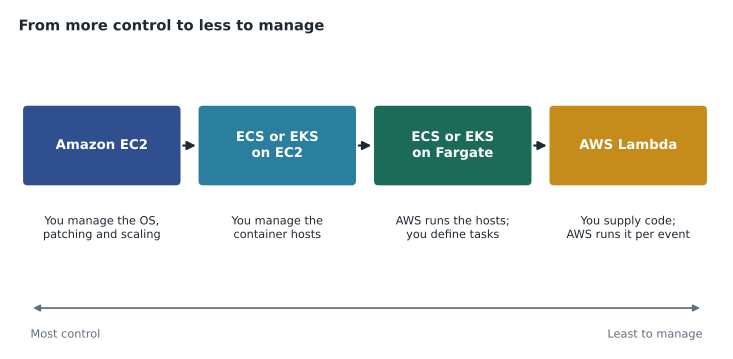
Moving from EC2 to Fargate to Lambda shifts work from customer to AWS. On EC2 the customer patches the operating system. On Fargate, AWS patches and runs the hosts and the customer is responsible for the container image and its contents. On Lambda, AWS runs the whole execution environment and the customer is responsible for the function code, its dependencies, its configuration and its permissions. In every case the customer still owns their data and who can access it.
The cost model shifts too. EC2 is paid for while it runs, busy or idle. Fargate is paid for the processor and memory each task reserves while it runs. Lambda is paid per request and per millisecond of execution. For steady, heavy workloads, EC2 with a Savings Plan can be cheapest. For spiky or light workloads, Lambda usually wins because idle time is free. Compute Savings Plans apply to all three, which Lorraine notes with approval.
Common mistakes
MistakeThinking serverless means there are no servers.
InsteadServers exist, but AWS manages them and the customer neither sees nor pays for idle capacity.
MistakeChoosing Lambda for a job that runs for an hour.
InsteadA Lambda invocation can run for at most 15 minutes; use a container task or EC2 for long jobs.
MistakeAnswering ECS when a question says the company has standardized on Kubernetes.
InsteadKubernetes points to Amazon EKS.
MistakeStoring session data inside a Lambda function between calls.
InsteadFunctions should be stateless; keep state in DynamoDB, S3, ElastiCache or a queue.
MistakeAssuming Fargate is a separate orchestrator.
InsteadFargate is a serverless compute engine that runs ECS tasks or EKS pods; ECS and EKS are the orchestrators.
At the end of the session Mateo adds four lines to the service map: ECR for BookVet images, ECS on Fargate for the nightly reports, Lambda with API Gateway for phase 2 of BookVet, and Step Functions for the refill-request workflow that needs a vet's approval. Kwame leaves with a list of reading, and a slightly worried look about rewriting his weekend project properly.
Summary and key terms
- Containers package an application with its dependencies and start quickly from images stored in Amazon ECR.
- Amazon ECS is the AWS-native orchestrator; Amazon EKS runs managed Kubernetes.
- Both can run on EC2 instances that the customer manages or on AWS Fargate, serverless compute for containers.
- AWS Lambda runs stateless functions in response to events, scales automatically from zero, is billed per request and millisecond, and limits each invocation to 15 minutes.
- API Gateway, Step Functions, DynamoDB and messaging services combine with Lambda to build serverless applications.
- Moving from EC2 to containers to Lambda shifts operational work to AWS.
- Container
- A package of an application and its dependencies that shares the host operating system kernel.
- Amazon ECR
- A managed private registry for container images.
- Amazon ECS
- The AWS-native container orchestration service.
- Amazon EKS
- A managed Kubernetes service.
- AWS Fargate
- Serverless compute that runs ECS tasks and EKS pods without managing instances.
- AWS Lambda
- Serverless compute that runs functions in response to events.
- Event source
- The service or action, such as an upload or API call, that triggers a Lambda function.
- Amazon API Gateway
- A managed service for creating and securing APIs.
- AWS Step Functions
- A service that coordinates steps into visual workflows.
- Cold start
- The extra time a function takes on a request when no ready environment exists.
Practice problems
Work each problem on paper first, then reveal the answer to check.
What is the maximum run time of one Lambda invocation?
Show answer
15 minutes.
Which service stores private container images?
Show answer
Amazon ECR.
A team wants to run containers without managing any EC2 instances. What should it use?
Show answer
AWS Fargate with Amazon ECS or Amazon EKS.
Lesson quiz · 5 questions
Score 60% or more to complete this lesson.
Create a free account to save your progress, take quizzes and earn a certificate.