
AWS-102 · Lesson 8 of 12 · 19 min
Encryption at rest and in transit
▶ Video coming soon A video version of this lesson is on the way.
The imaging archive was the largest thing Cascade Ridge would move to AWS: about 38 terabytes of radiographs and ultrasound studies, some of them going back twelve years. Hannah's first question about it was not how fast the upload would be. It was whether the images would be encrypted, who could decrypt them, and how she would prove it. "These are medical records for animals," she said, "but they carry the owners' names and addresses. If a backup tape had ever fallen out of the CFO's car, we would have had a very bad week."
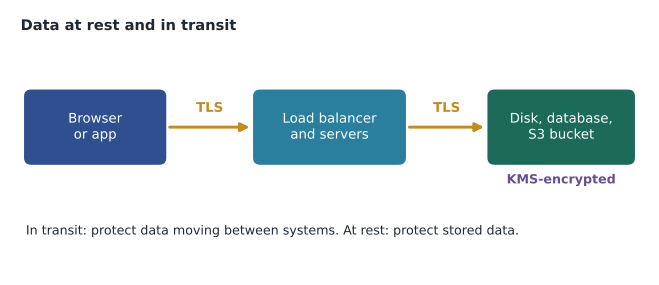
Encryption is one of the benefits of cloud security that the exam guide names directly. This lesson explains the two states of data that need protecting, how AWS encrypts data at rest with AWS Key Management Service (AWS KMS), how data in transit is protected with TLS and certificates, and what remains the customer's responsibility.
Why encrypt?
Encryption turns readable data, called plaintext, into ciphertext that is useless without the right key. Its value is that access to the stored bytes is no longer enough: someone also needs access to the key. If a disk is lost, a snapshot is shared by mistake or an attacker copies a file, the data remains protected as long as the key does. Encryption also gives auditors a clear, checkable control, and many regulations and contracts either require it or treat encrypted data more leniently when a breach occurs.
Encryption does not replace access control. If an attacker steals credentials for an identity that is allowed to decrypt, the encryption will decrypt for them too. That is why AWS designs key access as a second, separate permission. To read an encrypted object, a principal usually needs permission to read the object and permission to use the key.
Encryption at rest
Encryption at rest protects stored data: files in Amazon S3, EBS volumes attached to EC2 instances, RDS databases and their backups, DynamoDB tables, snapshots and many more. Across AWS, the pattern is consistent: the storage service encrypts data as it writes it and decrypts it when an authorized principal reads it, using keys managed in AWS KMS. Applications usually do not notice any difference.
Many services now encrypt by default. Amazon S3 encrypts all new objects automatically with keys that S3 manages, and a bucket's default encryption setting can switch that to a KMS key the customer controls. DynamoDB tables are always encrypted at rest. Other services, such as EBS volumes and RDS instances, offer encryption as a setting, and an account-level option can make new EBS volumes encrypted by default in each Region. Because some settings must be chosen when a resource is created, the safest habit is to turn encryption defaults on before creating resources.
Gwen made three settings on day one in each Region Cascade Ridge uses: EBS encryption by default turned on, S3 default encryption for the imaging bucket set to a customer managed KMS key, and RDS encryption chosen when the VetLedger database was created. "Encryption is cheap to turn on at the start and annoying to retrofit," she said. "An unencrypted RDS instance cannot simply be switched to encrypted; you restore an encrypted copy and cut over."
AWS Key Management Service
AWS KMS is a managed service for creating and controlling the cryptographic keys that protect data. KMS keys are created, used and stored inside hardware security modules that AWS manages and that are validated under recognized cryptographic standards; the key material of a KMS key never leaves KMS unencrypted. Other AWS services call KMS when they need to encrypt or decrypt, and every one of those calls is recorded in AWS CloudTrail, so the customer can see who used which key and when.
KMS keys come in three ownership models, a distinction worth knowing.
| Key type | Who manages it | Customer control | Typical use |
|---|---|---|---|
| AWS owned key | AWS, shared across many accounts | None; not visible in the account | Default encryption in some services |
| AWS managed key | AWS, created in the account for one service | Can view and audit its use; cannot change its policy or rotation | Quick encryption with a named key per service |
| Customer managed key | The customer | Full: key policy, grants, rotation, disabling, scheduled deletion | Sensitive data where the customer wants control and separation of duties |
A customer managed key has a key policy, a resource-based policy like the bucket policies in lesson 4, which decides who can administer the key and who can use it. That allows a useful separation of duties: the platform team can manage the key, while only the BookVet application role and the backup role may use it to decrypt images. Customer managed keys can be rotated automatically, so new data is protected with new key material while older data remains readable. They can also be disabled, which immediately makes everything protected by them unreadable, or scheduled for deletion after a waiting period.
That last power is serious. A deleted key means permanently unreadable data, which is why KMS enforces a waiting period of between 7 and 30 days before deletion, during which the deletion can be cancelled. Hannah added key deletion to the list of actions that the organization's guardrails deny for everyone except a break-glass role.
Envelope encryption
KMS does not usually encrypt large amounts of data directly. Instead, services use a technique called envelope encryption. KMS generates a data key, returns a plaintext copy and an encrypted copy. The service encrypts the data with the plaintext data key, immediately discards the plaintext data key from memory, and stores the encrypted data key alongside the encrypted data. To read the data later, the service sends the encrypted data key to KMS, which decrypts it only if the caller has permission, and the service uses it to decrypt the data.
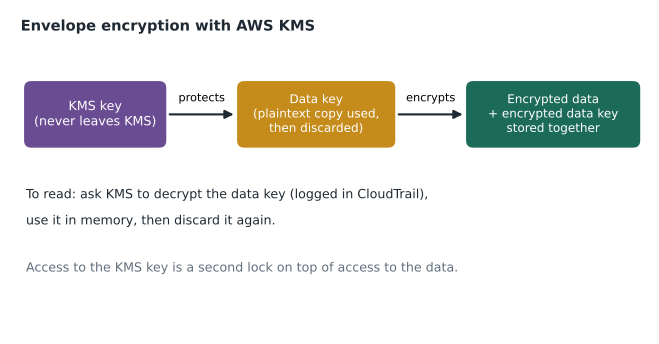
Envelope encryption is efficient, because large files are encrypted locally rather than sent to KMS, and it is secure, because the key that ultimately protects everything never leaves KMS. It also explains why key permissions are so effective: without permission to decrypt the data key, the stored ciphertext is useless.
# A toy illustration of envelope encryption (NOT real cryptography: XOR is not secure).
import hashlib, secrets

def toy_cipher(key: bytes, data: bytes) -> bytes:
    stream = hashlib.sha256(key).digest()
    while len(stream) < len(data):
        stream += hashlib.sha256(stream).digest()
    return bytes(a ^ b for a, b in zip(data, stream))

kms_key = secrets.token_bytes(32)            # stays inside "KMS"
data_key = secrets.token_bytes(32)           # generated per object
record = b"Patient: Biscuit (canine). Owner: J. Example."

ciphertext = toy_cipher(data_key, record)
encrypted_data_key = toy_cipher(kms_key, data_key)   # stored next to the ciphertext
del data_key                                          # plaintext data key discarded

# Later: ask "KMS" to decrypt the data key, then decrypt the record.
recovered_key = toy_cipher(kms_key, encrypted_data_key)
print(toy_cipher(recovered_key, ciphertext).decode())
print("ciphertext looks like:", ciphertext[:12].hex(), "...")Patient: Biscuit (canine). Owner: J. Example. ciphertext looks like: 6e1d2faa8c669f03f087b440 ...
What this code does
It demonstrates the idea of envelope encryption with a deliberately simple scrambling method that is not secure and is used only to show the steps. A fresh data key encrypts a record, the data key is itself encrypted with a master key that stays inside the key service, and the plain data key is thrown away. To read the record later, the master key decrypts the data key, which then decrypts the record, and the scrambled text looks like random characters.
The toy uses a deliberately simple cipher to show the flow of keys, not real security. Real services use strong algorithms such as AES-256 in an authenticated mode, and KMS does the protecting of data keys.
AWS CloudHSM
Some organizations must hold their keys in hardware security modules dedicated to them alone, often for regulatory reasons or for specialized cryptography. AWS CloudHSM provides single-tenant hardware security modules in the customer's VPC, which the customer manages and AWS cannot access. It is more work and cost than KMS, and Cascade Ridge had no requirement for it, but the exam expects candidates to recognize it as the option for dedicated hardware key storage.
Encryption in transit
Encryption in transit protects data moving between systems: from a pet owner's phone to BookVet, from the load balancer to the application servers, from the application to the database, from the clinics to AWS. The standard protocol is Transport Layer Security (TLS), the same protocol behind HTTPS. TLS encrypts the connection and, through certificates, lets the client confirm it is talking to the genuine server and not an impostor.
AWS service endpoints accept connections over TLS, and the AWS SDKs and CLI use it by default. For the customer's own applications, AWS Certificate Manager (ACM) issues public TLS certificates at no extra charge for use with AWS services such as Elastic Load Balancing and Amazon CloudFront, and renews them automatically. Expired certificates are a classic cause of outages, so automatic renewal is a quiet but real security benefit.
| Path | How it is protected at Cascade Ridge |
|---|---|
| Pet owner to BookVet | HTTPS to the load balancer with an ACM certificate |
| Load balancer to app servers | TLS inside the VPC as well, so traffic is encrypted end to end |
| App to RDS database | Encrypted database connections required by the database settings |
| Clinics to AWS | Site-to-Site VPN tunnels, which encrypt all traffic |
| Requests to S3 | A bucket policy denies any request not made over secure transport |
The last row uses a policy condition from lesson 4. A bucket policy can deny any request where secure transport is false, so even a misconfigured client cannot read or write the imaging archive over an unencrypted connection.
What stays with the customer
Encryption is a clear example of the shared responsibility model. AWS provides KMS, CloudHSM, ACM, encryption features in every major storage service and TLS on its endpoints, and AWS protects the hardware that holds key material. The customer decides whether to turn encryption on where it is optional, which keys to use, who may use them, whether to rotate them, whether to require TLS, and how to protect the identities that can decrypt. A bucket encrypted with a key that every developer can use is technically encrypted and practically open.
Common mistakes
MistakeAssuming encryption replaces access control.
InsteadEncryption adds a second lock; identities allowed to decrypt can still read data, so keep key permissions narrow.
MistakePlanning to switch an existing RDS instance to encrypted later.
InsteadChoose encryption at creation; converting means restoring an encrypted copy.
MistakeScheduling a customer managed key for deletion to tidy up.
InsteadDeleting a key makes all data it protects unreadable; disable it first and confirm nothing uses it.
MistakeAllowing plain HTTP to an application because it is internal.
InsteadUse TLS inside the VPC too, and require secure transport for S3.
Encryption and backups
Encryption follows data into its copies. Snapshots of encrypted EBS volumes are encrypted, and volumes restored from them are encrypted too. RDS automated backups and snapshots of an encrypted database are encrypted with the same key. AWS Backup vaults can use their own KMS key, which adds a useful separation: even an administrator in the production account cannot read the backups without permission on the vault key. Gwen set Cascade Ridge's backup vault to use a separate customer managed key held in the security account, so that a compromise of production would not also expose the backups.
Copying encrypted data to another Region, as Cascade Ridge plans for disaster recovery, needs a key in the destination Region, because KMS keys are regional. KMS also offers multi-Region keys, related keys in several Regions that can decrypt each other's data, which simplifies some cross-Region designs. For the pilot, Mateo kept things simple: a separate customer managed key in the recovery Region with the same restrictive key policy.
Worked problem
Choosing keys for the imaging archive
Hannah wants the imaging archive encrypted so that only BookVet, the backup service and two named radiology staff can decrypt images, and she wants a record of every decryption. Which key option meets this, and what else is needed?
Show solution
- S3's default keys encrypt the data but give Cascade Ridge no control over who may use the key.
- An AWS managed key can be audited but its policy cannot be changed to limit users.
- A customer managed KMS key can have a key policy allowing decryption only for the BookVet role, the backup role and the radiology permission set.
- Set it as the bucket's default encryption key; KMS logs every decrypt call in CloudTrail; add a bucket policy that requires secure transport.
Answer: Use a customer managed KMS key with a narrow key policy, set as the bucket default, with CloudTrail recording each use and TLS required.
Hannah printed the key policy and pinned it next to the incident plan. "For the first time," she said, "I can name every identity that can read an X-ray."
Summary and key terms
- Encryption protects data at rest (stored) and in transit (moving).
- It adds a second lock but does not replace access control.
- AWS storage services encrypt at rest with keys in AWS KMS; S3 and DynamoDB encrypt by default, and EBS and RDS encryption should be turned on at creation.
- KMS keys never leave KMS unencrypted, and every use is logged in CloudTrail.
- Key types are AWS owned, AWS managed and customer managed; customer managed keys have key policies, optional automatic rotation and a 7 to 30 day deletion waiting period.
- Services use envelope encryption with data keys.
- CloudHSM provides dedicated hardware security modules.
- TLS protects data in transit; ACM issues and renews certificates for AWS services, and policies can require secure transport.
- Encryption at rest
- Protecting stored data so it is unreadable without the key.
- Encryption in transit
- Protecting data moving between systems, usually with TLS.
- AWS KMS
- AWS Key Management Service, for creating and controlling encryption keys.
- Customer managed key
- A KMS key the customer controls, including its key policy and rotation.
- Key policy
- The resource-based policy that controls who can manage and use a KMS key.
- Envelope encryption
- Encrypting data with a data key, and encrypting the data key with a KMS key.
- AWS CloudHSM
- Single-tenant hardware security modules managed by the customer.
- AWS Certificate Manager
- A service that issues and renews TLS certificates for use with AWS services.
Practice problems
Work each problem on paper first, then reveal the answer to check.
Which service logs every use of a KMS key?
Show answer
AWS CloudTrail.
What protects data in transit?
Show answer
TLS, for example HTTPS with certificates from ACM, or VPN tunnels.
Which key type lets the customer write the key policy?
Show answer
A customer managed key.
Lesson quiz · 5 questions
Score 60% or more to complete this lesson.
Create a free account to save your progress, take quizzes and earn a certificate.