
AWS-102 · Lesson 6 of 12 · 18 min
IAM Identity Center and federation
▶ Video coming soon A video version of this lesson is on the way.
Cascade Ridge already had a list of every employee. It lived in Microsoft Entra ID, the directory behind the company's Microsoft 365 email. When a new technician started at the Lethbridge clinic, Andre's office added them to the directory, and they could read email the same afternoon. When someone left, their account was disabled and their email stopped working. "Can AWS use that same list?" Andre asked. "I do not want a second place where people get forgotten."
"That is exactly what federation is for," Gwen said. This lesson explains federation, the general idea of trusting an outside identity system, and AWS IAM Identity Center, the service AWS recommends for giving a workforce access to AWS accounts and applications. It also distinguishes workforce identity from customer identity, and shows how cross-account roles fit in.
Federation
Federation means that AWS trusts another system, an identity provider (IdP), to authenticate people. The person signs in to the identity provider, which already knows them, checks their password and MFA, and then vouches for them to AWS using a standard protocol. AWS gives the person temporary credentials based on what the identity provider says about them, such as which groups they belong to.
The two protocols that appear most often are SAML 2.0, widely used by corporate directories, and OpenID Connect (OIDC), common with web and mobile sign-in. The person never gets a separate long-term AWS password. Their access lasts only as long as the session, and if the company disables them in the directory, they can no longer sign in to AWS either.
Federation brings three benefits that matter to Cascade Ridge. People use one set of credentials, with one MFA setup, so they are less tempted to reuse passwords. Joiners, movers and leavers are handled in one place, the directory, so access does not outlive employment. And every AWS session uses temporary credentials, so there are no permanent keys or passwords to leak.
AWS IAM Identity Center
AWS IAM Identity Center is AWS's service for managing workforce access to multiple AWS accounts and to business applications. It was previously called AWS Single Sign-On, and older material still uses that name. It works with AWS Organizations so that one place controls who can reach which accounts with which permissions.
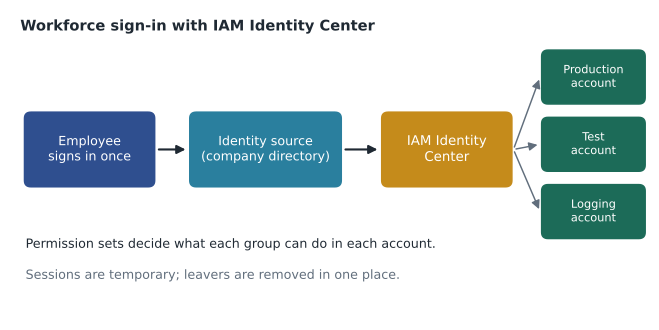
Identity Center has three main ideas.
An identity source. This is where users and groups come from. It can be Identity Center's own built-in directory, Active Directory through AWS Directory Service, or an external identity provider such as Microsoft Entra ID, Okta or Google Workspace. With an external provider, users and groups are usually kept in sync automatically through a standard called SCIM, so new staff and leavers are reflected without manual work.
Permission sets. A permission set is a template of policies, such as ReadOnly, Billing or DeveloperAccess. When a permission set is assigned to a group for an account, Identity Center creates the matching IAM role in that account behind the scenes. Permission sets can use AWS managed policies, customer managed policies and inline policies, and they set how long a session lasts.
Assignments. An assignment says this group gets this permission set in this account. Cascade Ridge's assignments read like plain sentences: Developers get DeveloperAccess in the development account and ReadOnly in production; Finance gets Billing in the management account; Auditors get SecurityAudit in every account.
People reach their accounts through the AWS access portal, a web page listing every account and permission set they may use. They choose one, and the console opens with temporary credentials. For the command line, the CLI signs in through the same portal and receives short-lived credentials too.
| Group (from the directory) | Account | Permission set |
|---|---|---|
| Platform Admins | All accounts | AdministratorAccess, MFA required, 1-hour sessions |
| Developers | Development | DeveloperAccess |
| Developers | Production | ReadOnly |
| Finance | Management | Billing |
| Auditors | All accounts | SecurityAudit |
| Clinic Ops | Production | Custom: view dashboards and alarms |
Why Identity Center beats IAM users for people
Before Identity Center, an organization with five accounts and forty staff might have created two hundred IAM users, each with its own password, MFA device and keys. Removing a leaver meant finding them in every account. With Identity Center, each person exists once, in the directory, and assignments are made to groups. AWS's current guidance is to use Identity Center for human access wherever possible and to reserve IAM users for special cases.
Andre's original worry, a second place where people get forgotten, disappears. When the Lethbridge technician leaves and is disabled in Entra ID, their AWS access ends with the same action. Hannah's quarterly access review becomes a review of six group assignments and the group memberships in one directory.
Cross-account roles
Identity Center handles people. Systems also need to reach across accounts. The security account must collect logs from production; a deployment pipeline in a tools account must update resources in production. The pattern for this is a cross-account IAM role: a role in the target account whose trust policy names the other account or a specific role in it. The other side assumes the role and receives temporary credentials limited to that role's permissions.
Cross-account roles avoid two bad alternatives: sharing a user's long-term keys between accounts, or making resources public. They are also easy to revoke; edit the trust policy and the access stops. The exam guide lists cross-account roles as one of the authentication methods to recognize, alongside MFA and Identity Center.
Workforce identity and customer identity
Kwame raised a different question. "BookVet has its own users: pet owners booking appointments. Do they go in Identity Center too?"
No. Identity Center is for the workforce, the people who build and run systems. The thousands of pet owners are customers of an application, and they should never receive access to AWS accounts at all. For application users, AWS offers Amazon Cognito, which provides sign-up, sign-in and user directories for web and mobile apps, including sign-in with social and enterprise identity providers. Cognito gives the app tokens it can use to recognize the user; if the app needs to let those users touch AWS resources directly, Cognito can exchange the token for tightly limited temporary credentials.
| Who | Identity tool | What they get |
|---|---|---|
| Employees and contractors | IAM Identity Center with the company directory | Access to AWS accounts and business apps with permission sets |
| Applications and services | IAM roles | Temporary credentials for exactly their job |
| Other AWS accounts | Cross-account roles | Temporary credentials defined by the role in the target account |
| End users of an app | Amazon Cognito | App sign-in; optional, tightly scoped AWS access |
Directory options
Some organizations still run Microsoft Active Directory on their own servers, as Cascade Ridge did for its old file shares. AWS Directory Service offers managed Microsoft Active Directory in AWS, or a connector that forwards requests to an existing on-site directory. Identity Center can use it as an identity source. Cascade Ridge chose Entra ID instead because its staff already signed in there every day.
# Who can reach which account with which permission set? (sample assignments)
assignments = [
    ("Developers", "development", "DeveloperAccess"),
    ("Developers", "production", "ReadOnly"),
    ("Finance", "management", "Billing"),
    ("Auditors", "*", "SecurityAudit"),
]
directory = {"kwame": ["Developers"], "lorraine": ["Finance"], "hannah": ["Auditors"]}
accounts = ["management", "development", "production", "security"]

for person, groups in directory.items():
    access = []
    for g, acct, pset in assignments:
        if g in groups:
            targets = accounts if acct == "*" else [acct]
            access += [f"{t}:{pset}" for t in targets]
print(person, "->", ", ".join(access))kwame -> development:DeveloperAccess, production:ReadOnly lorraine -> management:Billing hannah -> management:SecurityAudit, development:SecurityAudit, production:SecurityAudit, security:SecurityAudit
What this code does
It models IAM Identity Center assignments, where a directory group gets a permission set in one AWS account or in all accounts. For each person it looks up their groups and lists every account and permission set they can reach. The output shows developers have full access in development but only read access in production, finance sees billing, and auditors can review security in every account.
The output is the kind of view Hannah wants every quarter: each person, each account, each permission set. Identity Center's own console and reports provide the real version.
Common mistakes
MistakeCreating separate IAM users in every account for each employee.
InsteadUse IAM Identity Center with groups and permission sets across all accounts.
MistakePutting application customers in Identity Center.
InsteadUse Amazon Cognito for end users of apps; Identity Center is for the workforce.
MistakeSharing an IAM user's access keys with another account.
InsteadCreate a cross-account role that the other account can assume.
MistakeForgetting that federation still needs MFA.
InsteadRequire MFA at the identity provider or in Identity Center so every sign-in is protected.
Designing permission sets
Permission sets deserve the same care as IAM policies, because they become roles in every account they are assigned to. Gwen followed a few rules when creating Cascade Ridge's first set.
- Name them by job, not by person. ReadOnly, DeveloperAccess, Billing, SecurityAudit and ClinicOpsViewer describe a job; a permission set called KwameAccess would invite personal exceptions.
- Keep the number small. Each permission set is something Hannah must review. Six well-understood sets are better than thirty slightly different ones.
- Set session durations by risk. Read-only sessions can last eight hours. The AdministratorAccess set lasts one hour and requires MFA, so powerful sessions do not sit open on an unattended laptop.
- Prefer read-only in production. Developers deploy to production through the pipeline, not by hand, so their production permission set only reads.
- Use customer managed policies for anything specific. When a permission set needs a tailored policy, keep that policy as a customer managed policy with the same name in each account, so it can be reviewed and reused.
Andre asked for one more: a set that let him see the clinic systems' dashboards and alarms but change nothing. It became ClinicOpsViewer, built from a short customer managed policy covering CloudWatch dashboards and alarms. It was the first permission set designed by asking a business user what he actually needed, and Gwen said it was the model for the rest.
Applications behind Identity Center
Identity Center is not only for AWS accounts. It can also provide single sign-on to business applications that support SAML 2.0 or OIDC, and to AWS managed applications such as Amazon Q Business or the AWS access portal itself. Cascade Ridge already used Entra ID for that purpose with Microsoft 365, so it did not need Identity Center for other applications yet. But the exam guide mentions the capability, and it explains the service's name: one center for identity across accounts and applications.
Auditing who signed in
Every sign-in through Identity Center and every role assumption is recorded in AWS CloudTrail, with the person's directory identity attached. When Hannah investigates a change in production, she sees not just the name of the role that made it but which employee assumed that role and when. This traceability is one of the strongest arguments for federation: actions are tied to named people, not to shared accounts.
Gwen added one more habit for the Platform Admins group. Members do their everyday work in the ReadOnly or DeveloperAccess sets, and only switch to AdministratorAccess for the specific change that needs it. Because the administrator session expires after an hour and requires MFA, switching is a deliberate act rather than a default, and the CloudTrail record shows clearly which changes were made with elevated permissions. Hannah reviews those administrator sessions monthly, and the list is short enough to read in a few minutes.
Worked problem
Planning a new hire's access
Priya Nair joins as a second developer. She should deploy to the development account, view production read-only, and never see billing. What does Mateo do in AWS?
Show solution
- Nothing user-specific in AWS: Andre's office creates Priya in Entra ID and adds her to the Developers group.
- SCIM provisioning syncs her user and group membership into Identity Center automatically.
- The existing assignments give Developers DeveloperAccess in development and ReadOnly in production.
- Priya signs in to the access portal with her company credentials and MFA and sees exactly those two accounts.
Answer: Add her to the right directory group. The group's assignments do the rest, and removing her from the group or directory removes the access.
Andre ran the test himself with a new clinic manager the following week, and timed it: four minutes from directory entry to working AWS read access, and no AWS console changes at all.
Summary and key terms
- Federation lets AWS trust an external identity provider, using standards such as SAML 2.0 and OIDC, so people sign in with company credentials and receive temporary AWS credentials.
- AWS IAM Identity Center, formerly AWS Single Sign-On, manages workforce access to multiple AWS accounts and applications.
- It uses an identity source (its own directory, Active Directory or an external IdP with SCIM sync), permission sets that become roles in accounts, and assignments of groups to accounts.
- People use the AWS access portal and get temporary credentials.
- Cross-account roles let systems in one account act in another without shared keys.
- Amazon Cognito handles sign-in for customers of applications, not for the workforce.
- Federation
- Trusting an external identity provider to authenticate users for AWS access.
- Identity provider (IdP)
- A system that authenticates users and vouches for them, such as a corporate directory.
- IAM Identity Center
- The AWS service for central workforce access to AWS accounts and applications.
- Permission set
- A template of policies that Identity Center turns into a role in each assigned account.
- AWS access portal
- The page where Identity Center users choose an account and permission set.
- Cross-account role
- A role in one account that principals in another account can assume.
- Amazon Cognito
- A service providing sign-up and sign-in for users of web and mobile applications.
Practice problems
Work each problem on paper first, then reveal the answer to check.
What was IAM Identity Center previously called?
Show answer
AWS Single Sign-On.
What does a permission set become in an assigned account?
Show answer
An IAM role that users assume when they choose that account.
Which service handles sign-in for an app's customers?
Show answer
Amazon Cognito.
Lesson quiz · 5 questions
Score 60% or more to complete this lesson.
Create a free account to save your progress, take quizzes and earn a certificate.