
AWS-102 · Lesson 12 of 12 · 18 min
Case study: securing a new AWS account
▶ Video coming soon A video version of this lesson is on the way.
In December, Cascade Ridge will run its pilot: the imaging archive and a test copy of VetLedger in AWS, used by two clinics for a month before the full cutover in the spring. Before the pilot begins, Gwen wants a new production account built properly from the first hour, and she wants Mateo to build it, with her watching rather than typing. This lesson follows the plan they wrote together in the second week of November. It brings every earlier lesson into one sequence, and it is the kind of scenario the exam's security questions are built from: a new account, a list of risks and a choice of services.
"Most security problems in the cloud are not clever," Gwen told him. "They are an open port, a public bucket, a key in a file, a root user nobody protected, logging that was never turned on. If we do the boring things first and in the right order, we have avoided most of what goes wrong for most companies."
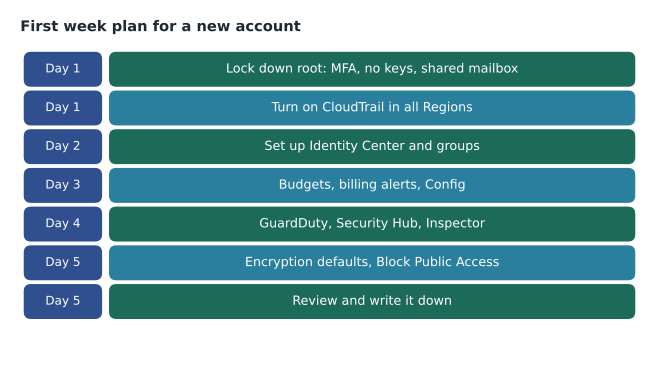
The starting point
The production account is created from the management account in AWS Organizations, inside an organizational unit called Workloads. Because the organization has centralized root access turned on, the new account is created without root credentials. It inherits the organization's service control policies from the first second: actions outside the approved Regions are denied, CloudTrail cannot be turned off and the account cannot leave the organization. Mateo reads the plan aloud before starting each day, and Gwen asks him, for each step, which earlier lesson it comes from and which risk it removes.
Day 1: identity and the audit trail
Root user (lesson 2). In this account there is no root password to protect, because centralized root access removed it. For the management account, which does have a root user, Mateo checks the five habits again: strong unique password in the vault, two security keys registered, no access keys, shared mailbox and on-call phone, and an alert on every root sign-in. He also sets the new account's alternate contacts for security, operations and billing.
Audit trail (lesson 9). The organization trail already covers every account and Region, so the new account's API activity flows to the protected log bucket in the security account from the start. Mateo confirms it by making a harmless change and finding the event in the log archive a few minutes later. "If it isn't logged," Gwen says, "it didn't happen as far as an investigation is concerned."
Gwen explains why this comes first. Every later step will be recorded. If something goes wrong during setup, the record exists. And the guardrails mean that even a mistake by an administrator cannot switch the logging off.
Day 2: workforce access
IAM Identity Center (lesson 6). Mateo assigns the existing directory groups to the new account with existing permission sets: Platform Admins with AdministratorAccess (MFA, one-hour sessions), Developers with ReadOnly, Auditors with SecurityAudit and Clinic Ops with ClinicOpsViewer. No IAM users are created at all. MFA is required for every Identity Center sign-in.
Least privilege (lesson 4). Developers get only read access in production; changes reach production through the deployment pipeline, whose cross-account role in production can update the application and nothing else. Gwen asks Mateo to write one line of justification next to each assignment. Two of his first drafts turn out to be broader than needed and he narrows them before they are applied.
Break-glass (lesson 2 extras). One emergency role, protected by a hardware key held in the safe, is created for use if Identity Center is unavailable, with an alert on any use.
Day 3: cost guardrails and configuration recording
Budgets may seem out of place in a security plan, but unexpected spending is often the first visible sign of a compromise, such as an attacker mining cryptocurrency on stolen resources. Mateo creates a monthly budget for the account with alerts to Lorraine and the platform team at two levels, as the next course in the series, AWS-104, explains.
AWS Config (lesson 9). Config recording is turned on for all resources, with a conformance pack of rules chosen with Hannah: encrypted EBS volumes and RDS instances, no security group allowing administrative ports from anywhere, S3 Block Public Access on, CloudTrail enabled, MFA for console users, and access keys rotated. Findings go to Security Hub.
Day 4: detection
GuardDuty, Inspector and Security Hub (lesson 9). Because the security account is the delegated administrator for all three, they are enabled for the new account automatically when it joins the organization. Mateo checks each console to confirm the account appears and that sample findings flow through to Security Hub. He confirms that high-severity findings reach the on-call phone by generating a sample finding, which GuardDuty supports for exactly this kind of test.
Network posture (lesson 7). The VPC for the pilot follows the standard design: public subnets only for the load balancer, private subnets for the application servers and database, no public addresses on instances, Session Manager for administration, VPC endpoints for S3 and Secrets Manager, and a Site-to-Site VPN from the two pilot clinics. Mateo runs Reachability Analyzer to confirm the database cannot be reached from the public subnets and saves the result.
Day 5: data protection
Encryption defaults (lesson 8). EBS encryption by default is turned on in both Regions. A customer managed KMS key is created for the imaging archive with a key policy that allows decryption only for the application role, the backup role and the radiology permission set. The RDS instance for the VetLedger test database is created with encryption on and with connections required to use TLS.
S3 protections (lessons 7 and 8). Block Public Access is turned on at the account level, so no bucket in the account can be made public by mistake. The imaging bucket's policy requires secure transport. Versioning is turned on so that deleted or overwritten images can be recovered.
Secrets (lesson 5). The database credentials are created in Secrets Manager with automatic rotation, and the application role is allowed to read only that one secret.
Edge protection (lesson 10). For the pilot, BookVet's test endpoint sits behind CloudFront with the company's web ACL attached in count mode for the first week, then block. Shield Standard is already in place.
Day 5: review and write it down
The final step is not technical. Mateo writes a two-page record of what was configured, why, and where the evidence lives, and Hannah reviews it against her compliance checklist from lesson 11. The record lists each control with its owner and its evidence source: the organization trail, the Config conformance pack results, the Identity Center assignments, the KMS key policy, the Security Hub standards score and AWS's own reports in Artifact for the inherited controls.
# Score the new account against the first-week checklist (sample state).
checklist = {
    "Root: MFA on and no access keys (management account)": True,
    "Organization CloudTrail covers this account": True,
    "No IAM users; access through Identity Center with MFA": True,
    "Config recording and conformance pack enabled": True,
    "GuardDuty, Inspector and Security Hub enabled": True,
    "EBS encryption by default in both Regions": True,
    "S3 Block Public Access on at account level": True,
    "Web ACL switched from count to block": False,
}
done = sum(checklist.values())
for item, ok in checklist.items():
    print(("[x] " if ok else "[ ] ") + item)
print(f"{done} of {len(checklist)} complete")[x] Root: MFA on and no access keys (management account) [x] Organization CloudTrail covers this account [x] No IAM users; access through Identity Center with MFA [x] Config recording and conformance pack enabled [x] GuardDuty, Inspector and Security Hub enabled [x] EBS encryption by default in both Regions [x] S3 Block Public Access on at account level [ ] Web ACL switched from count to block 7 of 8 complete
What this code does
A new account's first-week security checklist is stored as a list of items marked done or not done. It prints each item with a tick box and counts how many are complete. The result shows seven of eight items finished, with the web firewall still in counting mode instead of blocking.
The one open item, switching the web ACL to block, was scheduled for the end of the pilot's first week, after Kwame had reviewed the counted requests.
What the exam asks about scenarios like this
Security questions on the Cloud Practitioner exam often describe a company in the position Cascade Ridge was in and ask for the best first step, the most secure option or the right service. A few principles answer most of them.
| If the question is about... | Think of... |
|---|---|
| Who is responsible | The shared responsibility model: of the cloud versus in the cloud, and how it moves by service |
| The root user | MFA, no access keys, use only for root-only tasks |
| People needing access | IAM Identity Center, groups, least privilege, MFA |
| Applications needing access | IAM roles and temporary credentials, never stored keys |
| Secrets in code | AWS Secrets Manager or Parameter Store |
| Who did what | AWS CloudTrail |
| Whether settings comply | AWS Config and Security Hub standards |
| Threats and suspicious activity | Amazon GuardDuty |
| Vulnerabilities in workloads | Amazon Inspector |
| Encryption keys | AWS KMS; CloudHSM for dedicated hardware |
| Web attacks and DDoS | AWS WAF, AWS Shield, Firewall Manager across accounts |
| AWS's certifications | AWS Artifact |
Looking back
Mateo compared the new account with the test account Kwame had built in October. The test account had an administrator IAM user with an access key in a file, a security group open to Remote Desktop from the internet, an unencrypted volume, no Config, no GuardDuty and logging only through the 90-day event history. None of those were exotic problems, and none had caused harm yet. In the new account, each one was closed by a setting, a guardrail or a detection rule, and each closure was written down with its evidence.
Gwen's final comment was the one Mateo copied into the front of the project notebook. "Security on AWS is not a product you buy. It is a set of choices you make on your side of the line, made early, made deliberately and written down so the next person can check them." The test account was closed the following week. Its last event in CloudTrail was Mateo deleting Kwame's old access key.
Common mistakes
MistakeBuilding the workload first and adding security afterwards.
InsteadSet guardrails, logging, identity and encryption defaults before creating workload resources.
MistakeCreating IAM users in each new account for convenience.
InsteadUse Identity Center assignments; create no IAM users unless a specific case requires one.
MistakeTurning on detection services without testing alerts.
InsteadGenerate sample findings and confirm that alerts reach a person.
MistakeLeaving the configuration undocumented.
InsteadWrite down each control, its owner and its evidence so audits and handovers are easy.
After the first week
Security is not finished when the account is built. Gwen and Mateo agreed a simple rhythm for the months ahead. Daily, the on-call person handles high-severity alerts. Weekly, the platform team reviews new Security Hub findings and the access key report. Monthly, Hannah reviews Identity Center assignments, administrator sessions and the register of internet-facing rules. Quarterly, the team runs a tabletop exercise, walking through a scenario such as a leaked key or a ransomware alert using the incident plan, and fixes whatever the exercise exposes. Yearly, the plan itself is reviewed against new services and new risks.
The rhythm matters more than any single setting, because settings drift. A temporary exception becomes permanent, a new developer copies an old pattern, a new service is adopted without a review. Regular, short reviews catch drift while it is small and cheap to fix.
Worked problem
Best first steps for a new account
A small company has just created a standalone AWS account (not in an organization) and asks which three actions to take before anything else. What would you recommend?
Show solution
- Protect the root user: strong unique password, MFA, no access keys, and stop using it for daily work.
- Turn on logging with a CloudTrail trail delivering to an S3 bucket, so every later action is recorded.
- Create named identities for administrators, ideally through IAM Identity Center with MFA, and grant least-privilege permissions.
- Next, add detection (GuardDuty, Security Hub), Config rules, budgets, encryption defaults and S3 Block Public Access.
Answer: Root protection, logging and named least-privilege identities first; then detection, configuration checks, budgets and data protection defaults.
Summary and key terms
- Securing a new account follows a sensible order.
- First protect the root user (or remove member root credentials centrally) and make sure CloudTrail records everything to a protected location.
- Next give people access through IAM Identity Center with MFA and least privilege, and give applications roles.
- Then add budgets and AWS Config rules, turn on GuardDuty, Inspector and Security Hub, and design the network with private subnets and no open administrative ports.
- Protect data with encryption defaults, customer managed KMS keys where control is needed, TLS, S3 Block Public Access and Secrets Manager.
- Protect web endpoints with WAF and Shield.
- Finally, document each control, its owner and its evidence, using AWS Artifact for inherited controls.
- Guardrail
- A preventive or detective control that keeps accounts within policy, such as an SCP or Config rule.
- Conformance pack
- A collection of AWS Config rules and remediation actions deployed together.
- Delegated administrator
- An account given authority to manage a service, such as GuardDuty, for the whole organization.
- Block Public Access
- An S3 setting that prevents buckets and objects from being made public.
- Sample finding
- A test finding generated to confirm that alerts and workflows work.
Practice problems
Work each problem on paper first, then reveal the answer to check.
What are the first two things to do in a new standalone account?
Show answer
Protect the root user and turn on CloudTrail logging.
Why include budgets in a security plan?
Show answer
Unexpected spending can be the first sign of compromised resources.
Where does evidence for inherited controls come from?
Show answer
AWS's reports in AWS Artifact.
Lesson quiz · 5 questions
Score 60% or more to complete this lesson.
Create a free account to save your progress, take quizzes and earn a certificate.