
AWS-102 · Lesson 10 of 12 · 18 min
Protection services: AWS WAF, Shield and Firewall Manager
▶ Video coming soon A video version of this lesson is on the way.
BookVet went live in AWS for staff testing in the first week of November. By the second day, Kwame noticed something odd in the application log: thousands of requests to pages that did not exist, with names like wp-admin and phpmyadmin, and a few requests whose search fields contained fragments of database commands. "We don't even use WordPress," he said. Gwen nodded. "Nobody is reading your site. Bots try every common weakness on every site they find. The question is whether those requests ever reach your code."
This lesson covers the AWS services that protect internet-facing applications: AWS WAF, which filters web requests; AWS Shield, which protects against distributed denial of service attacks; and AWS Firewall Manager, which applies these protections consistently across many accounts. It also mentions where third-party security products fit. The exam guide names all three services as examples of AWS security features.
Two different kinds of attack
It helps to separate two problems. The first is harmful requests: individual requests crafted to exploit a weakness, such as SQL injection, which tries to sneak database commands into a form field, or cross-site scripting, which tries to plant code that runs in other users' browsers. These requests can be few in number and still do damage. The second is volume: a distributed denial of service (DDoS) attack, in which many machines, often compromised devices, flood a target with traffic so that genuine users cannot get through. Different tools address each.
AWS WAF
AWS WAF is a web application firewall. It inspects HTTP and HTTPS requests and allows, blocks, counts or challenges them based on rules. It works in front of Amazon CloudFront distributions, Application Load Balancers, Amazon API Gateway APIs, AWS AppSync and several other services. The rules live in a web ACL (web access control list) that the customer attaches to the protected resource.
Rules can match many properties of a request.
- Managed rule groups from AWS and AWS Marketplace sellers cover common threats, such as the OWASP top risks, known bad inputs, SQL injection patterns and requests from addresses with a poor reputation. AWS keeps them updated as new attack patterns appear.
- Rate-based rules count requests from each client address over a time window and act when a limit is exceeded, slowing down scrapers and password-guessing bots.
- Geographic match rules allow or block requests by country of origin.
- IP set rules allow or block specific address ranges.
- Custom rules match headers, query strings, paths or body content written for a specific application.
A sensible way to start is in count mode: the rules record what they would have blocked without blocking it, so the team can check that genuine users are not caught before switching to block. Kwame was glad of this. In count mode, one managed rule flagged requests from the clinics' own label printer software, which sent an unusual header. He adjusted the rule with an exception before switching to block.
Web ACL: bookvet-public
  Rule 1  AWS managed rule group: core rule set            Action: Block
  Rule 2  AWS managed rule group: known bad inputs         Action: Block
  Rule 3  AWS managed rule group: SQL database             Action: Block
  Rule 4  Rate-based: more than 300 requests in 5 minutes
          from one address to /login                       Action: Block
  Rule 5  IP set: clinic office ranges                     Action: Allow
  Default action                                           Allow
Rule order matters in a web ACL: rules are evaluated by priority, and the first rule that blocks or allows a request ends evaluation for it. WAF logs can be sent to CloudWatch Logs, S3 or Amazon Data Firehose, which gives Hannah a record of what was blocked and why.
AWS Shield
AWS Shield protects against DDoS attacks. It comes in two tiers.
| AWS Shield Standard | AWS Shield Advanced | |
|---|---|---|
| Cost | Included automatically for all AWS customers at no extra charge | A paid subscription with a monthly fee and a minimum commitment |
| Protection | Defends against common network and transport layer attacks, such as SYN floods and reflection attacks | Enhanced detection and mitigation for larger and more sophisticated attacks, including application layer attacks with WAF |
| Support | Automatic | Access to the AWS Shield Response Team during attacks |
| Cost protection | None | Protection against certain scaling charges caused by a DDoS attack |
| Visibility | Basic | Detailed attack diagnostics and reporting |
Every AWS customer already has Shield Standard, which is why exam questions sometimes ask what a company must do to get basic DDoS protection: nothing. Shield Advanced is for organizations whose online services are business-critical and likely targets, and for whom response help and cost protection are worth the subscription. Cascade Ridge decided that Shield Standard, combined with WAF rate-based rules and CloudFront, was proportionate for a regional veterinary group, and wrote the reasoning into its risk register for review next year.
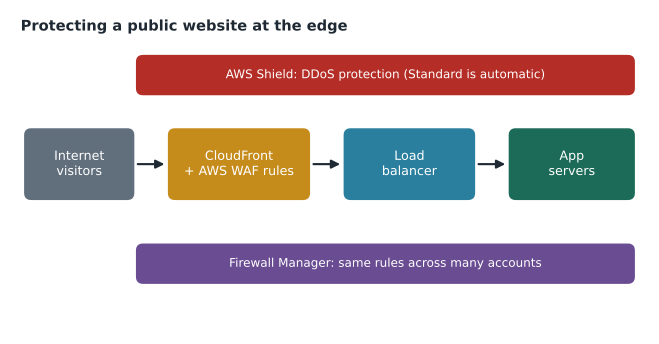
Architecture matters as much as the service. Serving the public site through Amazon CloudFront, AWS's content delivery network, spreads traffic across many edge locations around the world, absorbs much of a flood before it reaches the application, and lets WAF filter requests at the edge. Auto Scaling and load balancers help the application absorb surges. Gwen's design put BookVet behind CloudFront with the web ACL attached there, so the load balancer only accepts traffic that has come through CloudFront.
AWS Firewall Manager
As an organization grows, keeping protections consistent becomes the hard part. A new account is created for a project and its load balancer goes live without the company's web ACL. AWS Firewall Manager solves this. It works with AWS Organizations to define security policies centrally, such as a required web ACL, Shield Advanced protections, security group rules, AWS Network Firewall rules or DNS Firewall rules, and applies them automatically to existing and new resources across all accounts. It also reports resources that are out of compliance.
Firewall Manager has prerequisites worth recognizing: it needs AWS Organizations with all features enabled, a designated Firewall Manager administrator account, and AWS Config turned on in the accounts. Cascade Ridge, with only a few accounts, did not need it on day one, but Gwen planned it for the point when Kwame's phase two would add more accounts and environments.
| Need | Service |
|---|---|
| Block SQL injection and malicious bots on a web app | AWS WAF |
| Basic protection from network floods | AWS Shield Standard (automatic) |
| Expert help and cost protection during large DDoS attacks | AWS Shield Advanced |
| Apply the same WAF and firewall rules across many accounts | AWS Firewall Manager |
| Filter traffic in and out of a VPC with detailed rules | AWS Network Firewall |
| Allow or deny traffic to an instance | Security groups (lesson 7) |
# Simulate a rate-based rule: block an address after too many login attempts in a window.
from collections import defaultdict, deque

LIMIT, WINDOW = 5, 60          # at most 5 requests per 60 seconds per address (toy values)
recent = defaultdict(deque)
requests = [(0, "198.51.100.7"), (5, "198.51.100.7"), (9, "203.0.113.20"),
            (12, "198.51.100.7"), (15, "198.51.100.7"), (18, "198.51.100.7"),
            (21, "198.51.100.7"), (70, "198.51.100.7")]
for t, ip in requests:
    q = recent[ip]
    while q and t - q[0] >= WINDOW:
        q.popleft()
    q.append(t)
    action = "BLOCK" if len(q) > LIMIT else "allow"
print(f"t={t:>3}s {ip:15} {len(q)} in window -> {action}")t= 0s 198.51.100.7 1 in window -> allow t= 5s 198.51.100.7 2 in window -> allow t= 9s 203.0.113.20 1 in window -> allow t= 12s 198.51.100.7 3 in window -> allow t= 15s 198.51.100.7 4 in window -> allow t= 18s 198.51.100.7 5 in window -> allow t= 21s 198.51.100.7 6 in window -> BLOCK t= 70s 198.51.100.7 5 in window -> allow
What this code does
It simulates a rate-based firewall rule that allows each internet address at most 5 requests in any 60-second window. For each incoming request it drops timestamps older than 60 seconds, counts what remains and blocks the request if the count is over the limit. One address is blocked on its sixth quick attempt, while another address and a later request after the window has passed are allowed.
The simulation shows the behaviour of a rate-based rule: the sixth request inside the window is blocked, and once the window passes, the address can try again at a normal rate. Real WAF rate-based rules use longer windows and much larger limits, set from the application's normal traffic.
Third-party security products
AWS does not try to be the only security vendor. AWS Marketplace is a catalogue of third-party software, including firewalls, endpoint protection, vulnerability scanners, managed WAF rule groups and security information and event management tools, which customers can buy and deploy in their accounts, often billed through their AWS bill. Organizations that already use a particular vendor on-premises often continue with it in AWS through the Marketplace. The exam guide mentions this explicitly: candidates should know that third-party security products are available from AWS Marketplace.
Security information from AWS
Protection also depends on knowing what is happening in the wider security world. The exam guide names several places where AWS publishes security information: the AWS Security Center pages, the AWS Security Blog, AWS Knowledge Center articles that answer common questions, and security bulletins about issues affecting AWS services. Hannah subscribed the security mailbox to the security bulletins feed and set aside half an hour each Friday to read the week's posts.
Common mistakes
MistakeExpecting Shield Standard to require a subscription.
InsteadShield Standard is automatic and free for every AWS customer; Shield Advanced is the paid tier.
MistakeUsing WAF to block network-level floods alone.
InsteadWAF filters web requests; Shield and architecture choices such as CloudFront address volumetric attacks.
MistakeSwitching new WAF rules straight to block.
InsteadStart in count mode, check for false positives, then block.
MistakeConfiguring protection account by account as the organization grows.
InsteadUse Firewall Manager to apply the same policies to every account automatically.
Bots, credential stuffing and account takeover
Not every harmful request looks malicious on its own. In a credential stuffing attack, bots try user names and passwords leaked from other websites against a login page, hoping some customers reused them. Each individual request is a normal login attempt. Defending against this takes several layers. WAF rate-based rules slow the bots. AWS WAF also offers managed rule groups aimed specifically at bot control and at account takeover attempts, which look for patterns such as many failed logins with different user names from related sources, and can challenge suspicious clients with a CAPTCHA or a silent browser check. Inside the application, multi-factor authentication for customers and checks against known breached passwords reduce the value of stolen credentials.
Kwame added an optional second factor for BookVet accounts and a check that rejects passwords found in public breach lists. Gwen added a rate-based rule on the login path. Neither change alone would stop a determined attacker, but together they turned BookVet from an easy target into a tedious one, which is usually enough for automated attacks to move on.
Where each protection sits
It helps to picture a request's journey. It reaches a CloudFront edge location first, where Shield Standard filters network floods and the web ACL evaluates the request. It then travels over the AWS network to the load balancer, which accepts only traffic from CloudFront, then to an application server whose security group accepts only the load balancer. Each hop has its own control, and an attacker has to defeat all of them, which is the practical meaning of defence in depth.
Worked problem
Choosing protections
Lorraine reads that a competitor clinic group's booking site was knocked offline by a DDoS attack and asks what Cascade Ridge has. At the same time, Kwame sees repeated SQL injection attempts against BookVet's search box. Which services address each problem, and what does each cost Cascade Ridge?
Show solution
- The DDoS concern: Shield Standard already protects every AWS resource at no extra charge; CloudFront spreads and absorbs traffic.
- For a larger budget and higher risk, Shield Advanced adds expert response and cost protection for a subscription fee.
- The SQL injection attempts are harmful requests, which AWS WAF blocks with the managed SQL database rule group in the web ACL.
- Kwame should still fix the search code to use parameterized queries; WAF is a layer of protection, not a substitute for secure code.
Answer: Shield Standard (included) plus CloudFront for floods, AWS WAF for injection attempts, Shield Advanced only if the risk justifies its cost, and secure code underneath.
Within a week of switching the web ACL to block, the noise in BookVet's application log fell to almost nothing. The requests were still arriving at the edge, in their thousands, but they no longer reached Kwame's code.
Summary and key terms
- Internet-facing applications face harmful requests and volumetric DDoS attacks.
- AWS WAF is a web application firewall that inspects HTTP and HTTPS requests to CloudFront, Application Load Balancers, API Gateway and other services, using web ACLs with managed rule groups, rate-based, geographic, IP set and custom rules; start in count mode.
- AWS Shield Standard protects all customers from common DDoS attacks at no extra charge; Shield Advanced is a paid tier with enhanced protection, the Shield Response Team and cost protection.
- CloudFront and scalable architecture help absorb attacks.
- AWS Firewall Manager applies WAF, Shield Advanced, security group and Network Firewall policies across accounts in AWS Organizations.
- Third-party security products are available in AWS Marketplace, and AWS publishes security information in the Security Center, Security Blog and Knowledge Center.
- AWS WAF
- A web application firewall that filters HTTP and HTTPS requests with rules.
- Web ACL
- The set of rules AWS WAF applies to a protected resource.
- Rate-based rule
- A WAF rule that acts when one client sends too many requests in a time window.
- DDoS attack
- A distributed denial of service attack that floods a target with traffic.
- AWS Shield Standard
- Automatic DDoS protection included for all AWS customers.
- AWS Shield Advanced
- A paid tier with enhanced DDoS protection, response team access and cost protection.
- AWS Firewall Manager
- A service that centrally applies firewall and WAF policies across accounts.
- AWS Marketplace
- A catalogue of third-party software, including security products, for AWS.
Practice problems
Work each problem on paper first, then reveal the answer to check.
What must a customer do to get Shield Standard?
Show answer
Nothing; it is automatic.
Which service blocks SQL injection attempts?
Show answer
AWS WAF.
Which service applies the same WAF rules across many accounts?
Show answer
AWS Firewall Manager.
Lesson quiz · 5 questions
Score 60% or more to complete this lesson.
Create a free account to save your progress, take quizzes and earn a certificate.