
AWS-102 · Lesson 2 of 12 · 19 min
Protecting the root user
▶ Video coming soon A video version of this lesson is on the way.
When Cascade Ridge opened its first AWS account in early November, Mateo used the address it@cascaderidge.example and a password he invented on the spot. The sign-up form asked for a credit card, a phone number and a support plan, and a few minutes later he was looking at the AWS Management Console. Everything worked. Gwen arrived the next morning, looked over his shoulder and asked one question: "Which identity are you signed in as?"
Mateo checked the top right corner of the console. It showed the account name and nothing else. "That's the root user," Gwen said. "It can do anything in this account, including things no other identity can do, and nobody can stop it. We are going to protect it today, and after today you are going to stop using it."
This lesson explains what the root user is, why it is so powerful, which tasks only the root user can perform, and the steps that protect it. These are among the most frequently tested ideas in the security domain, and they are also among the most important things any new AWS customer does.
What the root user is
Every AWS account starts with one identity: the root user. It is the email address and password used to create the account. The root user has complete, unrestricted access to every service and resource in the account and to the account's billing settings. Unlike other identities, its permissions cannot be limited by an IAM policy within the account. If someone controls the root user's credentials, they control the account.
The root user is not the same thing as an IAM user with administrator permissions. An administrator created in IAM or in IAM Identity Center can be given broad permissions, but those permissions come from policies, and policies can be changed, limited, audited and revoked. The root user's power comes from owning the account itself.
Because the root user is so powerful, AWS's guidance is blunt: do not use it for everyday tasks, even administrative ones. Create other identities for daily work, and keep the root user for the handful of jobs that require it.
Tasks that only the root user can perform
AWS publishes a list of tasks that require root user credentials. The list changes from time to time, so treat the AWS IAM documentation as the source of truth, but the current list includes items like these.
| Area | Examples of root-only tasks |
|---|---|
| Account management | Change the root user's email address or password for a standalone account; close a standalone account; restore IAM permissions if the only administrator accidentally removed their own access |
| Billing | Activate IAM access to the Billing and Cost Management console; view certain tax invoices |
| Amazon S3 | Turn on MFA Delete for a bucket; edit or delete a bucket policy that denies everyone |
| Other services | Register as a seller in the EC2 Reserved Instance Marketplace; sign up for AWS GovCloud (US); recover an unmanageable KMS key with AWS Support |
Two items deserve explanation. If an administrator writes a bucket policy that denies all principals, nobody, not even an administrator, can fix it through IAM, so the root user is the way back in. Similarly, if the only IAM administrator removes their own permissions, the root user can restore them. In both cases the root user is a recovery identity, which is exactly how AWS wants it used.
Some tasks that people assume are root-only are not. Changing the account name, contact details, alternate contacts or which Regions are enabled can be delegated to IAM identities with the right permissions. Exam questions sometimes offer creating an EC2 instance or an IAM user as a supposed root-only task; both can be done by any identity with permission.
Five habits that protect the root user
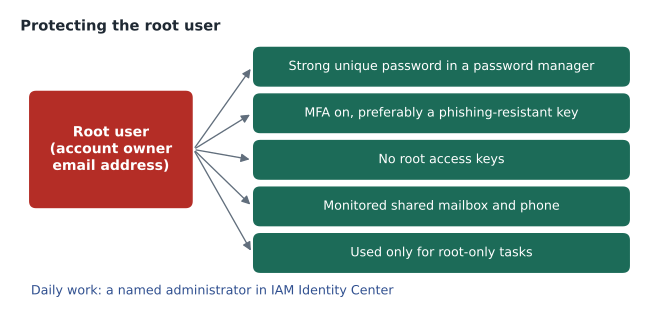
Gwen walked Mateo through five steps that morning. Each one closes a different door.
1. A strong, unique password stored safely. The root password should be long, never reused anywhere else, and stored in the organization's password manager rather than in someone's head or a spreadsheet. Mateo replaced his on-the-spot password with a long generated one.
2. Multi-factor authentication. MFA means a sign-in needs a second factor in addition to the password, so a stolen password alone is not enough. AWS supports several kinds of MFA device, and the strongest are passkeys and FIDO2 security keys, which also resist phishing. Gwen recommends registering more than one MFA device for the root user, kept in different safe places, so losing one does not lock the company out. AWS now requires MFA for root users of many accounts, but turning it on deliberately is still the first job. Lesson 5 covers MFA in detail.
3. No root access keys. Access keys let programs call AWS. A root access key would give a program unlimited power that never expires and cannot be restricted. AWS's guidance is that the root user should have no access keys at all; if any exist, delete them. Mateo checked the security credentials page and confirmed there were none.
4. A monitored mailbox and phone number. The root user's email address is how AWS sends account notices and how the password is reset. If that mailbox belongs to one employee, the account depends on that person. Gwen had Mateo change the root email to a shared mailbox, aws-root@cascaderidge.example, monitored by two people, and make sure the account phone number reached the IT on-call phone, not his personal mobile.
5. Used only for root-only tasks. After the setup, nobody signs in as root for daily work. Mateo now signs in through IAM Identity Center with his own named identity, as lesson 6 explains. Every action he takes is recorded under his name instead of an anonymous root session.
Monitoring root activity
Protection is not complete without detection. AWS CloudTrail records API activity in the account, including root sign-ins, and the sign-in events appear in its event history. Gwen added an alert so that any root sign-in produces a notification to the security mailbox. Since nobody should be using root, an unexpected root sign-in is either a planned recovery task or an incident, and either way someone should know about it immediately.
AWS also provides a credential report in IAM, a downloadable list of the account's identities showing, for each one, when its password was last used, whether MFA is on and how old its access keys are. The first line of that report is the root user. Hannah added a monthly check of the report to her compliance calendar.
# Check a few rows from an IAM credential report (sample data, not a real account).
rows = [
    {"user": "<root_account>", "mfa_active": True,  "access_key_1_active": False, "password_last_used": "2026-11-03"},
    {"user": "kwame",          "mfa_active": False, "access_key_1_active": True,  "password_last_used": "2026-11-10"},
    {"user": "build-bot",      "mfa_active": False, "access_key_1_active": True,  "password_last_used": "N/A"},
]
for r in rows:
    issues = []
    if r["user"] == "<root_account>" and r["access_key_1_active"]:
        issues.append("root has an access key: delete it")
    if r["password_last_used"] != "N/A" and not r["mfa_active"]:
        issues.append("console user without MFA")
print(r["user"], "->", "; ".join(issues) or "ok")<root_account> -> ok kwame -> console user without MFA build-bot -> ok
What this code does
It checks three sample rows from an IAM credential report, the downloadable list of every user and the state of their sign-in credentials. It flags the root user if it has an active access key and flags anyone who signs in to the console without multi-factor authentication (MFA). In the sample, root is fine, the build robot has no console password so it is fine, and one person needs MFA turned on.
The sample shows exactly the kind of finding the report surfaces. Kwame, testing early, had created himself an IAM user with a password and no MFA. That is not a root problem, but the same review catches it.
The root user in a multi-account setup
Cascade Ridge plans several accounts: a management account, production, development and a security and log archive account. Every AWS account has its own root user, so a multi-account setup has several root users to protect. Managing many root passwords and MFA devices is awkward, and AWS Organizations now offers centralized root access for member accounts. With it turned on, the management account can remove the root credentials from member accounts entirely, and new member accounts are created with no root credentials. When a root-only task is needed on a member account, such as deleting a bucket policy that locks everyone out, an authorized administrator in the management account performs it as a short, audited privileged task.
Gwen planned to use this. "The fewer root passwords that exist, the fewer can be stolen," she said. The management account's root user still exists and gets all five habits, with extra care, because it governs every other account.
If the root user is compromised
Hannah asked the uncomfortable question: what if, despite all this, someone else gets the root credentials? AWS publishes guidance for a suspected compromise. The urgent steps are to regain control, by changing the root password and reviewing the MFA devices; to delete any access keys that were created; to check CloudTrail for what the attacker did, such as new users, new access keys or resources in unfamiliar Regions; and to contact AWS Support. Because the root email address is the key to password recovery, protecting that mailbox with its own MFA matters just as much.
Hannah wrote the steps into the incident response plan she was drafting, under a heading she named, with some feeling, "the very bad day".
Common mistakes
MistakeUsing the root user for daily administration because it is convenient.
InsteadCreate named administrative identities, ideally in IAM Identity Center, and keep root for root-only tasks.
MistakeCreating root access keys for a script.
InsteadNever create root access keys. Give scripts a role or a narrowly scoped identity instead.
MistakeRegistering the root user with one person's work email and mobile number.
InsteadUse a monitored shared mailbox and an on-call phone so the account does not depend on one person.
MistakeAssuming creating IAM users or EC2 instances requires root.
InsteadAny identity with the right permissions can do those; the root-only list is short and specific.
Break-glass access
Even with Identity Center in place, Gwen planned for the day the identity provider itself is unavailable. If the company directory suffers an outage during a production incident, nobody can sign in through federation. Many organizations keep a small number of break-glass identities for exactly this case: one or two IAM users or roles with strong passwords, hardware MFA and administrative permissions, sealed away and used only in an emergency. They are not the root user, because root should stay reserved for root-only tasks, and they are watched just as closely. Any use of a break-glass identity triggers an alert, and afterwards the password is changed and the event is written up.
Cascade Ridge created one break-glass role in the management account and one in production, each requiring a hardware security key. The keys live in the same two safes as the root user's keys, with a sign-out sheet. Hannah tests the procedure twice a year: two people, one key each, a short task, and an alert that should arrive within minutes. If the alert does not arrive, the test has found something more important than the procedure itself.
Account contact information
One more root-adjacent detail is easy to overlook. Every account has alternate contacts for billing, operations and security. AWS uses the security contact to reach the customer about issues such as an exposed access key or abusive traffic from an instance. If the only contact is the root email, important messages can sit unread. Mateo set the security contact to Hannah's team mailbox, the operations contact to the IT on-call mailbox and the billing contact to Lorraine's finance mailbox.
Worked problem
Which tasks need the root user?
Mateo has four jobs this week: change the account's alternate billing contact; turn on MFA Delete on the imaging archive bucket; create IAM Identity Center users for the clinic managers; and fix a bucket policy Kwame wrote that accidentally denies every principal. Which need root?
Show solution
- Alternate contacts can be changed by an IAM identity with account permissions, so root is not needed.
- Turning on MFA Delete for an S3 bucket is on the root-only list.
- Creating workforce users in IAM Identity Center is a normal administrative task.
- A bucket policy that denies all principals cannot be fixed through IAM, so the root user (or a centralized root privileged task in AWS Organizations) is needed.
Answer: Root is needed for MFA Delete and for the policy that denies everyone. The other two use named administrator identities.
By lunchtime the root user had a new password in the company vault, two security keys locked in two different places, no access keys, a shared mailbox and an alert on every sign-in. Mateo signed out of it with something like relief, and signed back in as himself.
Summary and key terms
- The root user is the identity created with an AWS account.
- It has complete access that IAM policies in the account cannot restrict.
- AWS recommends using it only for the short list of root-only tasks, such as changing root credentials, closing a standalone account, some billing tasks, turning on S3 MFA Delete and fixing a bucket policy that denies everyone.
- Protect it with a strong unique password, MFA (preferably phishing-resistant), no access keys, a monitored shared email and phone, and alerts on any root sign-in.
- AWS Organizations can centrally remove root credentials from member accounts.
- Daily work uses named identities so actions are traceable.
- Root user
- The identity created with an AWS account, with full access to all resources and billing.
- Root-only task
- An action that requires root user credentials, such as turning on S3 MFA Delete.
- Access key
- A long-term credential pair that lets programs call AWS APIs.
- Credential report
- An IAM report listing every identity's password, MFA and access key status.
- Centralized root access
- An AWS Organizations feature that removes and manages root credentials for member accounts.
Practice problems
Work each problem on paper first, then reveal the answer to check.
Should the root user have access keys?
Show answer
No. Delete any that exist.
Name two root-only tasks.
Show answer
For example, turning on MFA Delete for an S3 bucket and closing a standalone account.
Why use a shared mailbox for the root email?
Show answer
So account notices and password recovery do not depend on one person.
Lesson quiz · 5 questions
Score 60% or more to complete this lesson.
Create a free account to save your progress, take quizzes and earn a certificate.