
ACCT-240 · Lesson 4 of 12 · 26 min
SQL for accounting data
Structured Query Language (SQL) is the standard language for asking questions of relational databases. Every ERP, every data warehouse and most analytics tools speak it, and even tools that hide it behind menus generate SQL underneath. An accountant who can write basic SQL can pull exactly the data needed for an aging report, a reconciliation, an audit test or a management question, instead of waiting for IT or exporting thousands of rows to a spreadsheet and hoping nothing is lost on the way. This lesson teaches the SQL an accountant uses most, applied to Ridgeback's data in SQLite, a small database engine built into Python. The same statements work, with minor dialect differences, in the database behind any ERP.
Two cautions apply from the start. First, accountants should normally query a copy of the data, a reporting database or a read-only connection, never the live production tables with write access; one careless UPDATE without a WHERE clause can change every row. Second, a query result is only evidence if you can show where the data came from and that it is complete. Good practice is to reconcile the record count and control totals of any extract to the system, for example by checking that the sum of open invoices equals the accounts receivable control account, before relying on it. Lesson 9 returns to these completeness checks.
The basic SELECT statement
Almost every query follows the same pattern. SELECT names the columns or calculations you want. FROM names the table. WHERE filters rows before any grouping. GROUP BY collects rows into groups for aggregate functions such as SUM, COUNT, AVG, MIN and MAX. HAVING filters the groups after aggregation. ORDER BY sorts the result. A JOIN combines rows from two tables where a key matches, which is how you bring the customer name into an invoice report or match payments to invoices. The logical order of evaluation is FROM and JOIN, then WHERE, GROUP BY, HAVING, SELECT and finally ORDER BY, which explains why you cannot use a column alias from SELECT inside WHERE in most databases.
| Clause | Purpose | Accounting example |
|---|---|---|
| SELECT | Columns and calculations to return | customer, SUM(amount - paid) |
| FROM / JOIN | Tables and how they link | invoice JOIN customer ON customer_id |
| WHERE | Filter rows | WHERE amount > paid (open items only) |
| GROUP BY | Form groups for totals | GROUP BY customer |
| HAVING | Filter groups after totals | HAVING SUM(amount - paid) > credit_limit |
| ORDER BY | Sort the output | ORDER BY balance DESC |
An accounts receivable aging
An aging report sorts each open invoice into buckets by how many days it is past due: current, 1 to 30 days, 31 to 60, 61 to 90 and over 90. It drives collection effort and supports the allowance for doubtful accounts (or expected credit losses) that ACCT-101 and ACCT-211 discussed. In SQL, the CASE expression assigns each invoice to a bucket, and GROUP BY totals the buckets. The example below builds 300 invented open invoices for Ridgeback and ages them at 31 October 2026.
import sqlite3, random
random.seed(240)
db = sqlite3.connect(":memory:")
db.executescript("""
CREATE TABLE invoice (inv_no INTEGER PRIMARY KEY, customer TEXT, inv_date TEXT, due_date TEXT, amount REAL, paid REAL);
CREATE TABLE journal (je_id INTEGER, line INTEGER, je_date TEXT, account TEXT, debit REAL, credit REAL, user TEXT);
CREATE TABLE payment (pay_id INTEGER PRIMARY KEY, supplier TEXT, inv_ref TEXT, pay_date TEXT, amount REAL);
""")
customers = ["Summit Trail", "Lakehead Paddle", "Coastline Gear", "Prairie Peak", "Granite Basin"]
for n in range(1, 301):
    d = random.randint(0, 150)
    inv = f"2026-{6 + d // 31:02d}-{1 + d % 28:02d}"
    amt = round(random.uniform(300, 9000), 2)
    paid = amt if random.random() < 0.55 else round(amt * random.choice([0, 0, 0.5]), 2)
    db.execute("INSERT INTO invoice VALUES (?,?,?,date(?, '+30 days'),?,?)",
               (n, random.choice(customers), inv, inv, amt, paid))
q = """
SELECT CASE WHEN julianday('2026-10-31') - julianday(due_date) <= 0 THEN '0 current'
            WHEN julianday('2026-10-31') - julianday(due_date) <= 30 THEN '1-30'
            WHEN julianday('2026-10-31') - julianday(due_date) <= 60 THEN '31-60'
            WHEN julianday('2026-10-31') - julianday(due_date) <= 90 THEN '61-90'
            ELSE 'over 90' END AS bucket,
       COUNT(*) AS invoices, ROUND(SUM(amount - paid), 2) AS open_amount
FROM invoice WHERE amount > paid GROUP BY bucket ORDER BY bucket"""
total = 0
for b, n, amt in db.execute(q):
    total += amt
    print(f"{b:>10s} {n:4d} invoices {amt:>12,.2f}")
print(f"{'total':>10s} {total:>12,.2f}") 0 current 28 invoices 104,908.26
1-30 31 invoices 122,347.89
31-60 27 invoices 124,105.86
61-90 31 invoices 131,742.19
over 90 28 invoices 98,729.70
total 581,833.90The total of the aging must agree with the accounts receivable control account in the general ledger. If it does not, the difference must be explained before the aging is used: unapplied cash, credit memos not yet posted, or invoices recorded in the subledger but not the ledger. The over-90 bucket deserves particular attention, because old balances are both likely to be uncollectible and a classic place to hide fictitious sales or misapplied cash.
A trial balance from the journal
In an ERP the trial balance is not a separate document; it is a query that sums every journal line by account. Writing that query yourself is a good way to understand the data and a useful audit test, because a trial balance built directly from the journal lines should agree with the one the system prints. The query also checks that each journal entry balances, since debits must equal credits within every entry, not just in total.
import sqlite3, random
random.seed(240)
db = sqlite3.connect(":memory:")
db.executescript("""
CREATE TABLE invoice (inv_no INTEGER PRIMARY KEY, customer TEXT, inv_date TEXT, due_date TEXT, amount REAL, paid REAL);
CREATE TABLE journal (je_id INTEGER, line INTEGER, je_date TEXT, account TEXT, debit REAL, credit REAL, user TEXT);
CREATE TABLE payment (pay_id INTEGER PRIMARY KEY, supplier TEXT, inv_ref TEXT, pay_date TEXT, amount REAL);
""")
lines = [
 (1, 1, "2026-10-01", "1100 Accounts receivable", 6200, 0, "kpatel"),
 (1, 2, "2026-10-01", "4000 Sales", 0, 6200, "kpatel"),
 (2, 1, "2026-10-03", "5000 Cost of goods sold", 3720, 0, "system"),
 (2, 2, "2026-10-03", "1300 Inventory", 0, 3720, "system"),
 (3, 1, "2026-10-05", "1000 Cash", 8000, 0, "mlee"),
 (3, 2, "2026-10-05", "1100 Accounts receivable", 0, 8000, "mlee"),
 (4, 1, "2026-10-09", "6100 Office expense", 450, 0, "jsmith"),
 (4, 2, "2026-10-09", "2000 Accounts payable", 0, 405, "jsmith"),
]
db.executemany("INSERT INTO journal VALUES (?,?,?,?,?,?,?)", lines)
print("Unbalanced entries:")
for je, d, c in db.execute("""SELECT je_id, SUM(debit), SUM(credit) FROM journal
                              GROUP BY je_id HAVING ROUND(SUM(debit) - SUM(credit), 2) <> 0"""):
    print(f"  JE {je}: debits {d:,.2f} credits {c:,.2f} difference {d - c:,.2f}")
print("Trial balance:")
for acct, bal in db.execute("""SELECT account, ROUND(SUM(debit) - SUM(credit), 2) FROM journal
                               GROUP BY account ORDER BY account"""):
print(f" {acct:28s} {bal:>10,.2f}")Unbalanced entries: JE 4: debits 450.00 credits 405.00 difference 45.00 Trial balance: 1000 Cash 8,000.00 1100 Accounts receivable -1,800.00 1300 Inventory -3,720.00 2000 Accounts payable -405.00 4000 Sales -6,200.00 5000 Cost of goods sold 3,720.00 6100 Office expense 450.00
The query found journal entry 4 out of balance by $45, a transposition-style error (450 keyed as 405). A properly configured ERP would refuse to post an unbalanced entry, so finding one in real data would itself be a serious finding: it suggests entries are entering the ledger by a route that bypasses the normal checks, such as a direct database load. That is why auditors like to rebuild the trial balance from raw journal data rather than relying on a report.
Finding possible duplicate payments
Duplicate payments are one of the most common and costly errors in accounts payable. They happen when the same invoice is entered twice, perhaps once from the paper copy and once from an emailed PDF, or under two supplier records, or with a small change to the invoice number such as an added letter or leading zero. A self-join compares the payment table with itself to find pairs with the same supplier and amount whose invoice references are identical once letters, spaces and leading zeros are removed. Results are leads to investigate, not proof; some genuine payments repeat, such as monthly rent.
import sqlite3, random
random.seed(240)
db = sqlite3.connect(":memory:")
db.executescript("""
CREATE TABLE invoice (inv_no INTEGER PRIMARY KEY, customer TEXT, inv_date TEXT, due_date TEXT, amount REAL, paid REAL);
CREATE TABLE journal (je_id INTEGER, line INTEGER, je_date TEXT, account TEXT, debit REAL, credit REAL, user TEXT);
CREATE TABLE payment (pay_id INTEGER PRIMARY KEY, supplier TEXT, inv_ref TEXT, pay_date TEXT, amount REAL);
""")
pays = [(1, "Northwind Textiles", "INV-4471", "2026-09-04", 12480.00),
        (2, "Northwind Textiles", "4471", "2026-09-19", 12480.00),
        (3, "Alpine Buckle Co", "A-220", "2026-09-07", 3150.75),
        (4, "Alpine Buckle Co", "A-221", "2026-09-07", 3150.75),
        (5, "Cascade Foam", "00981", "2026-09-10", 7400.00),
        (6, "Cascade Foam", "981", "2026-10-01", 7400.00),
        (7, "Harbour Logistics", "RENT-SEP", "2026-09-01", 5000.00),
        (8, "Harbour Logistics", "RENT-OCT", "2026-10-01", 5000.00)]
db.executemany("INSERT INTO payment VALUES (?,?,?,?,?)", pays)
def norm(ref):
    digits = "".join(ch for ch in ref if ch.isdigit()).lstrip("0")
    return digits or ref.upper()      # references without digits are compared as text
db.create_function("norm", 1, norm)
for a, b, sup, amt in db.execute("""
    SELECT p1.pay_id, p2.pay_id, p1.supplier, p1.amount FROM payment p1 JOIN payment p2
      ON p1.supplier = p2.supplier AND p1.amount = p2.amount AND p1.pay_id < p2.pay_id
     AND norm(p1.inv_ref) = norm(p2.inv_ref)"""):
print(f"Possible duplicate: payments {a} and {b}, {sup}, {amt:,.2f}")Possible duplicate: payments 1 and 2, Northwind Textiles, 12,480.00 Possible duplicate: payments 5 and 6, Cascade Foam, 7,400.00
The test flags two pairs: the Northwind invoice paid once as INV-4471 and again as 4471, and the Cascade invoice paid as 00981 and 981. The Alpine pair has different invoice numbers and the same date, which could be two genuine orders; the rent pair has the same amount every month by design. A reviewer would contact the suppliers for the flagged pairs and request credits. Preventive controls, covered in lesson 6, stop most duplicates before payment: the ERP can warn when the same supplier, amount and normalized invoice number are entered twice.
Testing amounts with Benford's law
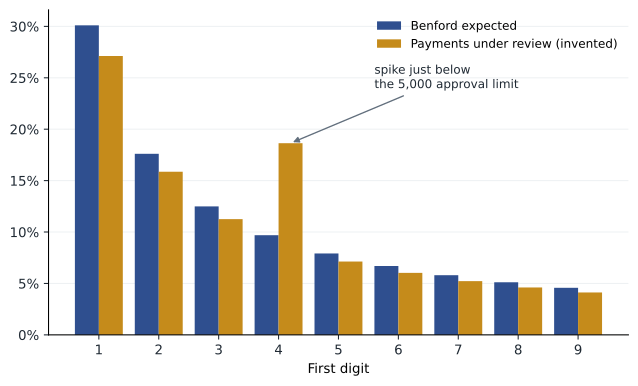
Benford's law says that in many naturally occurring sets of numbers that span several orders of magnitude, such as invoice amounts, the leading digit is 1 about 30 per cent of the time and 9 only about 5 per cent of the time; the expected share for digit d is log10(1 + 1/d). Fabricated numbers often do not follow this pattern, because people inventing figures tend to spread digits evenly or avoid amounts just above approval thresholds. A first-digit test compares actual and expected shares. It is a screening tool, not proof of fraud, and it does not suit data with assigned or capped values. BUS-310 introduced it as a fraud-detection idea; here is how it is computed from data.
import math, random
random.seed(7)
# Simulated genuine invoice amounts spanning several orders of magnitude (illustrative)
amounts = [round(math.exp(random.uniform(math.log(10), math.log(100000))), 2) for _ in range(2000)]
counts = {d: 0 for d in range(1, 10)}
for a in amounts:
    counts[int(str(a).lstrip("0.")[0])] += 1
chi2 = 0.0
print("digit  actual  expected")
for d in range(1, 10):
    exp_share = math.log10(1 + 1 / d)
    act_share = counts[d] / len(amounts)
    chi2 += (counts[d] - exp_share * len(amounts)) ** 2 / (exp_share * len(amounts))
    print(f"  {d}    {act_share:6.1%}   {exp_share:6.1%}")
print(f"chi-square statistic: {chi2:.1f} (critical value 15.5 at 8 df, 5% level)")digit actual expected 1 31.1% 30.1% 2 16.1% 17.6% 3 13.9% 12.5% 4 8.8% 9.7% 5 7.8% 7.9% 6 7.4% 6.7% 7 5.8% 5.8% 8 4.8% 5.1% 9 4.5% 4.6% chi-square statistic: 10.1 (critical value 15.5 at 8 df, 5% level)
The simulated amounts give a chi-square statistic of 10.1, below the 5 per cent critical value of 15.5, so they are consistent with Benford's law, as genuine amounts spanning several orders of magnitude usually are. The figure shows what a problem can look like: an invented set of payments in which too many amounts start with 4 because someone split purchases to stay just under a $5,000 approval limit. A spike like that tells the reviewer where to look, and the next step is to examine the payments behind it, by user, supplier and date.
Worked problem
Explaining an aging that does not reconcile
Ridgeback's SQL aging totals $412,860, but the accounts receivable control account shows $419,310. Investigation finds two items: credit memos of $2,800 were posted to customer accounts on 31 October but reached the general ledger on 1 November, and a manual journal entry on 28 October debited accounts receivable $3,650 for a freight recovery without creating a customer invoice. Reconcile the two balances.
Show solution
- Difference to explain: $419,310 − $412,860 = $6,450, with the ledger higher.
- The credit memos reduced the subledger in October but not the ledger, so the ledger is $2,800 too high at 31 October.
- The manual entry increased the ledger but not the subledger, so the ledger is a further $3,650 higher.
- $2,800 + $3,650 = $6,450, which fully explains the difference.
- Corrections: post the credit memos to October in the ledger, and either raise a proper customer invoice for the freight recovery or reverse the manual entry. Manual entries to a control account should normally be blocked.
Answer: The difference is fully explained, and the manual posting to a control account is itself a control weakness to report.
Common mistakes
MistakeQuerying the live production database with write access.
InsteadUse a read-only connection or a copy; never run updates you have not tested.
MistakeRelying on a query result without checking completeness.
InsteadReconcile record counts and control totals to the system before using an extract.
MistakeUsing WHERE to filter totals.
InsteadUse HAVING for conditions on aggregated values such as SUM or COUNT.
MistakeTreating duplicate-payment hits as proven errors.
InsteadInvestigate each pair; recurring genuine payments also match.
MistakeApplying Benford's law to assigned numbers or capped amounts.
InsteadUse it only for naturally occurring amounts spanning several orders of magnitude.
Summary and key terms
- SQL is the standard language for querying relational databases and works in every ERP.
- A query uses SELECT, FROM, JOIN, WHERE, GROUP BY, HAVING and ORDER BY.
- An aging report uses CASE to bucket open items by days past due and must reconcile to the control account.
- A trial balance can be rebuilt from journal lines, and each entry should balance on its own.
- Self-joins with normalized invoice numbers find possible duplicate payments.
- Benford's first-digit test screens naturally occurring amounts for unusual patterns.
- Query results are evidence only after completeness and accuracy checks.
- SQL
- Structured Query Language, the standard language for relational databases.
- JOIN
- An operation that combines rows from two tables where keys match.
- Aggregate function
- A function such as SUM or COUNT that summarizes many rows.
- HAVING
- A clause that filters groups after aggregation.
- CASE expression
- A SQL expression that returns different values depending on conditions.
- Self-join
- Joining a table to itself, for example to compare payments with one another.
- Aging report
- A report of open items grouped by how long they are past due.
- Control total
- A total used to check that data is complete and unchanged.
- Benford's law
- The expected distribution of leading digits in many natural data sets.
- Read-only connection
- Database access that allows queries but not changes.
Practice problems
Work each problem on paper first, then reveal the answer to check.
In what order are SQL clauses logically evaluated?
Show answer
FROM/JOIN, WHERE, GROUP BY, HAVING, SELECT, ORDER BY.
Write a WHERE condition that keeps only open invoices.
Show answer
WHERE amount > paid.
Why must an aging report agree with the control account?
Show answer
To show the subledger data is complete and accurate before relying on it.
What did the trial balance query reveal about JE 4?
Show answer
Debits exceeded credits by $45, a keying error that should not have posted.
Why should finding an unbalanced entry in ERP data concern an auditor?
Show answer
It suggests entries bypassed normal posting checks, for example through a direct data load.
Which payment pairs did the duplicate test flag?
Show answer
Payments 1 and 2 (Northwind) and 5 and 6 (Cascade).
Why was the rent pair not flagged as a duplicate?
Show answer
The normalized invoice references differ (RENT-SEP and RENT-OCT have no matching digits).
What is the expected Benford share for leading digit 1?
Show answer
log10(2), about 30.1 per cent.
Give one data set Benford's law does not suit.
Show answer
Assigned numbers such as invoice numbers, or amounts capped at a limit.
Write the clause that lists customers whose open balance exceeds $20,000.
Show answer
GROUP BY customer HAVING SUM(amount - paid) > 20000.
Lesson quiz · 5 questions
Score 60% or more to complete this lesson.
Create a free account to save your progress, take quizzes and earn a certificate.