
VIS-120 · Lesson 3 of 12 · 25 min
Still image file formats and compression
Once an image exists, it has to be stored in a file format, and the choice of format determines its quality, size, compatibility, ability to carry transparency, layers and metadata, and how well it will survive repeated editing and the passage of time. Image makers routinely handle a dozen formats: raw files from cameras, JPEGs and HEIFs for sharing, TIFFs and PSDs for editing and archiving, PNGs for graphics, and newer web formats such as WebP and AVIF. This lesson explains how compression works, the strengths and weaknesses of each major format, and how to choose formats at each stage of a workflow.
Why compress?
Uncompressed images are large: Lesson 1 showed that a 24 MP image is 72 MB as 8-bit RGB. Compression reduces file size by representing the same information more efficiently. Lossless compression finds redundancy, such as repeated patterns and smooth areas, and encodes it compactly so that decompression restores every bit exactly. Typical photographs compress losslessly to roughly half their original size. Lossy compression goes further by discarding information that viewers are unlikely to notice, achieving reductions of 10:1 to 20:1 or more for photographs with little visible change. The trade-off is that discarded information is gone forever, and repeated lossy saving accumulates damage.
How JPEG compression works
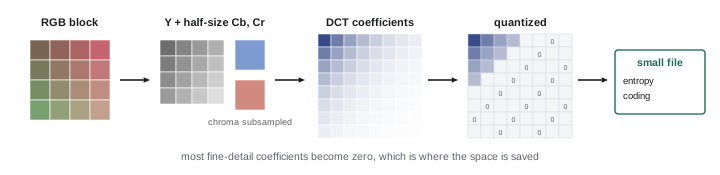
JPEG, standardized in 1992, remains the most widely used image format. Its compression exploits how human vision works. The image is converted from RGB into a luminance channel and two chrominance (color difference) channels; because the eye is much less sensitive to fine color detail than to brightness detail, the color channels are often reduced to half resolution, called chroma subsampling. Each channel is then divided into 8 × 8 pixel blocks and transformed with the discrete cosine transform (DCT) into frequency components, from smooth variations to fine detail. Quantization divides these components by values set by the quality setting and rounds them, discarding much of the fine high-frequency information. Finally, lossless entropy coding packs the remaining values efficiently.
At high quality settings, JPEG artifacts are invisible at normal viewing sizes. At low settings, or after repeated saving, characteristic artifacts appear: blocking, visible 8 × 8 squares in smooth areas; ringing or mosquito noise, halos around sharp edges and text; and color smearing from chroma subsampling. Each time a JPEG is opened, edited and saved again, it is recompressed and loses more information, called generation loss. Simply opening and closing a JPEG without saving does no harm, and rotating in 90° steps can be done losslessly with appropriate software.
Worked problem
Estimating compression and storage
A 24 MP photograph is 72 MB uncompressed (8-bit RGB). Saved as a high-quality JPEG it is 9 MB, and as a lossless compressed 16-bit TIFF it is 90 MB. Compute the compression ratios, and the storage needed for 5,000 images in each form.
Show solution
- JPEG ratio: 72 / 9 = 8:1.
- 16-bit uncompressed would be 144 MB; TIFF ratio: 144 / 90 = 1.6:1 (lossless).
- JPEG storage: 5,000 × 9 MB = 45 GB.
- TIFF storage: 5,000 × 90 MB = 450 GB.
- The tenfold difference is why masters are kept selectively and JPEGs are used for distribution.
Answer: JPEG 8:1 (45 GB); TIFF 1.6:1 lossless (450 GB).
HEIF and HEIC
The High Efficiency Image File Format (HEIF) stores images compressed with the HEVC (H.265) video codec, giving roughly half the file size of JPEG at similar quality, support for 10-bit color and HDR, transparency, depth maps and bursts or live photos in one file. Apple adopted HEIF (with the .heic extension) as the default for iPhone photos, and many cameras now offer 10-bit HEIF as an alternative to JPEG. Compatibility is improving but still not universal; some older software and web platforms require conversion to JPEG, which phones often do automatically when sharing. HEIF is excellent for capture and personal storage, but JPEG remains the safest choice for delivering files to clients and the public.
TIFF
The Tagged Image File Format (TIFF) is a flexible, long-established format for high-quality images. It supports 8, 16 and 32 bits per channel, RGB, CMYK, grayscale and Lab color, layers, alpha channels, extensive metadata and ICC color profiles, with no compression or lossless compression (LZW or ZIP). TIFF is the standard for delivering high-resolution images to printers, publishers, stock agencies and archives, and for saving master files from raw editors in a widely readable form. Its drawback is size. TIFF can technically use JPEG compression internally, but lossless options are normally chosen.
PSD and layered formats
Photoshop documents (PSD, and PSB for files larger than 2 GB or 30,000 pixels) store layers, masks, adjustment layers, smart objects, text and effects, preserving every editing decision so that a composite or retouch can be revised later. Many applications can read PSD files partly, but full fidelity requires Photoshop. Layered TIFF is an alternative with broader compatibility. Affinity, GIMP and other editors have their own native formats. Native layered files should be kept as working masters, with flattened exports created for delivery.
PNG, GIF, WebP and AVIF
PNG (Portable Network Graphics) uses lossless compression and supports full alpha transparency, making it ideal for logos, screenshots, graphics with text and sharp edges, and images that need transparent backgrounds. For photographs, PNG files are much larger than JPEGs with no visible benefit. GIF is an old format limited to 256 colors, still used for simple animations. WebP, developed by Google, supports both lossy and lossless compression, transparency and animation, producing files about 25 to 35 % smaller than JPEG at similar quality; all major browsers support it. AVIF, based on the AV1 video codec, compresses even more efficiently and supports HDR and wide color, and browser support is now broad. Web platforms and content management systems often convert uploaded JPEGs to WebP or AVIF automatically. JPEG XL is a newer format offering excellent compression and lossless recompression of existing JPEGs, with growing but still limited support.
| Format | Compression | Bit depth | Transparency | Best use |
|---|---|---|---|---|
| JPEG | Lossy | 8-bit | No | Sharing and delivery of photographs |
| HEIF / HEIC | Lossy (HEVC) | 8–10-bit | Yes | Efficient capture and storage |
| TIFF | None or lossless | 8, 16, 32-bit | Yes | Masters, print and archive delivery |
| PSD / PSB | Lossless | 8, 16, 32-bit | Yes (layers) | Layered working files |
| PNG | Lossless | 8, 16-bit | Yes | Graphics, screenshots, logos |
| WebP | Lossy or lossless | 8-bit | Yes | Web images |
| AVIF | Lossy or lossless | 8–12-bit | Yes | Web images, HDR |
| DNG | Lossless or lossy raw | 12–16-bit | No | Raw archive and interchange |
Choosing quality settings
JPEG quality scales differ between applications: Photoshop uses 0 to 12, Lightroom 0 to 100, and other software their own scales, and the same number does not produce the same result everywhere. As a practical guide, quality around 80 to 90 on a 100-point scale produces files that look identical to the original at normal viewing sizes while being much smaller than maximum quality; settings above 90 add size quickly with little visible benefit, and settings below 60 show artifacts in smooth gradients and skin. Social media platforms recompress uploads to their own settings, so uploading at the platform's recommended size and a high but not maximum quality usually gives the best result.
Archival considerations
Formats must be readable decades from now. Archivists prefer formats that are openly documented, widely supported, and lossless: TIFF and, increasingly, DNG for raw files, along with PNG and JPEG for derivatives. Proprietary raw formats depend on continued software support; while major formats are well supported today, some older or obscure camera formats are already difficult to open. Strategies include converting raw files to DNG (optionally embedding the original raw file), keeping a current converter installed, exporting full-resolution TIFF masters of the most important images, and periodically checking that archived files still open. Lesson 11 covers archiving in more depth.
Format choices across a workflow
A typical still photography workflow uses several formats: raw files at capture; non-destructive edits stored in a catalog or sidecar files (Lesson 9); layered PSD or TIFF files for heavy retouching or compositing; 16-bit TIFF masters for print and archive; and JPEG, WebP or AVIF derivatives sized for each destination. Each step should use the highest-quality format practical, with lossy compression applied once, at the end, for distribution. Keeping a clear naming system that distinguishes masters from derivatives prevents the common mistake of editing a small web JPEG instead of the original.
Metadata and formats
Formats differ in how well they carry metadata. JPEG, TIFF, PSD, DNG and HEIF store Exif, IPTC and XMP metadata (Lesson 8) and embedded color profiles reliably. PNG supports metadata and profiles, but some applications ignore or strip them. Web platforms frequently strip most metadata from uploaded images, including copyright information and color profiles, to reduce file size and protect privacy, which is one reason to export web images in sRGB and to watermark or caption images where attribution matters. Video containers carry their own metadata, and sidecar files are common in professional video workflows.
Transparency and compositing formats
Graphics and composites often need transparency. An alpha channel stores, for each pixel, how opaque it is, from fully transparent to fully opaque, allowing soft edges such as hair or smoke to blend smoothly over any background. PNG, TIFF, PSD, WebP, AVIF and HEIF support alpha channels; JPEG does not, so a logo saved as JPEG always sits in a rectangle. In video, ProRes 4444 and some other codecs carry alpha for titles and effects. A common mistake is saving a cut-out image as JPEG, losing the transparency that took time to create.
Choosing formats for clients
Clients rarely know which formats they need, so it falls to the image maker to ask questions and recommend. For a corporate website, high-quality sRGB JPEGs sized for the site, plus full-resolution files for future needs, are usually right. For a printed brochure, the designer may want full-resolution TIFFs or high-quality JPEGs in Adobe RGB or sRGB, depending on their workflow, or CMYK files prepared for a specific press. For social media teams, platform-sized JPEGs and vertical crops save time. For archives and museums, uncompressed or losslessly compressed TIFFs with full metadata are standard. Delivering a short written guide to which files to use for what reduces support calls and misused images.
Compression in context
A final point about compression: what matters is how the image looks at its intended size and use. A heavily compressed thumbnail on a phone can look perfect, while the same compression on a large print shows artifacts immediately. Judge compression settings by viewing exported files at their real display size, on the kind of device the audience will use, rather than zoomed to 200 % on a large monitor.
Animated and multi-image formats
Some formats store more than one image. Animated GIF, animated WebP and animated AVIF play short loops in browsers, with WebP and AVIF far more efficient than GIF; many websites now convert animated GIFs to short MP4 videos for the same reason. HEIF can store image sequences, bursts and the short video clips of live photos. Multi-page TIFF and PDF files hold several images, as in scanned documents or contact sheets. Choosing the right container for these multi-image uses keeps file sizes down and compatibility high, and knowing that a file contains more than one image helps avoid surprises when it is opened in software that shows only the first frame.
Format support also changes over time. Formats that were once standard, such as Kodak Photo CD and some early raw formats, are now difficult to open, while newer formats take years to become universally supported. Watching which formats your clients, platforms and archive partners accept, and revisiting format choices every few years, keeps a workflow current without chasing every new standard.
Common mistakes
MistakeEditing and resaving the same JPEG repeatedly.
InsteadEdit from the raw or a lossless master and export once.
MistakeSaving photographs as PNG for the web.
InsteadUse JPEG, WebP or AVIF for photos; PNG for graphics.
MistakeDelivering HEIC files to clients by default.
InsteadDeliver JPEG unless the client requests otherwise.
MistakeUsing maximum JPEG quality for every web image.
InsteadUse about 80–90 on a 100-point scale.
MistakeAssuming proprietary raw formats will always open.
InsteadConsider DNG and keep TIFF masters of key images.
Summary and key terms
- Lossless compression is reversible; lossy compression discards information.
- JPEG uses chroma subsampling, DCT and quantization.
- Repeated JPEG saving causes generation loss.
- HEIF halves JPEG sizes and supports 10-bit, but compatibility varies.
- TIFF and PSD hold high-bit-depth and layered masters.
- PNG suits graphics; WebP and AVIF suit the web.
- Use lossless formats until final export, and plan for archival readability.
- Lossless compression
- Compression that restores data exactly.
- Lossy compression
- Compression that discards information.
- Chroma subsampling
- Storing color at lower resolution than brightness.
- DCT
- Discrete cosine transform used in JPEG.
- Quantization
- Rounding coefficients to discard detail.
- Generation loss
- Quality loss from repeated lossy saving.
- HEIF
- High Efficiency Image File Format.
- TIFF
- Flexible lossless format for masters.
- WebP
- Web format with lossy and lossless modes.
- AVIF
- Web format based on the AV1 codec.
Practice problems
Work each problem on paper first, then reveal the answer to check.
A 60 MB image compresses to 6 MB. Ratio?
Show answer
10:1.
Why does JPEG subsample color?
Show answer
The eye is less sensitive to color detail.
What block size does JPEG use?
Show answer
8 × 8 pixels.
Name two JPEG artifacts.
Show answer
Blocking, ringing, color smearing.
Does opening a JPEG without saving reduce quality?
Show answer
No.
Which codec does HEIF use?
Show answer
HEVC (H.265).
Which format is best for a logo with transparency?
Show answer
PNG (or a vector format).
When is PSB used instead of PSD?
Show answer
Files over 2 GB or 30,000 pixels.
Recommended JPEG quality for web on a 100-point scale?
Show answer
About 80–90.
Why convert raw files to DNG for archives?
Show answer
Openly documented format with better long-term support.
Lesson quiz · 5 questions
Score 60% or more to complete this lesson.
Create a free account to save your progress, take quizzes and earn a certificate.