
VIS-120 · Lesson 2 of 12 · 25 min
From sensor to file: raw and processed capture
The first decision in any digital workflow happens before the shutter is pressed: should the camera save raw data, a processed file such as JPEG or HEIF, or both? The answer affects image quality, editing flexibility, file sizes, speed and how quickly images can be delivered. To make that decision well, you need to understand what happens between light striking the sensor and a file appearing on the card. This lesson follows that path: how a sensor records light, how color is captured with a color filter array, what the camera's image processor does, what a raw file actually contains, and when each capture format is the right choice for stills and video.
How a sensor records light
A digital camera sensor is a grid of millions of photosites, light-sensitive wells that collect photons during the exposure and convert them into electrical charge. More light produces more charge, up to the photosite's full-well capacity, beyond which it clips to pure white. After the exposure, the charge in each photosite is read out, amplified and converted into a number by an analog-to-digital converter. The ISO setting controls the amplification: higher ISO amplifies weaker signals, making the image brighter but also amplifying noise. The result, straight off the sensor, is a linear set of numbers, each proportional to the light that reached one photosite.
Sensors are measured by format (full frame, about 36 × 24 mm; APS-C, about 23.5 × 15.6 mm; Micro Four Thirds, 17.3 × 13 mm; and the much smaller sensors in phones), resolution and pixel pitch, the spacing between photosites. Larger photosites collect more light and generally produce less noise at a given exposure, which is one reason larger sensors perform better in low light. Phone cameras compensate for tiny sensors with computational photography, combining many rapid frames to reduce noise and extend dynamic range, a topic covered in PHOT-420.
Capturing color: the color filter array
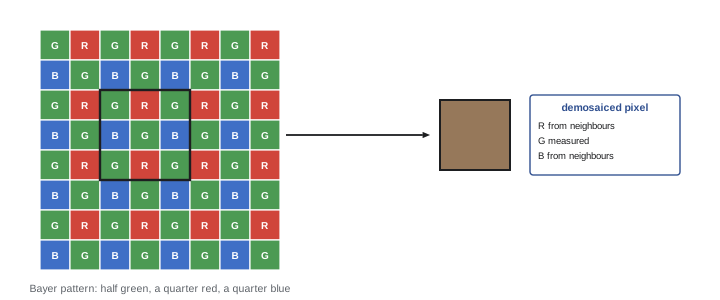
Photosites measure only brightness, not color. To capture color, most sensors place a mosaic of tiny red, green and blue filters over the photosites, so each one records only one color. The most common pattern is the Bayer filter, a repeating 2 × 2 block with two green, one red and one blue filter; green is doubled because the eye is most sensitive to green and it carries most of the luminance detail. Fujifilm's X-Trans sensors use a 6 × 6 pattern intended to reduce moiré. A few sensors, such as Foveon designs, stack color layers vertically, and monochrome cameras omit the filter entirely for maximum sharpness and sensitivity.
Because each photosite records only one color, the camera or software must estimate the two missing colors at every pixel from neighboring photosites, a process called demosaicing. Good demosaicing algorithms reconstruct fine detail and avoid artifacts such as false color along edges, zipper patterns and moiré on fine repeating textures like fabric. Many cameras place an optical low-pass (anti-aliasing) filter in front of the sensor to blur detail very slightly and reduce moiré; high-resolution cameras often omit it for extra sharpness, accepting occasional moiré.
What the camera processor does
When a camera saves a JPEG or HEIF, its image processor performs many steps in a fraction of a second:
- Demosaicing to create full RGB values for every pixel.
- White balance, scaling the red, green and blue channels so that neutral objects appear neutral under the light source.
- Color conversion from the sensor's native color response into a standard color space such as sRGB or Adobe RGB.
- Tone mapping, applying a tone curve (and gamma encoding) that converts linear sensor data into a pleasing, contrasty image for display.
- Noise reduction and sharpening, according to the camera settings.
- Lens corrections for distortion, vignetting and chromatic aberration.
- Application of the picture style or film simulation (standard, vivid, portrait, monochrome).
- Reduction to 8 bits per channel (or 10 bits for HEIF) and compression.
All of these choices are baked into the resulting file. Some can be adjusted later, but with less latitude, because information discarded during processing cannot be recovered.
What a raw file contains
A raw file stores the sensor data before most of this processing: the linear, mosaiced values from each photosite, typically at 12 or 14 bits, along with metadata describing the camera, lens, exposure settings, the white balance chosen in camera and the picture style. It usually also embeds a JPEG preview so that the camera screen and fast viewers can display the image. Raw files are not images in the ordinary sense until software processes them; the processing is done later by a raw converter such as Adobe Lightroom or Camera Raw, Capture One, DxO PhotoLab, darktable or RawTherapee, under the photographer's control.
Because white balance, color conversion, tone curve, noise reduction and sharpening are applied in software, they can be changed at any time without loss, and improved software can reprocess old raw files better years later. Each manufacturer uses its own raw format (Canon CR3, Nikon NEF, Sony ARW, Fujifilm RAF, and others), which raises long-term compatibility questions discussed in Lessons 3 and 11. Adobe's Digital Negative (DNG) is an openly documented raw format used natively by some cameras and phones and as a conversion target.
| Aspect | Raw | JPEG / HEIF |
|---|---|---|
| Bit depth | 12–14 bits per photosite | 8 bits (JPEG) or 10 bits (HEIF) |
| White balance | Adjustable without loss | Baked in; limited correction |
| Highlight and shadow recovery | Typically 1–3 stops of latitude | Very limited |
| File size (24 MP) | About 25–50 MB | About 5–15 MB |
| Ready to share | No; needs processing | Yes |
| Burst depth and card speed | Fills buffer and cards faster | Longer bursts, smaller cards |
| Compatibility | Needs raw converter support | Universal |
Raw compression options
Many cameras offer several raw options: uncompressed, lossless compressed, and lossy or "visually lossless" compressed raw. Lossless compression reduces file size by 30 to 50 % with no loss of data and is usually the best default. Lossy raw compression, such as some manufacturers' compressed raw modes, reduces files further but can produce artifacts in extreme edits, especially in high-contrast edges and heavily lifted shadows. Some cameras also offer reduced-resolution raw files. The choice balances storage and speed against maximum quality; for critical work, lossless compressed raw is a sensible standard.
When to choose each format
Raw capture is the right choice when maximum quality and flexibility matter: commercial, landscape, architecture, portraits, weddings and any situation with difficult or mixed lighting where white balance and exposure may need correction. JPEG or HEIF capture suits situations where speed matters more than flexibility: news and sports photographers transmitting images within minutes of capture, event photographers delivering same-day slideshows, very long bursts, or casual shooting. Many photographers shoot raw plus JPEG, using the JPEGs for quick previews and delivery and the raw files for final editing, at the cost of more storage. Careful exposure and white balance in camera still matter even when shooting raw, because they determine noise levels and how much latitude remains.
Worked problem
Choosing capture settings for an event
A photographer covers a two-hour corporate event and must supply a dozen images to the client's social media team during the event, then a full edited gallery a week later. The camera produces 26 MB lossless raw files and 9 MB fine JPEGs, and the photographer expects about 1,200 frames. Recommend a capture setting and estimate card space.
Show solution
- The quick social media delivery favors JPEG; the final gallery benefits from raw for mixed indoor lighting.
- Choose raw + JPEG: 26 + 9 = 35 MB per frame.
- Card space: 1,200 × 35 MB = 42,000 MB = 42 GB.
- Use a 128 GB card (or two cards in a dual-slot camera, recording to both for redundancy), leaving ample margin.
- Send selected JPEGs during the event; edit the raw files for the gallery.
Answer: Raw + JPEG, about 42 GB for 1,200 frames, on 128 GB cards with dual-slot backup if available.
Raw video and processed video
The same choice exists for video. Most cameras record processed, compressed video in codecs such as H.264, H.265 or ProRes, with white balance and a picture profile applied. Log profiles (such as S-Log3, C-Log, V-Log or N-Log) record a flat, low-contrast image that preserves more dynamic range for grading, a middle ground discussed in Lesson 5. Raw video formats, such as Blackmagic RAW, REDCODE RAW, ARRIRAW and Apple ProRes RAW (often recorded on external recorders), store sensor data with adjustable ISO and white balance in post-production, at higher data rates. Lesson 4 covers video formats and codecs in detail.
Card handling and capture reliability
The capture stage is also the first place files can be lost. Memory cards should be formatted in the camera that will use them, not deleted file by file or formatted on a computer, to keep the file system clean. Speed ratings matter for bursts and video: SD cards are rated with UHS speed classes and video speed classes (V30, V60, V90, the number indicating minimum sustained write speed in MB/s), and CFexpress cards offer much higher speeds for high-resolution video and long bursts. Dual-slot cameras can record simultaneously to two cards, creating an instant backup. Using several smaller cards rather than one huge card spreads risk, though modern professional practice increasingly relies on dual recording. Cards should be swapped and stored carefully, with a clear system for distinguishing full cards from empty ones, because a reformatted card that had not been backed up is one of the most common causes of lost work.
Tethered capture
In studios, photographers often shoot tethered, with the camera connected by cable or wireless link to a computer running capture software such as Capture One or Lightroom. Each frame transfers to the computer immediately, appearing on a large calibrated screen where the photographer, art director and client can check focus, lighting, composition and color as the shoot proceeds. Tethered capture applies naming, metadata and even editing presets on arrival, and files are stored directly in the project folder, effectively combining capture and ingest. It is standard in product, fashion, food and catalog photography. A backup destination should still be configured, and many photographers also record to the camera's card as a second copy, so that a computer crash does not lose images.
Phones as capture devices
Smartphones now produce a large share of professional and semi-professional images and video, from social media content to news footage. Their default output is heavily processed: multiple frames are merged, noise is reduced, tones are mapped and faces may be enhanced, usually saved as HEIF or JPEG. Many phones also offer raw capture, often as DNG files or computational raw formats that combine multi-frame processing with raw flexibility, and professional video modes with log profiles and ProRes recording. Understanding which processing has been applied, and choosing raw or log modes when editing flexibility matters, brings phone capture into a professional workflow.
Image stabilization, autofocus data and other camera information are also recorded in raw and processed files, and some cameras save additional data such as focus point positions, which helps culling software and photographers check whether the intended subject was in focus. Firmware updates can change processing, add raw formats or fix bugs that affect files, so keeping camera firmware current, and testing new versions before important jobs, is part of maintaining a reliable capture system.
Common mistakes
MistakeAssuming raw files need no care with exposure.
InsteadExpose correctly; raw latitude is limited and shadows add noise.
MistakeShooting JPEG for difficult mixed lighting.
InsteadShoot raw where white balance may need correction.
MistakeDeleting images on a computer and reusing the card.
InsteadBack up, then format the card in the camera.
MistakeUsing a slow card for high-bitrate video.
InsteadMatch the card's sustained speed class to the codec.
MistakeRelying on one card for an unrepeatable event.
InsteadRecord to two slots where possible.
Summary and key terms
- Photosites convert light to charge; ISO amplifies the signal.
- A color filter array records one color per photosite.
- Demosaicing estimates full color at every pixel.
- Camera processing bakes white balance, tone, color and compression into JPEGs.
- Raw files hold linear sensor data and metadata for later processing.
- Raw suits quality and flexibility; JPEG and HEIF suit speed.
- Card handling and dual recording protect captures.
- Photosite
- A light-sensitive element on a sensor.
- Full-well capacity
- Maximum charge before a photosite clips.
- Bayer filter
- A 2 × 2 red, green, green, blue filter pattern.
- Demosaicing
- Reconstructing full color from a mosaic.
- Moiré
- False patterns from fine repeating detail.
- White balance
- Channel scaling so neutrals appear neutral.
- Raw file
- A file of unprocessed sensor data.
- Raw converter
- Software that processes raw files.
- DNG
- Adobe's openly documented raw format.
- Video speed class
- Card rating for sustained write speed, such as V60.
Practice problems
Work each problem on paper first, then reveal the answer to check.
What does the ISO setting control?
Show answer
Amplification of the sensor signal.
Why does the Bayer pattern have two green filters?
Show answer
The eye is most sensitive to green and it carries luminance detail.
What is demosaicing?
Show answer
Estimating missing colors at each pixel from neighbors.
Name four steps the camera applies to a JPEG.
Show answer
Demosaic, white balance, tone curve, sharpening, compression.
What does a raw file embed for previews?
Show answer
A JPEG preview.
Name three raw converters.
Show answer
Lightroom, Capture One, DxO PhotoLab, darktable.
When is JPEG capture preferable?
Show answer
When fast delivery or long bursts matter most.
800 frames of raw + JPEG at 30 + 8 MB: card space?
Show answer
30.4 GB.
What does V60 mean?
Show answer
Minimum sustained write of 60 MB/s.
Where should cards be formatted?
Show answer
In the camera.
Lesson quiz · 5 questions
Score 60% or more to complete this lesson.
Create a free account to save your progress, take quizzes and earn a certificate.