
SLS-130 · Lesson 9 of 12 · 18 min
Self-service and AI in customer service
▶ Video coming soon A video version of this lesson is on the way.
In September 2026, Juniper & Pine's e-commerce and marketing coordinator, Tessa Yellowbird, ran a simple test. She read every email and chat the service team had received in one week, 260 in all, and sorted them by question. Almost a third were questions customers could have answered themselves if the information had been easy to find: store hours, whether an item was in stock, the status of an order, how to book a delivery change, and what the return policy said. Another large group were about the same handful of problems with the same few products. "We're paying skilled people to read out our opening hours," she told Bev. "And customers are waiting a day for an answer they could have had in ten seconds."
This lesson covers self-service, where customers find answers or complete tasks without help from a person, and the growing use of artificial intelligence, AI, in customer service. It explains what self-service does well, how to build a useful help center, what AI chat assistants can and cannot do, the risks, including legal ones, and how to design the hand-off from automation to a person.
Why customers like self-service
Many customers prefer to help themselves when the task is simple. Self-service is available at any hour, needs no waiting in a queue, and avoids the awkwardness some people feel about calling. Checking an order's status, rescheduling a delivery, downloading an invoice or reading a care guide are all tasks that customers often find quicker online than by talking to anyone.
Self-service also benefits the business. Each question answered by a help article or an online tool is one fewer contact for staff, which frees them to spend time on problems that really need a person. But self-service is only good service if it works. A help center that is hard to search, out of date or written in company jargon simply adds a frustrating step before the customer gives up and calls anyway, now more annoyed than before.
Types of self-service
| Type | What it does | Juniper & Pine or Ridgeline example |
|---|---|---|
| Help center or FAQ | Articles answering common questions | Return policy, delivery areas, mattress comfort-trial rules |
| Order tracking | Shows the status of an order or delivery | A page and text link showing where the delivery truck is |
| Account portal | Lets customers view records and make changes | Ridgeline's portal for logging printer faults and downloading invoices |
| Online booking | Lets customers schedule or change appointments | Rescheduling a delivery or booking a technician visit |
| Guides and videos | Show how to use, assemble or care for a product | Video on leveling a dishwasher; RoomFlow setup guide |
| Automated phone menus | Route calls or give simple information by voice | Press 1 for delivery status |
| Chat assistants | Answer questions in conversation, often using AI | A website assistant that answers policy questions and checks orders |
Building a help center that works
Tessa's sorting exercise was the right starting point: a help center should be built from the questions customers actually ask, not from what the company wants to say. The most frequent questions get the clearest, most visible answers. Each article should answer one question, start with the answer, use the customer's own words in its title ("Can I change my delivery date?" rather than "Delivery modification policy"), and be short enough to read on a phone.
Articles must stay accurate. An out-of-date help article is worse than none, because customers act on it. Every article needs an owner and a review date, and articles should change whenever the policy or product changes. Juniper & Pine linked its help articles to the same internal knowledge base that service staff use, introduced in lesson 8, so one change updates both.
Finally, the help center should be measured. Useful signals include which searches return no results, which articles are read most, whether readers mark them as helpful, and whether customers who read an article still contact the service team about the same thing soon after. If they do, the article is not answering the question.
AI in customer service
AI tools have spread rapidly through customer service since 2023, especially tools based on large language models, which can understand and generate fluent text. They are used in several ways.
- Customer-facing chat assistants that answer questions in natural language, often by searching the company's help articles.
- Agent assist tools that suggest replies, find relevant articles or summarize a long conversation for a human service worker.
- Automatic routing that reads incoming emails and sends them to the right team, or flags urgent or angry messages.
- Summaries and notes written after a call, saving staff time on record keeping.
- Analysis of large numbers of contacts or survey comments to find common themes.
Used well, these tools can answer simple questions instantly at any hour, reduce waiting, and give staff more time for complex problems. Agent assist and summarization are often the safest starting points, because a person checks the output before the customer sees it.
What AI gets wrong
Language-model tools have well-known weaknesses. The most serious for customer service is that they can produce confident, fluent answers that are wrong, sometimes called hallucinations. They may invent a policy, misstate a price or promise something the business does not offer. They can also misunderstand an unusual question, respond badly to an upset customer, and struggle with situations that need judgment or exceptions.
These are not just technical problems. They can create legal obligations. In February 2024, in Moffatt v. Air Canada, British Columbia's Civil Resolution Tribunal found Air Canada responsible for wrong information its website chatbot had given a customer about bereavement fares. The airline argued that the chatbot was responsible for its own statements; the tribunal rejected that argument, held that the company is responsible for all the information on its website, whether it comes from a static page or a chatbot, and ordered it to pay the customer about 812 dollars in damages, interest and fees. The amount was small, but the principle was widely reported: a business cannot disown what its automated assistant tells customers.
Some companies have also found that heavy automation hurt quality. The payments company Klarna announced in 2024 that its AI assistant was handling about two-thirds of its customer service chats. In 2025 its chief executive said the company would put more emphasis on human service again, after finding that cost-focused automation had lowered quality. The lesson most observers drew was not that AI fails, but that automation needs a strong human option behind it.
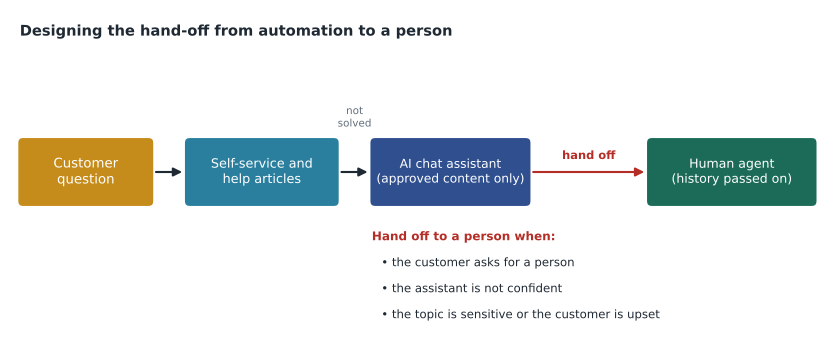
Designing the hand-off to a person
The most important design decision in automated service is when and how a customer reaches a human. Customers who feel trapped in a loop with an automated system, unable to reach anyone, become far angrier than if they had simply waited in a phone queue. Good designs follow a few rules.
- Make it easy to ask for a person, at any point, with a visible option.
- Hand off automatically when the assistant is not confident, when the topic is sensitive (such as damage, safety, money disputes or bereavement), or when the customer seems upset.
- Pass the conversation history to the person, so the customer does not repeat themselves.
- Be honest that the customer is talking to an automated assistant. Pretending it is a person damages trust when customers find out.
- Limit the assistant to approved information, such as the company's own knowledge base, and test it regularly with real questions.
- Never let the assistant make commitments, such as refunds, credits or exceptions, that only a person is authorized to give, unless those rules are explicitly built in.
Juniper & Pine's website assistant, introduced in a small trial in October 2026, follows these rules. It answers questions only from the store's help articles and order records, says plainly that it is an automated assistant, offers "talk to a person" on every screen, and hands any conversation about damage, refunds over 100 dollars or a complaint to the service team, with the chat history attached.
Accessible self-service
Self-service must work for customers with disabilities, or it shuts some people out. That means websites and apps that work with screen readers and keyboards, readable text and color contrast, captions on videos, forms that do not time out too quickly, and always another way to get help, such as a phone number or a live person. Title III of the Americans with Disabilities Act applies to businesses open to the public, and courts and the Department of Justice have treated websites as covered in many cases; many businesses follow the Web Content Accessibility Guidelines (WCAG) as the practical benchmark. Accessible design usually helps everyone: clear headings and plain language make a help center easier for every customer to use.
Privacy and AI
AI tools process customer information, so privacy rules apply. The United States has no single federal private-sector privacy law; South Dakota has no general consumer privacy statute, but the FTC Act prohibits unfair or deceptive practices, including misleading statements about how customer data is used, and several states have comprehensive privacy laws that apply to businesses serving their residents. Sending customer conversations to an AI vendor should be covered by a contract that restricts how the vendor uses the data. Staff should not paste customers' personal details into public AI tools that are not approved by the business.
Worked problem
Is the chat assistant pulling its weight?
During the October 2026 trial, Juniper & Pine's website assistant held 1,250 conversations. Of these, 700 ended with the customer marking the answer as helpful and not contacting the store about the same issue within seven days; 330 were handed to a person; and 220 ended with the customer leaving without rating, of which 90 contacted the store about the same issue within seven days. Estimate the assistant's containment rate, defined as conversations resolved without a person, and comment on what the figures do not show.
Show solution
- Resolved without a person: the 700 helpful conversations, plus the unrated ones that did not lead to a contact: 220 − 90 = 130. Total: 700 + 130 = 830.
- Containment rate: 830 ÷ 1,250 × 100 = 66.4 in 100.
- Handed to a person: 330 ÷ 1,250 × 100 = 26.4 in 100. Silent failures, unrated conversations followed by a contact: 90 ÷ 1,250 × 100 = 7.2 in 100.
- Check: 66.4 + 26.4 + 7.2 = 100.
- What the figures do not show: whether the 130 unrated customers were actually satisfied or just gave up and bought elsewhere, and whether any answers were wrong. A sample of transcripts should be reviewed for accuracy every week.
Answer: About 66 in 100 conversations were resolved without a person, 26 were handed over and about 7 failed silently. The containment rate looks good, but the store should check transcripts for wrong answers and survey a sample of customers, because a conversation that ends quietly is not always a success.
Measuring self-service and AI honestly
Automated service is often judged by its containment or deflection rate: the share of contacts handled without a person. These rates are useful but easy to inflate. A chatbot that makes it hard to reach a person will show high containment because customers give up, not because they were helped. Honest measurement combines containment with customer satisfaction, accuracy checks on a sample of conversations, the rate of repeat contacts, and complaints about the automated service itself.
For business customers, the questions are similar. Ridgeline's portal deflects many routine requests, such as toner orders, from phone and email. But Maya noticed that some customers, like Helen Park, preferred to email her personally even for simple things. She did not push them to the portal. Instead she logged their requests in the portal herself, so the records stayed complete while the customers kept the personal service they valued.
Common mistakes
MistakeBuilding a help center from what the company wants to say.
InsteadBuild it from the questions customers actually ask, written in their words, with the answer first.
MistakeLetting help articles go out of date.
InsteadGive every article an owner and a review date, and link it to the knowledge base staff use.
MistakeAssuming the business is not responsible for what its chatbot says.
InsteadA business is responsible for all information it gives customers, including from automated assistants, as Moffatt v. Air Canada showed.
MistakeMaking it hard to reach a person.
InsteadOffer a visible option to reach a person, hand off sensitive or uncertain conversations automatically, and pass the history along.
MistakeJudging automation by containment alone.
InsteadCombine containment with satisfaction, accuracy checks, repeat contacts and complaints about the automated service.
Summary and key terms
- Self-service lets customers find answers or complete tasks without a person; it suits simple tasks and frees staff for complex problems, but only if it works.
- Help centers should be built from real customer questions, written plainly, kept current and measured.
- AI in customer service includes chat assistants, agent assist, routing, summaries and theme analysis; tools where a person checks the output are often the safest start.
- AI can give confident wrong answers, and businesses remain responsible for them, as Moffatt v.
- Air Canada showed in 2024.
- Good designs make it easy to reach a person, hand off sensitive or uncertain conversations with their history, are honest that the assistant is automated and limit it to approved information.
- Privacy law applies to AI tools.
- Containment rates should be measured together with satisfaction, accuracy and repeat contacts.
- Self-service
- Customers finding answers or completing tasks without help from a person.
- Help center
- A collection of articles answering common customer questions.
- Large language model
- An AI model trained on large amounts of text that can understand and generate fluent language.
- Hallucination
- A confident but false answer produced by an AI model.
- Agent assist
- AI tools that help a human service worker, for example by suggesting replies or summarizing a conversation.
- Containment rate
- The share of contacts resolved by self-service or automation without a person.
Practice problems
Work each problem on paper first, then reveal the answer to check.
Why can an out-of-date help article be worse than no article?
Show answer
Customers act on it, so wrong information leads to mistakes, complaints and lost trust.
What did the tribunal decide in Moffatt v. Air Canada?
Show answer
That Air Canada was responsible for the wrong information its chatbot gave, and it had to compensate the customer.
A chatbot had 900 conversations; 540 were resolved without a person. What is the containment rate, in 100?
Show answer
540 ÷ 900 × 100 = 60 in 100.
Lesson quiz · 5 questions
Score 60% or more to complete this lesson.
Create a free account to save your progress, take quizzes and earn a certificate.