
RCDD-114 · Lesson 7 of 12 · 20 min
Converged networks and IoT devices
▶ Video coming soon A video version of this lesson is on the way.
By the end of the first month, Daniel has a spreadsheet he calls 'Everything with a cable'. It lists access points, cameras, door controllers, intercoms, AV encoders and decoders, touch panels, building automation controllers, occupancy sensors, digital signage players, nurse call stations, medication cabinets, smart meters and a few things he has never heard of, including 'asset tags gateway' and 'hand hygiene monitor'. The spreadsheet has more than 1,400 rows. Desktop computers and phones, the devices he used to think of as the network, are fewer than 400 of them. 'Welcome to the converged building,' Roz says. 'Most of what we connect now is not a computer. It is a thing.'
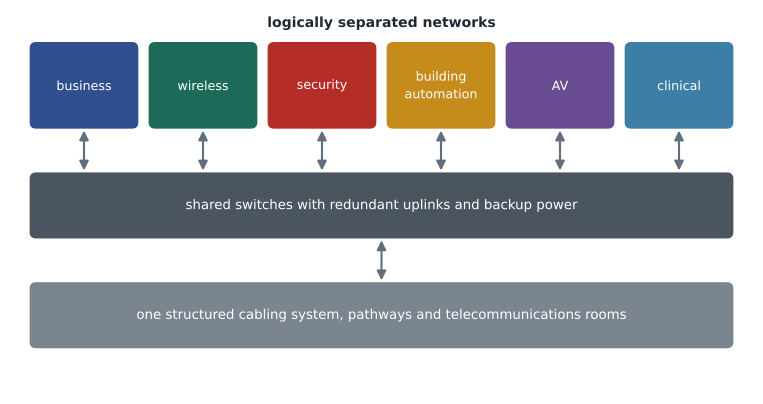
Network convergence means carrying many kinds of traffic and many building systems over a shared infrastructure: the same structured cabling, the same pathways and telecommunications rooms, and often the same network switches, separated logically rather than physically. The Internet of Things, or IoT, describes the enormous number of devices, sensors and controllers that connect to networks to report data or receive commands. In commercial buildings, IoT devices now outnumber people and personal computers, and their numbers keep rising. This lesson looks at what convergence and IoT mean for the RCDD: more connections, more power, new cabling options and a much bigger responsibility for reliability and security.
Why buildings converge
Owners converge building systems for several reasons. A single cabling infrastructure costs less to install than several parallel ones, takes less pathway space and is easier to document. A common network lets data from different systems be combined, which is the foundation of the intelligent building described in the previous lesson. Standards-based cabling outlasts the equipment connected to it, so the owner can change vendors without recabling. And a single, well-managed network is usually more secure than a collection of systems that nobody watches closely.
Convergence also concentrates risk. When cameras, door controllers, building automation, nurse call and business systems all depend on the same switches, a failure or attack can affect all of them at once. Good converged design therefore combines shared physical infrastructure with careful separation: different virtual networks for different systems, access controls between them, redundant uplinks and power for critical systems, and clear ownership of each system's devices. The RCDD's role is mainly physical, but physical choices, such as which switches serve which systems and how they are powered, shape how well the logical design can protect them.
Counting connections
The first infrastructure task in a converged building is to count the connections. Device schedules from each system designer are combined into one list with locations, cable types and power needs. From that list come outlet counts per room, horizontal cable counts per telecommunications room, patch panel and switch port counts, and PoE budgets. The total is almost always larger than a traditional estimate based on workstations alone, and the growth is concentrated in ceilings, walls and equipment locations rather than at desks.
Worked problem
Ports for the third-floor telecommunications room
The third-floor telecommunications room serves 120 work area outlets (two cables each), 16 access points (two cables each), 24 cameras, 14 door controllers, 75 building automation connection points and 18 other IoT devices. Every cable is terminated on a patch panel port. How many patch panel ports are needed, and how many 48-port panels, if the owner wants 20 spare ports for every 100 used?
Show solution
- Work areas: 120 × 2 = 240.
- Access points: 16 × 2 = 32.
- Cameras, door controllers, building automation and other devices: 24 + 14 + 75 + 18 = 131.
- Total used: 240 + 32 + 131 = 403 ports.
- With spares: 403 × 1.2 ≈ 484 ports.
- Panels: 484 ÷ 48 ≈ 10.1, so 11 panels of 48 ports.
Answer: About 484 ports, or 11 panels of 48 ports. Daniel checks that the room's rack layout and cable management can hold them, along with the switches.
New cabling options for IoT
Most IoT devices in commercial buildings today connect through four-pair balanced cabling and PoE, just like access points and cameras. Two newer options are changing that picture. The first is the modular plug terminated link, or MPTL, which ends a horizontal cable directly in a field-terminated plug that connects straight into a device, without an outlet and equipment cord. TIA-568 recognizes MPTL for devices such as cameras, access points and building automation controllers mounted in ceilings or on walls, where a wall plate would be awkward. The link is tested as a permanent link plus the plug, and the device can be replaced by unplugging it.
The second is single pair Ethernet, or SPE, which carries Ethernet over one twisted pair instead of four. IEEE 802.3 standards define single pair links at rates from 10 Mb/s up to 1 Gb/s and beyond, with reaches that vary by speed. The 10BASE-T1L variant, for example, is designed to reach up to about 1,000 m at 10 Mb/s, which suits sensors spread across large buildings or industrial sites. Single pair links can also deliver power using a technology called power over data lines. TIA and ISO/IEC are developing and publishing cabling standards for single pair systems, including new connector interfaces. SPE is still emerging in commercial buildings, but the RCDD should recognize it and watch how the standards and products develop.
| Option | What it is | Typical use | Design notes |
|---|---|---|---|
| Four-pair cabling with outlet | Standard horizontal link to an outlet, then an equipment cord | Workstations, most devices | Familiar, flexible, easy to test |
| Modular plug terminated link (MPTL) | Horizontal cable ending directly in a plug at the device | Ceiling and wall-mounted devices | No outlet or cord; test as a permanent link plus plug |
| Single pair Ethernet (SPE) | Ethernet over one twisted pair, with optional power | Sensors, actuators, long runs | Emerging standards and connectors; long reach at low speed |
| Wireless IoT protocols | Radio links to gateways | Battery sensors, retrofit devices | Gateways need outlets and power |
Power for many small devices
Every IoT device needs power. PoE is attractive because one cable delivers both data and power, and the switch can monitor, schedule and reset devices remotely. As device counts rise, PoE budgets rise with them, and so does the heat in cable bundles and telecommunications rooms. A floor full of PoE sensors and controllers may draw less power per device than access points do, but there are many more of them. Lesson 8 looks at PoE limits and cable heating in detail. For now, the key point is that the device list must include each device's power class so that switch budgets, UPS capacity and room cooling can be calculated.
Worked problem
The cost of a power interruption
A converged switch stack on the second floor powers 420 W of security devices, 310 W of building automation devices and 540 W of access points. The owner requires security and building automation to keep running for 60 minutes during an outage; access points need only 10 minutes. What energy must the UPS store, before inverter losses?
Show solution
- Security and building automation: (420 + 310) × 1 h = 730 Wh.
- Access points: 540 × (10 ÷ 60) h = 90 Wh.
- Total: 730 + 90 = 820 Wh.
- If all devices shared one runtime of 60 minutes, the UPS would need 1,270 Wh.
Answer: About 820 Wh if the switch can shed access point power after 10 minutes, compared with 1,270 Wh without load shedding. Separating critical and non-critical loads, by switch or by PoE priority settings, saves battery capacity.
Reliability by design
In a converged building, not all devices are equally important. Door controllers, cameras, nurse call and public safety interfaces are critical; digital signage and guest Wi-Fi are not. The infrastructure can reflect these differences. Critical systems can use switches with dual power supplies on separate circuits, redundant uplinks to different backbone paths, UPS and generator backup, and protected pathways. Less critical systems can share simpler switches. The RCDD should agree a set of reliability tiers with the owner and the network designer and then apply them consistently, rather than designing every device to the highest or lowest standard.
Diversity of pathways matters too. A single riser carrying all the backbone fiber for every system is a single point of failure: a fire, flood or construction accident in that riser can cut every system on several floors. Designs for critical buildings often include a second riser or a separate route for redundant backbone cables, so that each telecommunications room has two independent paths to the equipment room. Harbourview's owner has asked for exactly that for the clinic floors.
Security of IoT devices
IoT devices are often the weakest point in a network. Many have default passwords, rarely receive software updates and run services that were never designed to face an attacker. Large numbers of small devices also make it harder to notice a compromised one. Good practice includes keeping an inventory of every connected device, placing devices in networks segmented by system and function, allowing only the connections each device needs, changing default credentials, applying updates and monitoring for unusual behavior. Many organizations use network access control, which identifies each device when it connects and places it in the right network automatically.
The RCDD contributes in practical ways: labeling and documenting every IoT outlet with its system and device, making unused ports easy to disable, locating switches in secure rooms rather than ceiling spaces wherever possible, and ensuring that cabling records match the device inventory. Accurate documentation is a security control. When a port is found in use and nobody can say what is connected to it, the building has a security problem.
Who owns what
Convergence blurs lines of responsibility. In the past, the IT department owned the data network, facilities owned building automation and the security department owned cameras and doors. In a converged building they share switches and cabling. The design should state clearly who owns each part: who maintains the cabling, who manages the switches, who configures each system's network, who approves new devices and who responds when something fails. The RCDD can help by producing documentation that shows each system's devices, outlets, ports and pathways, and by recommending a governance model for adds, moves and changes.
Exam focus: convergence and IoT
Exam questions on converged networks often give a list of devices and ask for a count of outlets, ports or panels, sometimes with a spare allowance. Work methodically: multiply each device type by its cables, add the totals, apply the spare factor and round up to whole panels. Other questions test whether you can name the benefits and risks of convergence. The benefits are lower cost, less pathway space, easier integration and longer-lived infrastructure; the risks are shared failure and a larger attack surface, managed through segmentation, redundancy and backup power.
Be ready to recognize newer cabling options as well. A modular plug terminated link ends a horizontal cable in a plug that connects directly to a device and is tested as a permanent link plus the plug. Single pair Ethernet carries Ethernet, and often power, over one twisted pair and suits sensors and long low-speed runs. Neither replaces four-pair cabling for general use, and a question that suggests otherwise is usually testing that point.
Common mistakes
MistakeCounting outlets from workstations only.
InsteadIn converged buildings, IoT and building system devices often outnumber workstations. Combine every system's device schedule.
MistakeDesigning every device to the same reliability level.
InsteadAgree reliability tiers with the owner and apply redundancy, backup power and protected pathways where they matter.
MistakeTreating single pair Ethernet as a mature replacement for four-pair cabling.
InsteadSPE is emerging and suits specific uses. Four-pair cabling remains the default for most devices.
MistakeLeaving IoT ports undocumented.
InsteadUnknown devices are a security risk. Label and document every outlet and port with its system and device.
Summary and key terms
- Convergence carries many building systems on shared cabling, pathways and switches, separated logically.
- IoT devices now outnumber people and computers in many buildings, so outlet, port and PoE counts must include them.
- Modular plug terminated links and single pair Ethernet add options for connecting ceiling and field devices.
- Reliability tiers, redundant pathways, load shedding and backup power protect critical systems on a shared infrastructure.
- IoT security depends on inventory, segmentation, credential management and accurate cabling documentation.
- Convergence
- Carrying several systems and kinds of traffic over a shared infrastructure.
- Internet of Things (IoT)
- Networked devices, sensors and controllers that report data or receive commands.
- Modular plug terminated link (MPTL)
- A horizontal link that ends in a field-terminated plug connected directly to a device.
- Single pair Ethernet (SPE)
- Ethernet transmission over one twisted pair, often with power delivered over the same pair.
- Network access control
- A system that identifies devices as they connect and places them in appropriate networks.
- Reliability tier
- A level of redundancy and backup applied consistently to systems of similar importance.
Practice problems
Work each problem on paper first, then reveal the answer to check.
A room needs 290 ports with 20 spares per 100. How many 48-port panels?
Show answer
290 × 1.2 = 348; 348 ÷ 48 ≈ 7.25, so 8 panels.
Why might a designer use an MPTL for a ceiling camera?
Show answer
It avoids an outlet and cord in the ceiling, connecting the horizontal cable directly to the device with a field-terminated plug.
Name two practices that improve IoT security.
Show answer
Segmenting devices by system and keeping an accurate device inventory; also changing default credentials and applying updates.
Lesson quiz · 5 questions
Score 60% or more to complete this lesson.
Create a free account to save your progress, take quizzes and earn a certificate.