
RCDD-112 · Lesson 6 of 12 · 24 min
Media selection: copper, multimode and singlemode
▶ Video coming soon A video version of this lesson is on the way.
The owner's IT director at Harborview, Ines Kowalczyk, arrives at the media selection meeting with a printout of a vendor's sales sheet that says Category 8 cable is the future, and a question about why the design does not use it everywhere. Daniel has prepared a table of applications, distances and costs. Roz lets him present it. By the end of the meeting Ines agrees that Category 8 belongs in the data room, between servers and switches in the same row, and not in the ceilings of the clinic floors. The reasons are physics, standards and money, and a designer has to be able to explain all three.
What media selection decides
Every link in a cabling plant uses one of a small number of media, and each medium has a range of grades. The designer chooses for each link type: twisted pair of which category and shielding, or optical fiber of which mode and grade. The choice sets which applications the link can carry, how far, at what cost, and for how long. A wrong choice in the horizontal cabling is very expensive to undo, so media selection is one of the decisions an RCDD must justify in writing.
Balanced twisted-pair categories
Balanced twisted-pair cabling is graded by category in the TIA standards and by class in ISO/IEC 11801, where a class describes a channel and a category describes a component. Each category is specified up to a maximum frequency, and its performance limits for insertion loss, crosstalk and return loss are set across that range. Higher categories support higher data rates over the same 100 meter channel.
| TIA category | ISO/IEC class | Specified to | Typical top application |
|---|---|---|---|
| Category 5e | Class D | 100 MHz | 1 gigabit Ethernet; 2.5 gigabit in many cases |
| Category 6 | Class E | 250 MHz | 1 gigabit; 10 gigabit only on short channels |
| Category 6A | Class EA | 500 MHz | 10 gigabit Ethernet over 100 m |
| Category 8 | Class I or II | 2000 MHz | 25 and 40 gigabit Ethernet over 30 m channels |
Category 6A is the workhorse of new horizontal cabling. It carries 10 gigabit Ethernet over the full channel, supports the highest Power over Ethernet levels with less temperature rise than smaller cables, and is what TIA recommends for new installations and for wireless access points. Category 6 is still installed where budgets are tight and 10 gigabit is not expected at the desk. Category 5e is recognized but rarely chosen for new work. Category 8 is a special case: it is designed for data center links between switches and servers, with a channel of only 30 meters and no more than two connectors. It is not a horizontal office cable, despite marketing that suggests otherwise.
Unshielded and shielded cable
Twisted-pair cable comes unshielded, with an overall foil shield, or with individual foil shields on each pair and an overall braid. The names describe the construction: U/UTP is unshielded, F/UTP has an overall foil, and S/FTP has a braid overall and foil on each pair. Shielding improves immunity to outside noise and reduces alien crosstalk between neighboring cables, which matters most at Category 6A and above. It also helps in electrically noisy places such as factories, hospitals with imaging equipment and buildings near radio transmitters.
Shielded systems need care. Every component in the channel must be shielded, and the shield must be bonded at the telecommunications room according to the manufacturer's instructions and ANSI/TIA-607, which RCDD-113 covers. A shield that is broken at a connector or not bonded can act as an antenna and make performance worse. Unshielded Category 6A, built with larger cable diameters or special separators to control alien crosstalk, performs well in most office environments. The choice between them is often a matter of owner preference, local practice and the environment, and both are fully recognized.
Optical fiber: multimode and singlemode
Optical fiber carries light in a glass core surrounded by cladding of slightly lower refractive index. Multimode fiber has a relatively large core, 50 micrometers in modern grades, which allows many paths, or modes, of light. That large core works with inexpensive light sources such as vertical-cavity surface-emitting lasers at 850 nanometers, but the different paths spread a pulse in time, which limits how far a given data rate can travel. Singlemode fiber has a core of about 9 micrometers that carries a single mode, avoiding that spreading and supporting very long distances, but it needs more precise and historically more expensive lasers at 1310 or 1550 nanometers.
| Grade | Core | Typical jacket color | Notes |
|---|---|---|---|
| OM1, OM2 | 62.5 or 50 micrometers | Orange | Legacy; not chosen for new work |
| OM3 | 50 micrometers, laser optimized | Aqua | Common multimode for 10 gigabit |
| OM4 | 50 micrometers, higher bandwidth | Aqua or violet | Longer reach than OM3 at the same speed |
| OM5 | 50 micrometers, wideband | Lime green | Supports several wavelengths near 850 nm on one fiber |
| OS2 | About 9 micrometers | Yellow | Singlemode for building, campus and outside plant |
Within multimode, the grade is mainly about bandwidth at 850 nanometers. OM3 and OM4 differ in effective modal bandwidth, so OM4 reaches farther at the same data rate. OM5 adds bandwidth across a band of short wavelengths, which allows several signals of different colors to share one fiber. Singlemode grades differ mainly in attenuation and in performance at different wavelengths; OS2 is the usual specification for new work. Many singlemode and multimode fibers are now made bend-insensitive, which reduces loss when the fiber is routed through tight spaces.
Reach by application
Fiber reach depends on the application as much as on the fiber. The IEEE 802.3 Ethernet standards specify the maximum distance for each application on each fiber grade. Short-reach multimode applications, used inside buildings and data centers, have reaches of tens to a few hundred meters. Singlemode applications reach kilometers.
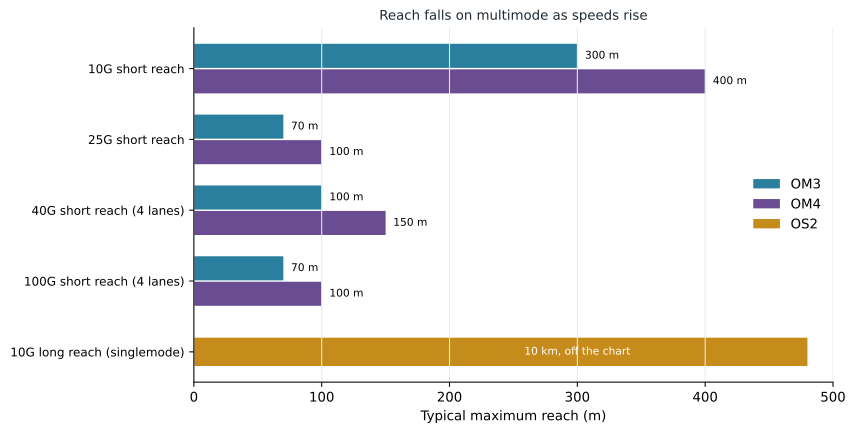
The pattern in the chart drives many backbone decisions. A riser that is 90 meters long works on OM4 multimode at 10, 25, 40 and 100 gigabits with common short-reach optics, but a campus link of 400 meters does not work on multimode above 10 gigabits. Data centers often choose multimode for links within a row and singlemode for links between rows and rooms. Because the price of singlemode optics has fallen, some owners now standardize on singlemode everywhere, accepting a small premium in optics to avoid ever having to recable for distance.
Making the decision
Roz uses six questions to choose media for any link type. What applications must it carry now, and what is the most demanding one expected over its life? How long is the longest link? Will it carry power, and how much? What is the electrical environment? What will the connected equipment cost with each medium, including optics and switch ports? And what does the owner already use and support? The answers usually point clearly to one choice. When they do not, the designer presents the options with costs and lets the owner decide, recording the decision in the design narrative.
For Harborview, the answers produce a short list. Horizontal cabling is unshielded Category 6A everywhere, because it covers every expected application at the desk and in the ceiling, supports high-power PoE and is what the owner's IT team already supports. Backbone is a pair of cables to each room, one OS2 singlemode and one OM4 multimode, to carry today's multimode uplinks while leaving a path to faster singlemode uplinks later. Within the data room, Category 6A patching is used for most equipment, Category 8 for a few high-speed server links within the same row, and OM4 trunks between cabinets. The campus link is OS2 singlemode in an outdoor-rated cable.
Cable construction and jackets
Within each category, cables differ in construction in ways that matter to the designer. Conductor gauge ranges from 22 to 24 AWG for horizontal cable; larger conductors have lower resistance, which reduces loss and PoE heating, but make the cable thicker and stiffer. Category 6A cables come in several outer diameters, and a smaller diameter saves pathway and manager space at some cost in alien crosstalk performance or heat. Some cables use a plastic separator, called a spline, between the pairs to keep them in place. These differences mean that two Category 6A cables can have very different effects on the pathways and rooms that hold them, and the designer should size pathways from the actual cable chosen, not from a generic figure.
Optical fiber cable construction differs too. Tight-buffered cables, where each fiber has its own thick coating, are easy to terminate and are common inside buildings. Loose-tube cables, where fibers float in gel-filled or dry tubes, protect the fiber from temperature and moisture and are common in outside plant. Indoor-outdoor cables combine outdoor durability with an indoor fire rating, so a campus link can enter a building and run to the equipment room without a splice at the entrance. Ribbon cables pack many fibers into flat ribbons for mass fusion splicing in very high counts.
Finally, the jacket must meet the fire rating for the space, as lesson 2 explained, and sometimes other requirements: low smoke zero halogen jackets in some institutional buildings and many international projects, ultraviolet resistance for exposed outdoor runs, and rodent protection where pests are expected. Each requirement narrows the list of products that fit, and the specification must state them all so that the installer cannot substitute a cheaper cable that meets only the category.
Media decisions should also consider the people who will maintain the plant. A college IT team that has worked only with unshielded copper and multimode fiber may need training and new test equipment to support shielded systems or singlemode, and those costs belong in the comparison. Conversely, an owner with an established singlemode practice in its other buildings may find that standardizing on singlemode everywhere simplifies spare parts and skills, even where multimode would have been slightly cheaper.
Worked problem
Choosing a fiber grade by distance
A backbone link inside a large college building is 180 meters long. The owner wants 10 gigabit uplinks now and expects 40 gigabit uplinks within ten years. Using the reaches in this lesson, which fiber grades would support both?
Show solution
- At 10 gigabits, OM3 reaches 300 meters and OM4 400, so both work at 180.
- At 40 gigabits with four-lane short-reach optics, OM3 reaches about 100 meters and OM4 about 150.
- Neither multimode grade reaches 180 meters at 40 gigabits with those optics.
- Singlemode reaches kilometers at both speeds.
Answer: Only singlemode supports both speeds over 180 meters with common optics. A designer could also run both grades, multimode for today and singlemode for the upgrade.
Worked problem
Comparing reach margins
A data center link between two rows is 85 meters. The design calls for 100 gigabit short-reach links over four lanes. What is the margin on OM3 and on OM4?
Show solution
- OM3 reach at 100 gigabits short reach is about 70 meters: 70 − 85 = −15, so the link fails by 15 meters.
- OM4 reach is about 100 meters: 100 − 85 = 15 meters of margin.
- The loss budget must also be checked, because extra connectors can make a link fail even within reach.
Answer: OM3 fails by 15 meters; OM4 has 15 meters of margin, subject to the loss budget.
Common mistakes
MistakeSpecifying Category 8 for office horizontal cabling.
InsteadCategory 8 is for short data center links of up to 30 m with two connectors.
MistakeMixing shielded and unshielded components in one channel.
InsteadA shielded system must be shielded and bonded end to end.
MistakeAssuming fiber reach is a property of the fiber alone.
InsteadReach depends on the application and the fiber grade together.
MistakeChoosing multimode for long campus links.
InsteadMultimode reach drops sharply at higher speeds; campus links are usually singlemode.
MistakeChoosing media without the connected equipment cost.
InsteadOptics and switch ports can cost more than the cable; include them.
Summary and key terms
- Media selection sets which applications a link can carry, how far, at what cost and for how long.
- Category 6A is the usual horizontal choice; Category 8 is for 30 m data center links.
- Shielded cabling improves noise immunity but must be shielded and bonded end to end.
- Multimode fiber (OM3, OM4, OM5) uses low-cost optics but has limited reach at high speeds.
- Singlemode fiber (OS2) reaches kilometers and is the usual choice for campus and long links.
- Reach depends on the application; check IEEE 802.3 reaches for each grade.
- Decide using applications, length, power, environment, equipment cost and the owner's practice.
- Category
- A TIA performance grade for twisted-pair components.
- Class
- An ISO/IEC performance grade for a twisted-pair channel.
- U/UTP
- Unshielded twisted-pair cable.
- F/UTP
- Twisted-pair cable with an overall foil shield.
- Multimode fiber
- Fiber with a large core that carries many modes of light.
- Singlemode fiber
- Fiber with a small core that carries one mode, for long distances.
- Effective modal bandwidth
- A measure of multimode fiber bandwidth for laser sources.
- Bend-insensitive fiber
- Fiber designed to lose less light at tight bends.
Practice problems
Work each problem on paper first, then reveal the answer to check.
What is the specified frequency of Category 6A?
Show answer
500 MHz.
What is the maximum Category 8 channel length?
Show answer
30 m.
Which ISO/IEC class matches Category 6A?
Show answer
Class EA.
What is the core size of modern multimode fiber?
Show answer
50 micrometers.
What jacket color usually marks singlemode fiber?
Show answer
Yellow.
At 10 gigabits short reach, how far does OM4 go?
Show answer
About 400 m.
Name the six questions Roz asks when choosing media.
Show answer
Applications, longest link, power, environment, equipment cost and owner practice.
Lesson quiz · 5 questions
Score 60% or more to complete this lesson.
Create a free account to save your progress, take quizzes and earn a certificate.