
RCDD-112 · Lesson 5 of 12 · 23 min
Backbone cabling design
▶ Video coming soon A video version of this lesson is on the way.
Two weeks after the horizontal plans are approved, Roz drops a stack of switch data sheets on Daniel's desk and asks him to design the backbone for Harborview. He starts by drawing one fiber cable from each floor's telecommunications room to the equipment room. Roz asks how many strands each cable will have. He guesses twelve, because the last building he installed used twelve. She asks why twelve, and he cannot say. By the end of the day he has worked out that the answer depends on the switches, the redundancy the owner wants, the services that will share the backbone and the growth the building will see over twenty years. That reasoning is what turns a backbone from a habit into a design.
What backbone cabling does
Backbone cabling joins the distributors in the hierarchical star: Cabling Subsystem 2 from each horizontal cross-connect to an intermediate or main cross-connect, and Cabling Subsystem 3 from intermediate cross-connects to the main cross-connect. Inside one building, it rises through riser sleeves, slots or shafts between stacked telecommunications rooms, or runs horizontally to rooms that are not stacked. Between buildings it is campus backbone, run in outside plant pathways that RCDD-115 covers. Backbone cables also connect entrance facilities to equipment rooms, so that service provider circuits reach the main cross-connect.
Backbone carries the aggregated traffic of every outlet it serves. A single horizontal cable carries one device; a backbone fiber pair may carry the uplink for a switch stack serving two hundred devices. A failure in the backbone therefore affects many more people, and backbone design pays more attention to capacity, redundancy and physical protection than horizontal design does.
Recognized backbone media
The standards recognize three families of backbone media. Multimode optical fiber, in grades OM3, OM4 and OM5, is common inside buildings for its low-cost light sources and good reach at the speeds used between floors. Singlemode optical fiber, in grade OS2 and its indoor-outdoor variants, supports far longer distances and higher speeds, and is now common for campus links and increasingly for building backbones too, because singlemode optics have fallen in price. Balanced twisted-pair cable, either 4-pair cables or large multipair cables, is recognized for backbone use, mainly for analog voice, alarm circuits and other low-speed services. Coaxial cable is recognized in some standards for broadband video distribution.
Choosing between multimode and singlemode has become one of the main backbone decisions. Multimode supports 10 gigabit Ethernet to about 300 meters on OM3 and 400 on OM4, but shorter reaches at 40 and 100 gigabits, as lesson 6 shows in detail. Singlemode supports those speeds to 10 kilometers or more. For a twenty-year backbone that will see several upgrades of switch speeds, many designers now run both: a multimode cable for today's uplinks and a singlemode cable for tomorrow's, often in the same pathway. Others go straight to singlemode only.
Sizing the backbone
Backbone sizing begins with the active equipment. For each telecommunications room, the designer estimates the number of switch stacks or chassis, the number of uplinks each needs, and whether each uplink uses a duplex pair of fibers or a parallel optic that needs eight or more. A stack of switches with two 10 gigabit uplinks, one to each of two core switches, needs two duplex pairs, which is four fibers. Two stacks need eight fibers. Other systems may need their own fibers: a security network kept separate from the main network, a building automation network, a distributed antenna system, or a service provider circuit extended to the floor.
To the count for current needs, the designer adds spare capacity, usually at least as much again, because adding fiber to a riser later is expensive and disruptive. Fiber cables come in standard strand counts, such as 12, 24, 48, 72, 96 and 144, so the total is rounded up to the next available size. A typical floor of a mid-sized office building might end up with a 24-strand singlemode cable and a 12- or 24-strand multimode cable from each telecommunications room to the equipment room.
| Need on one floor | Fibers |
|---|---|
| Main network: two switch stacks, two duplex uplinks each | 8 |
| Security network: one switch, one duplex uplink | 2 |
| Building automation: one duplex link | 2 |
| Distributed antenna remote unit | 2 |
| Subtotal for current needs | 14 |
| Spare capacity, at least equal to current needs | 14 |
| Total, rounded up to a standard cable size | 28, so a 48-strand cable, or 24 singlemode plus 24 multimode |
Copper backbone is sized differently. Where a building still needs analog voice lines, alarm dialers, elevator phones or similar circuits, the designer counts the pairs needed at each room, typically one or two pairs per circuit, and adds spares. Multipair cables come in sizes such as 25, 50, 100 and 200 pairs. In many new buildings the only copper backbone is a small multipair cable for elevator phones, fire alarm communicators and a handful of emergency lines, because almost all voice has moved to IP over the data network.
Distances in the backbone
Backbone distances depend on the application running over the cable, not just on the cable. Older editions of the standard gave fixed maximum distances for each medium from the main cross-connect to the horizontal cross-connect, such as 2000 meters for multimode and 3000 meters for singlemode, with 800 meters for twisted-pair voice. Current editions say that backbone distances are application dependent and point the designer to the reach that each Ethernet or storage networking application allows on each fiber grade. In practice, a designer checks the planned applications against the length of each backbone link and against the loss budget the optics allow, as lesson 7 explains.
Within a single building, backbone runs are usually short, often under 100 meters from the top floor to the equipment room. Twisted-pair backbone for data is limited to the same 90 meter link and 100 meter channel as horizontal cabling, because it uses the same Ethernet applications. Campus links are longer, and for them singlemode is usually the only sensible choice.
Redundancy and diverse routes
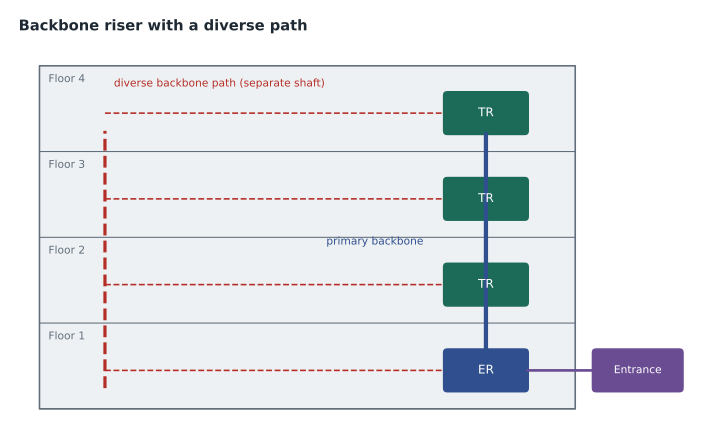
Because a backbone failure affects whole floors, owners with critical operations often ask for redundant backbone links. Redundancy in cabling means more than two cables; two cables in the same sleeve can be cut by the same contractor's saw or damaged by the same water leak. Real redundancy needs diverse routes: two physically separate pathways, ideally in different shafts or at opposite ends of the building, joining each telecommunications room to the equipment room or to two separate equipment rooms. Health care buildings, which must keep clinical systems running, often have two equipment rooms on different floors, each fed by its own service provider entrance, with every telecommunications room connected to both.
On Harborview, the clinic floors get diverse backbone: a primary fiber cable in the main riser and a second cable through a separate sleeve stack at the other end of the building, both terminating in the equipment room. The classroom and office floors get a single riser with spare strands. The decision is recorded in the design narrative with the reason, so that a future value engineering exercise does not quietly remove the second path.
Installing backbone cable
Backbone cables in risers must be rated for vertical runs, CMR or CMP for copper and OFNR or OFNP for nonconductive optical fiber cable under NEC Article 770, and supported at intervals so that their weight does not strain the cable or its terminations. Heavy multipair copper cables need support at every floor. Optical cables need care with bend radius, typically ten times the cable diameter when not under load and twenty times during pulling, and with pulling tension, which must stay within the manufacturer's rating. Many designers specify interlocking armored fiber cable in risers and shared pathways, which protects the fiber from crushing and from rodents and can avoid the need for innerduct.
Pre-terminated fiber trunks, with factory-installed multi-fiber push-on connectors at each end, are increasingly used for backbones inside buildings and data centers. They install quickly and arrive tested, but they must be ordered to exact lengths, and a damaged connector usually means replacing or repairing the whole trunk. Field-terminated or spliced backbones are more forgiving of design changes. The choice belongs in the specification, with lengths taken from a careful routed survey.
Backbone for service providers and other systems
Not all backbone cabling belongs to the owner's network. Service providers usually bring their cables to the entrance facility and terminate them at the demarcation point, and the owner then extends the services to the equipment room and sometimes to tenant floors. In a multi-tenant building, the backbone may need separate strands or cables for each tenant, or for several providers, so that one tenant's circuits can be reached without entering another's space. The designer should ask the owner early whether the building will have tenants and which services they are likely to buy, because the answer can double the backbone count.
Other building systems may also need their own backbone. A distributed antenna system for cellular coverage runs singlemode fiber from a head-end in the equipment room to remote units on each floor. Public safety radio systems may have their own requirements for survivability, such as cable rated to survive a fire for a set time or routed in protected pathways, set by the fire code and the authority having jurisdiction. Security systems are sometimes kept physically separate from the main network, with their own fiber and switches. Each of these systems should appear in the backbone count from the start rather than being squeezed into spare strands later.
Worked problem
Choosing a cable size
The fourth floor of Harborview has three switch stacks, each with two duplex uplinks, plus a security switch with one duplex uplink and a lighting control gateway that needs one duplex link. The owner wants spare capacity equal to current needs. Fiber cables are available in 12, 24, 48 and 72 strands. What size should be specified if a single cable is used?
Show solution
- Main network: 3 stacks × 2 uplinks × 2 fibers = 12 fibers.
- Security: 1 × 2 = 2 fibers; lighting: 1 × 2 = 2 fibers.
- Current needs: 12 + 2 + 2 = 16 fibers.
- With equal spare capacity: 16 × 2 = 32 fibers.
- Round up to the next standard size: 48 strands.
Answer: A 48-strand cable. A 24-strand cable would cover today's needs with almost no spares, which the owner's growth policy does not allow.
Worked problem
Checking a backbone distance
The campus link from the Harborview equipment room to the older building runs 410 meters along its pathway. The owner wants to run 10 gigabit Ethernet now and 100 gigabit later. Should the link be multimode or singlemode?
Show solution
- At 10 gigabits, OM4 multimode reaches about 400 meters with short-wavelength optics, so 410 meters is already over.
- At 100 gigabits, multimode reach with common short-reach optics is about 100 meters on OM4.
- Singlemode supports both speeds well beyond 410 meters.
- Outdoor and indoor-outdoor singlemode cable is also the norm for campus links.
Answer: Singlemode. The link is too long for multimode even at 10 gigabits, and singlemode leaves room for future speeds.
Common mistakes
MistakeChoosing strand counts by habit.
InsteadCount uplinks and services per room, then add spares and round up to a standard size.
MistakeCalling two cables in the same sleeve redundant.
InsteadRedundancy needs physically diverse pathways.
MistakeAssuming backbone distances are fixed for each medium.
InsteadCurrent standards make backbone distance application dependent.
MistakeForgetting non-network services in the backbone count.
InsteadSecurity, building systems, antenna systems and provider circuits may need fibers too.
MistakeExceeding pulling tension or bend radius in a riser pull.
InsteadFollow the manufacturer's ratings; support cable at every floor.
Summary and key terms
- Backbone cabling joins distributors: Subsystem 2 to the horizontal cross-connects and Subsystem 3 between intermediate and main cross-connects.
- Recognized media are multimode and singlemode fiber, balanced twisted pair and, in some standards, coaxial cable.
- Many designs now run singlemode, or both singlemode and multimode, for long life.
- Size the backbone from uplinks and services per room, add spares and round up to a standard cable size.
- Backbone distances are application dependent; check each application's reach and loss budget.
- Redundant backbones need physically diverse routes.
- Riser cables need the right fire rating, support at every floor, and care with bend radius and pulling tension.
- Backbone cabling
- Cabling Subsystems 2 and 3, joining distributors.
- Riser
- A vertical pathway joining stacked rooms on different floors.
- Strand count
- The number of optical fibers in a cable.
- Diverse route
- A physically separate pathway used for redundancy.
- Interlocking armor
- A spiral metal armor that protects fiber cable from crushing.
- Pre-terminated trunk
- A factory-terminated, tested fiber cable with connectors at both ends.
Practice problems
Work each problem on paper first, then reveal the answer to check.
Which subsystem joins a horizontal cross-connect to the main cross-connect when there is no intermediate cross-connect?
Show answer
Cabling Subsystem 2.
Name the three main families of backbone media.
Show answer
Multimode fiber, singlemode fiber and balanced twisted pair.
Two stacks each need two duplex uplinks. How many fibers is that?
Show answer
8.
Why is singlemode the usual choice for campus links?
Show answer
Its reach supports long links at current and future speeds.
What makes a backbone truly redundant?
Show answer
Two physically diverse pathways.
What do current standards say about backbone distances?
Show answer
They depend on the application running over the cable.
Name one advantage and one drawback of pre-terminated trunks.
Show answer
Fast installation and factory testing; exact lengths are needed and repairs are harder.
Lesson quiz · 5 questions
Score 60% or more to complete this lesson.
Create a free account to save your progress, take quizzes and earn a certificate.