
PYTH-250 · Lesson 6 of 12 · 21 min
Concurrent futures
▶ Video coming soon A video version of this lesson is on the way.
Lessons 4 and 5 used two different modules with two different styles: threading.Thread objects that Jordan started and joined by hand, and multiprocessing.Pool with its map methods. Real programs need more than either gives easily. Theo's quote script must cap the number of requests running at once, collect each quote as soon as it arrives, and record which orders failed without losing the others. Kai's analysis must do the same for roast batches, but in processes. Writing that logic twice, once for threads and once for processes, is exactly the kind of duplication good libraries remove.
The concurrent.futures module, added in Python 3.2, gives threads and processes one shared, high-level interface. This lesson covers executors and futures, submitting tasks and collecting results with map, as_completed and wait, handling exceptions and timeouts, choosing between ThreadPoolExecutor and ProcessPoolExecutor, and choosing the number of workers. As in the last two lessons, real executors cannot run in the browser, so they appear as listings with their output, and the exercises simulate how a pool schedules work, which is the part that decides how long a job takes.
Executors and futures
An executor is an object that runs functions for you in the background. ThreadPoolExecutor runs them in a pool of threads; ProcessPoolExecutor runs them in a pool of processes. Both have the same methods. You hand a function and its arguments to executor.submit(), and it immediately returns a future: an object that stands for a result that may not exist yet. Later you ask the future for its result with future.result(), which waits if the task is still running. A future can also tell you whether it is done(), give you the exception() if the task failed, and let you cancel() a task that has not started.
from concurrent.futures import ThreadPoolExecutor
import time

def get_quote(order_id):
    time.sleep(0.5)                                  # waiting for the shipping server
    return order_id, round(11.75 + int(order_id[-2:]) * 0.35, 2)

with ThreadPoolExecutor(max_workers=4) as pool:      # the with block waits for all tasks
    future = pool.submit(get_quote, "A-1007")
    print("submitted; done yet?", future.done())
    print("result:", future.result())                # waits until it is ready
print("done now?", future.done())submitted; done yet? False
result: ('A-1007', 14.2)
done now? TrueUsing the executor in a with block is important. When the block ends, the executor waits for all submitted tasks to finish and then shuts its workers down cleanly, even if an exception is raised inside the block. Forgetting to shut an executor down leaves threads or processes running, and a script may hang at exit waiting for them.
executor.map
For the common case of applying one function to many inputs, executor.map(func, items) works like the built-in map and like Pool.map: it returns results in the order of the inputs. Theo's whole Monday job becomes a few lines. With eight workers, twenty half-second requests take about a second and a half instead of ten seconds.
from concurrent.futures import ThreadPoolExecutor
import time

def get_quote(order_id):
    time.sleep(0.5)
    return order_id, round(11.75 + int(order_id[-2:]) * 0.35, 2)

orders = [f"A-10{n:02d}" for n in range(20)]
start = time.perf_counter()
with ThreadPoolExecutor(max_workers=8) as pool:
    quotes = dict(pool.map(get_quote, orders))
print(f"{len(quotes)} quotes in {time.perf_counter() - start:.1f} s")
print("first three:", list(quotes.items())[:3])20 quotes in 1.5 s
first three: [('A-1000', 11.75), ('A-1001', 12.1), ('A-1002', 12.45)]Why about one and a half seconds? Eight workers take the first eight orders, which finish together after half a second; the next eight take another half second; the last four take a third half second. The number of rounds, the total number of tasks divided by the number of workers and rounded up, sets the time when all tasks take the same time. When tasks take different times, the arithmetic is less obvious, and that is what the next exercise works out.
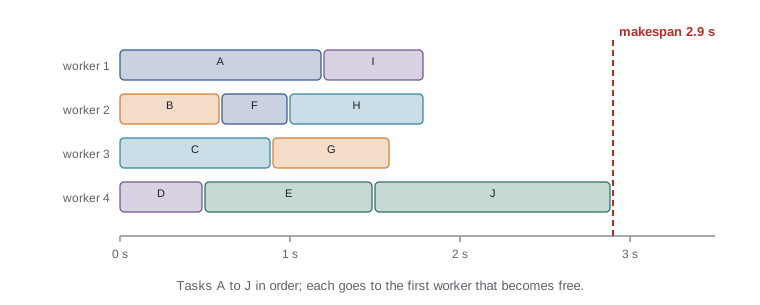
Try it yourself
How long will the pool take?
A pool with workers workers takes tasks in list order and gives each one to the worker that becomes free first. Write makespan(durations, workers) returning the time at which the last task finishes.
Use heapq to keep the time at which each worker becomes free. For example, makespan([3, 1, 1, 1], 2) is 3: one worker does the 3-second task while the other does the three 1-second tasks.
import heapq

def makespan(durations, workers):
    return sum(durations) / workers

print(makespan([3, 1, 1, 1], 2))
The last test shows a practical point: the order in which tasks are submitted matters. A long task submitted last starts late and makes everyone wait for it. When task lengths are known roughly in advance, submitting the longest tasks first usually shortens the whole job, a heuristic called longest processing time first.
import heapq

def makespan(durations, workers):
    free = [0] * workers
    end = 0
    for d in durations:
        start = heapq.heappop(free)
        end = max(end, start + d)
        heapq.heappush(free, start + d)
    return end

# Kai's batches: estimated analysis seconds, in the order they were roasted
batches = [3, 2, 2, 3, 2, 2, 3, 2, 9, 8]
print("roast order:          ", makespan(batches, 3), "s")
print("longest first:        ", makespan(sorted(batches, reverse=True), 3), "s")
print("perfect split (bound):", round(sum(batches) / 3, 1), "s")roast order: 15 s longest first: 13 s perfect split (bound): 12.0 s
The lower bound in the last line is the total work divided by the number of workers: no schedule can beat it. Sorting the batches longest first finishes at 13 seconds, one above the bound, while the roast order takes 15, because the two long batches arrive last and start only after the short ones, leaving the other workers idle at the end. Kai only needs a rough estimate of each batch's length, the number of readings, to benefit. Real executors do not reorder tasks for you, so this is a decision you make when you submit.
as_completed: results as they arrive
executor.map returns results in input order, so one slow task at the start holds back all the results behind it. concurrent.futures.as_completed(futures) instead yields each future as soon as it finishes, in completion order. That suits progress reporting and pipelines where each result is processed on its own. The usual pattern submits every task, keeps a dictionary from future to its input so you know which result is which, and loops over as_completed.
from concurrent.futures import ThreadPoolExecutor, as_completed
import time

def get_quote(order_id, delay):
    time.sleep(delay)
    return round(11.75 + delay * 3, 2)

orders = {"A-1001": 0.6, "A-1002": 0.2, "A-1003": 0.4, "A-1004": 0.1}
with ThreadPoolExecutor(max_workers=4) as pool:
    futures = {pool.submit(get_quote, o, d): o for o, d in orders.items()}
    for fut in as_completed(futures):
print(f"{futures[fut]} ready: {fut.result():.2f}")A-1004 ready: 12.05 A-1002 ready: 12.35 A-1003 ready: 12.95 A-1001 ready: 13.55
Try it yourself
Predict the completion order
Using the same scheduling rule as makespan (tasks in list order, each to the first free worker), write completion_order(durations, workers) returning the list of task indexes in the order they finish, which is the order as_completed would yield them.
If two tasks finish at the same time, the one with the smaller index comes first.
def completion_order(durations, workers):
    return list(range(len(durations)))

print(completion_order([0.6, 0.2, 0.4, 0.1], 4))
Exceptions and timeouts
If a task raises an exception, the executor does not crash. The exception is stored in the future and raised again when you call result(). This means one failed request does not stop the others, but it also means errors are silent unless you ask for every result. Wrapping each result() in try and except lets the program record failures and carry on. result(timeout=...) waits at most that many seconds and raises TimeoutError if the task is still running, and as_completed and wait accept a timeout too.
from concurrent.futures import ThreadPoolExecutor, as_completed

def get_quote(order_id):
    if order_id.endswith("3"):
        raise ConnectionError(f"shipping server refused {order_id}")
    return 12.40

orders = ["A-1001", "A-1002", "A-1003", "A-1004"]
quotes, failed = {}, {}
with ThreadPoolExecutor(max_workers=2) as pool:
    futures = {pool.submit(get_quote, o): o for o in orders}
    for fut in as_completed(futures):
        order = futures[fut]
        try:
            quotes[order] = fut.result()
        except ConnectionError as e:
            failed[order] = str(e)
print("quotes:", dict(sorted(quotes.items())))
print("failed:", failed)quotes: {'A-1001': 12.4, 'A-1002': 12.4, 'A-1004': 12.4}
failed: {'A-1003': 'shipping server refused A-1003'}concurrent.futures.wait(futures, return_when=...) offers one more style: it waits until all futures are done, until the first completes, or until the first raises an exception, and returns two sets, done and not_done. FIRST_EXCEPTION is useful when one failure makes the rest of the work pointless, for example when the shipping server reports that the account's credentials are wrong.
ThreadPoolExecutor or ProcessPoolExecutor
Because both executors share an interface, switching between them is usually a one-word change, which makes it easy to try both. The choice follows the rule from lessons 4 and 5. For I/O-bound tasks, such as web requests, file downloads and database queries, use ThreadPoolExecutor: threads are cheap, share memory and wait well. For CPU-bound pure Python tasks, use ProcessPoolExecutor: processes give real parallelism, but tasks and results must be picklable and the function must be defined at module level, and the code that creates the pool must be under the main guard.
from concurrent.futures import ProcessPoolExecutor

def analyse_batch(batch_id):
    score = 0
    for second in range(840 * 300):
        score += (second * batch_id) % 97
    return batch_id, score % 1000

if __name__ == "__main__":
    with ProcessPoolExecutor(max_workers=4) as pool:
        results = list(pool.map(analyse_batch, range(1, 9), chunksize=2))
print(results[:3])[(1, 727), (2, 748), (3, 769)]
Canceling work and shutting down
A future that has not started can be canceled with future.cancel(), which returns True if the cancellation succeeded; a task that is already running cannot be stopped this way. executor.shutdown(wait=True, cancel_futures=False) is what the with block calls for you; passing cancel_futures=True, available since Python 3.9, cancels every task that has not started yet, which is the clean way to abandon a job after a fatal error. Long-running tasks that need to stop early should check a shared flag, such as a threading.Event, and return when it is set, because Python offers no safe way to kill a thread from outside.
How many workers?
For processes doing CPU-bound work, the right number is about the number of cores, os.cpu_count(); more workers just compete for the same cores. ProcessPoolExecutor uses that number by default. For threads doing I/O, more workers than cores is normal, because most of them are waiting. ThreadPoolExecutor's default is min(32, os.cpu_count() + 4). The real limit is often outside your program: a shipping company may allow only ten requests at a time per account, a database may accept a limited number of connections, and a small web server can be overwhelmed by hundreds of simultaneous requests from one client. Set max_workers to respect those limits, and measure to find the point where more workers stop helping.
import math

def estimate(n_tasks, task_s, workers, limit=None):
    """Equal-length I/O tasks; the server allows at most `limit` at once."""
    effective = min(workers, limit) if limit else workers
    return math.ceil(n_tasks / effective) * task_s

for w in [1, 4, 10, 20, 50]:
print(f"{w:>2} workers: {estimate(200, 0.5, w):6.1f} s; with a 10-request limit: {estimate(200, 0.5, w, 10):6.1f} s")1 workers: 100.0 s; with a 10-request limit: 100.0 s 4 workers: 25.0 s; with a 10-request limit: 25.0 s 10 workers: 10.0 s; with a 10-request limit: 10.0 s 20 workers: 5.0 s; with a 10-request limit: 10.0 s 50 workers: 2.0 s; with a 10-request limit: 10.0 s
With a ten-request limit, Theo's 200 quotes take ten seconds however many workers he starts: inside the 15-second goal from lesson 1. Starting fifty workers would only produce errors from the shipping server. The next two lessons show asyncio, which handles large numbers of waits with even less overhead than threads, and a semaphore, the tool for enforcing exactly this kind of limit.
Common mistakes
MistakeCalling result() immediately after each submit().
InsteadSubmit all tasks first, then collect results, or the tasks run one at a time.
MistakeNever calling result() and missing exceptions.
InsteadExceptions are stored in futures; check every result or exception().
MistakeUsing ProcessPoolExecutor for web requests.
InsteadI/O-bound work suits ThreadPoolExecutor; processes add overhead for no gain.
MistakeCreating an executor without a with block or shutdown().
InsteadUse with so the executor waits for tasks and shuts down cleanly.
MistakeSetting max_workers far above what the remote server allows.
InsteadRespect outside limits; extra workers only cause errors.
MistakeExpecting executor.map to yield results as soon as they are ready.
Insteadmap keeps input order; use as_completed for completion order.
Summary and key terms
- concurrent.futures gives threads and processes one interface: ThreadPoolExecutor and ProcessPoolExecutor.
- submit() returns a future at once; result() waits for the value or raises the task's exception.
- executor.map returns results in input order; as_completed yields futures as they finish.
- A with block waits for all tasks and shuts the executor down.
- Exceptions are stored in futures; timeouts are available on result, as_completed and wait.
- Use threads for I/O-bound tasks and processes for CPU-bound tasks.
- Choose max_workers from the number of cores for CPU work and from outside limits for I/O work.
- executor
- An object that runs submitted functions in a pool of threads or processes.
- future
- An object representing a result that may not be available yet.
- submit
- The executor method that schedules one call and returns its future.
- as_completed
- A function that yields futures in the order they finish.
- makespan
- The total time from the start of a set of tasks until the last one finishes.
- max_workers
- The number of threads or processes in an executor's pool.
- TimeoutError
- The exception raised when a result is not ready within the given time.
- longest processing time first
- Scheduling the longest tasks first to shorten the total time.
Practice problems
Work each problem on paper first, then reveal the answer to check.
What does executor.submit(f, 3) return?
Show answer
A future for the result of f(3).
Six one-second I/O tasks run on four threads. How long does the job take?
Show answer
Two rounds: about 2 seconds.
A task raised ValueError. When does your code see it?
Show answer
When it calls result() on that task's future.
Which executor suits resizing 500 product photos in pure Python?
Show answer
ProcessPoolExecutor, because the work is CPU-bound.
Why keep a dictionary from future to order id when using as_completed?
Show answer
Futures arrive in completion order, so you need to know which input each belongs to.
What is the default max_workers for ThreadPoolExecutor?
Show answer
min(32, os.cpu_count() + 4).
Lesson quiz · 5 questions
Score 60% or more to complete this lesson.
Create a free account to save your progress, take quizzes and earn a certificate.