
PYTH-250 · Lesson 12 of 12 · 22 min
Capstone: speeding up a slow program
▶ Video coming soon A video version of this lesson is on the way.
The course ends where it began: with a slow program and the temptation to start rewriting it. This time Jordan has the method and the tools. Rosa has asked for a new year-end report that combines everything Ridgeline knows: every sale since the shop opened, priced in Canadian or US dollars depending on where the customer lives, matched to the product list, flagged when a customer has bought the same coffee more than five times so Mei can send a thank-you card, and summarized by month and by coffee. Jordan's first version, written quickly and correctly, takes nineteen minutes on the real data. The goal agreed with Rosa is under thirty seconds.
This capstone works through the whole optimization loop from lesson 1 on that program: set the goal, build a reproducible benchmark, profile, fix the biggest cost, check the results are unchanged, measure again, and repeat until the goal is met. Each fix uses a technique from an earlier lesson. The exercises then ask you to make the same kinds of change yourself, with tests that check both that your answers are correct and that your code does far less work.
The slow first version
Here is the heart of Jordan's first version, scaled down so it runs in a moment. It loops over sales, scans the product list for each sale's coffee, fetches the exchange rate for each US sale, checks for repeat customers by counting through all their previous purchases, and builds monthly totals. Every part is correct, and every part does far more work than it needs to.
import random

rnd = random.Random(42)
PRODUCTS = [{"sku": f"RC-{n}", "price_cad": round(16 + n % 7 * 0.75, 2)} for n in range(101, 401)]
CUSTOMERS = [f"555-{n:04d}" for n in range(50)]
SALES = [{"day": f"2026-{rnd.randint(1, 12):02d}-{rnd.randint(1, 28):02d}",
          "sku": f"RC-{rnd.randint(341, 400)}", "qty": rnd.randint(1, 3),
          "phone": rnd.choice(CUSTOMERS), "country": rnd.choice(["CA", "CA", "US"])}
         for _ in range(6000)]
WORK = {"product_scans": 0, "rate_fetches": 0, "history_checks": 0}

def fetch_rate(currency):                       # pretend: a slow web request
    WORK["rate_fetches"] += 1
    return {"CAD": 1.0, "USD": 0.73}[currency]

def year_end_slow(sales):
    monthly, loyal, seen = {}, set(), []
    for s in sales:
        product = None
        for p in PRODUCTS:                       # O(products) scan per sale
            WORK["product_scans"] += 1
            if p["sku"] == s["sku"]:
                product = p
                break
        rate = fetch_rate("USD" if s["country"] == "US" else "CAD")
        amount = round(product["price_cad"] * rate * s["qty"], 2)
        month = s["day"][:7]
        monthly[month] = round(monthly.get(month, 0) + amount, 2)
        seen.append((s["phone"], s["sku"]))
        WORK["history_checks"] += len(seen)      # seen.count scans the whole history
        if seen.count((s["phone"], s["sku"])) > 5:
            loyal.add(s["phone"])
    return monthly, sorted(loyal)

monthly, loyal = year_end_slow(SALES)
print("months:", len(monthly), "| January:", monthly["2026-01"], "| loyal customers:", len(loyal))
for k, v in WORK.items():
print(f"{k:15} {v:>12,}")months: 12 | January: 15838.56 | loyal customers: 27 product_scans 1,622,022 rate_fetches 6,000 history_checks 18,003,000
The work counters tell the story before any profiler runs. For 6,000 sales, the program scans more than one and a half million product entries, makes 6,000 rate requests when only two different rates exist, and examines 18 million history entries to spot repeat buyers. On the real data, with 150,000 sales, the history check alone grows with the square of the number of sales, which is why the report takes nineteen minutes.
Step 1: goal and benchmark
Jordan writes the goal into the benchmark script: the full report on 150,000 sales in under thirty seconds, with output identical to the slow version's. The benchmark generates sales with a fixed seed, as in lesson 1, runs both the old and the new function, compares their results, and prints the work counters and the best of three timings. Keeping the slow version around as a reference is important: it is the definition of the correct answer, and every optimized version must match it exactly.
import time

def benchmark(func, sales, repeat=3):
    """Best time of several runs, plus the result for comparison."""
    best, result = float("inf"), None
    for _ in range(repeat):
        start = time.perf_counter()
        result = func(sales)
        best = min(best, time.perf_counter() - start)
    return best, result

def total_bags(sales):
    return sum(s["qty"] for s in sales)

sales = [{"qty": q % 3 + 1} for q in range(100_000)]
t, r = benchmark(total_bags, sales)
print(f"result {r:,} in {t * 1000:.1f} ms (best of 3)")result 199,999 in 5.6 ms (best of 3)
Step 2: profile
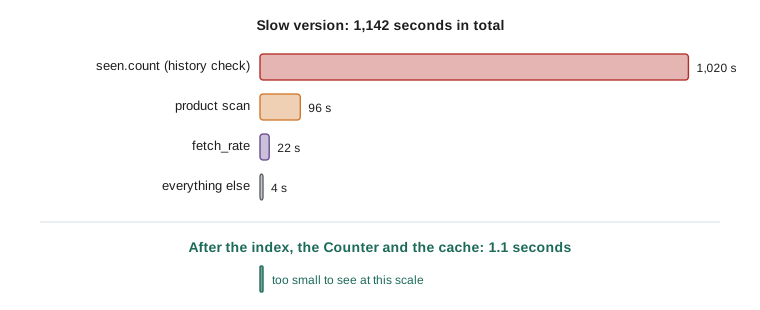
A profile of the full report on the real data confirms the counters. seen.count, inside the repeat-customer check, has by far the largest tottime, followed by the product scan in the inner loop, followed by fetch_rate, whose time is almost all waiting for the bank's server. Everything else, the month arithmetic and building the dictionaries, is noise. Amdahl's law says the history check must go first: removing it alone takes the report from nineteen minutes to under two, and nothing else could have done that.
Step 3: fix the biggest cost first
Counting a customer's previous purchases of a coffee by scanning the whole history is an O(n) operation inside an O(n) loop, O(n²) overall. The question it answers, how many times has this customer bought this coffee so far, is a counting problem, and lesson 3's Counter answers it in O(1) per sale. The same lesson's dictionary index replaces the product scan, and lesson 10's caching means the two exchange rates are fetched once each instead of 6,000 times.
import random
from collections import Counter
from functools import lru_cache

rnd = random.Random(42)
PRODUCTS = [{"sku": f"RC-{n}", "price_cad": round(16 + n % 7 * 0.75, 2)} for n in range(101, 401)]
CUSTOMERS = [f"555-{n:04d}" for n in range(50)]
SALES = [{"day": f"2026-{rnd.randint(1, 12):02d}-{rnd.randint(1, 28):02d}",
          "sku": f"RC-{rnd.randint(341, 400)}", "qty": rnd.randint(1, 3),
          "phone": rnd.choice(CUSTOMERS), "country": rnd.choice(["CA", "CA", "US"])}
         for _ in range(6000)]
WORK = {"rate_fetches": 0}

def fetch_rate(currency):
    WORK["rate_fetches"] += 1
    return {"CAD": 1.0, "USD": 0.73}[currency]

@lru_cache(maxsize=None)
def rate_for(currency):                          # lesson 10: fetch each rate once
    return fetch_rate(currency)

def year_end_fast(sales):
    by_sku = {p["sku"]: p for p in PRODUCTS}     # lesson 3: index built once
    bought = Counter()                           # lesson 3: running counts
    monthly, loyal = {}, set()
    for s in sales:
        product = by_sku[s["sku"]]
        rate = rate_for("USD" if s["country"] == "US" else "CAD")
        amount = round(product["price_cad"] * rate * s["qty"], 2)
        month = s["day"][:7]
        monthly[month] = round(monthly.get(month, 0) + amount, 2)
        key = (s["phone"], s["sku"])
        bought[key] += 1
        if bought[key] > 5:
            loyal.add(s["phone"])
    return monthly, sorted(loyal)

monthly, loyal = year_end_fast(SALES)
print("months:", len(monthly), "| January:", monthly["2026-01"], "| loyal customers:", len(loyal))
print("rate fetches:", WORK["rate_fetches"], "| product lookups: one per sale | history checks: one per sale")months: 12 | January: 15838.56 | loyal customers: 27 rate fetches: 2 | product lookups: one per sale | history checks: one per sale
The printed figures match the slow version exactly, which is the first thing to check after any optimization. The work, though, has collapsed: one dictionary lookup per sale instead of a scan, one counter update instead of a history search, and two rate fetches in total. On the real 150,000 sales the report now takes a little over one second.
Step 4: check, measure, decide
Correctness checks come before celebration. Jordan's test compares the fast and slow versions on several seeded datasets, including edge cases: a day with no sales, a customer who reaches the loyalty threshold on the very last sale, a sku with a price that rounds awkwardly. The tests also assert upper bounds on the work counters, so that a future change that reintroduces a scan fails loudly. Only then does he time the real report: 1.1 seconds, far inside the thirty-second goal.
def check_same(slow, fast, datasets):
    for name, data in datasets.items():
        assert slow(data) == fast(data), f"results differ on {name}"
    return "all datasets match"

def slow_bags(sales):
    return {sku: sum(q for s, q in sales if s == sku) for sku, _ in sales}

def fast_bags(sales):
    totals = {}
    for sku, q in sales:
        totals[sku] = totals.get(sku, 0) + q
    return totals

datasets = {
    "empty": [],
    "one sale": [("RC-101", 2)],
    "repeats": [("RC-101", 2), ("RC-104", 1), ("RC-101", 3)],
}
print(check_same(slow_bags, fast_bags, datasets))all datasets match
With the goal met, the method says stop. Jordan notes two further ideas in the issue tracker instead of doing them: reading the sales file as a stream, which would matter only if the data grew tenfold, and fetching rates asynchronously, which no longer matters because only two are fetched. Neither would change what Rosa sees, and both would add complexity. Knowing when to stop optimizing is as much a part of the craft as knowing how to start.
Try it yourself
Remove the scan
revenue_by_sku(sales, products) should return a dictionary from sku to total revenue (price times quantity, rounded to 2 decimal places) for the given sales, a list of (sku, qty) pairs. The starter is correct but scans the product list for every sale.
Rewrite it so that it looks at each product only once: build a dictionary index first. The tests use a product list that counts how many entries are looked at.
def revenue_by_sku(sales, products):
    totals = {}
    for sku, qty in sales:
        for p in products:
            if p['sku'] == sku:
                totals[sku] = round(totals.get(sku, 0) + p['price'] * qty, 2)
                break
    return totals

print(len(revenue_by_sku(SALES, PRODUCTS)))
Try it yourself
Find repeat orders in linear time
repeated(ids) must return a sorted list of the order ids that appear more than once. The starter uses ids.count(i) for every id, which is O(n²).
Rewrite it in O(n) with collections.Counter, a dictionary or a set. The tests include 50,000 ids.
def repeated(ids):
    return sorted({i for i in ids if ids.count(i) > 1})

print(repeated(['A-1', 'A-2', 'A-1', 'A-3', 'A-2']))
Step 5: the same method elsewhere
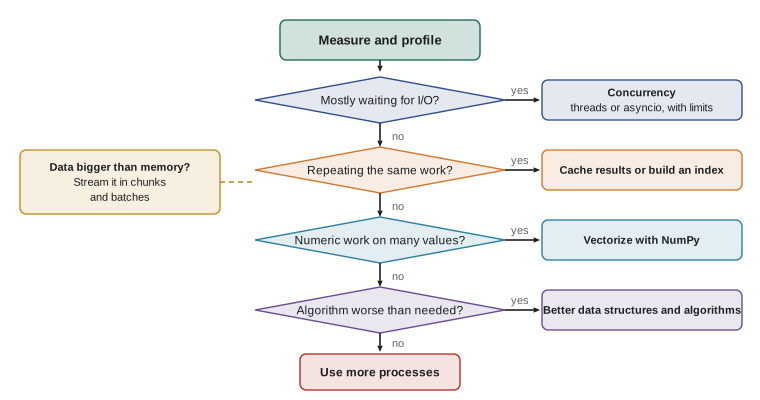
The year-end report used indexing, counting and caching because those matched its problems. Other programs in Ridgeline's toolkit needed other tools, and the course has covered them all. Theo's shipping quotes were I/O-bound, so concurrency fixed them: threads in lesson 4, a thread pool in lesson 6, and finally an asyncio client with a semaphore and backoff in lesson 8. Kai's roast analysis was CPU-bound numeric work: multiprocessing in lesson 5 helped, and NumPy in lesson 9 helped far more. The year-long archive was too big for memory, so lesson 11's streaming kept memory flat. In every case the decision came from a measurement, not a hunch.
Try it yourself
Cache the slow lookups
fetch_rate(currency) (provided) is slow and counts its calls in FETCHES. Write convert_all(amounts) taking a list of (amount, currency) pairs and returning the list of amounts converted to Canadian dollars, each round(amount / rate, 2), where the rate comes from fetch_rate.
Each currency must be fetched only once per program run, however many amounts use it: wrap the lookup in a function decorated with functools.lru_cache.
def convert_all(amounts):
    return [round(a / fetch_rate(c), 2) for a, c in amounts]

print(convert_all([(10.0, 'USD'), (20.0, 'CAD')]))
What you have learned
Performance work is a discipline with a few durable rules. Decide what fast enough means before you start. Measure with realistic data, repeat the measurement, and count work when timing is too noisy. Profile to find the hot spot, and remember that cumulative time points at call paths while own time points at the culprit. Fix the biggest cost first and expect diminishing returns, as Amdahl's law predicts. Prefer better algorithms and data structures to clever tricks. Use concurrency for waiting, processes or vectorized libraries for computing, caches for repeated work and streaming for data that does not fit. Check results after every change, and stop when the goal is met. Those rules will outlast every specific tool in this course, including the ones not yet invented.
Common mistakes
MistakeOptimizing before writing down a goal and a benchmark.
InsteadSet a numeric goal and a reproducible benchmark first, so you know when you are done.
MistakeDeleting the slow version once the fast one works.
InsteadKeep it as a reference and test that the fast version matches it.
MistakeFixing small costs first because they are easy.
InsteadWork on the biggest cost the profile shows; small fixes cannot beat Amdahl's law.
MistakeUsing threads or processes when the real problem is an O(n²) algorithm.
InsteadFix the algorithm first; more hardware cannot rescue quadratic growth.
MistakeKeeping on optimizing after the goal is met.
InsteadStop, record further ideas, and spend the time on features or correctness.
MistakeNot testing edge cases after optimizing.
InsteadCheck empty inputs, boundaries and rounding, where optimized code most often differs.
Summary and key terms
- The optimization loop: goal, benchmark, profile, fix the biggest cost, verify, measure, repeat, stop.
- Work counters and profiles expose the real costs before any code changes.
- Quadratic patterns, such as list.count or scans inside loops, are the first targets; Counter and dictionary indexes remove them.
- Caching removes repeated slow lookups; lru_cache makes it a one-line change.
- The slow version is kept as a reference, and tests assert both identical results and bounded work.
- I/O-bound problems need concurrency, CPU-bound numeric problems need NumPy or processes, large data needs streaming.
- Every decision follows from measurement, and optimization stops when the goal is met.
- optimization loop
- The cycle of measuring, changing the biggest cost and measuring again.
- reference implementation
- A simple, trusted version used to check that optimized code gives the same results.
- work counter
- A counter added to code to measure how many operations it performs.
- quadratic time
- O(n²) behavior, where doubling the input quadruples the work.
- bottleneck
- The part of a program that limits its overall speed.
- performance budget
- The maximum time or memory a task is allowed to use.
- diminishing returns
- Each further improvement giving less benefit than the one before.
Practice problems
Work each problem on paper first, then reveal the answer to check.
Which part of the slow year-end report grew with the square of the number of sales?
Show answer
The repeat-customer check, which scanned the whole history with seen.count for every sale.
Why keep year_end_slow after writing year_end_fast?
Show answer
It defines the correct answer, so tests can check the fast version matches it.
A report meets its 30-second goal in 1.1 seconds. Should you parallelize it?
Show answer
No: the goal is met, and parallelism would add complexity for no visible benefit.
Name the technique for each: waiting on many APIs, crunching sensor arrays, repeated identical lookups.
Show answer
Concurrency (threads or asyncio), NumPy vectorization, caching.
How can a test guard against a scan being reintroduced?
Show answer
Count the work, for example items examined, and assert an upper bound.
What should you do with optimization ideas you decide not to pursue?
Show answer
Record them, for example in the issue tracker, with the measurement that would make them worthwhile.
Lesson quiz · 5 questions
Score 60% or more to complete this lesson.
Create a free account to save your progress, take quizzes and earn a certificate.