
PYTH-250 · Lesson 4 of 12 · 24 min
Threads and the global interpreter lock
▶ Video coming soon A video version of this lesson is on the way.
After the indexing fix, the month-end report meets its goal. Theo's Monday shipping quotes do not. His script asks the shipping company's server for a quote for each order in turn, and each request spends about half a second waiting for the reply. For 200 orders that is 100 seconds, and almost all of it is waiting: the computer sends a request, then sits idle until the answer arrives. A faster loop cannot fix waiting. What can fix it is doing the waiting for many orders at the same time, which is called concurrency.
This lesson introduces the first tool for concurrency in Python: threads. It explains what a thread is, how to start and join threads with the threading module, why threads speed up programs that wait for input and output but not programs that compute, which comes down to the global interpreter lock, and how threads that share data can corrupt it through race conditions unless they use locks. Because browsers do not let Python start real threads, the thread examples here are listings shown with their real output, and the exercises simulate what threads do so you can run them.
Concurrency and parallelism
Two words are often confused. Concurrency means making progress on several tasks over the same period, by switching between them: while one task waits for a reply, another runs. Parallelism means literally running several tasks at the same instant on different processor cores. A single cook who puts the kettle on, toasts bread while the kettle heats, and butters the toast while the coffee brews is working concurrently. Three cooks each making one breakfast at the same time are working in parallel. Concurrency helps whenever tasks spend time waiting; parallelism helps when there is more computing to do than one core can manage.
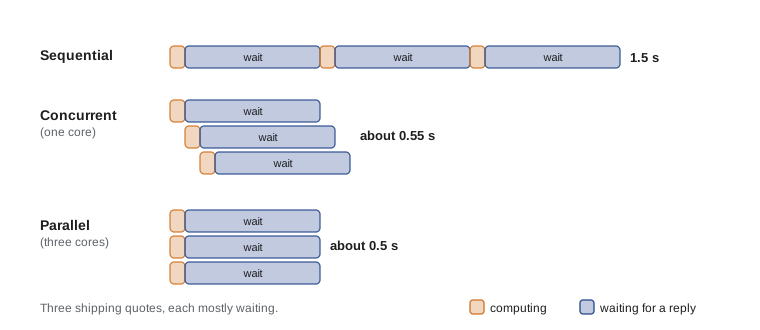
Programs are often described as I/O-bound or CPU-bound. An I/O-bound program spends most of its time waiting for input and output: network replies, disk reads, a database, a printer. A CPU-bound program spends most of its time computing: crunching numbers, parsing large files, compressing images. Theo's quotes are I/O-bound. Kai's roast-curve analysis, which fits curves to hundreds of thousands of temperature readings, is CPU-bound. The two need different cures, and telling them apart is the first step.
import time

def cpu_task():
    total = 0
    for i in range(300_000):
        total += i * i
    return total

def io_task():
    time.sleep(0.2)            # stands in for waiting on a network reply

for task in (cpu_task, io_task):
    wall0, cpu0 = time.perf_counter(), time.process_time()
    task()
    wall = time.perf_counter() - wall0
    cpu = time.process_time() - cpu0
    kind = "CPU-bound" if cpu / wall > 0.5 else "I/O-bound"
print(f"{task.__name__}: wall {wall:.2f} s, processor {cpu:.2f} s -> {kind}")cpu_task: wall 0.03 s, processor 0.01 s -> I/O-bound io_task: wall 0.20 s, processor 0.00 s -> I/O-bound
time.process_time() counts only the time the processor spent running your program, while perf_counter counts real elapsed time. When the two are close, the program was computing the whole time. When processor time is a small fraction of wall time, the program was mostly waiting.
Try it yourself
CPU-bound or I/O-bound?
Write classify(cpu_seconds, wall_seconds) returning "CPU-bound" when processor time is more than half of wall-clock time, and "I/O-bound" otherwise.
Then write waiting_share(cpu_seconds, wall_seconds) returning the fraction of the wall time spent not computing, rounded to 2 decimal places.
def classify(cpu_seconds, wall_seconds):
    return 'CPU-bound'

def waiting_share(cpu_seconds, wall_seconds):
    return 0

print(classify(0.05, 100.0))
Starting threads
A thread is a separate flow of execution inside the same program. All threads of a program share its memory: the same global variables, the same objects. Python's threading module creates them. You give a Thread a target function and its arguments, call start() to begin running it alongside the main program, and call join() to wait until it finishes. Here Theo's quote requests are simulated with time.sleep, which, like a real network call, lets other threads run while it waits.
import threading, time

def get_quote(order_id, results):
    time.sleep(0.5)                          # waiting for the shipping server
    results[order_id] = 12.40 + len(order_id) / 10

orders = [f"A-10{n:02d}" for n in range(8)]

start = time.perf_counter()
results = {}
for o in orders:                             # one at a time
    get_quote(o, results)
print(f"sequential: {time.perf_counter() - start:.1f} s for {len(results)} quotes")

start = time.perf_counter()
results = {}
threads = [threading.Thread(target=get_quote, args=(o, results)) for o in orders]
for t in threads:
    t.start()                                # all eight begin waiting together
for t in threads:
    t.join()                                 # wait for every thread to finish
print(f"threaded: {time.perf_counter() - start:.1f} s for {len(results)} quotes")sequential: 4.0 s for 8 quotes threaded: 0.5 s for 8 quotes
The threaded version finishes in a little over half a second instead of four, because the eight waits overlap. Each thread writes its own key in the shared results dictionary, which is safe because each key is written by only one thread. For 200 real orders the same idea takes Theo's quotes from 100 seconds to a few seconds, limited by how many requests the shipping company allows at once. In practice you would not start 200 bare threads by hand; lesson 6 shows the thread pool, which manages a fixed number of worker threads for you.
The global interpreter lock
The standard CPython interpreter has a global interpreter lock, the GIL: a lock that only one thread can hold at a time, and a thread must hold it to run Python bytecode. The GIL makes the interpreter's internals, such as the reference counts on every object, simple and safe, and it makes single-threaded code fast. Its cost is that two threads cannot run Python code at the same time, even on a machine with many cores. Threads take turns.
Threads still help I/O-bound programs, because a thread releases the GIL while it waits: during time.sleep, a socket read, a file read or a database query, another thread can run. Many C extensions, including NumPy for large array operations, also release the GIL while they compute. But for pure Python computation, threads add switching overhead without adding speed, as this experiment shows.
import threading, time

def crunch(n):
    total = 0
    for i in range(n):
        total += i % 7
    return total

N = 2_000_000
start = time.perf_counter()
crunch(N); crunch(N)
seq = time.perf_counter() - start

start = time.perf_counter()
ts = [threading.Thread(target=crunch, args=(N,)) for _ in range(2)]
for t in ts: t.start()
for t in ts: t.join()
par = time.perf_counter() - start
print(f"two tasks in turn: {seq:.2f} s; two threads: {par:.2f} s")
print("threads were much faster:", par < seq * 0.7)two tasks in turn: 0.16 s; two threads: 0.30 s threads were much faster: False
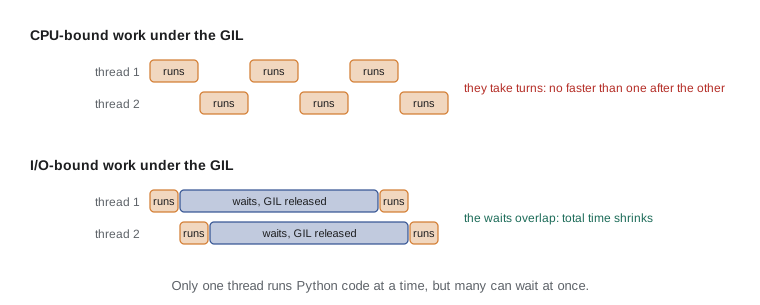
Python is changing here. Python 3.13 introduced an optional free-threaded build of CPython without the GIL, described in PEP 703, and in Python 3.14 that build became officially supported, though it is still a separate installation and the standard build keeps the GIL. In the free-threaded build, CPU-bound threads can genuinely run in parallel, at the cost of some single-threaded speed and with extension libraries needing to be updated. For now, the safe rule for everyday Python is: threads for I/O-bound work, processes (lesson 5) for CPU-bound work.
Race conditions
Shared memory makes threads convenient and dangerous. A race condition happens when the result of a program depends on the unpredictable order in which threads run. The classic example is a counter. counter += 1 looks like one step, but it is three: read the current value, add one, write the result back. If two threads both read 41 before either writes, both write 42, and one increment is lost. The program is correct most of the time and wrong occasionally, which makes race conditions some of the hardest bugs to find.
# One possible interleaving of two threads each doing counter += 1
counter = 41
steps = [("T1", "read"), ("T2", "read"), ("T1", "add"), ("T2", "add"), ("T1", "write"), ("T2", "write")]
local = {}
for thread, op in steps:
    if op == "read":
        local[thread] = counter
    elif op == "add":
        local[thread] += 1
    else:
        counter = local[thread]
    print(f"{thread} {op:5} -> local={local[thread]}, counter={counter}")
print("two increments, but counter is", counter)T1 read -> local=41, counter=41 T2 read -> local=41, counter=41 T1 add -> local=42, counter=41 T2 add -> local=42, counter=41 T1 write -> local=42, counter=42 T2 write -> local=42, counter=42 two increments, but counter is 42
Because the GIL can switch threads between any two bytecodes, even code that looks atomic in Python source may not be. Some operations happen to be atomic in CPython, such as list.append or setting a single dictionary key, but relying on that is fragile. The reliable rule is: when threads share data that any of them changes, protect every access with a lock, or avoid sharing by giving each thread its own data and combining the results afterwards.
Try it yourself
Replay an interleaving
Write replay(start, steps) that simulates threads each doing counter += 1. steps is a list of (thread, op) pairs where op is "read" (copy counter into that thread's local value), "add" (add 1 to its local value) or "write" (copy its local value into counter). Return the final counter.
Then write lost_updates(start, steps) returning how many increments were lost: the number of "write" steps minus the actual increase of the counter.
def replay(start, steps):
    return start + sum(1 for t, op in steps if op == 'write')

def lost_updates(start, steps):
    return 0

BAD = [('T1', 'read'), ('T2', 'read'), ('T1', 'add'), ('T2', 'add'), ('T1', 'write'), ('T2', 'write')]
print(replay(41, BAD))
Locks
A lock, threading.Lock, is an object that only one thread can hold at a time. A thread calls acquire() to take it, waiting if another thread has it, and release() to give it back. Code between the two is a critical section: only one thread can be inside it at once. The with statement acquires and releases the lock for you, and releases it even if an exception is raised, so it is the form to use.
import threading

counter = 0
lock = threading.Lock()

def add_many(n):
    global counter
    for _ in range(n):
        with lock:                  # read, add and write happen as one step
            counter += 1

threads = [threading.Thread(target=add_many, args=(100_000,)) for _ in range(4)]
for t in threads: t.start()
for t in threads: t.join()
print("counter:", counter, "(always 400000 with the lock)")counter: 400000 (always 400000 with the lock)
Locks fix races but bring their own problems. Holding a lock while doing slow work makes other threads wait, so keep critical sections short. And if two threads each hold one lock and wait for the other's, neither can ever continue: a deadlock. The standard defense is to always acquire multiple locks in the same order, or better, design the program so that threads rarely share mutable data. The queue.Queue class, a thread-safe queue with its own internal locking, is the usual way for threads to hand work to each other safely.
import queue, threading

jobs = queue.Queue()
done = []
done_lock = threading.Lock()

def worker():
    while True:
        order = jobs.get()
        if order is None:            # sentinel: no more work
            break
        with done_lock:
            done.append(f"label printed for {order}")
        jobs.task_done()

workers = [threading.Thread(target=worker) for _ in range(3)]
for w in workers: w.start()
for o in ["A-1001", "A-1002", "A-1003", "A-1004", "A-1005"]:
    jobs.put(o)
jobs.join()                          # wait until every job is marked done
for _ in workers: jobs.put(None)
for w in workers: w.join()
print(sorted(done))['label printed for A-1001', 'label printed for A-1002', 'label printed for A-1003', 'label printed for A-1004', 'label printed for A-1005']
Try it yourself
A thread-safe counter class
Write a class SafeCounter with an attribute lock holding a threading.Lock() and a value starting at 0. Its increment(by=1) method must update value inside with self.lock:, and get() returns the value.
The browser cannot start threads, so the tests call the methods directly and check that the lock is used and released.
import threading

class SafeCounter:
    def __init__(self):
        self.value = 0

    def increment(self, by=1):
        self.value += by

    def get(self):
        return self.value

c = SafeCounter()
c.increment(); c.increment(5)
print(c.get())
When threads are the right tool
Threads suit programs that do many independent waits: downloading files, calling web APIs, querying databases, reading from devices such as Kai's roaster or the label printer. They are simple to add to existing blocking code, because the code inside each thread stays ordinary sequential Python. They are the wrong tool for speeding up pure Python computation under the GIL, and every shared mutable object they touch needs care. In the next lessons, processes take over for CPU-bound work, concurrent.futures gives both tools a tidy interface, and asyncio offers a different way to handle thousands of waits with a single thread.
Common mistakes
MistakeUsing threads to speed up pure Python number crunching.
InsteadUnder the GIL threads take turns; use processes or vectorized libraries for CPU-bound work.
MistakeAssuming counter += 1 is a single safe step.
InsteadIt is a read, an add and a write; protect shared updates with a lock.
MistakeForgetting to join threads.
InsteadCall join() on each thread before using its results.
MistakeCalling acquire() without a matching release() when an exception occurs.
InsteadUse with lock: so the lock is always released.
MistakeHolding a lock during slow I/O.
InsteadKeep critical sections short; do the slow work outside the lock.
MistakeAcquiring two locks in different orders in different threads.
InsteadAlways take multiple locks in the same order to avoid deadlock.
Summary and key terms
- Concurrency overlaps tasks over time; parallelism runs them at the same instant on several cores.
- I/O-bound programs mostly wait; CPU-bound programs mostly compute. Compare process_time with wall time to tell them apart.
- threading.Thread runs a function in a new thread; start() begins it and join() waits for it.
- CPython's global interpreter lock lets only one thread run Python bytecode at a time.
- Threads speed up I/O-bound work because waiting releases the GIL; they do not speed up pure Python computation.
- Race conditions corrupt shared data; locks create critical sections that one thread at a time can enter.
- queue.Queue passes work between threads safely; deadlocks are avoided by consistent lock ordering.
- concurrency
- Making progress on several tasks over the same period by switching between them.
- parallelism
- Running several tasks at the same instant on different processor cores.
- I/O-bound
- Limited by waiting for input and output such as networks and disks.
- CPU-bound
- Limited by the amount of computation.
- thread
- A separate flow of execution that shares memory with the rest of the program.
- global interpreter lock (GIL)
- A CPython lock that allows only one thread to run Python bytecode at a time.
- race condition
- A bug where the result depends on the unpredictable order in which threads run.
- lock
- An object that only one thread can hold, used to protect a critical section.
- critical section
- Code that only one thread at a time may execute.
- deadlock
- A state where threads wait for each other forever.
Practice problems
Work each problem on paper first, then reveal the answer to check.
Downloading 50 supplier price files takes 50 seconds, with processor time 0.4 seconds. Will threads help?
Show answer
Yes: the program is I/O-bound, so overlapping the waits can cut the time dramatically.
Why do two CPU-bound threads take about as long as running the tasks in turn?
Show answer
The GIL lets only one thread run Python bytecode at a time.
What are the three steps hidden inside counter += 1?
Show answer
Read the value, add one, write it back.
Why is with lock: better than calling acquire() and release()?
Show answer
It releases the lock even if an exception is raised.
What is a sentinel in a worker queue?
Show answer
A special value, such as None, that tells a worker there is no more work.
Name the optional CPython build that removes the GIL.
Show answer
The free-threaded build, introduced in Python 3.13 (PEP 703).
Lesson quiz · 5 questions
Score 60% or more to complete this lesson.
Create a free account to save your progress, take quizzes and earn a certificate.