
PYTH-215 · Lesson 9 of 12 · 31 min
Using SQLite and PostgreSQL from Python
▶ Video coming soon A video version of this lesson is on the way.
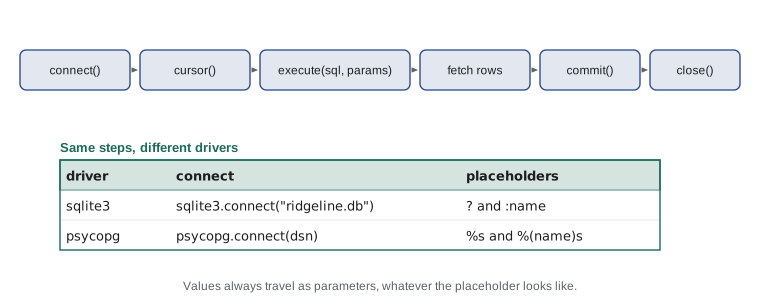
So far every example has used the same few calls: connect, execute, fetch and commit. Those calls are not peculiar to SQLite. Python defines a standard interface for database libraries, so code written for SQLite looks almost the same when it talks to PostgreSQL, MySQL or SQL Server. This lesson looks at that standard closely, then at the features that make database code pleasant to write and maintain: rows you can read by column name, conversion between Python types and database types, sensible connection handling, error handling, and keeping SQL organized in one module.
Ridgeline is planning ahead. The cafe and office tools can keep using a SQLite file for now, but the online shop will run on a hosted PostgreSQL server, and Jordan wants a single storage module that works with either. The second half of the lesson shows the PostgreSQL side with psycopg, the most widely used PostgreSQL driver for Python. PostgreSQL needs a running server, which a browser cannot provide, so those listings are shown for reading rather than running.
The DB-API: one interface, many databases
PEP 249, the Python Database API Specification 2.0, describes what every database driver should provide. A module-level connect function returns a connection. A connection makes cursors, commits and rolls back transactions, and closes. A cursor executes statements with parameters, fetches results with fetchone, fetchmany and fetchall, and describes the result columns in its description attribute. Drivers also provide a standard family of exceptions, so error handling code transfers between databases too.
sqlite3 adds a convenience you have used throughout: connection.execute, which creates a cursor, executes the statement and returns the cursor in one step. The standard pattern makes the cursor explicit, and it is what you will see in code for other databases.
import sqlite3

con = sqlite3.connect(":memory:")
con.executescript("""
CREATE TABLE coffees (sku TEXT PRIMARY KEY, name TEXT NOT NULL, origin TEXT NOT NULL,
                      roast TEXT NOT NULL, price_cents INTEGER NOT NULL, stock INTEGER NOT NULL);
INSERT INTO coffees VALUES
    ('RC-101', 'Sunrise Blend', 'Blend', 'medium', 1850, 42),
    ('RC-102', 'Ethiopia Guji', 'Ethiopia', 'light', 2200, 15),
    ('RC-103', 'Colombia Huila', 'Colombia', 'medium', 1975, 27),
    ('RC-104', 'Sumatra Dark', 'Indonesia', 'dark', 2025, 9),
    ('RC-105', 'Decaf Swiss Water', 'Mexico', 'medium', 1900, 12),
    ('RC-106', 'Espresso Ridge', 'Blend', 'dark', 2150, 30);
""")

cur = con.cursor()                                   # the explicit DB-API style
cur.execute("SELECT sku, name, stock FROM coffees WHERE stock < ? ORDER BY stock", (20,))
print([d[0] for d in cur.description])
print(cur.fetchmany(2))                              # the next two rows
print(cur.fetchall())                                # the rest
cur.close()

import sqlite3
print(sqlite3.paramstyle, sqlite3.apilevel) # placeholder style and DB-API level['sku', 'name', 'stock']
[('RC-104', 'Sumatra Dark', 9), ('RC-105', 'Decaf Swiss Water', 12)]
[('RC-102', 'Ethiopia Guji', 15)]
qmark 2.0paramstyle names the placeholder style a driver uses: 'qmark' means question marks for sqlite3 (which also accepts named :name placeholders), while psycopg uses 'pyformat', written %s and %(name)s. The style differs, but the principle from lesson 3 does not: values always travel as parameters.
Rows by name instead of by position
Tuples are fast but fragile: row[3] says nothing about what the value is, and it silently refers to a different column if the query changes. Every driver offers a way to get rows that can be read by column name. In sqlite3 you set the connection's row_factory. The built-in sqlite3.Row supports both row['name'] and row[0], and converts to a dictionary with dict(row). Alternatively, a row factory can be any function that turns a cursor and a raw tuple into whatever you like, such as a dictionary or a dataclass.
import sqlite3

con = sqlite3.connect(":memory:")
con.executescript("""
CREATE TABLE coffees (sku TEXT PRIMARY KEY, name TEXT NOT NULL, origin TEXT NOT NULL,
                      roast TEXT NOT NULL, price_cents INTEGER NOT NULL, stock INTEGER NOT NULL);
INSERT INTO coffees VALUES
    ('RC-101', 'Sunrise Blend', 'Blend', 'medium', 1850, 42),
    ('RC-102', 'Ethiopia Guji', 'Ethiopia', 'light', 2200, 15),
    ('RC-103', 'Colombia Huila', 'Colombia', 'medium', 1975, 27),
    ('RC-104', 'Sumatra Dark', 'Indonesia', 'dark', 2025, 9),
    ('RC-105', 'Decaf Swiss Water', 'Mexico', 'medium', 1900, 12),
    ('RC-106', 'Espresso Ridge', 'Blend', 'dark', 2150, 30);
""")

import sqlite3

con.row_factory = sqlite3.Row
row = con.execute("SELECT sku, name, price_cents FROM coffees WHERE sku = ?", ("RC-102",)).fetchone()
print(row["name"], row["price_cents"], row[0], row.keys())
print(dict(row))

def dict_factory(cursor, values):
    names = [d[0] for d in cursor.description]
    return dict(zip(names, values))

con.row_factory = dict_factory
for coffee in con.execute("SELECT sku, stock FROM coffees WHERE stock < 13"):
print(coffee)Ethiopia Guji 2200 RC-102 ['sku', 'name', 'price_cents']
{'sku': 'RC-102', 'name': 'Ethiopia Guji', 'price_cents': 2200}
{'sku': 'RC-104', 'stock': 9}
{'sku': 'RC-105', 'stock': 12}Setting row_factory on the connection affects every query made through it from then on; you can also set it on a single cursor. The rest of this course uses sqlite3.Row in the storage module, so the code reads as clearly as the SQL.
Try it yourself
Rows as dictionaries
Write fetch_dicts(con, sql, params=()) that runs sql with params and returns a list of dictionaries, one per row, using the column names from cursor.description as keys.
Do not change con.row_factory; build the dictionaries yourself.
def fetch_dicts(con, sql, params=()):
    return con.execute(sql, params).fetchall()

print(fetch_dicts(con, 'SELECT sku, stock FROM coffees WHERE stock < ?', (10,)))
Converting types
Databases and Python have different type systems, and drivers convert between them. sqlite3 maps INTEGER to int, REAL to float, TEXT to str, BLOB to bytes and NULL to None. Other Python types need a decision. Dates are the common case: SQLite has no date type, so the usual approach is to store ISO 8601 text and convert explicitly with date.isoformat and date.fromisoformat at the edge of your storage code. sqlite3 also lets you register adapters, which turn a Python type into a storable value, and converters, which turn stored values back, but explicit conversion is clearer and is what the capstone uses. (Python 3.12 deprecated sqlite3's old built-in date adapters for exactly this reason.)
import sqlite3

con = sqlite3.connect(":memory:")
con.executescript("""
CREATE TABLE coffees (sku TEXT PRIMARY KEY, name TEXT NOT NULL, origin TEXT NOT NULL,
                      roast TEXT NOT NULL, price_cents INTEGER NOT NULL, stock INTEGER NOT NULL);
INSERT INTO coffees VALUES
    ('RC-101', 'Sunrise Blend', 'Blend', 'medium', 1850, 42),
    ('RC-102', 'Ethiopia Guji', 'Ethiopia', 'light', 2200, 15),
    ('RC-103', 'Colombia Huila', 'Colombia', 'medium', 1975, 27),
    ('RC-104', 'Sumatra Dark', 'Indonesia', 'dark', 2025, 9),
    ('RC-105', 'Decaf Swiss Water', 'Mexico', 'medium', 1900, 12),
    ('RC-106', 'Espresso Ridge', 'Blend', 'dark', 2150, 30);
""")

from datetime import date
from decimal import Decimal

con.execute("CREATE TABLE price_changes (sku TEXT, changed_on TEXT, new_cents INTEGER)")
con.execute("INSERT INTO price_changes VALUES (?, ?, ?)", ("RC-102", date(2026, 11, 9).isoformat(), 2300))

sku, changed_on, cents = con.execute("SELECT * FROM price_changes").fetchone()
when = date.fromisoformat(changed_on)                 # text back to a date
price = Decimal(cents) / 100                          # integer cents to an exact Decimal
print(sku, when, when.strftime("%A"), price, type(price).__name__)RC-102 2026-11-09 Monday 23 Decimal
PostgreSQL has real date, timestamp, numeric and boolean types, and psycopg converts them automatically: a date column arrives as datetime.date, numeric as Decimal and boolean as bool. That is one of several ways a server database is more convenient than SQLite, and a reason storage code should hide such details from the rest of the program, so swapping databases changes one module.
Connections: opening, closing and files
A connection is a resource, like an open file. A program usually opens one connection when it starts, or one per request in a web application, and closes it when done. For SQLite, the database argument is a file path; the file is created if it does not exist. As lesson 8 showed, with con: manages a transaction, not the connection, so use contextlib.closing, or an explicit close in a finally block, to make sure the connection is closed.
import sqlite3
from contextlib import closing

with closing(sqlite3.connect("ridgeline.db")) as con:        # a real file on disk
    con.execute("PRAGMA foreign_keys = ON")
    with con:                                                  # one transaction
        con.execute("CREATE TABLE IF NOT EXISTS visits (day TEXT PRIMARY KEY, count INTEGER NOT NULL)")
        con.execute("INSERT INTO visits VALUES ('2026-11-09', 1) "
                    "ON CONFLICT (day) DO UPDATE SET count = count + 1")
    print(con.execute("SELECT * FROM visits").fetchall())

with closing(sqlite3.connect("ridgeline.db")) as con:        # reopen: the data persisted
print(con.execute("SELECT count FROM visits").fetchone()[0], "visit(s) recorded")[('2026-11-09', 1)]
1 visit(s) recordedRun that listing twice and the count goes up, because the file persists between runs; in the browser it lives in the page's temporary file system until you reload. A few connection settings are worth applying every time you open a SQLite database in an application: PRAGMA foreign_keys = ON, so relationships are enforced; a timeout argument to connect, so a connection waits briefly for another writer's lock instead of failing at once; and for applications with several readers and a writer, PRAGMA journal_mode = WAL, which lets readers continue while a write is in progress.
Handling database errors
Every DB-API driver raises exceptions from the same family. sqlite3.Error is the base class. IntegrityError means a constraint was violated: a duplicate key, a missing foreign key target, a failed CHECK. OperationalError covers problems such as a missing table, a syntax error in the SQL or a locked database. ProgrammingError means the program misused the API, for example the wrong number of parameters. Catch the specific error you can handle, close to where you can do something sensible about it, and let the others propagate.
import sqlite3

con = sqlite3.connect(":memory:")
con.executescript("""
CREATE TABLE coffees (sku TEXT PRIMARY KEY, name TEXT NOT NULL, origin TEXT NOT NULL,
                      roast TEXT NOT NULL, price_cents INTEGER NOT NULL, stock INTEGER NOT NULL);
INSERT INTO coffees VALUES
    ('RC-101', 'Sunrise Blend', 'Blend', 'medium', 1850, 42),
    ('RC-102', 'Ethiopia Guji', 'Ethiopia', 'light', 2200, 15),
    ('RC-103', 'Colombia Huila', 'Colombia', 'medium', 1975, 27),
    ('RC-104', 'Sumatra Dark', 'Indonesia', 'dark', 2025, 9),
    ('RC-105', 'Decaf Swiss Water', 'Mexico', 'medium', 1900, 12),
    ('RC-106', 'Espresso Ridge', 'Blend', 'dark', 2150, 30);
""")

import sqlite3

def add_coffee(con, sku, name, price_cents):
    try:
        with con:
            con.execute("INSERT INTO coffees VALUES (?, ?, 'Blend', 'medium', ?, 0)", (sku, name, price_cents))
    except sqlite3.IntegrityError:
        return f"{sku} already exists"
    return f"added {sku}"

print(add_coffee(con, "RC-120", "Winter Blend", 1990))
print(add_coffee(con, "RC-120", "Winter Blend", 1990))
try:
    con.execute("SELECT * FROM cofees")
except sqlite3.OperationalError as e:
    print("OperationalError:", e)
try:
    con.execute("SELECT * FROM coffees WHERE sku = ?", ("RC-101", "extra"))
except sqlite3.ProgrammingError as e:
print("ProgrammingError:", e)added RC-120 RC-120 already exists OperationalError: no such table: cofees ProgrammingError: Incorrect number of bindings supplied. The current statement uses 1, and there are 2 supplied.
Try it yourself
Add a customer, or report a duplicate
Write add_customer(con, name, email) that inserts a customer inside with con: and returns the new customer's id (cursor.lastrowid).
If the email already exists, the UNIQUE constraint raises sqlite3.IntegrityError: catch it and return None instead.
def add_customer(con, name, email):
    con.execute('INSERT INTO customers (name, email) VALUES (?, ?)', (name, email))
    return 0
PostgreSQL with psycopg
PostgreSQL is a powerful open-source client-server database, widely used for web applications, and the usual next step when an application outgrows SQLite. To use it from Python you install a driver, most commonly psycopg (version 3, installed with pip install psycopg), and connect with the server's address, database name, user and password. The code shape is the DB-API shape you already know. The main visible differences are the %s placeholder style, the connection details, and that psycopg's connection context manager commits or rolls back and then closes the connection.
import os
import psycopg

# Connection details come from the environment, never from the source code.
dsn = os.environ["RIDGELINE_DATABASE_URL"]        # e.g. postgresql://shop:secret@db.example.com/ridgeline

with psycopg.connect(dsn) as conn:                 # commits on success, rolls back on error, then closes
    with conn.cursor() as cur:
        cur.execute("SELECT sku, name, stock FROM coffees WHERE stock < %s ORDER BY stock", (10,))
        for sku, name, stock in cur:
            print(sku, name, stock)
        cur.execute(
            "UPDATE coffees SET stock = stock - %(qty)s WHERE sku = %(sku)s AND stock >= %(qty)s",
            {"sku": "RC-104", "qty": 2},
        )
        print("rows changed:", cur.rowcount)
Never write a password into source code. Code is shared, copied and committed to version control, and a password in it is effectively public. Read connection details from environment variables, as above, or from a configuration file kept out of version control or a secrets manager provided by the hosting platform. Give each application its own database user with only the permissions it needs, so a bug or a leak in one program cannot damage everything.
A few PostgreSQL differences will affect Ridgeline's schema when it moves: SERIAL or GENERATED ALWAYS AS IDENTITY replaces INTEGER PRIMARY KEY for auto-numbered ids; NUMERIC(10, 2) and real DATE columns become available; types are enforced strictly; and foreign keys are always on. Web applications also use a connection pool, which keeps a few connections open and lends them to requests, because opening a new server connection for every request is slow; psycopg_pool provides one.
Keeping SQL in one place
Scattering SQL strings throughout a program makes changes risky: renaming a column means finding every query that mentions it. A common and effective structure gathers all database access into one module, sometimes called a repository or data access layer, with one function per operation: get_coffee, low_stock, record_sale. The rest of the program calls these functions and never sees SQL or cursors. This also makes testing easy, because tests can call the functions against a fresh in-memory database, which is fast and isolated.
import sqlite3

con = sqlite3.connect(":memory:")
con.executescript("""
CREATE TABLE coffees (sku TEXT PRIMARY KEY, name TEXT NOT NULL, origin TEXT NOT NULL,
                      roast TEXT NOT NULL, price_cents INTEGER NOT NULL, stock INTEGER NOT NULL);
INSERT INTO coffees VALUES
    ('RC-101', 'Sunrise Blend', 'Blend', 'medium', 1850, 42),
    ('RC-102', 'Ethiopia Guji', 'Ethiopia', 'light', 2200, 15),
    ('RC-103', 'Colombia Huila', 'Colombia', 'medium', 1975, 27),
    ('RC-104', 'Sumatra Dark', 'Indonesia', 'dark', 2025, 9),
    ('RC-105', 'Decaf Swiss Water', 'Mexico', 'medium', 1900, 12),
    ('RC-106', 'Espresso Ridge', 'Blend', 'dark', 2150, 30);
""")

import sqlite3

# --- the data access layer: the only code that knows SQL ---
def low_stock(con, limit=10):
    return [dict(r) for r in con.execute(
        "SELECT sku, name, stock FROM coffees WHERE stock < ? ORDER BY stock, sku", (limit,))]

def set_price(con, sku, cents):
    with con:
        cur = con.execute("UPDATE coffees SET price_cents = ? WHERE sku = ?", (cents, sku))
    if cur.rowcount != 1:
        raise KeyError(sku)

# --- the rest of the program uses plain functions and dictionaries ---
con.row_factory = sqlite3.Row
for coffee in low_stock(con, 13):
    print(f"{coffee['sku']}: {coffee['stock']} bags of {coffee['name']}")
set_price(con, "RC-104", 2100)

# --- a test (a real suite builds a fresh in-memory database for each test) ---
def test_set_price_unknown_sku():
    try:
        set_price(con, "RC-999", 100)
    except KeyError:
        return "passed"
print(test_set_price_unknown_sku())RC-104: 9 bags of Sumatra Dark RC-105: 12 bags of Decaf Swiss Water passed
Lesson 10 shows the other common approach, an object-relational mapper, which generates much of this layer for you, and lesson 12 builds Ridgeline's full storage module in the repository style.
Worked problem
Moving a query from SQLite to PostgreSQL
Jordan's SQLite code is con.execute("SELECT name FROM customers WHERE email = :email", {"email": email}).fetchone(). Rewrite it for psycopg.
Show solution
- Placeholder style: psycopg uses %(email)s for named parameters (or %s for positional).
- psycopg has no connection.execute shortcut in the DB-API sense; use a cursor (psycopg 3 also offers conn.execute, which returns a cursor).
- with conn.cursor() as cur: cur.execute("SELECT name FROM customers WHERE email = %(email)s", {"email": email})
- row = cur.fetchone() returns a tuple or None, exactly as before.
Answer: cur.execute("SELECT name FROM customers WHERE email = %(email)s", {"email": email}); row = cur.fetchone()
Common mistakes
MistakeReading columns by position, such as row[3].
InsteadUse sqlite3.Row or a dictionary row factory and read row["stock"].
MistakeHard-coding a database password in the source.
InsteadRead it from an environment variable or a secrets store.
MistakeAssuming with con: closes a sqlite3 connection.
InsteadIt manages the transaction; use contextlib.closing or close().
MistakeCatching sqlite3.Error everywhere and carrying on.
InsteadCatch specific errors such as IntegrityError where you can handle them.
MistakeRelying on sqlite3's implicit date conversion.
InsteadStore ISO text and convert explicitly with isoformat and fromisoformat.
MistakeSpreading SQL strings across the whole program.
InsteadGather queries in one data access module of small functions.
Summary and key terms
- PEP 249 defines a common DB-API: connect, cursor, execute, fetch, commit, rollback and close.
- Placeholder styles differ (? in sqlite3, %s in psycopg), but values always go in parameters.
- sqlite3.Row or a custom row factory lets code read columns by name.
- Convert dates and money explicitly at the edge of the storage code; PostgreSQL drivers convert real types automatically.
- Close connections reliably with contextlib.closing; enable foreign keys and set a timeout for SQLite.
- DB-API exceptions include IntegrityError, OperationalError and ProgrammingError.
- psycopg connects to PostgreSQL with connection details from the environment, never from source code.
- A data access layer keeps SQL in one module and makes testing with in-memory databases easy.
- DB-API
- The Python Database API Specification (PEP 249) that drivers follow.
- driver
- A library that connects Python to a particular database, such as sqlite3 or psycopg.
- paramstyle
- The placeholder style a driver uses, such as qmark or pyformat.
- row factory
- A function that turns each raw result row into another object.
- sqlite3.Row
- A row type that supports access by column name and by index.
- IntegrityError
- The exception raised when a constraint is violated.
- OperationalError
- The exception for problems such as missing tables or locked databases.
- psycopg
- The most widely used PostgreSQL driver for Python.
- connection pool
- A set of open connections lent to requests and reused.
- data access layer
- The module that contains all of a program's database code.
Practice problems
Work each problem on paper first, then reveal the answer to check.
What does sqlite3.paramstyle report, and what is psycopg's style?
Show answer
'qmark' for sqlite3; psycopg uses pyformat (%s and %(name)s).
How do you make sqlite3 return rows readable by column name?
Show answer
Set con.row_factory = sqlite3.Row.
A duplicate email raises which exception?
Show answer
sqlite3.IntegrityError.
Where should a PostgreSQL password come from?
Show answer
An environment variable, a configuration file kept out of version control, or a secrets manager.
Why are in-memory SQLite databases useful in tests?
Show answer
Each test gets a fresh, fast, isolated database.
What does with psycopg.connect(dsn) as conn: do at the end of the block?
Show answer
Commits (or rolls back on error) and closes the connection.
Lesson quiz · 5 questions
Score 60% or more to complete this lesson.
Create a free account to save your progress, take quizzes and earn a certificate.