
PYTH-215 · Lesson 6 of 12 · 29 min
Designing tables and keys
▶ Video coming soon A video version of this lesson is on the way.
Writing queries is half of working with databases; designing the tables they run against is the other half, and design mistakes are far more expensive to fix. A badly chosen column type, a missing key or a list crammed into one column will make every query awkward and every report suspect for as long as the database lives, and changing a table that already holds years of data and is used by several programs is slow and risky. Time spent on design up front is repaid many times.
Ridgeline's online shop is about to take orders that contain several coffees each, a shape the sales table cannot represent. In this lesson Jordan designs the tables for orders properly: choosing types, keys and constraints, modeling a many-to-many relationship with a junction table, deciding what happens when a referenced row is deleted, and drawing the result as an entity-relationship diagram. Lesson 7 then checks the design against the rules of normalization.
From requirements to tables
Design starts with the things the business talks about, called entities, and the facts it needs to record about each. Listening to Theo and Rosa describe online orders gives the raw material: a customer places an order on a date; an order has a status (placed, packed, shipped or canceled); an order contains one or more coffees, each with a quantity and the price charged at the time; orders are shipped to an address. Nouns such as customer, order and coffee become tables; facts such as date, status, quantity and price become columns; and phrases such as 'an order contains coffees' become relationships.
Two questions shape each relationship. How many of each side can be related? And is the relationship required? A customer can place many orders and each order belongs to exactly one customer: one-to-many, required on the order side. An order can contain many coffees and a coffee can appear in many orders: many-to-many. Writing these down before creating any table catches most design problems early.
Choosing column types
Choose the type that matches the meaning of the data, and the narrowest one that will always fit. Quantities, counts and identifiers are integers. Names, codes and email addresses are text. Measurements with fractions, such as kilograms of green coffee, are real numbers. Dates and times use the database's date type where it has one, and ISO 8601 text in SQLite. True-or-false facts use a boolean, which SQLite stores as the integers 0 and 1.
Money deserves special care. Floating-point numbers cannot represent most decimal fractions exactly, so sums of prices drift by fractions of a cent. Two safe choices exist: store whole cents in an integer column, as Ridgeline does with price_cents, or use an exact decimal type such as NUMERIC(10, 2) in PostgreSQL. SQLite has no true decimal type, which is why integer cents are the standard approach there, with conversion to dollars at the edges of the program.
Codes that look like numbers are a classic trap. A postal code, a phone number, a product code with leading zeros or a credit card number is an identifier, not a quantity: you never add two postal codes together. Store them as text, or the leading zeros vanish and the database may reformat them.
import sqlite3

con = sqlite3.connect(":memory:")
con.execute("CREATE TABLE bad (zip INTEGER, price REAL)")
con.execute("INSERT INTO bad VALUES ('02134', 0.1)")
con.execute("INSERT INTO bad VALUES ('90210', 0.2)")
print(con.execute("SELECT zip FROM bad").fetchall())            # the leading zero is gone
print(con.execute("SELECT SUM(price) FROM bad").fetchone()[0])  # not exactly 0.3

con.execute("CREATE TABLE good (zip TEXT, price_cents INTEGER)")
con.executemany("INSERT INTO good VALUES (?, ?)", [("02134", 10), ("90210", 20)])
print(con.execute("SELECT zip FROM good").fetchall(), con.execute("SELECT SUM(price_cents) FROM good").fetchone()[0])[(2134,), (90210,)]
0.30000000000000004
[('02134',), ('90210',)] 30Choosing keys
Every table needs a primary key. For orders, there is no natural identifier, so Jordan uses a surrogate key, an integer id assigned by the database. For coffees, the SKU is a stable code the business already uses and other systems print on labels, so it stays the natural primary key. Both are defensible; the essential properties are that the key is unique, never NULL and never needs to change.
Some tables are identified by a combination of columns, a composite primary key. A line on an order is identified by which order it belongs to and which coffee it is: the pair (order_id, sku). Declaring that pair as the primary key also enforces a business rule for free, because the same coffee cannot appear twice on one order; a second bag is a higher quantity on the same line, not a second line.
Candidate keys that are not chosen as the primary key should still be declared UNIQUE, so the database enforces them. A customer's email is unique even though id is the primary key. Without the UNIQUE constraint, nothing stops two accounts sharing an email, and lookups by email would quietly return the wrong one.
Many-to-many: the junction table
A relational table cannot hold a list in a column, so a many-to-many relationship needs a table of its own between the two entities, called a junction table (also a link or bridge table). Each row of the junction table pairs one order with one coffee, and holds facts that belong to that pairing: the quantity, and the unit price charged. Price belongs on the order line rather than only on the coffee because prices change; an order placed last year must still show what the customer actually paid.
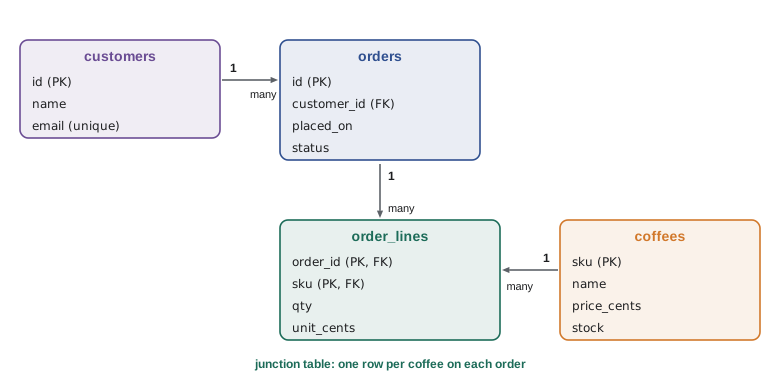
The diagram is an entity-relationship diagram (ERD), the standard way to sketch a design. Each box is a table listing its columns, with keys marked, and each line is a relationship, with its ends showing one or many. ERD notations differ in detail (the popular crow's-foot notation draws a three-pronged foot for many), but all express the same information, and drawing one before writing CREATE TABLE statements is the habit of experienced designers.
import sqlite3

con = sqlite3.connect(":memory:")
con.execute("PRAGMA foreign_keys = ON")
con.executescript("""
CREATE TABLE customers (
    id    INTEGER PRIMARY KEY,
    name  TEXT NOT NULL,
    email TEXT NOT NULL UNIQUE
);
CREATE TABLE coffees (
    sku         TEXT PRIMARY KEY,
    name        TEXT NOT NULL,
    price_cents INTEGER NOT NULL CHECK (price_cents > 0)
);
CREATE TABLE orders (
    id          INTEGER PRIMARY KEY,
    customer_id INTEGER NOT NULL REFERENCES customers (id),
    placed_on   TEXT NOT NULL,
    status      TEXT NOT NULL DEFAULT 'placed'
                CHECK (status IN ('placed', 'packed', 'shipped', 'cancelled'))
);
CREATE TABLE order_lines (
    order_id   INTEGER NOT NULL REFERENCES orders (id) ON DELETE CASCADE,
    sku        TEXT    NOT NULL REFERENCES coffees (sku),
    qty        INTEGER NOT NULL CHECK (qty > 0),
    unit_cents INTEGER NOT NULL,
    PRIMARY KEY (order_id, sku)
);
INSERT INTO customers VALUES (1, 'Priya Natarajan', 'priya@example.com');
INSERT INTO coffees VALUES ('RC-101', 'Sunrise Blend', 1850), ('RC-104', 'Sumatra Dark', 2025);
INSERT INTO orders (id, customer_id, placed_on) VALUES (501, 1, '2026-11-08');
INSERT INTO order_lines VALUES (501, 'RC-101', 2, 1850), (501, 'RC-104', 1, 2025);
""")
print(con.execute("SELECT id, status FROM orders").fetchall())
total = con.execute("SELECT SUM(qty * unit_cents) FROM order_lines WHERE order_id = 501").fetchone()[0]
print("order 501 total:", total / 100)[(501, 'placed')] order 501 total: 57.25
executescript runs several statements separated by semicolons in one call, which suits creating a whole schema. The status column shows DEFAULT and CHECK working together: an INSERT that leaves status out gets 'placed', and any value outside the four allowed statuses is rejected. The composite primary key is written as a separate PRIMARY KEY (order_id, sku) clause after the columns because it spans two of them.
Try it yourself
Constraints that refuse bad data
Create a table roast_profiles with columns id (INTEGER PRIMARY KEY), name (TEXT, NOT NULL, UNIQUE), level (TEXT, NOT NULL, allowed only light, medium or dark), and minutes (REAL, NOT NULL, must be greater than 0 and at most 20).
Use CHECK constraints so the database itself rejects bad rows. The connection con is open on an empty database.
con.execute("""
    CREATE TABLE roast_profiles (
        id INTEGER PRIMARY KEY,
        name TEXT,
        level TEXT,
        minutes REAL
    )
""")
What happens on delete
A foreign key must say what happens when the row it refers to is deleted or its key changes. The default, NO ACTION (or RESTRICT, almost the same), refuses the delete while referring rows exist: you cannot delete a coffee that order lines still mention. ON DELETE CASCADE deletes the referring rows too: deleting an order deletes its lines, because a line means nothing without its order. ON DELETE SET NULL keeps the referring row but clears the reference, which suits optional links, such as keeping a sale when the customer account is deleted. Choose per relationship, from the meaning of the data.
import sqlite3

con = sqlite3.connect(":memory:")
con.execute("PRAGMA foreign_keys = ON")
con.executescript("""
CREATE TABLE coffees (sku TEXT PRIMARY KEY, name TEXT NOT NULL);
CREATE TABLE orders (id INTEGER PRIMARY KEY, placed_on TEXT NOT NULL);
CREATE TABLE order_lines (
    order_id INTEGER NOT NULL REFERENCES orders (id) ON DELETE CASCADE,
    sku      TEXT    NOT NULL REFERENCES coffees (sku),       -- default: refuse
    qty      INTEGER NOT NULL,
    PRIMARY KEY (order_id, sku)
);
INSERT INTO coffees VALUES ('RC-101', 'Sunrise Blend'), ('RC-104', 'Sumatra Dark');
INSERT INTO orders VALUES (501, '2026-11-08'), (502, '2026-11-08');
INSERT INTO order_lines VALUES (501, 'RC-101', 2), (501, 'RC-104', 1), (502, 'RC-101', 1);
""")
con.execute("DELETE FROM orders WHERE id = 501")
print(con.execute("SELECT * FROM order_lines").fetchall())   # 501's lines went with it
try:
    con.execute("DELETE FROM coffees WHERE sku = 'RC-101'")
except sqlite3.IntegrityError as e:
print("refused:", e)[(502, 'RC-101', 1)] refused: FOREIGN KEY constraint failed
Many systems never delete business records such as coffees or customers at all. Instead they mark them inactive with a column such as discontinued or deleted_at, a pattern called soft deletion, so history stays complete and reports for past years still add up. Ridgeline will discontinue coffees, not delete them.
Changing a table later
Requirements change, and tables change with them. ALTER TABLE adds a column, renames a column or a table, and in most databases changes types and constraints. SQLite supports ADD COLUMN, RENAME COLUMN, RENAME TO and DROP COLUMN, but not changing a column's type or constraints in place; for those, the documented approach is to create a new table, copy the data, drop the old table and rename the new one, all inside a transaction. DROP TABLE removes a table and all its data, which is why it deserves a moment's thought every time.
import sqlite3

con = sqlite3.connect(":memory:")
con.executescript("""CREATE TABLE coffees (
    sku         TEXT PRIMARY KEY,
    name        TEXT NOT NULL,
    origin      TEXT NOT NULL,
    roast       TEXT NOT NULL CHECK (roast IN ('light', 'medium', 'dark')),
    price_cents INTEGER NOT NULL CHECK (price_cents > 0),
    stock       INTEGER NOT NULL DEFAULT 0 CHECK (stock >= 0)
);
CREATE TABLE customers (
    id     INTEGER PRIMARY KEY,
    name   TEXT NOT NULL,
    email  TEXT NOT NULL UNIQUE,
    points INTEGER NOT NULL DEFAULT 0
);
CREATE TABLE sales (
    id          INTEGER PRIMARY KEY,
    sold_on     TEXT NOT NULL,
    channel     TEXT NOT NULL CHECK (channel IN ('cafe', 'online')),
    sku         TEXT NOT NULL REFERENCES coffees (sku),
    customer_id INTEGER REFERENCES customers (id),
    qty         INTEGER NOT NULL CHECK (qty > 0),
    price_cents INTEGER NOT NULL
);
CREATE TABLE roasts (
    batch      TEXT PRIMARY KEY,
    roasted_on TEXT NOT NULL,
    sku        TEXT NOT NULL REFERENCES coffees (sku),
    green_kg   REAL NOT NULL,
    roasted_kg REAL NOT NULL,
    minutes    REAL NOT NULL
);
INSERT INTO coffees VALUES
    ('RC-101', 'Sunrise Blend', 'Blend', 'medium', 1850, 42),
    ('RC-102', 'Ethiopia Guji', 'Ethiopia', 'light', 2200, 15),
    ('RC-103', 'Colombia Huila', 'Colombia', 'medium', 1975, 27),
    ('RC-104', 'Sumatra Dark', 'Indonesia', 'dark', 2025, 9),
    ('RC-105', 'Decaf Swiss Water', 'Mexico', 'medium', 1900, 12),
    ('RC-106', 'Espresso Ridge', 'Blend', 'dark', 2150, 30);
INSERT INTO customers VALUES
    (1, 'Priya Natarajan', 'priya@example.com', 140),
    (2, 'Marcus Bell', 'marcus@example.com', 35),
    (3, 'Lena Fischer', 'lena@example.com', 320),
    (4, 'Omar Haddad', 'omar@example.com', 0),
    (5, 'Grace Kim', 'grace@example.com', 95);
INSERT INTO sales VALUES
    (1, '2026-11-02', 'cafe', 'RC-101', 1, 2, 1850),
    (2, '2026-11-02', 'online', 'RC-102', 3, 1, 2200),
    (3, '2026-11-02', 'cafe', 'RC-106', NULL, 1, 2150),
    (4, '2026-11-03', 'online', 'RC-103', 2, 3, 1975),
    (5, '2026-11-03', 'cafe', 'RC-101', NULL, 1, 1850),
    (6, '2026-11-03', 'online', 'RC-104', 3, 2, 2025),
    (7, '2026-11-04', 'cafe', 'RC-105', 5, 1, 1900),
    (8, '2026-11-04', 'online', 'RC-101', 1, 1, 1850),
    (9, '2026-11-04', 'cafe', 'RC-106', 2, 2, 2150),
    (10, '2026-11-05', 'online', 'RC-102', 5, 2, 2200),
    (11, '2026-11-05', 'cafe', 'RC-103', NULL, 1, 1975),
    (12, '2026-11-06', 'online', 'RC-106', 3, 1, 2150),
    (13, '2026-11-06', 'cafe', 'RC-101', 1, 3, 1850),
    (14, '2026-11-06', 'online', 'RC-104', NULL, 1, 2025);
INSERT INTO roasts VALUES
    ('B-0412', '2026-10-28', 'RC-101', 12.0, 10.2, 13.5),
    ('B-0413', '2026-10-29', 'RC-106', 12.0, 10.1, 14.0),
    ('B-0414', '2026-10-30', 'RC-102', 9.0, 7.7, 11.75),
    ('B-0415', '2026-10-31', 'RC-103', 12.0, 10.3, 12.5),
    ('B-0416', '2026-11-01', 'RC-104', 6.0, 5.0, 15.0),
    ('B-0417', '2026-11-02', 'RC-101', 12.0, 10.2, 13.25);""")

con.execute("ALTER TABLE coffees ADD COLUMN discontinued INTEGER NOT NULL DEFAULT 0")
con.execute("UPDATE coffees SET discontinued = 1 WHERE sku = 'RC-105'")
print(con.execute("SELECT sku, discontinued FROM coffees").fetchall())
print([c[1] for c in con.execute("PRAGMA table_info(coffees)")])[('RC-101', 0), ('RC-102', 0), ('RC-103', 0), ('RC-104', 0), ('RC-105', 1), ('RC-106', 0)]
['sku', 'name', 'origin', 'roast', 'price_cents', 'stock', 'discontinued']A new NOT NULL column needs a DEFAULT, because existing rows must get some value. In a real system, schema changes are written as numbered scripts called migrations, kept in version control and applied in order to every copy of the database, so the development, test and live databases always share the same structure. Tools such as Alembic (for SQLAlchemy) and Django's migrations automate this; lesson 10 returns to them.
Try it yourself
Model orders and their lines
A coffees table exists. Create orders with id (INTEGER PRIMARY KEY) and placed_on (TEXT, NOT NULL), and a junction table order_lines with order_id (references orders, ON DELETE CASCADE), sku (references coffees), qty (INTEGER, NOT NULL, greater than 0) and unit_cents (INTEGER, NOT NULL).
Make (order_id, sku) the composite primary key. Foreign keys are switched on.
con.execute("CREATE TABLE orders (id INTEGER PRIMARY KEY, placed_on TEXT NOT NULL)")
con.execute("CREATE TABLE order_lines (order_id INTEGER, sku TEXT, qty INTEGER, unit_cents INTEGER)")
Naming and conventions
Consistent names make a schema easy to read and queries easy to write. Common conventions: lower-case names with underscores (snake_case), matching Python style; plural table names (coffees, orders) or singular ones, but not a mix; a primary key named id for surrogate keys; foreign keys named after the table they refer to, such as customer_id; units in the name where they matter, such as price_cents, weight_g or duration_minutes; and avoiding SQL keywords such as order, user or group as names, which would need quoting everywhere. The orders table is plural partly for that reason.
Finally, let the database do the work it is good at. Every rule declared as a constraint is a rule no program can forget. Put NOT NULL on every column that must have a value, UNIQUE on every candidate key, foreign keys on every relationship, and CHECK on every simple rule about values. Your Python code still validates input so it can give users helpful messages, but the constraints are the guarantee.
Worked problem
Designing a loyalty table
Mei wants to record loyalty stamps: each time a customer buys a drink at the cafe, they earn a stamp, with the date and the drink; ten stamps earn a free drink, which is recorded when redeemed. Design the table.
Show solution
- Entity: a stamp event. Facts: which customer, when, which drink, and whether it was redeemed.
- Key: no natural key, so id INTEGER PRIMARY KEY.
- customer_id INTEGER NOT NULL REFERENCES customers (id): every stamp belongs to a customer.
- stamped_on TEXT NOT NULL and drink TEXT NOT NULL; redeemed_on TEXT, NULL until used.
- ON DELETE: keep stamps if an account is closed? Stamps are worthless without the customer, so CASCADE is reasonable here.
- Query for a free drink: COUNT(*) of unredeemed stamps per customer, HAVING COUNT(*) >= 10.
Answer: CREATE TABLE stamps (id INTEGER PRIMARY KEY, customer_id INTEGER NOT NULL REFERENCES customers (id) ON DELETE CASCADE, stamped_on TEXT NOT NULL, drink TEXT NOT NULL, redeemed_on TEXT)
Common mistakes
MistakeStoring money as floating point.
InsteadUse integer cents in SQLite, or an exact NUMERIC type in PostgreSQL.
MistakeStoring postal codes or phone numbers as integers.
InsteadStore identifiers that look like numbers as text.
MistakePutting a list of items in one column of an orders table.
InsteadUse a junction table with one row per item.
MistakeKeeping only the coffee's current price for past orders.
InsteadCopy the price charged into the order line.
MistakeDeclaring a candidate key such as email without UNIQUE.
InsteadDeclare UNIQUE so the database enforces it.
MistakeAdding a NOT NULL column to a filled table with no default.
InsteadGive the new column a DEFAULT, or fill it before adding the constraint.
Summary and key terms
- Design from the business's entities, facts and relationships before writing CREATE TABLE.
- Choose types by meaning: integers for counts and cents, text for codes and names, ISO text for dates in SQLite.
- Every table needs a primary key; use surrogate keys unless a stable natural key exists, and declare other candidate keys UNIQUE.
- A composite primary key spans several columns and can enforce rules such as one line per coffee per order.
- A many-to-many relationship needs a junction table, which can hold facts about each pairing.
- ON DELETE CASCADE, SET NULL and the default refusal decide what happens to referring rows.
- ALTER TABLE changes a table; real systems apply schema changes as versioned migrations.
- Consistent naming and thorough constraints make a schema readable and trustworthy.
- entity
- A kind of thing the business records facts about, which usually becomes a table.
- composite key
- A primary key made of two or more columns.
- candidate key
- Any column or set of columns that could uniquely identify a row.
- junction table
- A table that resolves a many-to-many relationship, one row per pairing.
- ERD
- Entity-relationship diagram: a drawing of tables, keys and relationships.
- CHECK constraint
- A rule that every row must satisfy, such as qty > 0.
- DEFAULT
- The value a column receives when an INSERT leaves it out.
- ON DELETE CASCADE
- A foreign key action that deletes referring rows with the referenced row.
- soft deletion
- Marking a row inactive instead of deleting it.
- migration
- A versioned script that changes a database schema.
Practice problems
Work each problem on paper first, then reveal the answer to check.
Why does order_lines store unit_cents when coffees already has price_cents?
Show answer
Prices change; the line must record the price actually charged.
Which relationship needs a junction table: customers and orders, or orders and coffees?
Show answer
Orders and coffees, which is many-to-many.
What does PRIMARY KEY (order_id, sku) prevent?
Show answer
The same coffee appearing on two lines of one order.
Choose an ON DELETE action for sales.customer_id if sales must be kept when an account closes.
Show answer
ON DELETE SET NULL (with customer_id nullable).
What type should a phone number column have?
Show answer
TEXT, because it is an identifier, not a quantity.
Why is order a poor table name?
Show answer
ORDER is an SQL keyword, so the name would need quoting.
Lesson quiz · 5 questions
Score 60% or more to complete this lesson.
Create a free account to save your progress, take quizzes and earn a certificate.