
PYTH-215 · Lesson 7 of 12 · 32 min
Normalization
▶ Video coming soon A video version of this lesson is on the way.
Before Ridgeline's online shop had a database, Theo tracked web orders in a spreadsheet: one row per coffee per order, with the customer's name and email, the coffee's name and origin, the quantity and the price all typed into each row. It was quick to start and easy to read. Six months later it was full of quiet errors. Priya appeared under two email addresses, one coffee was spelled two ways, and when Ethiopia Guji was renamed, half the old rows kept the old name. None of this was carelessness; it is what happens when the same fact is stored in many places.
Normalization is the discipline of organizing tables so that each fact is stored exactly once. It is a set of rules, called normal forms, that identify tables likely to cause trouble and show how to split them. This lesson explains the problems normalization prevents, walks through the first three normal forms using Theo's spreadsheet, and ends with when it makes sense to break the rules on purpose.
The trouble with repeated facts
Here is a small copy of Theo's sheet loaded into a table exactly as it was kept. Look at what the same facts look like when they are repeated on every row.
import sqlite3

con = sqlite3.connect(":memory:")
con.executescript("""
CREATE TABLE order_sheet (
    order_id INTEGER, placed_on TEXT, customer TEXT, email TEXT,
    sku TEXT, coffee TEXT, origin TEXT, qty INTEGER, unit_cents INTEGER
);
INSERT INTO order_sheet VALUES
    (501, '2026-11-08', 'Priya Natarajan', 'priya@example.com', 'RC-101', 'Sunrise Blend', 'Blend', 2, 1850),
    (501, '2026-11-08', 'Priya Natarajan', 'priya@example.com', 'RC-104', 'Sumatra Dark', 'Indonesia', 1, 2025),
    (502, '2026-11-08', 'Lena Fischer', 'lena@example.com', 'RC-102', 'Ethiopia Guji', 'Ethiopia', 1, 2200),
    (503, '2026-11-09', 'Priya Natarajan', 'priya.n@example.com', 'RC-101', 'Sunrise Blend', 'Blend', 1, 1850),
    (504, '2026-11-09', 'Marcus Bell', 'marcus@example.com', 'RC-101', 'Sunrise Blend ', 'Blend', 3, 1850);
""")
for row in con.execute("SELECT order_id, customer, email, sku, coffee, qty FROM order_sheet"):
    print(row)
print(con.execute("SELECT DISTINCT email FROM order_sheet WHERE customer = 'Priya Natarajan'").fetchall())
print(con.execute("SELECT DISTINCT '[' || coffee || ']' FROM order_sheet WHERE sku = 'RC-101'").fetchall())(501, 'Priya Natarajan', 'priya@example.com', 'RC-101', 'Sunrise Blend', 2)
(501, 'Priya Natarajan', 'priya@example.com', 'RC-104', 'Sumatra Dark', 1)
(502, 'Lena Fischer', 'lena@example.com', 'RC-102', 'Ethiopia Guji', 1)
(503, 'Priya Natarajan', 'priya.n@example.com', 'RC-101', 'Sunrise Blend', 1)
(504, 'Marcus Bell', 'marcus@example.com', 'RC-101', 'Sunrise Blend ', 3)
[('priya@example.com',), ('priya.n@example.com',)]
[('[Sunrise Blend]',), ('[Sunrise Blend ]',)]Priya's email is stored three times and the copies disagree. Sunrise Blend's name is stored three times and one copy has a trailing space, which the square brackets reveal. Neither problem shows up while you read the sheet, but every report that groups by email or by coffee name now gives wrong answers. Database designers name three kinds of trouble that repeated facts cause.
- Update anomaly: changing one fact means changing many rows. Rename a coffee or change a customer's email, miss one row, and the data contradicts itself.
- Insertion anomaly: you cannot record one fact without another. A new coffee cannot be added to the sheet until someone orders it, because every row is an order line.
- Deletion anomaly: deleting one fact destroys another. If Lena's only order is canceled and its row deleted, the business also loses the only record of Lena's email and of the Ethiopia Guji's origin.
All three come from one cause: a table that mixes facts about several different things, orders, customers and coffees, so facts about one thing are repeated wherever another appears. Normalization separates them.
Functional dependencies
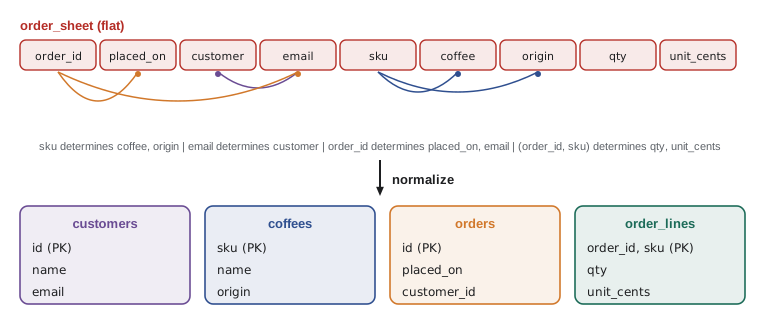
The normal forms are defined in terms of functional dependencies. Column B depends functionally on column A, written A determines B, when knowing A's value fixes B's value. In Theo's sheet, sku determines coffee and origin: every row with RC-101 should say Sunrise Blend and Blend. email determines customer. order_id determines placed_on and the customer. And the pair (order_id, sku) determines qty and unit_cents, because those are facts about one line of one order.
Dependencies come from the meaning of the data, not from whatever values happen to be in the table today. Rosa can tell you that an SKU always identifies one coffee; the data can only fail to contradict it. Listing the dependencies is the analytical heart of normalization: once you know what determines what, the right tables almost design themselves, one table per determinant, holding the columns it determines.
First normal form
A table is in first normal form (1NF) when every column holds a single, indivisible value, every row is unique and has a key, and there are no repeating groups of columns. Two common violations: a cell holding a list, such as 'RC-101, RC-104' for the coffees in an order, and numbered columns such as coffee1, qty1, coffee2, qty2, coffee3, qty3. Both make queries painful (how many bags of RC-104 sold, when it could be in any of three columns?) and both impose arbitrary limits (what about a fourth coffee?). The fix is always the same: one row per item, which is exactly how Theo's sheet already lists order lines, so it is in 1NF with the composite key (order_id, sku).
import sqlite3

con = sqlite3.connect(":memory:")
con.execute("CREATE TABLE bad_orders (order_id INTEGER, skus TEXT)")
con.execute("INSERT INTO bad_orders VALUES (501, 'RC-101,RC-104'), (502, 'RC-102'), (503, 'RC-101')")
# How many orders include RC-101? Pattern matching is fragile (RC-1011 would also match).
print(con.execute("SELECT COUNT(*) FROM bad_orders WHERE skus LIKE '%RC-101%'").fetchone()[0])

con.execute("CREATE TABLE order_lines (order_id INTEGER, sku TEXT, PRIMARY KEY (order_id, sku))")
for order_id, skus in con.execute("SELECT order_id, skus FROM bad_orders").fetchall():
    con.executemany("INSERT INTO order_lines VALUES (?, ?)", [(order_id, s) for s in skus.split(",")])
print(con.execute("SELECT COUNT(*) FROM order_lines WHERE sku = 'RC-101'").fetchone()[0])
print(con.execute("SELECT * FROM order_lines ORDER BY order_id, sku").fetchall())2 2 [(501, 'RC-101'), (501, 'RC-104'), (502, 'RC-102'), (503, 'RC-101')]
Second normal form
A table is in second normal form (2NF) when it is in 1NF and every non-key column depends on the whole primary key, not on just part of it. This only matters for composite keys. Theo's sheet has the key (order_id, sku), but coffee and origin depend on sku alone, and placed_on, customer and email depend on order_id alone. Those partial dependencies are exactly what repeats the coffee's name on every line that sells it and the customer's details on every line of their order.
To reach 2NF, move each group of partially dependent columns into a table keyed by the part they depend on. Coffee facts go to a coffees table keyed by sku; order facts go to an orders table keyed by order_id. What remains in the order lines table, qty and unit_cents, depends on the whole key (order_id, sku). One subtlety: unit_cents stays on the line even though the coffee has a price, because the line records the price charged on that order, a fact about the line, as lesson 6 explained.
Third normal form
A table is in third normal form (3NF) when it is in 2NF and no non-key column depends on another non-key column. Such a chain is called a transitive dependency. After the 2NF split, the orders table holds order_id, placed_on, customer and email. Here order_id determines email, and email determines customer: the customer's name depends on the order only through the email. So the name is still repeated on every order the customer places. Moving customer facts into their own customers table, and keeping only a reference to the customer in orders, removes the chain.
A memorable summary, often quoted, is that every non-key column must depend on the key, the whole key, and nothing but the key. The first part is 1NF (there is a key), the second is 2NF, and the third is 3NF. Normal forms beyond the third exist, Boyce-Codd normal form, fourth and fifth, but they deal with rarer situations, and a design in 3NF is generally regarded as well normalized for business data.
import sqlite3

con = sqlite3.connect(":memory:")
con.executescript("""
CREATE TABLE order_sheet (
    order_id INTEGER, placed_on TEXT, customer TEXT, email TEXT,
    sku TEXT, coffee TEXT, origin TEXT, qty INTEGER, unit_cents INTEGER
);
INSERT INTO order_sheet VALUES
    (501, '2026-11-08', 'Priya Natarajan', 'priya@example.com', 'RC-101', 'Sunrise Blend', 'Blend', 2, 1850),
    (501, '2026-11-08', 'Priya Natarajan', 'priya@example.com', 'RC-104', 'Sumatra Dark', 'Indonesia', 1, 2025),
    (502, '2026-11-08', 'Lena Fischer', 'lena@example.com', 'RC-102', 'Ethiopia Guji', 'Ethiopia', 1, 2200),
    (503, '2026-11-09', 'Priya Natarajan', 'priya.n@example.com', 'RC-101', 'Sunrise Blend', 'Blend', 1, 1850),
    (504, '2026-11-09', 'Marcus Bell', 'marcus@example.com', 'RC-101', 'Sunrise Blend ', 'Blend', 3, 1850);
""")
con.executescript("""
CREATE TABLE customers (id INTEGER PRIMARY KEY, name TEXT NOT NULL, email TEXT NOT NULL UNIQUE);
CREATE TABLE coffees (sku TEXT PRIMARY KEY, name TEXT NOT NULL, origin TEXT NOT NULL);
CREATE TABLE orders (id INTEGER PRIMARY KEY, placed_on TEXT NOT NULL,
                     customer_id INTEGER NOT NULL REFERENCES customers (id));
CREATE TABLE order_lines (order_id INTEGER REFERENCES orders (id), sku TEXT REFERENCES coffees (sku),
                          qty INTEGER NOT NULL, unit_cents INTEGER NOT NULL, PRIMARY KEY (order_id, sku));

-- One row per distinct fact, cleaning up the copies as we go.
INSERT INTO coffees SELECT sku, trim(min(coffee)), min(origin) FROM order_sheet GROUP BY sku;
INSERT INTO customers (name, email) SELECT DISTINCT customer, email FROM order_sheet;
INSERT INTO orders SELECT DISTINCT o.order_id, o.placed_on, c.id
                   FROM order_sheet AS o JOIN customers AS c ON c.email = o.email;
INSERT INTO order_lines SELECT order_id, sku, qty, unit_cents FROM order_sheet;
""")
for table in ("customers", "coffees", "orders", "order_lines"):
    print(table, con.execute(f"SELECT COUNT(*) FROM {table}").fetchone()[0], "rows")
print(con.execute("SELECT * FROM coffees").fetchall())
print(con.execute("SELECT name, email FROM customers WHERE name LIKE 'Priya%'").fetchall())customers 4 rows
coffees 3 rows
orders 4 rows
order_lines 5 rows
[('RC-101', 'Sunrise Blend', 'Blend'), ('RC-102', 'Ethiopia Guji', 'Ethiopia'), ('RC-104', 'Sumatra Dark', 'Indonesia')]
[('Priya Natarajan', 'priya@example.com'), ('Priya Natarajan', 'priya.n@example.com')]INSERT ... SELECT fills a table from the result of a query, which is the standard way to restructure data inside a database. The coffees query groups by sku and uses trim to remove the stray space, so each coffee appears once with one clean name. The customers table, however, now holds two Priyas, because the sheet gave her two email addresses and the database cannot know they are the same person. Normalization makes this visible but cannot fix it; someone has to decide which email is right and merge the two customer rows. Finding and repairing that kind of problem is called data cleaning, and it is a large part of every real migration from spreadsheets.
Try it yourself
Spot the update anomaly
The table order_sheet holds Theo's flat spreadsheet. Set conflicts to a sorted list of the SKUs that appear with more than one different coffee name. Compare names exactly as stored; a stray space counts as a difference.
Use GROUP BY with HAVING COUNT(DISTINCT coffee) > 1.
conflicts = [r[0] for r in con.execute('SELECT DISTINCT sku FROM order_sheet ORDER BY sku')]
print(conflicts)
Getting the flat view back: joins and views
Normalizing splits data apart, and joins put it back together for reading. Because people often want to see orders in the old flat shape, a database can store a query under a name as a view. A view behaves like a read-only table: you can SELECT from it, join it and filter it, but it stores no data of its own, so it is always up to date with the tables underneath. Views give users the convenience of the spreadsheet with none of its anomalies.
import sqlite3

con = sqlite3.connect(":memory:")
con.executescript("""CREATE TABLE coffees (
    sku         TEXT PRIMARY KEY,
    name        TEXT NOT NULL,
    origin      TEXT NOT NULL,
    roast       TEXT NOT NULL CHECK (roast IN ('light', 'medium', 'dark')),
    price_cents INTEGER NOT NULL CHECK (price_cents > 0),
    stock       INTEGER NOT NULL DEFAULT 0 CHECK (stock >= 0)
);
CREATE TABLE customers (
    id     INTEGER PRIMARY KEY,
    name   TEXT NOT NULL,
    email  TEXT NOT NULL UNIQUE,
    points INTEGER NOT NULL DEFAULT 0
);
CREATE TABLE sales (
    id          INTEGER PRIMARY KEY,
    sold_on     TEXT NOT NULL,
    channel     TEXT NOT NULL CHECK (channel IN ('cafe', 'online')),
    sku         TEXT NOT NULL REFERENCES coffees (sku),
    customer_id INTEGER REFERENCES customers (id),
    qty         INTEGER NOT NULL CHECK (qty > 0),
    price_cents INTEGER NOT NULL
);
CREATE TABLE roasts (
    batch      TEXT PRIMARY KEY,
    roasted_on TEXT NOT NULL,
    sku        TEXT NOT NULL REFERENCES coffees (sku),
    green_kg   REAL NOT NULL,
    roasted_kg REAL NOT NULL,
    minutes    REAL NOT NULL
);
INSERT INTO coffees VALUES
    ('RC-101', 'Sunrise Blend', 'Blend', 'medium', 1850, 42),
    ('RC-102', 'Ethiopia Guji', 'Ethiopia', 'light', 2200, 15),
    ('RC-103', 'Colombia Huila', 'Colombia', 'medium', 1975, 27),
    ('RC-104', 'Sumatra Dark', 'Indonesia', 'dark', 2025, 9),
    ('RC-105', 'Decaf Swiss Water', 'Mexico', 'medium', 1900, 12),
    ('RC-106', 'Espresso Ridge', 'Blend', 'dark', 2150, 30);
INSERT INTO customers VALUES
    (1, 'Priya Natarajan', 'priya@example.com', 140),
    (2, 'Marcus Bell', 'marcus@example.com', 35),
    (3, 'Lena Fischer', 'lena@example.com', 320),
    (4, 'Omar Haddad', 'omar@example.com', 0),
    (5, 'Grace Kim', 'grace@example.com', 95);
INSERT INTO sales VALUES
    (1, '2026-11-02', 'cafe', 'RC-101', 1, 2, 1850),
    (2, '2026-11-02', 'online', 'RC-102', 3, 1, 2200),
    (3, '2026-11-02', 'cafe', 'RC-106', NULL, 1, 2150),
    (4, '2026-11-03', 'online', 'RC-103', 2, 3, 1975),
    (5, '2026-11-03', 'cafe', 'RC-101', NULL, 1, 1850),
    (6, '2026-11-03', 'online', 'RC-104', 3, 2, 2025),
    (7, '2026-11-04', 'cafe', 'RC-105', 5, 1, 1900),
    (8, '2026-11-04', 'online', 'RC-101', 1, 1, 1850),
    (9, '2026-11-04', 'cafe', 'RC-106', 2, 2, 2150),
    (10, '2026-11-05', 'online', 'RC-102', 5, 2, 2200),
    (11, '2026-11-05', 'cafe', 'RC-103', NULL, 1, 1975),
    (12, '2026-11-06', 'online', 'RC-106', 3, 1, 2150),
    (13, '2026-11-06', 'cafe', 'RC-101', 1, 3, 1850),
    (14, '2026-11-06', 'online', 'RC-104', NULL, 1, 2025);
INSERT INTO roasts VALUES
    ('B-0412', '2026-10-28', 'RC-101', 12.0, 10.2, 13.5),
    ('B-0413', '2026-10-29', 'RC-106', 12.0, 10.1, 14.0),
    ('B-0414', '2026-10-30', 'RC-102', 9.0, 7.7, 11.75),
    ('B-0415', '2026-10-31', 'RC-103', 12.0, 10.3, 12.5),
    ('B-0416', '2026-11-01', 'RC-104', 6.0, 5.0, 15.0),
    ('B-0417', '2026-11-02', 'RC-101', 12.0, 10.2, 13.25);""")

con.execute("""
    CREATE VIEW sales_report AS
    SELECT s.id, s.sold_on, s.channel, c.name AS coffee, c.origin,
           coalesce(cu.name, 'walk-in') AS customer, s.qty, s.qty * s.price_cents AS cents
    FROM sales AS s
    JOIN coffees AS c ON c.sku = s.sku
    LEFT JOIN customers AS cu ON cu.id = s.customer_id
""")
for row in con.execute("SELECT * FROM sales_report WHERE origin = 'Ethiopia'"):
    print(row)
con.execute("UPDATE coffees SET name = 'Ethiopia Guji Natural' WHERE sku = 'RC-102'")   # one change...
print(con.execute("SELECT DISTINCT coffee FROM sales_report WHERE origin = 'Ethiopia'").fetchall())(2, '2026-11-02', 'online', 'Ethiopia Guji', 'Ethiopia', 'Lena Fischer', 1, 2200)
(10, '2026-11-05', 'online', 'Ethiopia Guji', 'Ethiopia', 'Grace Kim', 2, 4400)
[('Ethiopia Guji Natural',)]The rename touched one row in coffees, and every sale in the view shows the new name immediately. That is the update anomaly solved: the coffee's name is stored once, so it can only be changed once.
Try it yourself
A view of order totals
The sample database is open as con. Create a view named customer_totals with columns customer (the customer's name) and spent_cents (their total qty * price_cents across all sales), one row per customer who has bought something.
Then set top to the first row of SELECT * FROM customer_totals ORDER BY spent_cents DESC.
con.execute('CREATE VIEW customer_totals AS SELECT customer_id, qty FROM sales')
top = con.execute('SELECT * FROM customer_totals').fetchone()
When to denormalize
Normalization optimizes for correct, consistent data that is easy to change. Occasionally a design deliberately stores a fact twice, called denormalization, to make an important query faster or simpler. Order lines copying the price charged is one example that is not really denormalization at all, since the price charged is a different fact from the current price. A genuine example would be storing an order's total on the orders row instead of summing its lines each time, so the order history page loads quickly.
Denormalize only for a measured reason, and when you do, make the database or a single piece of code responsible for keeping the copies in step, for example by updating the total in the same transaction that changes the lines. Analytical databases and data warehouses denormalize heavily, into wide tables designed for reading, because their data is loaded in batches rather than edited row by row. For the everyday operational data of a business like Ridgeline, start normalized.
Worked problem
Normalizing a roast log
Kai's roast spreadsheet has columns batch, roasted_on, sku, coffee, origin, roaster_name, roaster_phone, green_kg, roasted_kg. Batch identifies a row; each batch uses one coffee and one roaster machine; the phone belongs to the roaster's service contact. Normalize it to 3NF.
Show solution
- Key: batch. Dependencies: batch determines roasted_on, sku, roaster_name, green_kg, roasted_kg.
- sku determines coffee and origin: a transitive dependency (batch to sku to coffee). Move them to coffees (sku, name, origin).
- roaster_name determines roaster_phone: another transitive dependency. Move it to roasters (name, phone).
- What remains: roasts (batch, roasted_on, sku, roaster_name, green_kg, roasted_kg), with sku and roaster_name as foreign keys.
Answer: Three tables: coffees (sku, name, origin), roasters (name, phone) and roasts (batch, roasted_on, sku, roaster_name, green_kg, roasted_kg).
Common mistakes
MistakeStoring a customer's or coffee's details on every order row.
InsteadStore each fact once in its own table and refer to it by key.
MistakePutting lists in a cell or using numbered columns such as coffee1, coffee2.
InsteadUse one row per item (1NF).
MistakeDeciding dependencies from today's data alone.
InsteadDecide them from the meaning of the data, confirmed by the people who know the business.
MistakeAssuming normalization cleans dirty data.
InsteadIt exposes duplicates; merging them is a separate data-cleaning step.
MistakeDenormalizing by habit for speed.
InsteadNormalize first; denormalize only for a measured need, keeping copies in step in one place.
MistakeRecreating flat reports with copy-paste queries everywhere.
InsteadDefine a view once and query it.
Summary and key terms
- Storing a fact in several places causes update, insertion and deletion anomalies.
- A functional dependency A determines B means knowing A fixes B; dependencies come from the meaning of the data.
- 1NF: single values in each cell, no repeating groups, and a key.
- 2NF: no non-key column depends on only part of a composite key.
- 3NF: no non-key column depends on another non-key column.
- INSERT ... SELECT restructures data inside the database; normalization exposes duplicates but cannot merge them.
- Views store a query under a name, giving users a flat, always-current picture of normalized tables.
- Denormalize only for a measured reason, keeping the copies consistent in one place.
- normalization
- Organizing tables so that each fact is stored once.
- update anomaly
- Inconsistency caused by changing one copy of a repeated fact but not the others.
- insertion anomaly
- Being unable to record one fact without recording another.
- deletion anomaly
- Losing one fact by deleting a row that held another.
- functional dependency
- A relationship where one column's value determines another's.
- first normal form
- Every cell holds a single value, with no repeating groups and a key.
- second normal form
- 1NF with no partial dependencies on a composite key.
- third normal form
- 2NF with no transitive dependencies between non-key columns.
- view
- A stored query that can be selected from like a table.
- denormalization
- Deliberately storing a fact more than once for performance or simplicity.
Practice problems
Work each problem on paper first, then reveal the answer to check.
In a sheet keyed by (order_id, sku), coffee depends on sku alone. Which normal form does this break?
Show answer
Second normal form: a partial dependency.
orders(id, customer_email, customer_name) has id determining email, and email determining name. Which normal form is broken?
Show answer
Third normal form: a transitive dependency.
Give an example of a deletion anomaly in the flat sheet.
Show answer
Deleting Lena's only order also deletes the only record of her email.
Why does a view never show stale data?
Show answer
It stores only the query, which runs against the current tables each time.
A table has columns phone1, phone2, phone3. What is wrong, and how is it fixed?
Show answer
A repeating group (1NF); use a separate phones table with one row per number.
Name one legitimate reason to denormalize.
Show answer
A measured performance need, such as storing order totals for a busy page.
Lesson quiz · 5 questions
Score 60% or more to complete this lesson.
Create a free account to save your progress, take quizzes and earn a certificate.