
PYTH-215 · Lesson 4 of 12 · 43 min
Filtering, sorting and grouping
▶ Video coming soon A video version of this lesson is on the way.
Anita's end-of-week questions are typical of what people ask a database. Which online sales over 40.00 happened this week? What did each coffee earn? Which day was busiest? Which coffees sold fewer than three bags and might need a promotion? Each of these takes a few lines of SQL, and each would take a dozen lines of loops, dictionaries and sorting in Python.
This lesson adds the clauses that make SELECT genuinely useful. WHERE keeps the rows you want, ORDER BY puts them in order, aggregate functions summarize many rows into one value, GROUP BY produces one summary per group, and HAVING filters those groups. Together they cover the large majority of everyday reporting.
WHERE keeps matching rows
WHERE takes a condition and keeps only the rows for which it is true. Conditions compare values with =, <> (not equal; != also works in SQLite), <, <=, > and >=, and combine with AND, OR and NOT. As in Python, AND binds more tightly than OR, so use parentheses whenever a condition mixes the two; they cost nothing and prevent a classic mistake where OR quietly widens a filter.
import sqlite3

con = sqlite3.connect(":memory:")
con.executescript("""CREATE TABLE coffees (
    sku         TEXT PRIMARY KEY,
    name        TEXT NOT NULL,
    origin      TEXT NOT NULL,
    roast       TEXT NOT NULL CHECK (roast IN ('light', 'medium', 'dark')),
    price_cents INTEGER NOT NULL CHECK (price_cents > 0),
    stock       INTEGER NOT NULL DEFAULT 0 CHECK (stock >= 0)
);
CREATE TABLE customers (
    id     INTEGER PRIMARY KEY,
    name   TEXT NOT NULL,
    email  TEXT NOT NULL UNIQUE,
    points INTEGER NOT NULL DEFAULT 0
);
CREATE TABLE sales (
    id          INTEGER PRIMARY KEY,
    sold_on     TEXT NOT NULL,
    channel     TEXT NOT NULL CHECK (channel IN ('cafe', 'online')),
    sku         TEXT NOT NULL REFERENCES coffees (sku),
    customer_id INTEGER REFERENCES customers (id),
    qty         INTEGER NOT NULL CHECK (qty > 0),
    price_cents INTEGER NOT NULL
);
CREATE TABLE roasts (
    batch      TEXT PRIMARY KEY,
    roasted_on TEXT NOT NULL,
    sku        TEXT NOT NULL REFERENCES coffees (sku),
    green_kg   REAL NOT NULL,
    roasted_kg REAL NOT NULL,
    minutes    REAL NOT NULL
);
INSERT INTO coffees VALUES
    ('RC-101', 'Sunrise Blend', 'Blend', 'medium', 1850, 42),
    ('RC-102', 'Ethiopia Guji', 'Ethiopia', 'light', 2200, 15),
    ('RC-103', 'Colombia Huila', 'Colombia', 'medium', 1975, 27),
    ('RC-104', 'Sumatra Dark', 'Indonesia', 'dark', 2025, 9),
    ('RC-105', 'Decaf Swiss Water', 'Mexico', 'medium', 1900, 12),
    ('RC-106', 'Espresso Ridge', 'Blend', 'dark', 2150, 30);
INSERT INTO customers VALUES
    (1, 'Priya Natarajan', 'priya@example.com', 140),
    (2, 'Marcus Bell', 'marcus@example.com', 35),
    (3, 'Lena Fischer', 'lena@example.com', 320),
    (4, 'Omar Haddad', 'omar@example.com', 0),
    (5, 'Grace Kim', 'grace@example.com', 95);
INSERT INTO sales VALUES
    (1, '2026-11-02', 'cafe', 'RC-101', 1, 2, 1850),
    (2, '2026-11-02', 'online', 'RC-102', 3, 1, 2200),
    (3, '2026-11-02', 'cafe', 'RC-106', NULL, 1, 2150),
    (4, '2026-11-03', 'online', 'RC-103', 2, 3, 1975),
    (5, '2026-11-03', 'cafe', 'RC-101', NULL, 1, 1850),
    (6, '2026-11-03', 'online', 'RC-104', 3, 2, 2025),
    (7, '2026-11-04', 'cafe', 'RC-105', 5, 1, 1900),
    (8, '2026-11-04', 'online', 'RC-101', 1, 1, 1850),
    (9, '2026-11-04', 'cafe', 'RC-106', 2, 2, 2150),
    (10, '2026-11-05', 'online', 'RC-102', 5, 2, 2200),
    (11, '2026-11-05', 'cafe', 'RC-103', NULL, 1, 1975),
    (12, '2026-11-06', 'online', 'RC-106', 3, 1, 2150),
    (13, '2026-11-06', 'cafe', 'RC-101', 1, 3, 1850),
    (14, '2026-11-06', 'online', 'RC-104', NULL, 1, 2025);
INSERT INTO roasts VALUES
    ('B-0412', '2026-10-28', 'RC-101', 12.0, 10.2, 13.5),
    ('B-0413', '2026-10-29', 'RC-106', 12.0, 10.1, 14.0),
    ('B-0414', '2026-10-30', 'RC-102', 9.0, 7.7, 11.75),
    ('B-0415', '2026-10-31', 'RC-103', 12.0, 10.3, 12.5),
    ('B-0416', '2026-11-01', 'RC-104', 6.0, 5.0, 15.0),
    ('B-0417', '2026-11-02', 'RC-101', 12.0, 10.2, 13.25);""")

q = "SELECT id, sold_on, channel, qty * price_cents AS cents FROM sales WHERE {} ORDER BY id"

print(con.execute(q.format("channel = 'online' AND qty * price_cents > 4000")).fetchall())

# Without parentheses, AND binds first: (online AND RC-102) OR RC-101 - not what was meant.
print(len(con.execute(q.format("channel = 'online' AND sku = 'RC-102' OR sku = 'RC-101'")).fetchall()), "rows")
print(len(con.execute(q.format("channel = 'online' AND (sku = 'RC-102' OR sku = 'RC-101')")).fetchall()), "rows")[(4, '2026-11-03', 'online', 5925), (6, '2026-11-03', 'online', 4050), (10, '2026-11-05', 'online', 4400)] 6 rows 3 rows
The first filter finds the three large online sales. The next two differ only in parentheses, yet one returns six rows and the other three: without parentheses, every RC-101 sale is included whatever its channel, because the condition reads as (online AND RC-102) OR RC-101. This listing fills in the WHERE condition with Python's str.format only because the conditions are fixed text written by the developer for demonstration. As lesson 3 stressed, values that come from users always go in parameters.
Convenient operators: IN, BETWEEN and LIKE
Three operators shorten common conditions. IN tests membership in a list, replacing a chain of ORs: sku IN ('RC-102', 'RC-104'). BETWEEN tests a range and includes both ends: sold_on BETWEEN '2026-11-03' AND '2026-11-05' works because ISO dates sort correctly as text. LIKE matches text against a pattern, where % stands for any run of characters and _ for exactly one character; in SQLite, LIKE ignores case for ASCII letters. All three can be negated with NOT, and IS NULL completes the set.
import sqlite3

con = sqlite3.connect(":memory:")
con.executescript("""CREATE TABLE coffees (
    sku         TEXT PRIMARY KEY,
    name        TEXT NOT NULL,
    origin      TEXT NOT NULL,
    roast       TEXT NOT NULL CHECK (roast IN ('light', 'medium', 'dark')),
    price_cents INTEGER NOT NULL CHECK (price_cents > 0),
    stock       INTEGER NOT NULL DEFAULT 0 CHECK (stock >= 0)
);
CREATE TABLE customers (
    id     INTEGER PRIMARY KEY,
    name   TEXT NOT NULL,
    email  TEXT NOT NULL UNIQUE,
    points INTEGER NOT NULL DEFAULT 0
);
CREATE TABLE sales (
    id          INTEGER PRIMARY KEY,
    sold_on     TEXT NOT NULL,
    channel     TEXT NOT NULL CHECK (channel IN ('cafe', 'online')),
    sku         TEXT NOT NULL REFERENCES coffees (sku),
    customer_id INTEGER REFERENCES customers (id),
    qty         INTEGER NOT NULL CHECK (qty > 0),
    price_cents INTEGER NOT NULL
);
CREATE TABLE roasts (
    batch      TEXT PRIMARY KEY,
    roasted_on TEXT NOT NULL,
    sku        TEXT NOT NULL REFERENCES coffees (sku),
    green_kg   REAL NOT NULL,
    roasted_kg REAL NOT NULL,
    minutes    REAL NOT NULL
);
INSERT INTO coffees VALUES
    ('RC-101', 'Sunrise Blend', 'Blend', 'medium', 1850, 42),
    ('RC-102', 'Ethiopia Guji', 'Ethiopia', 'light', 2200, 15),
    ('RC-103', 'Colombia Huila', 'Colombia', 'medium', 1975, 27),
    ('RC-104', 'Sumatra Dark', 'Indonesia', 'dark', 2025, 9),
    ('RC-105', 'Decaf Swiss Water', 'Mexico', 'medium', 1900, 12),
    ('RC-106', 'Espresso Ridge', 'Blend', 'dark', 2150, 30);
INSERT INTO customers VALUES
    (1, 'Priya Natarajan', 'priya@example.com', 140),
    (2, 'Marcus Bell', 'marcus@example.com', 35),
    (3, 'Lena Fischer', 'lena@example.com', 320),
    (4, 'Omar Haddad', 'omar@example.com', 0),
    (5, 'Grace Kim', 'grace@example.com', 95);
INSERT INTO sales VALUES
    (1, '2026-11-02', 'cafe', 'RC-101', 1, 2, 1850),
    (2, '2026-11-02', 'online', 'RC-102', 3, 1, 2200),
    (3, '2026-11-02', 'cafe', 'RC-106', NULL, 1, 2150),
    (4, '2026-11-03', 'online', 'RC-103', 2, 3, 1975),
    (5, '2026-11-03', 'cafe', 'RC-101', NULL, 1, 1850),
    (6, '2026-11-03', 'online', 'RC-104', 3, 2, 2025),
    (7, '2026-11-04', 'cafe', 'RC-105', 5, 1, 1900),
    (8, '2026-11-04', 'online', 'RC-101', 1, 1, 1850),
    (9, '2026-11-04', 'cafe', 'RC-106', 2, 2, 2150),
    (10, '2026-11-05', 'online', 'RC-102', 5, 2, 2200),
    (11, '2026-11-05', 'cafe', 'RC-103', NULL, 1, 1975),
    (12, '2026-11-06', 'online', 'RC-106', 3, 1, 2150),
    (13, '2026-11-06', 'cafe', 'RC-101', 1, 3, 1850),
    (14, '2026-11-06', 'online', 'RC-104', NULL, 1, 2025);
INSERT INTO roasts VALUES
    ('B-0412', '2026-10-28', 'RC-101', 12.0, 10.2, 13.5),
    ('B-0413', '2026-10-29', 'RC-106', 12.0, 10.1, 14.0),
    ('B-0414', '2026-10-30', 'RC-102', 9.0, 7.7, 11.75),
    ('B-0415', '2026-10-31', 'RC-103', 12.0, 10.3, 12.5),
    ('B-0416', '2026-11-01', 'RC-104', 6.0, 5.0, 15.0),
    ('B-0417', '2026-11-02', 'RC-101', 12.0, 10.2, 13.25);""")

print(con.execute("SELECT name FROM coffees WHERE origin IN ('Ethiopia', 'Mexico')").fetchall())
print(con.execute("SELECT id FROM sales WHERE sold_on BETWEEN '2026-11-03' AND '2026-11-04'").fetchall())
print(con.execute("SELECT name FROM coffees WHERE name LIKE '%blend%'").fetchall())
print(con.execute("SELECT name FROM coffees WHERE name NOT LIKE '%a%'").fetchall())

term = "ridge"                                      # a search box: wildcards added in Python
print(con.execute("SELECT name FROM coffees WHERE name LIKE ?", (f"%{term}%",)).fetchall())[('Ethiopia Guji',), ('Decaf Swiss Water',)]
[(4,), (5,), (6,), (7,), (8,), (9,)]
[('Sunrise Blend',)]
[('Sunrise Blend',), ('Espresso Ridge',)]
[('Espresso Ridge',)]In the search example, the % wildcards are added to the value in Python and the whole pattern is passed as a parameter, which keeps the query safe. A search term containing % or _ would act as a wildcard; for strict matching, SQLite's LIKE accepts an ESCAPE clause, or you can use instr(name, ?) > 0 to find a plain substring.
Try it yourself
Filter the week's sales
Set rows to the id values (plain integers, in id order) of the sales that were made on 2026-11-03 through 2026-11-05 inclusive, through the cafe, for the coffees RC-101 or RC-106.
Use BETWEEN for the dates and IN for the coffees.
sql = "SELECT id FROM sales WHERE channel = 'cafe' AND sku = 'RC-101' OR sku = 'RC-106' ORDER BY id"
rows = [r[0] for r in con.execute(sql)]
print(rows)
ORDER BY sorts the result
ORDER BY lists one or more sort keys. Each sorts ascending by default; add DESC to sort descending. Later keys break ties in earlier ones, so ORDER BY roast, price_cents DESC sorts by roast and, within each roast, most expensive first. You can sort by columns, by expressions, by aliases from the SELECT list, and even by columns you do not select. NULLs sort first in ascending order in SQLite (PostgreSQL puts them last), and standard SQL lets you choose with NULLS FIRST or NULLS LAST, which recent versions of SQLite support too.
import sqlite3

con = sqlite3.connect(":memory:")
con.executescript("""
CREATE TABLE coffees (sku TEXT PRIMARY KEY, name TEXT NOT NULL, origin TEXT NOT NULL,
                      roast TEXT NOT NULL, price_cents INTEGER NOT NULL, stock INTEGER NOT NULL);
INSERT INTO coffees VALUES
    ('RC-101', 'Sunrise Blend', 'Blend', 'medium', 1850, 42),
    ('RC-102', 'Ethiopia Guji', 'Ethiopia', 'light', 2200, 15),
    ('RC-103', 'Colombia Huila', 'Colombia', 'medium', 1975, 27),
    ('RC-104', 'Sumatra Dark', 'Indonesia', 'dark', 2025, 9),
    ('RC-105', 'Decaf Swiss Water', 'Mexico', 'medium', 1900, 12),
    ('RC-106', 'Espresso Ridge', 'Blend', 'dark', 2150, 30);
""")

for row in con.execute("SELECT roast, name, price_cents FROM coffees ORDER BY roast, price_cents DESC"):
    print(row)
print(con.execute("SELECT name FROM coffees ORDER BY length(name) DESC, name LIMIT 2").fetchall())('dark', 'Espresso Ridge', 2150)
('dark', 'Sumatra Dark', 2025)
('light', 'Ethiopia Guji', 2200)
('medium', 'Colombia Huila', 1975)
('medium', 'Decaf Swiss Water', 1900)
('medium', 'Sunrise Blend', 1850)
[('Decaf Swiss Water',), ('Colombia Huila',)]Remember that without ORDER BY a database may return rows in any order, and the order you happen to see today can change after an update or an index is added. If anything depends on the order, such as a report, a page of results or a test, say so in the query. A common habit is to add the primary key as the final sort key, which makes the order fully determined even when the other keys tie.
Aggregate functions
Aggregate functions compute one value from many rows. COUNT counts them, SUM adds, AVG averages, and MIN and MAX find the smallest and largest. Without GROUP BY, an aggregate summarizes the whole table, or every row that passed WHERE, and the query returns a single row. As lesson 2 showed, aggregates skip NULLs, and COUNT(*) counts rows while COUNT(column) counts non-NULL values.
import sqlite3

con = sqlite3.connect(":memory:")
con.executescript("""CREATE TABLE coffees (
    sku         TEXT PRIMARY KEY,
    name        TEXT NOT NULL,
    origin      TEXT NOT NULL,
    roast       TEXT NOT NULL CHECK (roast IN ('light', 'medium', 'dark')),
    price_cents INTEGER NOT NULL CHECK (price_cents > 0),
    stock       INTEGER NOT NULL DEFAULT 0 CHECK (stock >= 0)
);
CREATE TABLE customers (
    id     INTEGER PRIMARY KEY,
    name   TEXT NOT NULL,
    email  TEXT NOT NULL UNIQUE,
    points INTEGER NOT NULL DEFAULT 0
);
CREATE TABLE sales (
    id          INTEGER PRIMARY KEY,
    sold_on     TEXT NOT NULL,
    channel     TEXT NOT NULL CHECK (channel IN ('cafe', 'online')),
    sku         TEXT NOT NULL REFERENCES coffees (sku),
    customer_id INTEGER REFERENCES customers (id),
    qty         INTEGER NOT NULL CHECK (qty > 0),
    price_cents INTEGER NOT NULL
);
CREATE TABLE roasts (
    batch      TEXT PRIMARY KEY,
    roasted_on TEXT NOT NULL,
    sku        TEXT NOT NULL REFERENCES coffees (sku),
    green_kg   REAL NOT NULL,
    roasted_kg REAL NOT NULL,
    minutes    REAL NOT NULL
);
INSERT INTO coffees VALUES
    ('RC-101', 'Sunrise Blend', 'Blend', 'medium', 1850, 42),
    ('RC-102', 'Ethiopia Guji', 'Ethiopia', 'light', 2200, 15),
    ('RC-103', 'Colombia Huila', 'Colombia', 'medium', 1975, 27),
    ('RC-104', 'Sumatra Dark', 'Indonesia', 'dark', 2025, 9),
    ('RC-105', 'Decaf Swiss Water', 'Mexico', 'medium', 1900, 12),
    ('RC-106', 'Espresso Ridge', 'Blend', 'dark', 2150, 30);
INSERT INTO customers VALUES
    (1, 'Priya Natarajan', 'priya@example.com', 140),
    (2, 'Marcus Bell', 'marcus@example.com', 35),
    (3, 'Lena Fischer', 'lena@example.com', 320),
    (4, 'Omar Haddad', 'omar@example.com', 0),
    (5, 'Grace Kim', 'grace@example.com', 95);
INSERT INTO sales VALUES
    (1, '2026-11-02', 'cafe', 'RC-101', 1, 2, 1850),
    (2, '2026-11-02', 'online', 'RC-102', 3, 1, 2200),
    (3, '2026-11-02', 'cafe', 'RC-106', NULL, 1, 2150),
    (4, '2026-11-03', 'online', 'RC-103', 2, 3, 1975),
    (5, '2026-11-03', 'cafe', 'RC-101', NULL, 1, 1850),
    (6, '2026-11-03', 'online', 'RC-104', 3, 2, 2025),
    (7, '2026-11-04', 'cafe', 'RC-105', 5, 1, 1900),
    (8, '2026-11-04', 'online', 'RC-101', 1, 1, 1850),
    (9, '2026-11-04', 'cafe', 'RC-106', 2, 2, 2150),
    (10, '2026-11-05', 'online', 'RC-102', 5, 2, 2200),
    (11, '2026-11-05', 'cafe', 'RC-103', NULL, 1, 1975),
    (12, '2026-11-06', 'online', 'RC-106', 3, 1, 2150),
    (13, '2026-11-06', 'cafe', 'RC-101', 1, 3, 1850),
    (14, '2026-11-06', 'online', 'RC-104', NULL, 1, 2025);
INSERT INTO roasts VALUES
    ('B-0412', '2026-10-28', 'RC-101', 12.0, 10.2, 13.5),
    ('B-0413', '2026-10-29', 'RC-106', 12.0, 10.1, 14.0),
    ('B-0414', '2026-10-30', 'RC-102', 9.0, 7.7, 11.75),
    ('B-0415', '2026-10-31', 'RC-103', 12.0, 10.3, 12.5),
    ('B-0416', '2026-11-01', 'RC-104', 6.0, 5.0, 15.0),
    ('B-0417', '2026-11-02', 'RC-101', 12.0, 10.2, 13.25);""")

row = con.execute("""
    SELECT COUNT(*), SUM(qty), SUM(qty * price_cents) / 100.0,
           MIN(sold_on), MAX(sold_on), round(AVG(qty), 2)
    FROM sales
""").fetchone()
print(row)
print(con.execute("SELECT COUNT(*), SUM(qty) FROM sales WHERE channel = 'online'").fetchone())(14, 22, 440.25, '2026-11-02', '2026-11-06', 1.57) (7, 11)
GROUP BY: one summary per group
GROUP BY splits the rows into groups that share the same values in the listed columns, and the aggregates are computed separately for each group. GROUP BY sku gives one result row per coffee; GROUP BY sold_on gives one per day; GROUP BY sold_on, channel gives one per day and channel. Conceptually, the database sorts the rows into piles, one per group, and reduces each pile to one row.
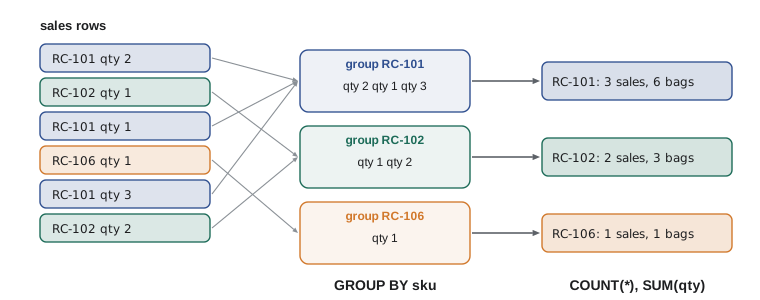
import sqlite3

con = sqlite3.connect(":memory:")
con.executescript("""CREATE TABLE coffees (
    sku         TEXT PRIMARY KEY,
    name        TEXT NOT NULL,
    origin      TEXT NOT NULL,
    roast       TEXT NOT NULL CHECK (roast IN ('light', 'medium', 'dark')),
    price_cents INTEGER NOT NULL CHECK (price_cents > 0),
    stock       INTEGER NOT NULL DEFAULT 0 CHECK (stock >= 0)
);
CREATE TABLE customers (
    id     INTEGER PRIMARY KEY,
    name   TEXT NOT NULL,
    email  TEXT NOT NULL UNIQUE,
    points INTEGER NOT NULL DEFAULT 0
);
CREATE TABLE sales (
    id          INTEGER PRIMARY KEY,
    sold_on     TEXT NOT NULL,
    channel     TEXT NOT NULL CHECK (channel IN ('cafe', 'online')),
    sku         TEXT NOT NULL REFERENCES coffees (sku),
    customer_id INTEGER REFERENCES customers (id),
    qty         INTEGER NOT NULL CHECK (qty > 0),
    price_cents INTEGER NOT NULL
);
CREATE TABLE roasts (
    batch      TEXT PRIMARY KEY,
    roasted_on TEXT NOT NULL,
    sku        TEXT NOT NULL REFERENCES coffees (sku),
    green_kg   REAL NOT NULL,
    roasted_kg REAL NOT NULL,
    minutes    REAL NOT NULL
);
INSERT INTO coffees VALUES
    ('RC-101', 'Sunrise Blend', 'Blend', 'medium', 1850, 42),
    ('RC-102', 'Ethiopia Guji', 'Ethiopia', 'light', 2200, 15),
    ('RC-103', 'Colombia Huila', 'Colombia', 'medium', 1975, 27),
    ('RC-104', 'Sumatra Dark', 'Indonesia', 'dark', 2025, 9),
    ('RC-105', 'Decaf Swiss Water', 'Mexico', 'medium', 1900, 12),
    ('RC-106', 'Espresso Ridge', 'Blend', 'dark', 2150, 30);
INSERT INTO customers VALUES
    (1, 'Priya Natarajan', 'priya@example.com', 140),
    (2, 'Marcus Bell', 'marcus@example.com', 35),
    (3, 'Lena Fischer', 'lena@example.com', 320),
    (4, 'Omar Haddad', 'omar@example.com', 0),
    (5, 'Grace Kim', 'grace@example.com', 95);
INSERT INTO sales VALUES
    (1, '2026-11-02', 'cafe', 'RC-101', 1, 2, 1850),
    (2, '2026-11-02', 'online', 'RC-102', 3, 1, 2200),
    (3, '2026-11-02', 'cafe', 'RC-106', NULL, 1, 2150),
    (4, '2026-11-03', 'online', 'RC-103', 2, 3, 1975),
    (5, '2026-11-03', 'cafe', 'RC-101', NULL, 1, 1850),
    (6, '2026-11-03', 'online', 'RC-104', 3, 2, 2025),
    (7, '2026-11-04', 'cafe', 'RC-105', 5, 1, 1900),
    (8, '2026-11-04', 'online', 'RC-101', 1, 1, 1850),
    (9, '2026-11-04', 'cafe', 'RC-106', 2, 2, 2150),
    (10, '2026-11-05', 'online', 'RC-102', 5, 2, 2200),
    (11, '2026-11-05', 'cafe', 'RC-103', NULL, 1, 1975),
    (12, '2026-11-06', 'online', 'RC-106', 3, 1, 2150),
    (13, '2026-11-06', 'cafe', 'RC-101', 1, 3, 1850),
    (14, '2026-11-06', 'online', 'RC-104', NULL, 1, 2025);
INSERT INTO roasts VALUES
    ('B-0412', '2026-10-28', 'RC-101', 12.0, 10.2, 13.5),
    ('B-0413', '2026-10-29', 'RC-106', 12.0, 10.1, 14.0),
    ('B-0414', '2026-10-30', 'RC-102', 9.0, 7.7, 11.75),
    ('B-0415', '2026-10-31', 'RC-103', 12.0, 10.3, 12.5),
    ('B-0416', '2026-11-01', 'RC-104', 6.0, 5.0, 15.0),
    ('B-0417', '2026-11-02', 'RC-101', 12.0, 10.2, 13.25);""")

query = """
    SELECT sku, COUNT(*) AS sales, SUM(qty) AS bags, SUM(qty * price_cents) / 100.0 AS revenue
    FROM sales
    GROUP BY sku
    ORDER BY revenue DESC
"""
for row in con.execute(query):
print(row)('RC-101', 4, 7, 129.5)
('RC-106', 3, 4, 86.0)
('RC-103', 2, 4, 79.0)
('RC-102', 2, 3, 66.0)
('RC-104', 2, 3, 60.75)
('RC-105', 1, 1, 19.0)One rule governs GROUP BY: every column in the SELECT list must either be one of the grouping columns or be inside an aggregate function. Asking for SELECT sku, sold_on, SUM(qty) ... GROUP BY sku makes no sense, because each group contains several dates; which one should appear? PostgreSQL and most databases reject such a query with an error. SQLite accepts it and returns a date from some row in the group, which hides the mistake, so it is worth knowing the rule even when SQLite does not enforce it.
Grouping by a computed value works too. Because dates are stored as ISO text, substr(sold_on, 1, 7) gives the year and month, so GROUP BY substr(sold_on, 1, 7) produces monthly totals. SQLite's strftime function extracts other parts of a date, such as the day of the week with strftime('%w', sold_on).
Try it yourself
Revenue by channel and day
Set rows to a list of (sold_on, channel, bags) tuples, one for each day and channel, where bags is the total quantity sold, ordered by day and then channel.
sql = "SELECT sold_on, channel, qty FROM sales ORDER BY sold_on"
rows = con.execute(sql).fetchall()
print(rows[:3])
HAVING filters groups
WHERE filters rows before they are grouped; HAVING filters groups after the aggregates are computed. To find coffees that sold fewer than three bags, the condition is on SUM(qty), which only exists once rows are grouped, so it belongs in HAVING. A query can use both: WHERE channel = 'online' keeps only online sales, GROUP BY sku groups them, and HAVING SUM(qty) >= 2 keeps the coffees with at least two online bags.
import sqlite3

con = sqlite3.connect(":memory:")
con.executescript("""CREATE TABLE coffees (
    sku         TEXT PRIMARY KEY,
    name        TEXT NOT NULL,
    origin      TEXT NOT NULL,
    roast       TEXT NOT NULL CHECK (roast IN ('light', 'medium', 'dark')),
    price_cents INTEGER NOT NULL CHECK (price_cents > 0),
    stock       INTEGER NOT NULL DEFAULT 0 CHECK (stock >= 0)
);
CREATE TABLE customers (
    id     INTEGER PRIMARY KEY,
    name   TEXT NOT NULL,
    email  TEXT NOT NULL UNIQUE,
    points INTEGER NOT NULL DEFAULT 0
);
CREATE TABLE sales (
    id          INTEGER PRIMARY KEY,
    sold_on     TEXT NOT NULL,
    channel     TEXT NOT NULL CHECK (channel IN ('cafe', 'online')),
    sku         TEXT NOT NULL REFERENCES coffees (sku),
    customer_id INTEGER REFERENCES customers (id),
    qty         INTEGER NOT NULL CHECK (qty > 0),
    price_cents INTEGER NOT NULL
);
CREATE TABLE roasts (
    batch      TEXT PRIMARY KEY,
    roasted_on TEXT NOT NULL,
    sku        TEXT NOT NULL REFERENCES coffees (sku),
    green_kg   REAL NOT NULL,
    roasted_kg REAL NOT NULL,
    minutes    REAL NOT NULL
);
INSERT INTO coffees VALUES
    ('RC-101', 'Sunrise Blend', 'Blend', 'medium', 1850, 42),
    ('RC-102', 'Ethiopia Guji', 'Ethiopia', 'light', 2200, 15),
    ('RC-103', 'Colombia Huila', 'Colombia', 'medium', 1975, 27),
    ('RC-104', 'Sumatra Dark', 'Indonesia', 'dark', 2025, 9),
    ('RC-105', 'Decaf Swiss Water', 'Mexico', 'medium', 1900, 12),
    ('RC-106', 'Espresso Ridge', 'Blend', 'dark', 2150, 30);
INSERT INTO customers VALUES
    (1, 'Priya Natarajan', 'priya@example.com', 140),
    (2, 'Marcus Bell', 'marcus@example.com', 35),
    (3, 'Lena Fischer', 'lena@example.com', 320),
    (4, 'Omar Haddad', 'omar@example.com', 0),
    (5, 'Grace Kim', 'grace@example.com', 95);
INSERT INTO sales VALUES
    (1, '2026-11-02', 'cafe', 'RC-101', 1, 2, 1850),
    (2, '2026-11-02', 'online', 'RC-102', 3, 1, 2200),
    (3, '2026-11-02', 'cafe', 'RC-106', NULL, 1, 2150),
    (4, '2026-11-03', 'online', 'RC-103', 2, 3, 1975),
    (5, '2026-11-03', 'cafe', 'RC-101', NULL, 1, 1850),
    (6, '2026-11-03', 'online', 'RC-104', 3, 2, 2025),
    (7, '2026-11-04', 'cafe', 'RC-105', 5, 1, 1900),
    (8, '2026-11-04', 'online', 'RC-101', 1, 1, 1850),
    (9, '2026-11-04', 'cafe', 'RC-106', 2, 2, 2150),
    (10, '2026-11-05', 'online', 'RC-102', 5, 2, 2200),
    (11, '2026-11-05', 'cafe', 'RC-103', NULL, 1, 1975),
    (12, '2026-11-06', 'online', 'RC-106', 3, 1, 2150),
    (13, '2026-11-06', 'cafe', 'RC-101', 1, 3, 1850),
    (14, '2026-11-06', 'online', 'RC-104', NULL, 1, 2025);
INSERT INTO roasts VALUES
    ('B-0412', '2026-10-28', 'RC-101', 12.0, 10.2, 13.5),
    ('B-0413', '2026-10-29', 'RC-106', 12.0, 10.1, 14.0),
    ('B-0414', '2026-10-30', 'RC-102', 9.0, 7.7, 11.75),
    ('B-0415', '2026-10-31', 'RC-103', 12.0, 10.3, 12.5),
    ('B-0416', '2026-11-01', 'RC-104', 6.0, 5.0, 15.0),
    ('B-0417', '2026-11-02', 'RC-101', 12.0, 10.2, 13.25);""")

slow = con.execute("""
    SELECT sku, SUM(qty) AS bags FROM sales
    GROUP BY sku
    HAVING SUM(qty) < 3
    ORDER BY bags
""").fetchall()
print("slow sellers:", slow)

online = con.execute("""
    SELECT sku, SUM(qty) AS bags FROM sales
    WHERE channel = 'online'
    GROUP BY sku
    HAVING bags >= 2
    ORDER BY sku
""").fetchall()
print("online, 2+ bags:", online)slow sellers: [('RC-105', 1)]
online, 2+ bags: [('RC-102', 3), ('RC-103', 3), ('RC-104', 3)]Coffees that sold nothing at all do not appear in either result, because there are no sales rows to group for them. Finding things that are missing, such as coffees with no sales, needs a join that keeps unmatched rows, which is exactly what lesson 5's LEFT JOIN provides. SQLite also lets HAVING refer to the alias bags, as the second query does; standard SQL and some databases require repeating the aggregate expression.
Try it yourself
Customers who spent the most
Using the sales table only, set big to a list of (customer_id, spent) tuples for customers whose total spending is at least 4000 cents, where spent is SUM(qty * price_cents).
Ignore walk-in sales (customer_id is NULL), and order by spent descending.
big = con.execute("SELECT customer_id, qty * price_cents FROM sales WHERE qty * price_cents >= 4000").fetchall()
print(big)
Putting the clauses together
Here is a single query that uses every clause from this lesson and the last, with the logical order of processing written beside it. Reading queries in this order, from FROM down, is the most reliable way to understand one written by someone else.
import sqlite3

con = sqlite3.connect(":memory:")
con.executescript("""CREATE TABLE coffees (
    sku         TEXT PRIMARY KEY,
    name        TEXT NOT NULL,
    origin      TEXT NOT NULL,
    roast       TEXT NOT NULL CHECK (roast IN ('light', 'medium', 'dark')),
    price_cents INTEGER NOT NULL CHECK (price_cents > 0),
    stock       INTEGER NOT NULL DEFAULT 0 CHECK (stock >= 0)
);
CREATE TABLE customers (
    id     INTEGER PRIMARY KEY,
    name   TEXT NOT NULL,
    email  TEXT NOT NULL UNIQUE,
    points INTEGER NOT NULL DEFAULT 0
);
CREATE TABLE sales (
    id          INTEGER PRIMARY KEY,
    sold_on     TEXT NOT NULL,
    channel     TEXT NOT NULL CHECK (channel IN ('cafe', 'online')),
    sku         TEXT NOT NULL REFERENCES coffees (sku),
    customer_id INTEGER REFERENCES customers (id),
    qty         INTEGER NOT NULL CHECK (qty > 0),
    price_cents INTEGER NOT NULL
);
CREATE TABLE roasts (
    batch      TEXT PRIMARY KEY,
    roasted_on TEXT NOT NULL,
    sku        TEXT NOT NULL REFERENCES coffees (sku),
    green_kg   REAL NOT NULL,
    roasted_kg REAL NOT NULL,
    minutes    REAL NOT NULL
);
INSERT INTO coffees VALUES
    ('RC-101', 'Sunrise Blend', 'Blend', 'medium', 1850, 42),
    ('RC-102', 'Ethiopia Guji', 'Ethiopia', 'light', 2200, 15),
    ('RC-103', 'Colombia Huila', 'Colombia', 'medium', 1975, 27),
    ('RC-104', 'Sumatra Dark', 'Indonesia', 'dark', 2025, 9),
    ('RC-105', 'Decaf Swiss Water', 'Mexico', 'medium', 1900, 12),
    ('RC-106', 'Espresso Ridge', 'Blend', 'dark', 2150, 30);
INSERT INTO customers VALUES
    (1, 'Priya Natarajan', 'priya@example.com', 140),
    (2, 'Marcus Bell', 'marcus@example.com', 35),
    (3, 'Lena Fischer', 'lena@example.com', 320),
    (4, 'Omar Haddad', 'omar@example.com', 0),
    (5, 'Grace Kim', 'grace@example.com', 95);
INSERT INTO sales VALUES
    (1, '2026-11-02', 'cafe', 'RC-101', 1, 2, 1850),
    (2, '2026-11-02', 'online', 'RC-102', 3, 1, 2200),
    (3, '2026-11-02', 'cafe', 'RC-106', NULL, 1, 2150),
    (4, '2026-11-03', 'online', 'RC-103', 2, 3, 1975),
    (5, '2026-11-03', 'cafe', 'RC-101', NULL, 1, 1850),
    (6, '2026-11-03', 'online', 'RC-104', 3, 2, 2025),
    (7, '2026-11-04', 'cafe', 'RC-105', 5, 1, 1900),
    (8, '2026-11-04', 'online', 'RC-101', 1, 1, 1850),
    (9, '2026-11-04', 'cafe', 'RC-106', 2, 2, 2150),
    (10, '2026-11-05', 'online', 'RC-102', 5, 2, 2200),
    (11, '2026-11-05', 'cafe', 'RC-103', NULL, 1, 1975),
    (12, '2026-11-06', 'online', 'RC-106', 3, 1, 2150),
    (13, '2026-11-06', 'cafe', 'RC-101', 1, 3, 1850),
    (14, '2026-11-06', 'online', 'RC-104', NULL, 1, 2025);
INSERT INTO roasts VALUES
    ('B-0412', '2026-10-28', 'RC-101', 12.0, 10.2, 13.5),
    ('B-0413', '2026-10-29', 'RC-106', 12.0, 10.1, 14.0),
    ('B-0414', '2026-10-30', 'RC-102', 9.0, 7.7, 11.75),
    ('B-0415', '2026-10-31', 'RC-103', 12.0, 10.3, 12.5),
    ('B-0416', '2026-11-01', 'RC-104', 6.0, 5.0, 15.0),
    ('B-0417', '2026-11-02', 'RC-101', 12.0, 10.2, 13.25);""")

query = """
    SELECT strftime('%w', sold_on) AS weekday,      -- 5: compute the output columns
           COUNT(*)                AS sales,
           SUM(qty)                AS bags
    FROM sales                                      -- 1: start with all sales
    WHERE channel = 'cafe'                          -- 2: keep cafe sales
    GROUP BY weekday                                -- 3: one group per weekday
    HAVING bags > 1                                 -- 4: keep weekdays with 2+ bags
    ORDER BY bags DESC, weekday                     -- 6: busiest first
    LIMIT 3                                         -- 7: top three
"""
for row in con.execute(query):
print(row)('1', 2, 3)
('3', 2, 3)
('5', 1, 3)The double hyphen starts a comment in SQL, running to the end of the line, and /* ... */ marks a block comment. strftime('%w', ...) returns the day of the week as text, from '0' for Sunday to '6' for Saturday; 2026-11-02 was a Monday. Comments inside SQL are as valuable as comments in Python, especially in long reporting queries.
Worked problem
Planning a report query
Anita wants, for each coffee that sold at least 3 bags online, the number of online bags and the online revenue in dollars, highest revenue first. Plan the query clause by clause.
Show solution
- FROM sales: the data is in the sales table.
- WHERE channel = 'online': only online rows count toward the totals.
- GROUP BY sku: one result per coffee.
- HAVING SUM(qty) >= 3: keep coffees with at least 3 online bags.
- SELECT sku, SUM(qty) AS bags, SUM(qty * price_cents) / 100.0 AS revenue.
- ORDER BY revenue DESC.
Answer: SELECT sku, SUM(qty) AS bags, SUM(qty * price_cents) / 100.0 AS revenue FROM sales WHERE channel = 'online' GROUP BY sku HAVING SUM(qty) >= 3 ORDER BY revenue DESC
Common mistakes
MistakeMixing AND and OR without parentheses.
InsteadGroup conditions with parentheses so the filter means what you intend.
MistakePutting an aggregate condition in WHERE, such as WHERE SUM(qty) < 3.
InsteadFilter groups with HAVING; WHERE runs before grouping.
MistakeSelecting a column that is neither grouped nor aggregated.
InsteadGroup by it, aggregate it, or leave it out.
MistakeRelying on the order rows happen to come back in.
InsteadUse ORDER BY, with the primary key last to break ties.
MistakeComparing dates stored in a format such as 11/02/2026.
InsteadStore dates as ISO 8601 text (YYYY-MM-DD) so they sort and compare correctly.
MistakeExpecting groups with no rows to appear, such as coffees with no sales.
InsteadUse a LEFT JOIN (lesson 5) to keep items with no matches.
Summary and key terms
- WHERE keeps rows for which a condition is true; combine conditions with AND, OR and NOT, using parentheses.
- IN tests membership, BETWEEN tests an inclusive range, and LIKE matches patterns with % and _.
- ORDER BY sorts by one or more keys, ascending by default or DESC; without it, row order is not guaranteed.
- COUNT, SUM, AVG, MIN and MAX summarize many rows into one value and skip NULLs.
- GROUP BY produces one result row per group; selected columns must be grouped or aggregated.
- HAVING filters groups after aggregation; WHERE filters rows before.
- Read a query in logical order: FROM, WHERE, GROUP BY, HAVING, SELECT, ORDER BY, LIMIT.
- WHERE
- The clause that filters rows by a condition.
- IN
- An operator that tests whether a value is in a list.
- BETWEEN
- An operator that tests an inclusive range.
- LIKE
- An operator that matches text against a pattern with % and _ wildcards.
- ORDER BY
- The clause that sorts the result.
- aggregate function
- A function, such as SUM or COUNT, that computes one value from many rows.
- GROUP BY
- The clause that groups rows sharing values so aggregates are computed per group.
- HAVING
- The clause that filters groups after aggregation.
- ISO 8601
- The date format YYYY-MM-DD, which sorts correctly as text.
- strftime
- SQLite's function for formatting and extracting parts of dates.
Practice problems
Work each problem on paper first, then reveal the answer to check.
Rewrite sku = 'RC-101' OR sku = 'RC-104' OR sku = 'RC-105' with IN.
Show answer
sku IN ('RC-101', 'RC-104', 'RC-105')
Does BETWEEN 10 AND 20 include 20?
Show answer
Yes, BETWEEN includes both ends.
Write a pattern that matches coffee names ending in Dark.
Show answer
name LIKE '%Dark'
Why is WHERE COUNT(*) > 2 an error?
Show answer
Aggregates are computed after WHERE; use HAVING COUNT(*) > 2.
How would you get monthly totals from ISO date text?
Show answer
GROUP BY substr(sold_on, 1, 7), or strftime('%Y-%m', sold_on).
What does ORDER BY roast, price_cents DESC sort by?
Show answer
Roast ascending, then price descending within each roast.
Lesson quiz · 5 questions
Score 60% or more to complete this lesson.
Create a free account to save your progress, take quizzes and earn a certificate.