
PYTH-215 · Lesson 1 of 12 · 29 min
Why databases
▶ Video coming soon A video version of this lesson is on the way.
By the end of PYTH-102, Ridgeline Coffee Roasters ran on a tidy Python package. Coffees, prices and stock lived in an Inventory object, sales were recorded with a timestamp, and everything was saved to a JSON file after each change. For a single roaster with one cafe, that design works. It is also starting to strain. Theo wants to know how many bags of each coffee sold online last month. Anita needs the cafe's daily totals for the bookkeeping. Mei wants to look up a loyalty customer by email at the till while Theo is updating stock on the office computer at the same moment. And Rosa has asked whether a power cut halfway through a save could ever lose the day's sales.
Each of those requests is hard to answer well with files. This course moves Ridgeline's data into a relational database and teaches the language used to talk to one, SQL, together with the Python tools that connect the two. This first lesson explains what a database is, what problems it solves that plain files do not, and what a database management system actually does for you. By the end you will have created, filled and queried your first SQLite database from Python, entirely in your browser.
The limits of files
Files are the simplest way to keep data between runs of a program, and you have used several kinds already: plain text, CSV for tables, and JSON for nested structures. Files are excellent for configuration, for exchanging data between programs and for small amounts of data that one program reads and writes. As data grows and more people depend on it, five problems appear.
- Finding things is slow. To answer 'which coffees are low on stock?' from a JSON file, the program must load and scan the whole file every time. With ten coffees that is instant; with a million sales records it is not.
- Questions need new code. Every new report, such as total bags sold per coffee per month, means writing and testing new Python loops. The logic for filtering, grouping and summing is repeated in every program that reads the file.
- Two writers collide. If the till and the office computer both load the file, change it and save it, the second save silently overwrites the first. One person's changes are lost and nobody is told.
- Crashes leave damage. A program that stops halfway through writing a file can leave it truncated or corrupt. PYTH-102's storage module guarded against this by writing a temporary file and renaming it, which helps, but it still rewrites everything for every change.
- Rules are scattered. That stock may never be negative, that every sale must refer to a real coffee, and that each customer's email is unique are rules enforced only if every program that touches the file remembers to check them.
A database is designed to solve exactly these problems. It stores data in a structure built for fast searching, answers questions written in a declarative language, lets many users read and write at once without overwriting each other, survives crashes without losing committed work, and enforces rules about the data in one place, no matter which program makes the change.
Databases and database management systems
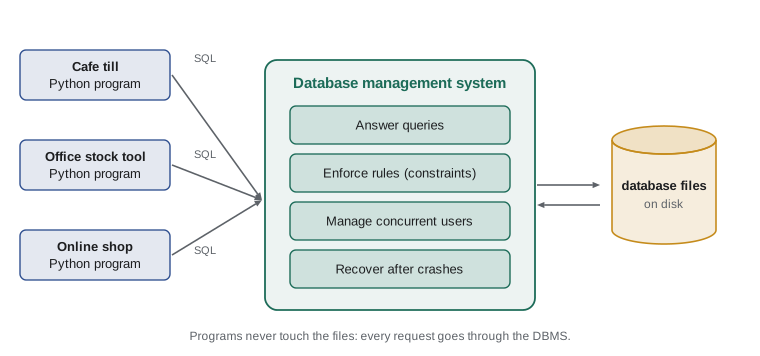
Strictly speaking, a database is an organized collection of data, and a database management system (DBMS) is the software that stores it, answers questions about it and protects it. In everyday speech both are called 'the database'. Your Python program never reads the database's files directly. It sends requests to the DBMS, and the DBMS decides how to find, change and safeguard the data.
That separation is the heart of the idea. Your program says what it wants: the names and stock of coffees with fewer than ten bags, sorted by stock. The DBMS works out how to get it, which index to use, which order to read things in, and how to avoid interfering with another program that is updating stock at the same moment. Because the how is the DBMS's job, the same question keeps working as the data grows from ten rows to ten million, and the DBMS can find faster ways to answer it without your code changing.
Kinds of databases
Several families of databases exist, each suited to different shapes of data. Relational databases store data in tables of rows and columns, link tables through shared values, and are queried with SQL. They are by far the most common choice for business data such as orders, customers, inventory and accounts, and they are the focus of this course. Well-known relational systems include SQLite, PostgreSQL, MySQL and MariaDB, Microsoft SQL Server and Oracle Database.
Other families exist for other needs, often grouped under the label NoSQL. Document databases such as MongoDB store JSON-like documents. Key-value stores such as Redis keep values under keys, often in memory, for very fast lookups and caching. Graph databases store nodes and relationships for highly connected data such as social networks. Column-oriented and data warehouse systems are tuned for analyzing huge datasets. Most organizations use a relational database for their core records and add others where they fit, so relational skills transfer almost everywhere.
Client-server and embedded databases
Relational systems come in two broad styles. A client-server database such as PostgreSQL runs as a separate program, the server, usually on its own machine. Applications connect to it over a network with a username and password, and the server handles many connections at once. This is how Ridgeline's online shop would share data with the cafe and the office.
An embedded database runs inside your program as a library, and keeps the whole database in a single ordinary file. SQLite is the best-known example and is one of the most widely deployed pieces of software in the world: it is built into every major web browser, every smartphone, and countless desktop applications. Python includes SQLite in its standard library as the sqlite3 module, so you can use a real relational database with no installation and no server. That is what this course uses for its runnable examples, and lesson 9 shows how the same code style connects to PostgreSQL.
SQLite is not a toy. It supports transactions, constraints, indexes, joins and most of standard SQL. Its limits appear when many different computers must write to the same database at once, which is the job client-server systems are built for. For a single application, a mobile app, a test suite or a data analysis on one machine, SQLite is often the best choice.
Your first database
The sqlite3 module follows a pattern you will see in every database library for Python. You connect to a database, which gives you a connection object. You execute SQL statements through the connection. Statements that read data return rows you can fetch, and statements that change data are made permanent by committing. A database name of ':memory:' creates a temporary database that lives only in memory, which is perfect for experiments: every run starts fresh.
import sqlite3

con = sqlite3.connect(":memory:")          # a brand-new, empty database in memory
con.execute("""
    CREATE TABLE coffees (
        sku   TEXT PRIMARY KEY,
        name  TEXT NOT NULL,
        price REAL NOT NULL,
        stock INTEGER NOT NULL
    )
""")
con.execute("INSERT INTO coffees VALUES ('RC-101', 'Sunrise Blend', 18.50, 42)")
con.execute("INSERT INTO coffees VALUES ('RC-104', 'Sumatra Dark', 20.25, 9)")
con.commit()

for row in con.execute("SELECT sku, name, stock FROM coffees"):
    print(row)
con.close()('RC-101', 'Sunrise Blend', 42)
('RC-104', 'Sumatra Dark', 9)Three kinds of statement appear here. CREATE TABLE describes a table: its name and, for each column, a name, a type and optional rules such as NOT NULL. INSERT adds a row. SELECT asks a question and returns matching rows, which Python hands back as tuples. SQL keywords are case-insensitive, but writing them in capitals is a common convention that makes the SQL easy to pick out inside Python strings. Try editing the listing: add a third coffee, or change the SELECT to return only the name column.
Look at what the program did not do. It never opened a file, never looped through records to find matches, and never worried about the format on disk. It described the table once and then asked for what it wanted.
Declarative questions
SQL is a declarative language: you describe the result you want, not the steps to compute it. Compare two ways of finding the coffees that need reordering, one in Python over a list of dictionaries, the other as a single SQL query. Both give the same answer, but the SQL version states the question directly, and the DBMS is free to answer it however is fastest.
import sqlite3

con = sqlite3.connect(":memory:")
con.executescript("""
CREATE TABLE coffees (sku TEXT PRIMARY KEY, name TEXT NOT NULL, origin TEXT NOT NULL,
                      roast TEXT NOT NULL, price_cents INTEGER NOT NULL, stock INTEGER NOT NULL);
INSERT INTO coffees VALUES
    ('RC-101', 'Sunrise Blend', 'Blend', 'medium', 1850, 42),
    ('RC-102', 'Ethiopia Guji', 'Ethiopia', 'light', 2200, 15),
    ('RC-103', 'Colombia Huila', 'Colombia', 'medium', 1975, 27),
    ('RC-104', 'Sumatra Dark', 'Indonesia', 'dark', 2025, 9),
    ('RC-105', 'Decaf Swiss Water', 'Mexico', 'medium', 1900, 12),
    ('RC-106', 'Espresso Ridge', 'Blend', 'dark', 2150, 30);
""")

# The Python way: write the loop, the test and the sort yourself.
rows = [{"sku": "RC-101", "stock": 42}, {"sku": "RC-104", "stock": 9}, {"sku": "RC-105", "stock": 12},
        {"sku": "RC-102", "stock": 15}, {"sku": "RC-106", "stock": 30}, {"sku": "RC-103", "stock": 27}]
low = sorted((r for r in rows if r["stock"] < 13), key=lambda r: r["stock"])
print([r["sku"] for r in low])

# The SQL way: describe the result; the database decides how to produce it.
query = "SELECT sku FROM coffees WHERE stock < 13 ORDER BY stock"
print([sku for (sku,) in con.execute(query)])['RC-104', 'RC-105'] ['RC-104', 'RC-105']
The first lines of that listing build the sample coffee table so the listing can run on its own. Every runnable example in this course does the same, so you can run any of them in any order. The table matches Ridgeline's coffee list from PYTH-101, with one improvement you will meet properly in lesson 6: prices are stored as whole cents in a column named price_cents, so 18.50 is stored as 1850. Integers are exact, which means totals always balance to the cent.
What a DBMS guarantees
The protections a relational database gives are often summarized by the acronym ACID. You will study each in lesson 8; for now, it is enough to know what they promise.
- Atomicity: a group of changes, called a transaction, happens completely or not at all. Recording a sale and reducing the stock either both happen or neither does.
- Consistency: every transaction leaves the data obeying its rules, such as stock never being negative.
- Isolation: transactions running at the same time do not see each other's half-finished work.
- Durability: once a transaction is committed, it survives a crash or power cut.
Together these answer Rosa's question. With a database, a power cut halfway through recording the day's sales cannot leave the books half-updated: committed sales are safe, and an unfinished transaction is rolled back as if it never started.
Try it yourself
Create and fill a table
A connection named con to an empty in-memory database is ready. Create a table named teas with three columns: name (TEXT, NOT NULL), price_cents (INTEGER, NOT NULL) and caffeine (TEXT).
Then insert two rows: Earl Gray at 300 cents with caffeine yes, and Rooibos at 300 cents with caffeine no, and commit.
con.execute("CREATE TABLE teas (name TEXT)")
con.execute("INSERT INTO teas VALUES ('Earl Grey')")
con.commit()
Reading results in Python
A SELECT returns a cursor, an object you can loop over or fetch from. fetchone returns the next row or None when there are no more, and fetchall returns all remaining rows as a list. Each row is a tuple in the order of the columns you asked for. For a query that returns a single value, such as a count, fetchone()[0] is the usual idiom.
import sqlite3

con = sqlite3.connect(":memory:")
con.executescript("""
CREATE TABLE coffees (sku TEXT PRIMARY KEY, name TEXT NOT NULL, origin TEXT NOT NULL,
                      roast TEXT NOT NULL, price_cents INTEGER NOT NULL, stock INTEGER NOT NULL);
INSERT INTO coffees VALUES
    ('RC-101', 'Sunrise Blend', 'Blend', 'medium', 1850, 42),
    ('RC-102', 'Ethiopia Guji', 'Ethiopia', 'light', 2200, 15),
    ('RC-103', 'Colombia Huila', 'Colombia', 'medium', 1975, 27),
    ('RC-104', 'Sumatra Dark', 'Indonesia', 'dark', 2025, 9),
    ('RC-105', 'Decaf Swiss Water', 'Mexico', 'medium', 1900, 12),
    ('RC-106', 'Espresso Ridge', 'Blend', 'dark', 2150, 30);
""")

cur = con.execute("SELECT name, stock FROM coffees ORDER BY name")
print(cur.fetchone())          # the first row
print(cur.fetchone())          # the next row
print(len(cur.fetchall()))     # everything that is left

total = con.execute("SELECT SUM(stock) FROM coffees").fetchone()[0]
count = con.execute("SELECT COUNT(*) FROM coffees").fetchone()[0]
print(f"{count} coffees, {total} bags on the shelf")('Colombia Huila', 27)
('Decaf Swiss Water', 12)
4
6 coffees, 135 bags on the shelfSUM and COUNT are aggregate functions: they compute one value from many rows. You will use them heavily in lesson 4. Here they replace exactly the kind of loop PYTH-101 wrote by hand to total the stock.
Try it yourself
Ask the database a question
The connection con holds Ridgeline's sample database. Set the variable sql to a query that returns the name of every coffee whose roast is dark, sorted by name.
Then set names to a list of those names (plain strings, not tuples), and print it.
sql = "SELECT name FROM coffees"
names = con.execute(sql).fetchall()
print(names)
Where SQL runs and where Python runs
A useful habit from the start is to let each language do what it does best. SQL is good at finding, filtering, joining, grouping and summing large amounts of data, close to where the data lives. Python is good at everything around that: reading input, applying business logic, formatting output, calling other services and testing. Pulling an entire table into Python to filter it there wastes time and memory; asking the database for exactly the rows you need is faster and clearer.
The reverse mistake also happens: cramming complicated application logic into SQL because it can be done. The courses ahead keep a clear line between the two, with SQL for data questions and Python for the program around them.
Ridgeline's plan for this course
Over the next eleven lessons, Jordan rebuilds Ridgeline's storage on a database. Lessons 2 to 5 cover the relational model and the SELECT statement: filtering, sorting, grouping and joining. Lessons 6 and 7 design Ridgeline's tables properly with keys and normalization. Lesson 8 changes data safely inside transactions, and lesson 9 connects from Python to SQLite and to PostgreSQL, the server database the online shop will eventually use. Lesson 10 introduces object-relational mapping, lesson 11 indexes and performance, and lesson 12 replaces PYTH-102's JSON storage module with a database-backed one, keeping the same Inventory interface so the rest of the package does not change.
Worked problem
Files or a database?
For each of Ridgeline's needs, decide whether a plain file or a database fits better: (a) the settings for the label printer, (b) every sale from the cafe and the online shop, shared between three computers, (c) a one-off export of last month's sales for the accountant.
Show solution
- (a) Printer settings are small, read by one program and rarely change: a configuration file (such as JSON or TOML) is simplest.
- (b) Sales grow every day, are written by several computers at once, must never be lost, and need reports: a database.
- (c) A one-off export for someone else's software is a data exchange: a CSV file produced by a query on the database.
Answer: (a) a file, (b) a database, (c) a CSV file exported from the database.
Common mistakes
MistakeTreating a JSON or CSV file as a shared database for several users.
InsteadUse a database when several programs or people write the same data.
MistakeLoading a whole table into Python and filtering it with loops.
InsteadAsk the database for exactly the rows you need with WHERE.
MistakeForgetting con.commit() after changing data.
InsteadCommit to make changes permanent; uncommitted changes are discarded when the connection closes.
MistakeExpecting a SELECT to return plain values.
InsteadRows come back as tuples; use row[0] or unpack them.
MistakeAssuming SQLite is only for practice.
InsteadSQLite is a full relational database, ideal for single applications and testing.
MistakeStoring money as REAL (floating point).
InsteadStore whole cents as INTEGER so totals are exact.
Summary and key terms
- Files are simple but struggle with searching, ad hoc questions, several writers, crashes and shared rules.
- A DBMS stores data, answers declarative queries, manages concurrent users, recovers from crashes and enforces rules.
- Relational databases store data in tables and are queried with SQL; they are the standard for business records.
- Client-server systems such as PostgreSQL serve many users over a network; embedded SQLite runs inside your program.
- Python's sqlite3 module connects, executes SQL, fetches rows as tuples and commits changes.
- ACID stands for atomicity, consistency, isolation and durability, the guarantees of transactions.
- Let SQL find, filter and summarize data, and let Python handle the program around it.
- database
- An organized collection of data.
- DBMS
- Database management system: the software that stores, queries and protects a database.
- relational database
- A database that stores data in related tables of rows and columns.
- SQL
- Structured Query Language, the language for defining, querying and changing relational data.
- SQLite
- An embedded relational database that stores a whole database in one file; built into Python.
- connection
- An open link between a program and a database, through which SQL is sent.
- cursor
- The object returned by executing a query, from which rows are fetched.
- commit
- Make a transaction's changes permanent.
- declarative
- Describing the result wanted rather than the steps to compute it.
- ACID
- Atomicity, consistency, isolation and durability, the properties of reliable transactions.
Practice problems
Work each problem on paper first, then reveal the answer to check.
Name two problems that appear when two programs share one JSON file.
Show answer
Lost updates when both save, and corruption or partial writes if one crashes mid-save.
What does sqlite3.connect(":memory:") create?
Show answer
A temporary database held in memory, discarded when the connection closes.
Which statement adds a row, and which one asks a question?
Show answer
INSERT adds a row; SELECT asks a question.
A query returns one row with one value. How do you get the value itself?
Show answer
cur.fetchone()[0], or unpack it: (value,) = cur.fetchone().
Why is SQLite a poor fit for a busy website with many servers writing at once?
Show answer
It is embedded in one program and handles concurrent writers less well than a client-server DBMS.
What does the D in ACID promise?
Show answer
Durability: committed changes survive crashes and power cuts.
Lesson quiz · 5 questions
Score 60% or more to complete this lesson.
Create a free account to save your progress, take quizzes and earn a certificate.