
PYTH-215 · Lesson 2 of 12 · 36 min
The relational model
▶ Video coming soon A video version of this lesson is on the way.
Every relational database, from the SQLite file on a phone to the largest PostgreSQL cluster, rests on one idea published by Edgar F. Codd at IBM in 1970: store data as relations, which we now call tables, and describe what you want from them in a high-level language rather than navigating through records by hand. Before Codd, programs followed chains of pointers from record to record, and changing how data was stored meant rewriting the programs. The relational model separated the logical view of the data from how it is stored, and that separation is why the SQL you write today will still work on data stored in completely different ways tomorrow.
This lesson introduces the vocabulary of the relational model: tables, rows and columns, types, NULL, keys and relationships. It is the foundation for everything that follows. By the end you will be able to read a table definition, explain what its keys mean, and inspect any SQLite database from Python to discover its tables and columns.
Tables, rows and columns
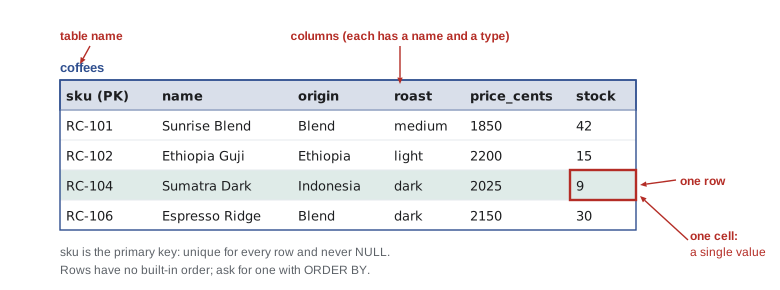
A table holds data about one kind of thing: coffees, customers, sales or roast batches. Each row describes one particular thing, such as the Sunrise Blend, and each column holds one fact about it, such as its price. Every row in a table has the same columns. The formal terms are relation for table, tuple for row and attribute for column, and you will meet them in textbooks and documentation, but most working developers say table, row and column.
Two properties make a table relational rather than just a grid. First, every value in a cell is a single value: a price, a name, a date. A list of several items does not belong in one cell; lesson 7 shows how to handle that properly. Second, rows have no inherent order. A table is a set of rows, so if you need them in a particular order you must ask for it with ORDER BY. A query without ORDER BY may return rows in any order, and that order can change as the data changes.
Columns have types
Each column is declared with a type that says what kind of value it holds. Standard SQL defines many types, and each database system adds its own, but the everyday ones are few: integers for whole numbers such as stock and cents, text for names and codes, real (floating-point) numbers for measurements such as kilograms, dates and times, and booleans for true or false facts.
SQLite takes a relaxed approach. It has five storage classes, NULL, INTEGER, REAL, TEXT and BLOB (raw bytes), and a column's declared type is a preference, called its type affinity, rather than a strict rule. If you insert the text '42' into an INTEGER column, SQLite converts it to the number 42; if you insert 'lots', it stores the text. Most other databases, including PostgreSQL, reject a value of the wrong type with an error. SQLite also has no separate date type: dates are usually stored as ISO 8601 text such as '2026-11-02', which sorts correctly as text and is understood by SQLite's date functions.
import sqlite3

con = sqlite3.connect(":memory:")
con.execute("CREATE TABLE t (n INTEGER, x REAL, s TEXT)")
con.execute("INSERT INTO t VALUES ('42', 7, 3.5)")       # values of the "wrong" types
con.execute("INSERT INTO t VALUES ('lots', '2.5', NULL)")
for row in con.execute("SELECT n, typeof(n), x, typeof(x), s, typeof(s) FROM t"):
print(row)(42, 'integer', 7.0, 'real', '3.5', 'text')
('lots', 'text', 2.5, 'real', None, 'null')The typeof function reports how SQLite actually stored each value. Text that looks like a number was converted to fit the INTEGER and REAL columns, while 'lots' stayed text. Since version 3.37, SQLite also supports STRICT tables, which reject wrongly typed values the way other databases do. Whichever database you use, the safest habit is the same: send values of the right type from your program, and declare constraints, covered below, that catch mistakes.
NULL: the missing value
Sometimes a fact is unknown or does not apply. A cafe sale to a walk-in customer has no customer to record; a coffee that has never been roasted has no last roast date. SQL represents a missing value as NULL. NULL is not zero and not an empty string: it means no value at all.
NULL behaves in a way that surprises newcomers. Any comparison with NULL, even NULL = NULL, is neither true nor false but unknown, and a WHERE clause keeps only rows where the condition is true. To test for a missing value you must write IS NULL or IS NOT NULL. Arithmetic with NULL gives NULL, while aggregate functions such as SUM and AVG simply skip NULLs.
import sqlite3

con = sqlite3.connect(":memory:")
con.executescript("""CREATE TABLE coffees (
    sku         TEXT PRIMARY KEY,
    name        TEXT NOT NULL,
    origin      TEXT NOT NULL,
    roast       TEXT NOT NULL CHECK (roast IN ('light', 'medium', 'dark')),
    price_cents INTEGER NOT NULL CHECK (price_cents > 0),
    stock       INTEGER NOT NULL DEFAULT 0 CHECK (stock >= 0)
);
CREATE TABLE customers (
    id     INTEGER PRIMARY KEY,
    name   TEXT NOT NULL,
    email  TEXT NOT NULL UNIQUE,
    points INTEGER NOT NULL DEFAULT 0
);
CREATE TABLE sales (
    id          INTEGER PRIMARY KEY,
    sold_on     TEXT NOT NULL,
    channel     TEXT NOT NULL CHECK (channel IN ('cafe', 'online')),
    sku         TEXT NOT NULL REFERENCES coffees (sku),
    customer_id INTEGER REFERENCES customers (id),
    qty         INTEGER NOT NULL CHECK (qty > 0),
    price_cents INTEGER NOT NULL
);
CREATE TABLE roasts (
    batch      TEXT PRIMARY KEY,
    roasted_on TEXT NOT NULL,
    sku        TEXT NOT NULL REFERENCES coffees (sku),
    green_kg   REAL NOT NULL,
    roasted_kg REAL NOT NULL,
    minutes    REAL NOT NULL
);
INSERT INTO coffees VALUES
    ('RC-101', 'Sunrise Blend', 'Blend', 'medium', 1850, 42),
    ('RC-102', 'Ethiopia Guji', 'Ethiopia', 'light', 2200, 15),
    ('RC-103', 'Colombia Huila', 'Colombia', 'medium', 1975, 27),
    ('RC-104', 'Sumatra Dark', 'Indonesia', 'dark', 2025, 9),
    ('RC-105', 'Decaf Swiss Water', 'Mexico', 'medium', 1900, 12),
    ('RC-106', 'Espresso Ridge', 'Blend', 'dark', 2150, 30);
INSERT INTO customers VALUES
    (1, 'Priya Natarajan', 'priya@example.com', 140),
    (2, 'Marcus Bell', 'marcus@example.com', 35),
    (3, 'Lena Fischer', 'lena@example.com', 320),
    (4, 'Omar Haddad', 'omar@example.com', 0),
    (5, 'Grace Kim', 'grace@example.com', 95);
INSERT INTO sales VALUES
    (1, '2026-11-02', 'cafe', 'RC-101', 1, 2, 1850),
    (2, '2026-11-02', 'online', 'RC-102', 3, 1, 2200),
    (3, '2026-11-02', 'cafe', 'RC-106', NULL, 1, 2150),
    (4, '2026-11-03', 'online', 'RC-103', 2, 3, 1975),
    (5, '2026-11-03', 'cafe', 'RC-101', NULL, 1, 1850),
    (6, '2026-11-03', 'online', 'RC-104', 3, 2, 2025),
    (7, '2026-11-04', 'cafe', 'RC-105', 5, 1, 1900),
    (8, '2026-11-04', 'online', 'RC-101', 1, 1, 1850),
    (9, '2026-11-04', 'cafe', 'RC-106', 2, 2, 2150),
    (10, '2026-11-05', 'online', 'RC-102', 5, 2, 2200),
    (11, '2026-11-05', 'cafe', 'RC-103', NULL, 1, 1975),
    (12, '2026-11-06', 'online', 'RC-106', 3, 1, 2150),
    (13, '2026-11-06', 'cafe', 'RC-101', 1, 3, 1850),
    (14, '2026-11-06', 'online', 'RC-104', NULL, 1, 2025);
INSERT INTO roasts VALUES
    ('B-0412', '2026-10-28', 'RC-101', 12.0, 10.2, 13.5),
    ('B-0413', '2026-10-29', 'RC-106', 12.0, 10.1, 14.0),
    ('B-0414', '2026-10-30', 'RC-102', 9.0, 7.7, 11.75),
    ('B-0415', '2026-10-31', 'RC-103', 12.0, 10.3, 12.5),
    ('B-0416', '2026-11-01', 'RC-104', 6.0, 5.0, 15.0),
    ('B-0417', '2026-11-02', 'RC-101', 12.0, 10.2, 13.25);""")

print(con.execute("SELECT COUNT(*) FROM sales").fetchone()[0], "sales in total")
print(con.execute("SELECT COUNT(*) FROM sales WHERE customer_id = NULL").fetchone()[0], "found with = NULL")
print(con.execute("SELECT COUNT(*) FROM sales WHERE customer_id IS NULL").fetchone()[0], "found with IS NULL")
print(con.execute("SELECT COUNT(customer_id) FROM sales").fetchone()[0], "sales have a customer")
print(con.execute("SELECT NULL = NULL, NULL + 1, 1 + 1").fetchone())14 sales in total 0 found with = NULL 4 found with IS NULL 10 sales have a customer (None, None, 2)
The comparison customer_id = NULL found no rows at all, even though four sales have no customer, because every comparison with NULL is unknown. IS NULL is the correct test. COUNT(*) counts rows, while COUNT(customer_id) counts only the non-NULL values in that column. Python's sqlite3 module turns NULL into None, as the last line shows.
Because NULL complicates every query that touches it, good designs allow NULL only where a value can genuinely be missing, and mark every other column NOT NULL. In Ridgeline's sales table, customer_id may be NULL for walk-in customers, but sold_on, sku, qty and price_cents may not.
Keys identify rows
A table needs a way to point at exactly one row. A primary key is a column, or a combination of columns, whose value is unique for every row and never NULL. Coffees are identified by their SKU, so sku is the primary key of the coffees table; no two coffees can share an SKU. Customers and sales have no natural identifier that is guaranteed unique and unchanging, so they get a surrogate key: a number with no meaning of its own, assigned by the database.
Choosing a primary key is a design decision. A natural key, such as an SKU or an email address, carries meaning and is already familiar to users, but may change: a customer can change email address, and changing a key value that other tables refer to is awkward. A surrogate key never needs to change, which is why most tables in real systems use one. In SQLite, a column declared INTEGER PRIMARY KEY becomes an alias for the table's built-in rowid and is filled in automatically with the next number when you insert a row without it.
import sqlite3

con = sqlite3.connect(":memory:")
con.execute("CREATE TABLE customers (id INTEGER PRIMARY KEY, name TEXT NOT NULL, email TEXT UNIQUE)")
con.execute("INSERT INTO customers (name, email) VALUES ('Priya Natarajan', 'priya@example.com')")
con.execute("INSERT INTO customers (name, email) VALUES ('Marcus Bell', 'marcus@example.com')")
print(con.execute("SELECT * FROM customers").fetchall())

try:
    con.execute("INSERT INTO customers (name, email) VALUES ('Imposter', 'priya@example.com')")
except sqlite3.IntegrityError as e:
print("Rejected:", e)[(1, 'Priya Natarajan', 'priya@example.com'), (2, 'Marcus Bell', 'marcus@example.com')] Rejected: UNIQUE constraint failed: customers.email
The INSERT statements name the columns they fill, (name, email), and leave id out, so SQLite assigns 1 and then 2. Naming the columns is a good habit in general: the statement keeps working if columns are later added to the table. The email column is not the primary key but is declared UNIQUE, which makes it a candidate key, a column that could also identify a row. The database enforces the rule by raising an IntegrityError, so no program can create two customers with one email address.
Try it yourself
Find the missing customers
In the sample database (connection con), some sales were made to walk-in customers, so their customer_id is NULL.
Set walk_ins to the number of such sales, and known to the number of sales that do have a customer. Use one query for each, letting the database do the counting.
walk_ins = con.execute("SELECT COUNT(*) FROM sales WHERE customer_id = NULL").fetchone()[0]
known = con.execute("SELECT COUNT(*) FROM sales").fetchone()[0]
print(walk_ins, known)
Relationships and foreign keys
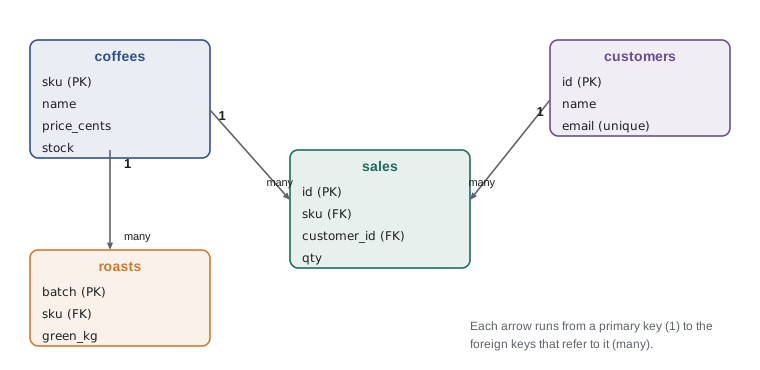
Tables become powerful when they refer to each other. Each sale records which coffee was sold, and rather than copying the coffee's name and origin into every sale, the sales table stores just the coffee's SKU in its sku column. That column is a foreign key: a column whose values must match the primary key of another table. It links each sale to exactly one coffee, and lesson 5 shows how a join follows that link to combine the two tables in a query.
A foreign key expresses a rule, called referential integrity: a sale may only refer to a coffee that exists. When the rule is enforced, the database refuses to insert a sale for an unknown SKU and refuses to delete a coffee that sales still refer to, unless you tell it what should happen instead. SQLite understands foreign key declarations but, for historical compatibility, only enforces them after you run PRAGMA foreign_keys = ON on each connection. PostgreSQL and most other systems always enforce them.
import sqlite3

con = sqlite3.connect(":memory:")
con.executescript("""CREATE TABLE coffees (
    sku         TEXT PRIMARY KEY,
    name        TEXT NOT NULL,
    origin      TEXT NOT NULL,
    roast       TEXT NOT NULL CHECK (roast IN ('light', 'medium', 'dark')),
    price_cents INTEGER NOT NULL CHECK (price_cents > 0),
    stock       INTEGER NOT NULL DEFAULT 0 CHECK (stock >= 0)
);
CREATE TABLE customers (
    id     INTEGER PRIMARY KEY,
    name   TEXT NOT NULL,
    email  TEXT NOT NULL UNIQUE,
    points INTEGER NOT NULL DEFAULT 0
);
CREATE TABLE sales (
    id          INTEGER PRIMARY KEY,
    sold_on     TEXT NOT NULL,
    channel     TEXT NOT NULL CHECK (channel IN ('cafe', 'online')),
    sku         TEXT NOT NULL REFERENCES coffees (sku),
    customer_id INTEGER REFERENCES customers (id),
    qty         INTEGER NOT NULL CHECK (qty > 0),
    price_cents INTEGER NOT NULL
);
CREATE TABLE roasts (
    batch      TEXT PRIMARY KEY,
    roasted_on TEXT NOT NULL,
    sku        TEXT NOT NULL REFERENCES coffees (sku),
    green_kg   REAL NOT NULL,
    roasted_kg REAL NOT NULL,
    minutes    REAL NOT NULL
);
INSERT INTO coffees VALUES
    ('RC-101', 'Sunrise Blend', 'Blend', 'medium', 1850, 42),
    ('RC-102', 'Ethiopia Guji', 'Ethiopia', 'light', 2200, 15),
    ('RC-103', 'Colombia Huila', 'Colombia', 'medium', 1975, 27),
    ('RC-104', 'Sumatra Dark', 'Indonesia', 'dark', 2025, 9),
    ('RC-105', 'Decaf Swiss Water', 'Mexico', 'medium', 1900, 12),
    ('RC-106', 'Espresso Ridge', 'Blend', 'dark', 2150, 30);
INSERT INTO customers VALUES
    (1, 'Priya Natarajan', 'priya@example.com', 140),
    (2, 'Marcus Bell', 'marcus@example.com', 35),
    (3, 'Lena Fischer', 'lena@example.com', 320),
    (4, 'Omar Haddad', 'omar@example.com', 0),
    (5, 'Grace Kim', 'grace@example.com', 95);
INSERT INTO sales VALUES
    (1, '2026-11-02', 'cafe', 'RC-101', 1, 2, 1850),
    (2, '2026-11-02', 'online', 'RC-102', 3, 1, 2200),
    (3, '2026-11-02', 'cafe', 'RC-106', NULL, 1, 2150),
    (4, '2026-11-03', 'online', 'RC-103', 2, 3, 1975),
    (5, '2026-11-03', 'cafe', 'RC-101', NULL, 1, 1850),
    (6, '2026-11-03', 'online', 'RC-104', 3, 2, 2025),
    (7, '2026-11-04', 'cafe', 'RC-105', 5, 1, 1900),
    (8, '2026-11-04', 'online', 'RC-101', 1, 1, 1850),
    (9, '2026-11-04', 'cafe', 'RC-106', 2, 2, 2150),
    (10, '2026-11-05', 'online', 'RC-102', 5, 2, 2200),
    (11, '2026-11-05', 'cafe', 'RC-103', NULL, 1, 1975),
    (12, '2026-11-06', 'online', 'RC-106', 3, 1, 2150),
    (13, '2026-11-06', 'cafe', 'RC-101', 1, 3, 1850),
    (14, '2026-11-06', 'online', 'RC-104', NULL, 1, 2025);
INSERT INTO roasts VALUES
    ('B-0412', '2026-10-28', 'RC-101', 12.0, 10.2, 13.5),
    ('B-0413', '2026-10-29', 'RC-106', 12.0, 10.1, 14.0),
    ('B-0414', '2026-10-30', 'RC-102', 9.0, 7.7, 11.75),
    ('B-0415', '2026-10-31', 'RC-103', 12.0, 10.3, 12.5),
    ('B-0416', '2026-11-01', 'RC-104', 6.0, 5.0, 15.0),
    ('B-0417', '2026-11-02', 'RC-101', 12.0, 10.2, 13.25);""")

con.execute("PRAGMA foreign_keys = ON")      # SQLite: enforce foreign keys on this connection
try:
    con.execute("INSERT INTO sales (sold_on, channel, sku, qty, price_cents) "
                "VALUES ('2026-11-07', 'cafe', 'RC-999', 1, 1850)")
except sqlite3.IntegrityError as e:
    print("Unknown coffee rejected:", e)
try:
    con.execute("DELETE FROM coffees WHERE sku = 'RC-104'")
except sqlite3.IntegrityError as e:
print("Coffee with sales kept:", e)Unknown coffee rejected: FOREIGN KEY constraint failed Coffee with sales kept: FOREIGN KEY constraint failed
Relationships come in three shapes. In a one-to-many relationship, one row on one side matches many on the other: one coffee has many sales, one customer has many sales. One-to-one relationships, where each row matches at most one on the other side, are rarer, for example a customer and their loyalty card. Many-to-many relationships, where each side can have many of the other, such as orders and coffees (an order contains several coffees and a coffee appears in many orders), need a third table in between; lesson 6 builds one.
The schema
The full set of table definitions, with their columns, types, keys and rules, is called the schema. It is the database's description of itself, and it is stored in the database. SQLite keeps it in a special table named sqlite_master (also available as sqlite_schema), and the PRAGMA table_info command lists a table's columns. These are invaluable when you open an unfamiliar database and need to know what is in it.
import sqlite3

con = sqlite3.connect(":memory:")
con.executescript("""CREATE TABLE coffees (
    sku         TEXT PRIMARY KEY,
    name        TEXT NOT NULL,
    origin      TEXT NOT NULL,
    roast       TEXT NOT NULL CHECK (roast IN ('light', 'medium', 'dark')),
    price_cents INTEGER NOT NULL CHECK (price_cents > 0),
    stock       INTEGER NOT NULL DEFAULT 0 CHECK (stock >= 0)
);
CREATE TABLE customers (
    id     INTEGER PRIMARY KEY,
    name   TEXT NOT NULL,
    email  TEXT NOT NULL UNIQUE,
    points INTEGER NOT NULL DEFAULT 0
);
CREATE TABLE sales (
    id          INTEGER PRIMARY KEY,
    sold_on     TEXT NOT NULL,
    channel     TEXT NOT NULL CHECK (channel IN ('cafe', 'online')),
    sku         TEXT NOT NULL REFERENCES coffees (sku),
    customer_id INTEGER REFERENCES customers (id),
    qty         INTEGER NOT NULL CHECK (qty > 0),
    price_cents INTEGER NOT NULL
);
CREATE TABLE roasts (
    batch      TEXT PRIMARY KEY,
    roasted_on TEXT NOT NULL,
    sku        TEXT NOT NULL REFERENCES coffees (sku),
    green_kg   REAL NOT NULL,
    roasted_kg REAL NOT NULL,
    minutes    REAL NOT NULL
);
INSERT INTO coffees VALUES
    ('RC-101', 'Sunrise Blend', 'Blend', 'medium', 1850, 42),
    ('RC-102', 'Ethiopia Guji', 'Ethiopia', 'light', 2200, 15),
    ('RC-103', 'Colombia Huila', 'Colombia', 'medium', 1975, 27),
    ('RC-104', 'Sumatra Dark', 'Indonesia', 'dark', 2025, 9),
    ('RC-105', 'Decaf Swiss Water', 'Mexico', 'medium', 1900, 12),
    ('RC-106', 'Espresso Ridge', 'Blend', 'dark', 2150, 30);
INSERT INTO customers VALUES
    (1, 'Priya Natarajan', 'priya@example.com', 140),
    (2, 'Marcus Bell', 'marcus@example.com', 35),
    (3, 'Lena Fischer', 'lena@example.com', 320),
    (4, 'Omar Haddad', 'omar@example.com', 0),
    (5, 'Grace Kim', 'grace@example.com', 95);
INSERT INTO sales VALUES
    (1, '2026-11-02', 'cafe', 'RC-101', 1, 2, 1850),
    (2, '2026-11-02', 'online', 'RC-102', 3, 1, 2200),
    (3, '2026-11-02', 'cafe', 'RC-106', NULL, 1, 2150),
    (4, '2026-11-03', 'online', 'RC-103', 2, 3, 1975),
    (5, '2026-11-03', 'cafe', 'RC-101', NULL, 1, 1850),
    (6, '2026-11-03', 'online', 'RC-104', 3, 2, 2025),
    (7, '2026-11-04', 'cafe', 'RC-105', 5, 1, 1900),
    (8, '2026-11-04', 'online', 'RC-101', 1, 1, 1850),
    (9, '2026-11-04', 'cafe', 'RC-106', 2, 2, 2150),
    (10, '2026-11-05', 'online', 'RC-102', 5, 2, 2200),
    (11, '2026-11-05', 'cafe', 'RC-103', NULL, 1, 1975),
    (12, '2026-11-06', 'online', 'RC-106', 3, 1, 2150),
    (13, '2026-11-06', 'cafe', 'RC-101', 1, 3, 1850),
    (14, '2026-11-06', 'online', 'RC-104', NULL, 1, 2025);
INSERT INTO roasts VALUES
    ('B-0412', '2026-10-28', 'RC-101', 12.0, 10.2, 13.5),
    ('B-0413', '2026-10-29', 'RC-106', 12.0, 10.1, 14.0),
    ('B-0414', '2026-10-30', 'RC-102', 9.0, 7.7, 11.75),
    ('B-0415', '2026-10-31', 'RC-103', 12.0, 10.3, 12.5),
    ('B-0416', '2026-11-01', 'RC-104', 6.0, 5.0, 15.0),
    ('B-0417', '2026-11-02', 'RC-101', 12.0, 10.2, 13.25);""")

for (name,) in con.execute("SELECT name FROM sqlite_master WHERE type = 'table' ORDER BY name"):
    cols = con.execute(f"PRAGMA table_info({name})").fetchall()
    print(name.ljust(10), ", ".join(col[1] for col in cols))

print()
for col in con.execute("PRAGMA table_info(coffees)"):
    cid, colname, coltype, notnull, default, pk = col
print(colname.ljust(12), coltype.ljust(8), "NOT NULL" if notnull else "", "PRIMARY KEY" if pk else "")coffees sku, name, origin, roast, price_cents, stock customers id, name, email, points roasts batch, roasted_on, sku, green_kg, roasted_kg, minutes sales id, sold_on, channel, sku, customer_id, qty, price_cents sku TEXT PRIMARY KEY name TEXT NOT NULL origin TEXT NOT NULL roast TEXT NOT NULL price_cents INTEGER NOT NULL stock INTEGER NOT NULL
The f-string inside PRAGMA table_info is safe here only because the table names come from the database itself, not from a user. Lesson 3 explains why values from outside your program must never be pasted into SQL text, and how parameters avoid the danger. Other databases offer the same information through a standard set of views called information_schema, and through the describe commands of tools such as psql, PostgreSQL's command-line client.
Try it yourself
Describe a table from its schema
Write a function columns(con, table) that returns a list of the column names of table, in order, using PRAGMA table_info.
Then write key_columns(con, table) that returns only the names of the primary key columns. (In each PRAGMA row, index 1 is the name and index 5 is non-zero for primary key columns.)
def columns(con, table):
    return []

def key_columns(con, table):
    return []

print(columns(con, 'coffees'), key_columns(con, 'coffees'))
Constraints protect the data
Keys are one kind of constraint, a rule the database enforces on every change. The others you will use most are NOT NULL, which forbids missing values; UNIQUE, which forbids duplicates; CHECK, which requires a condition such as stock >= 0 or roast IN ('light', 'medium', 'dark'); and DEFAULT, which supplies a value when an INSERT leaves a column out. Constraints are the database's half of data validation. Your Python code should still check input and give friendly messages, but the constraints guarantee that no program, script or late-night manual fix can store data that breaks the rules.
Worked problem
Reading a table definition
Explain each line of Ridgeline's roasts table: CREATE TABLE roasts (batch TEXT PRIMARY KEY, roasted_on TEXT NOT NULL, sku TEXT NOT NULL REFERENCES coffees (sku), green_kg REAL NOT NULL, roasted_kg REAL NOT NULL, minutes REAL NOT NULL).
Show solution
- batch TEXT PRIMARY KEY: each roast batch has a unique code such as B-0412, a natural key.
- roasted_on TEXT NOT NULL: the roast date, stored as ISO 8601 text, and required.
- sku TEXT NOT NULL REFERENCES coffees (sku): a required foreign key; every batch roasts a coffee that exists.
- green_kg, roasted_kg and minutes REAL NOT NULL: measurements with decimals, all required.
- Relationship: one coffee has many roast batches (one-to-many).
Answer: A table of roast batches keyed by batch code, each linked to one coffee, with all measurements required.
Common mistakes
MistakeTesting for missing values with = NULL.
InsteadUse IS NULL and IS NOT NULL.
MistakeExpecting rows to come back in insertion order.
InsteadTables are unordered; use ORDER BY whenever order matters.
MistakePutting several values in one cell, such as "RC-101,RC-104".
InsteadStore one value per cell and use a related table for lists.
MistakeCopying a coffee's name and price into every sale.
InsteadStore the coffee's key as a foreign key and join when needed.
MistakeAssuming SQLite enforces foreign keys by default.
InsteadRun PRAGMA foreign_keys = ON on each connection.
MistakeAllowing NULL in every column.
InsteadDeclare NOT NULL wherever a value is always required.
Summary and key terms
- The relational model stores data in tables of rows and columns and queries it declaratively.
- Each cell holds a single value, and rows have no order unless a query asks for one.
- Columns have types; SQLite uses flexible type affinity, while most databases enforce types strictly.
- NULL means a missing value; compare with IS NULL, never = NULL.
- A primary key uniquely identifies each row; surrogate keys never need to change.
- Foreign keys link tables and enforce referential integrity; SQLite needs PRAGMA foreign_keys = ON.
- The schema describes the database and can be inspected with sqlite_master and PRAGMA table_info.
- Constraints such as NOT NULL, UNIQUE, CHECK and DEFAULT enforce rules on every change.
- table
- A set of rows with the same columns, describing one kind of thing; a relation.
- row
- One record in a table; a tuple.
- column
- One named, typed fact held for every row; an attribute.
- NULL
- The marker for a missing or inapplicable value.
- primary key
- The column or columns that uniquely identify each row.
- surrogate key
- A meaningless identifier, often an auto-assigned integer, used as a primary key.
- foreign key
- A column whose values must match the primary key of another table.
- referential integrity
- The rule that every foreign key value refers to an existing row.
- schema
- The definitions of all tables, columns, types and constraints in a database.
- constraint
- A rule the database enforces on the data, such as NOT NULL or CHECK.
Practice problems
Work each problem on paper first, then reveal the answer to check.
What does WHERE customer_id = NULL return, and why?
Show answer
No rows: comparisons with NULL are unknown, never true.
Give one advantage and one risk of using email as the primary key of customers.
Show answer
It is meaningful and unique; but emails change, and changing a key referenced elsewhere is awkward.
In a one-to-many relationship between coffees and sales, which table holds the foreign key?
Show answer
The many side: sales holds sku.
What does INTEGER PRIMARY KEY do in SQLite when you insert without a value?
Show answer
SQLite assigns the next integer automatically (it aliases the rowid).
Write a CHECK constraint that keeps stock from going negative.
Show answer
stock INTEGER NOT NULL CHECK (stock >= 0)
Which SQLite table lists the tables in a database?
Show answer
sqlite_master (also called sqlite_schema).
Lesson quiz · 5 questions
Score 60% or more to complete this lesson.
Create a free account to save your progress, take quizzes and earn a certificate.